
1. 서론
This manual provides essential information for the safe and efficient use of your Wathai 97mm x 33mm 9733 12V DC Brushless Small Blower Fan. This compact centrifugal fan is designed to deliver high-velocity airflow for various applications, including cooling electronic equipment, ventilating workspaces, and providing targeted air circulation in confined spaces. Please read this manual thoroughly before installation and operation.

Image 1.1: The Wathai 9733 Blower Fan is suitable for diverse applications such as PC servers, 3D printers, PC cases, and camper ventilation, demonstrating its versatility in small spaces.
2. 제품 특징
- Compact Centrifugal Design: A 97mm x 33mm squirrel cage fan delivers high-velocity airflow, ideal for electronics, appliances, and instruments.
- PWM 속도 제어: Features a 4-pin PWM connector (1300-4800 RPM) for automatic BIOS-controlled cooling, adapting to various workloads.
- 내구성 있는 구조: Built with PBT plastic housing and dual-ball bearings, ensuring a 50,000-hour lifespan and supporting both horizontal and vertical mounting.
- 고성능: Provides 35.8 CFM airflow, 2 In H2O static pressure, and operates at 18W.
- 와이드볼tag전자 범위: Operates efficiently within a voltage range of 7-13.5V, with a startup voltage는 5.5V입니다.
- 로우프로file 설계: Suitable for installation in tight spaces.
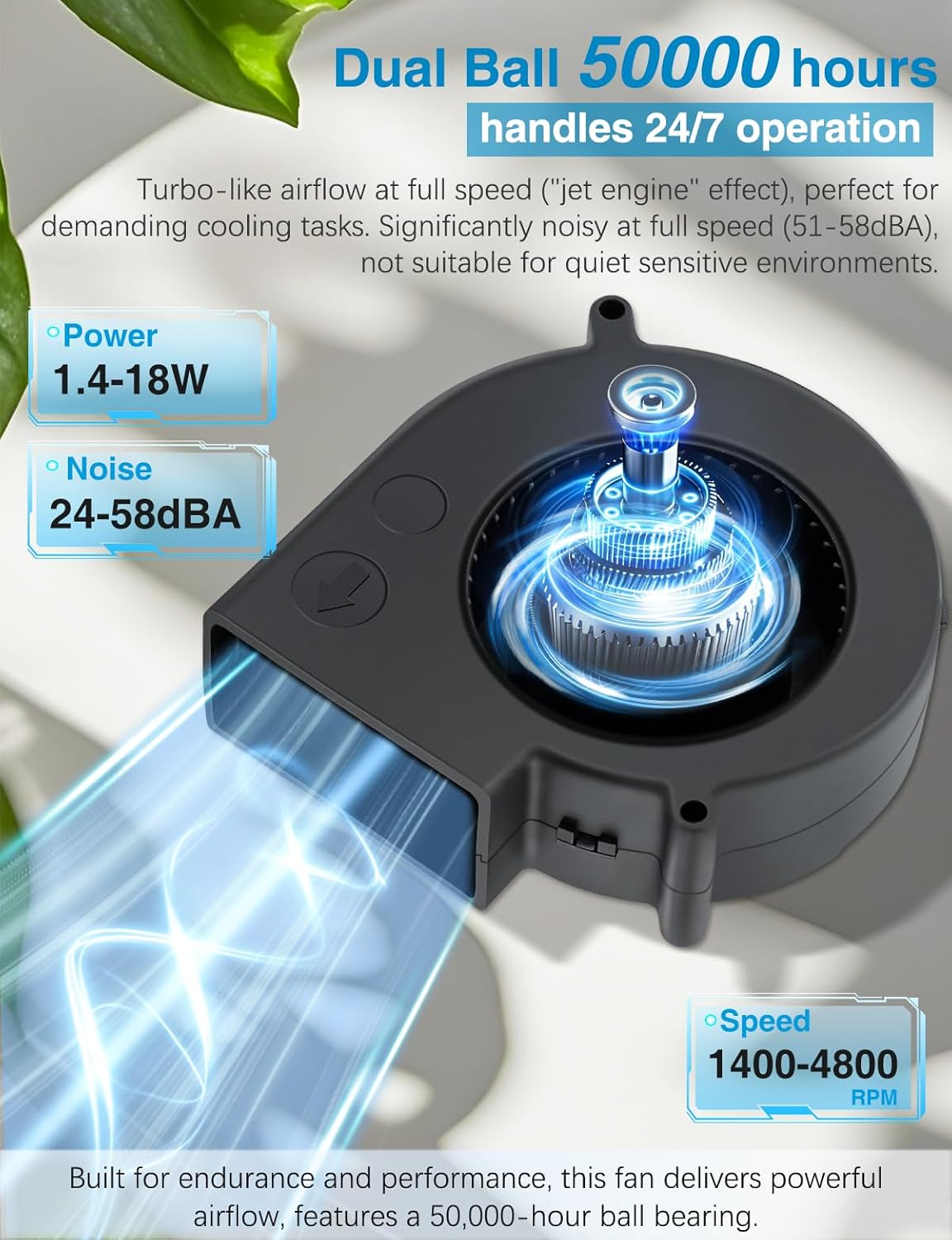
Image 2.1: The Wathai 9733 Blower Fan is engineered for endurance and performance, featuring a 50,000-hour dual-ball bearing and variable power, noise, and speed capabilities.
3. 상자 안에 무엇이 들어있나요?
패키지를 열면 다음 구성품이 모두 포함되어 있는지 확인하세요.
- 1x Wathai 12V PWM Blower Fan
- 1x Metal Fan Guard
- Screws and Nuts for mounting
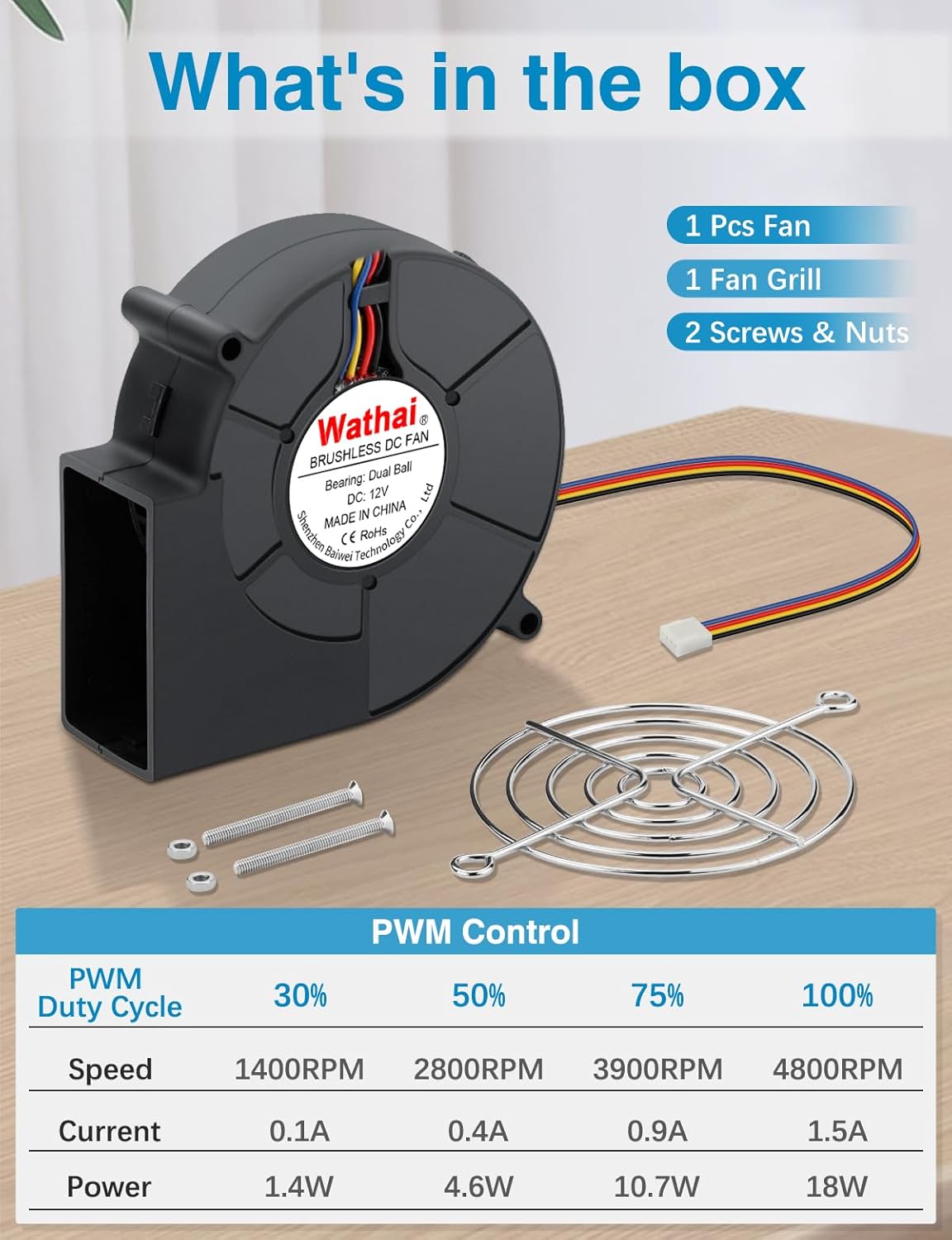
Image 3.1: The package includes the Wathai 9733 Blower Fan, a protective fan grill, and necessary mounting hardware (screws and nuts).
4. 설정 및 설치
The Wathai 9733 Blower Fan is designed for easy integration into various systems. Follow these steps for proper installation:
- 설치: Secure the blower fan in your desired location using the provided screws and nuts. Ensure adequate clearance for airflow. The fan supports both horizontal and vertical mounting orientations.
- Connect Fan Guard: Attach the metal fan guard to the intake side of the fan to prevent foreign objects from entering and damaging the impeller.
- 전원 연결: Connect the 4-pin PWM connector to a compatible 4-pin fan header on your motherboard or power supply.
- 배선도:
- 검은색: 지면 (-)
- 빨간색: 12V DC(+)
- 노란색 : RPM Signal (Tachometer)
- 파란색: PWM Signal (Speed Control)
- 케이블 관리 : Route the fan cable neatly to avoid interference with other components or moving parts.

Image 4.1: The 4-pin PWM connector allows for precise speed control and provides RPM feedback. The wiring diagram illustrates the function of each pin.
5. 운영
The Wathai 9733 Blower Fan utilizes a 4-pin PWM connection for dynamic speed control, allowing it to adjust its performance based on system requirements.
5.1. PWM Speed Control
When connected to a compatible motherboard or controller, the fan's speed can be automatically adjusted via PWM signals. This allows for optimized cooling performance and noise reduction. The fan's speed ranges from 1300 RPM to 4800 RPM.
| PWM 듀티 사이클 | 속도 | 현재의 | 힘 |
|---|---|---|---|
| 30% | 1400 RPM | 0.1A | 1.4와트 |
| 50% | 2800 RPM | 0.4A | 4.6와트 |
| 75% | 3900 RPM | 0.9A | 10.7와트 |
| 100% | 4800 RPM | 1.5A | 18와트 |
At lower PWM duty cycles, the fan operates quietly, suitable for general use. At higher duty cycles, it delivers maximum airflow, which may result in increased noise levels (up to 58.5 dBA) comparable to a "jet engine" sound, ideal for demanding cooling tasks.
5.2. Direct 12V Operation
If PWM control is not desired or available, the fan can be powered directly by connecting the Red wire to 12V DC (+) and the Black wire to Ground (-). In this configuration, the fan will operate at its maximum speed (4800 RPM) and noise level. The Yellow (RPM Signal) and Blue (PWM Signal) wires can be left unconnected if not used.
6. 유지관리
Regular maintenance ensures optimal performance and extends the lifespan of your Wathai blower fan.
- 청소: Periodically inspect the fan blades and housing for dust accumulation. Use compressed air or a soft brush to gently remove dust. Ensure the fan is powered off and disconnected before cleaning.
- 베어링 점검: While the dual-ball bearings are designed for long life, listen for any unusual noises during operation, which might indicate a bearing issue.
- 케이블 검사: Check the power cable and connector for any signs of wear, damage, or loose connections.
7. 문제 해결
If you encounter issues with your Wathai blower fan, refer to the following common troubleshooting steps:
- 팬이 회전하지 않음:
- 4핀 커넥터가 팬 헤더에 제대로 꽂혀 있는지 확인하십시오.
- Verify that the power supply is providing 12V DC.
- Check BIOS settings if using PWM control; ensure the fan header is enabled and configured correctly.
- If connected directly (Red to 12V, Black to Ground), ensure correct polarity and sufficient power.
- 과도한 소음:
- At full speed (4800 RPM), the fan is designed to be loud (up to 58.5 dBA). This is normal for its high airflow capacity.
- If using PWM, reduce the fan speed via your motherboard's BIOS or fan control software.
- Check for any obstructions or loose mounting that might cause vibrations.
- Ensure the fan guard is properly installed and not rattling.
- 공기 흐름이 부족합니다.
- Ensure the fan is operating at a sufficient speed. Increase PWM duty cycle if possible.
- Check for dust buildup on the fan blades or in the intake/exhaust vents.
- Verify that the fan is installed in the correct orientation for desired airflow.
8. 사양
Detailed technical specifications for the Wathai 9733 Blower Fan:
| 모델 번호 | 9733B12V4P |
| 치수(길이 x 너비 x 높이) | 97 x 97 x 33mm(3.82 x 3.82 x 1.3인치) |
| 베어링 유형 | 듀얼 볼 베어링 |
| 커넥터 유형 | 4-pin PWM (Computer Motherboard) |
| 정격 볼륨tage | 12V 직류 |
| 운영 볼륨tag및 범위 | 7V ~ 13.5V 직류 |
| 스타트업 규모tage | 5.5V 직류 |
| 정격 전류 | 1.5 Amp (최대) |
| 전력 소비 | 18W (최대) |
| 최대 회전 속도 | 4800 RPM |
| 공기 흐름 용량 | 35.8 퀴놀론 |
| 정압 | 2 In H2O |
| 소음 수준 | 58.5dBA(최대) |
| 기대수명 | 50,000시간 |
| 재료 | PBT Plastic Housing, Metal Grill |
| 호환 장치 | Amplifier, Desktop, Electronic Equipment, Laptop, Refrigerator |
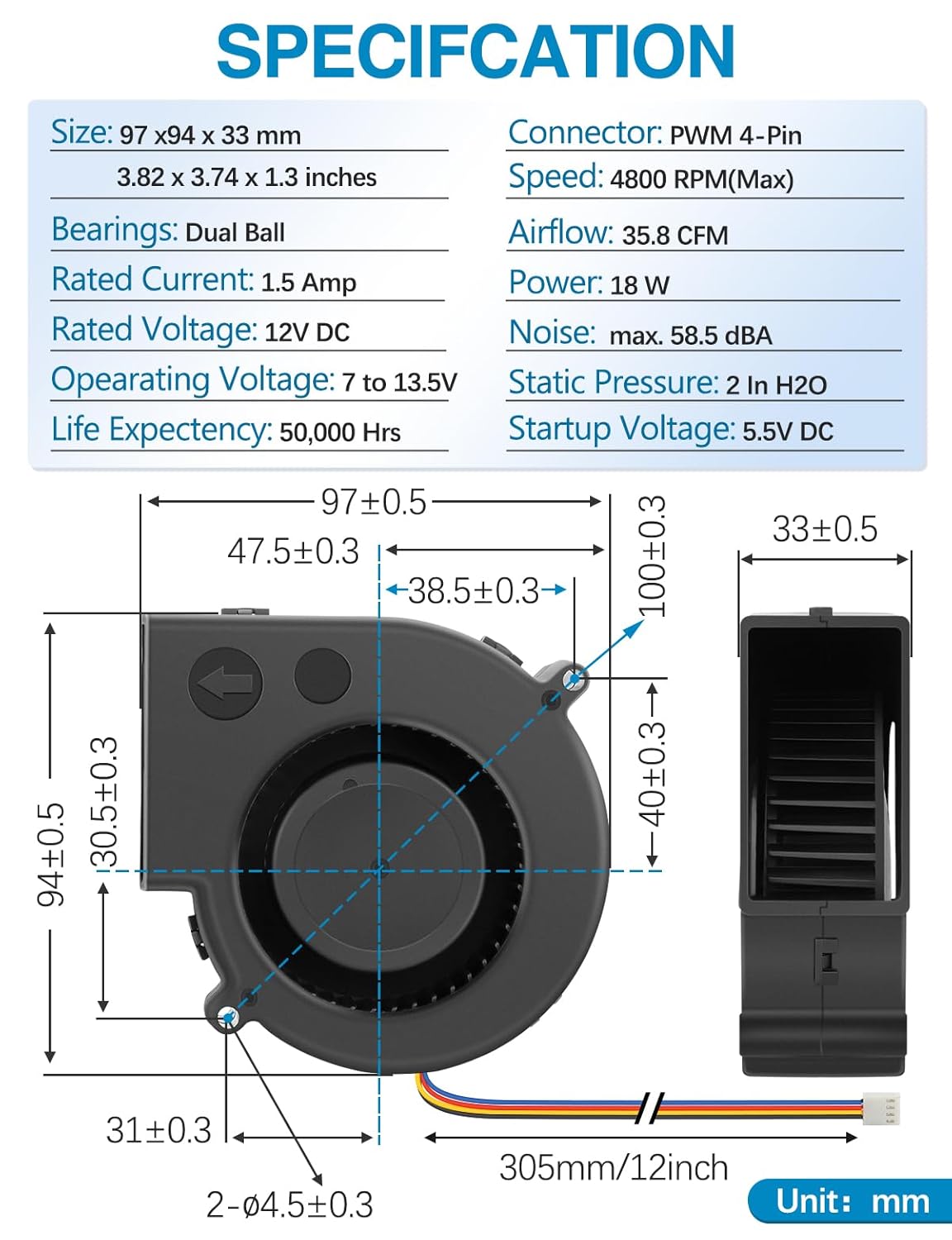
이미지 8.1: 포괄적인 개요view of the fan's specifications and precise dimensions, including its 97x97x33mm size and 4-pin PWM connector.
9. 보증 및 지원
For warranty information, technical support, or any inquiries regarding your Wathai 9733 Blower Fan, please contact the manufacturer directly through their official website or the retailer from whom the product was purchased. Keep your purchase receipt as proof of purchase.
Manufacturer: Wathai
자세한 내용은 다음을 방문하세요. Wathai Store on Amazon.