
1. 서론
This manual provides detailed instructions for the safe and efficient use of your Techkey MFi Certified 3-in-1 USB 3.0 Flash Drive. Please read this manual thoroughly before using the device to ensure optimal performance and to prevent damage.
The Techkey flash drive is designed for convenient data transfer and storage across various devices, including iPhones, iPads, Android phones, and personal computers. Its multi-interface design and MFi certification ensure broad compatibility and reliable performance.
2. 제품 특징
- MFi 인증: Ensures compatibility and reliable performance with Apple devices.
- 3-in-1 Interface Design: Equipped with USB, Lightning, and Type-C connectors for universal compatibility.
- 고속 USB 3.0: Offers fast read and write speeds for efficient data transfer.
- 256GB 저장 용량: 제공합니다 ample space for photos, videos, documents, and other files.
- 데이터 암호화: Supports Touch ID/Passcode encryption for enhanced data security.
- 내구성 있는 구조: Made from high-quality metal with dustproof, drop-proof, and anti-magnetic properties.
- 소형 및 휴대성: Lightweight design with a keychain for easy carrying.
- 자동 저장: In-app camera captures automatically save to the drive.
- On-the-Go Playback: Directly play stored movies and music from the drive.
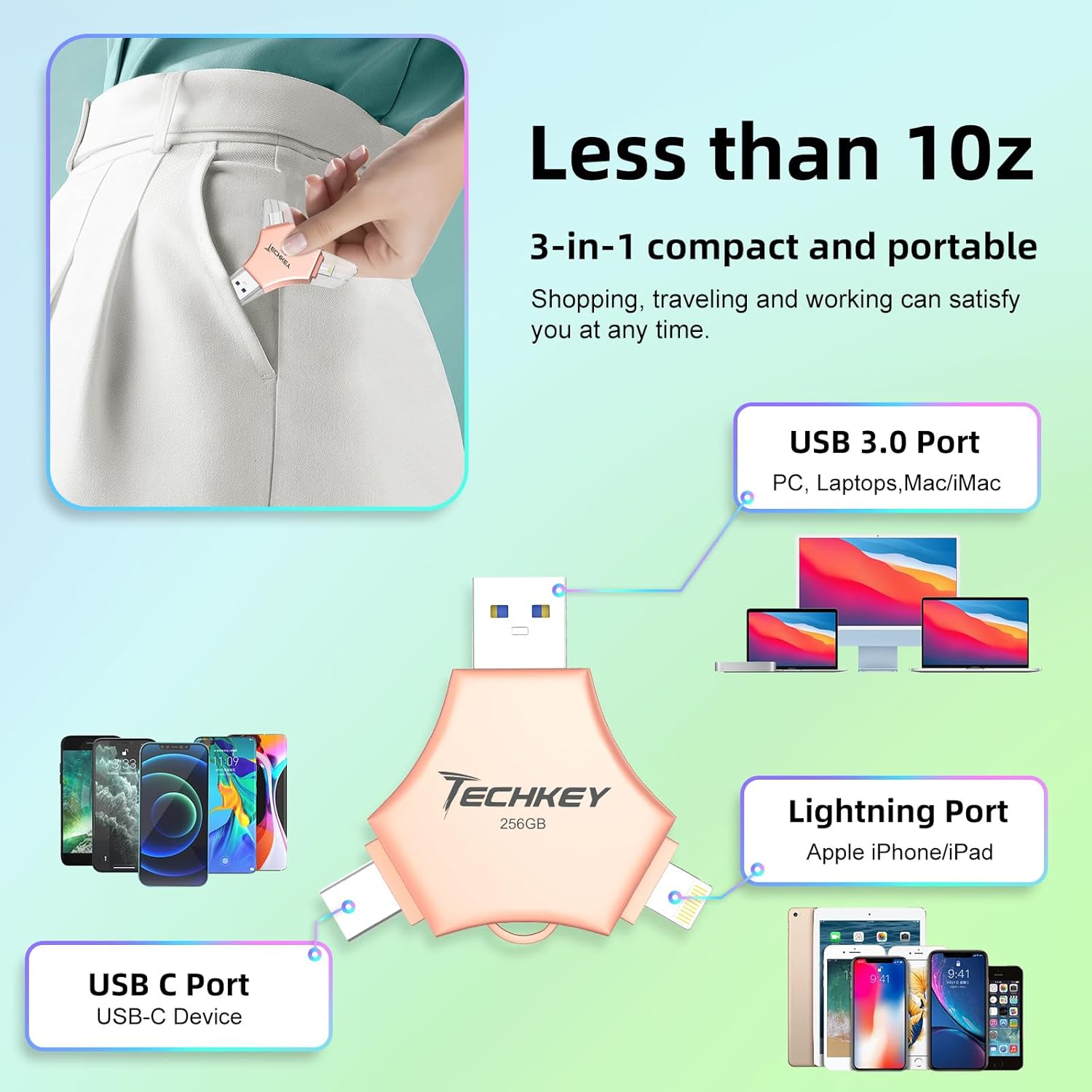
Image: The Techkey 3-in-1 USB Flash Drive showing its USB 3.0, Lightning, and USB-C ports, highlighting its compact and portable design.

Image: A diagram illustrating the three distinct connectors: Lightning for iPhone/iPad, Type-C for iPhone/iPad/Android, and USB for PC.

Image: An illustration of a high-tech chip, symbolizing the advanced technology and MFi certification integrated into the flash drive.

Image: Certificates of authority, indicating the product's compliance with industry standards and quality assurance.
3. 패키지 내용
패키지에 모든 품목이 들어 있는지 확인하세요.
- Techkey MFi Certified 3-in-1 USB 3.0 Flash Drive (256GB)
- Protective Caps (may include extra)
- Keychain/Lanyard
- 사용 설명서 (본 문서)
4. 설정
4.1. 초기 연결
The Techkey flash drive features three types of connectors: USB, Lightning, and Type-C. Select the appropriate connector for your device.
- iOS 기기(아이폰/아이패드)용: Insert the Lightning connector into your device's Lightning port.
- Android 기기의 경우: Insert the Type-C connector into your device's USB-C port. Ensure your Android device supports OTG (On-The-Go) functionality.
- PC/Mac의 경우: USB 커넥터를 컴퓨터의 사용 가능한 USB 포트에 삽입합니다.
4.2. App Installation (iOS Devices Only)
For iOS devices (iPhone/iPad), the "U-Disk" application is required for full functionality. When you connect the flash drive to an iOS device for the first time, a prompt to download the "U-Disk" app from the App Store should appear. Follow the on-screen instructions to install it.
- If the prompt does not appear, manually search for "U-Disk" in the Apple App Store and install it.
- Android and PC devices do not require a dedicated app for basic file 관리.
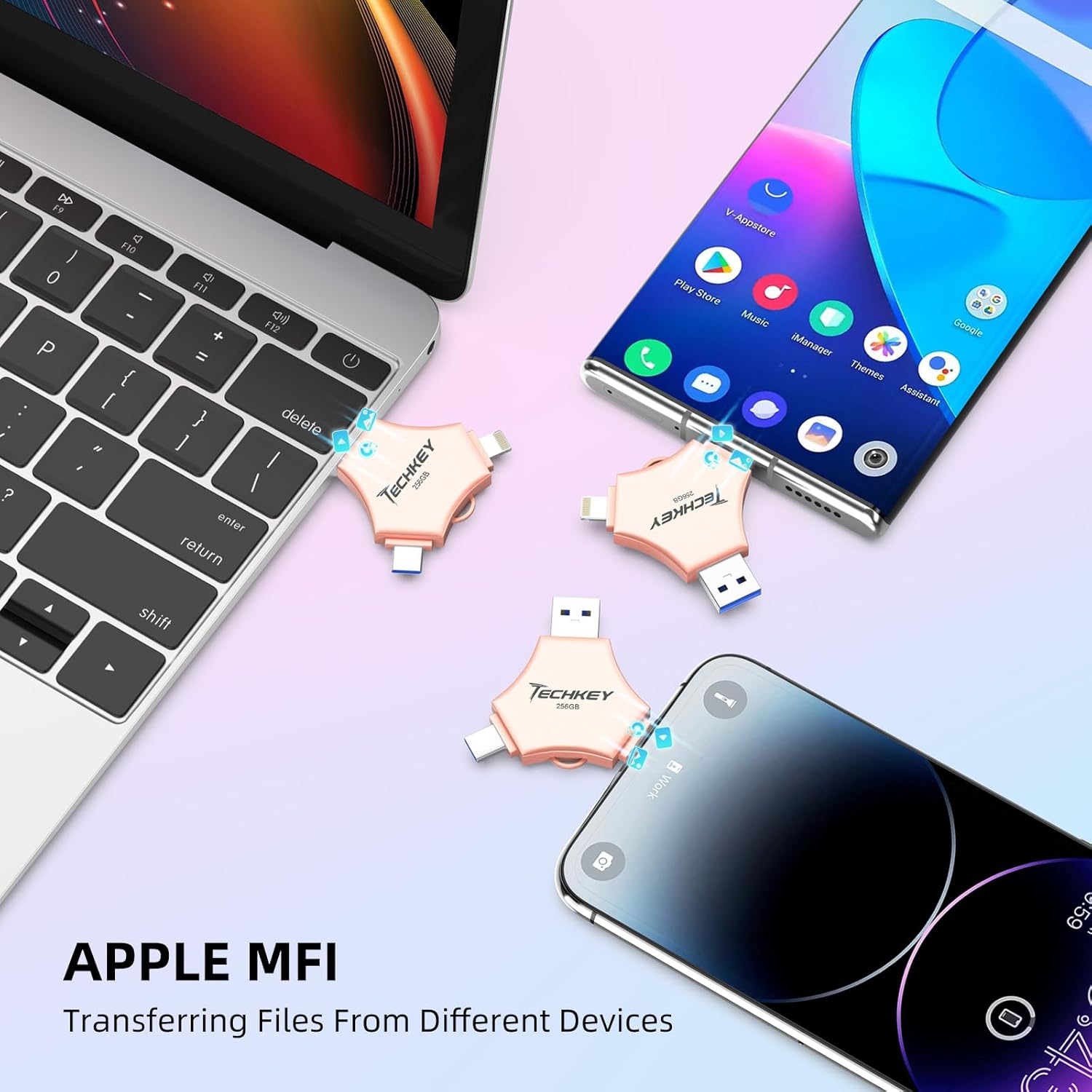
Image: The Techkey flash drive connected to an iPhone and iPad, illustrating its MFi compatibility and ease of use with Apple devices.
5. 사용 설명서
5.1. 데이터 전송
The flash drive supports high-speed data transfer. Actual speeds may vary based on device, file size, and system conditions.
- For iOS Devices (via U-Disk App):
- Connect the flash drive to your iPhone/iPad.
- Open the "U-Disk" app.
- 원하는 항목으로 이동 files on your device or within the app.
- 선택하다 files and use the app's functions to copy or move them to the flash drive.
- To transfer from the flash drive to your device, select files on the drive and use the app's functions to copy them to your device.
- Android 기기의 경우:
- Connect the flash drive to your Android device.
- Access the flash drive through your device's file manager (e.g., "Files," "나의 Files").
- 복사 또는 이동 files between your device's internal storage/SD card and the flash drive.
- PC/Mac의 경우:
- Connect the flash drive to your computer's USB port.
- The drive will appear as a removable storage device (e.g., "USB Drive," "NO NAME").
- 드래그 앤 드롭 files between your computer and the flash drive, or use copy/paste functions.
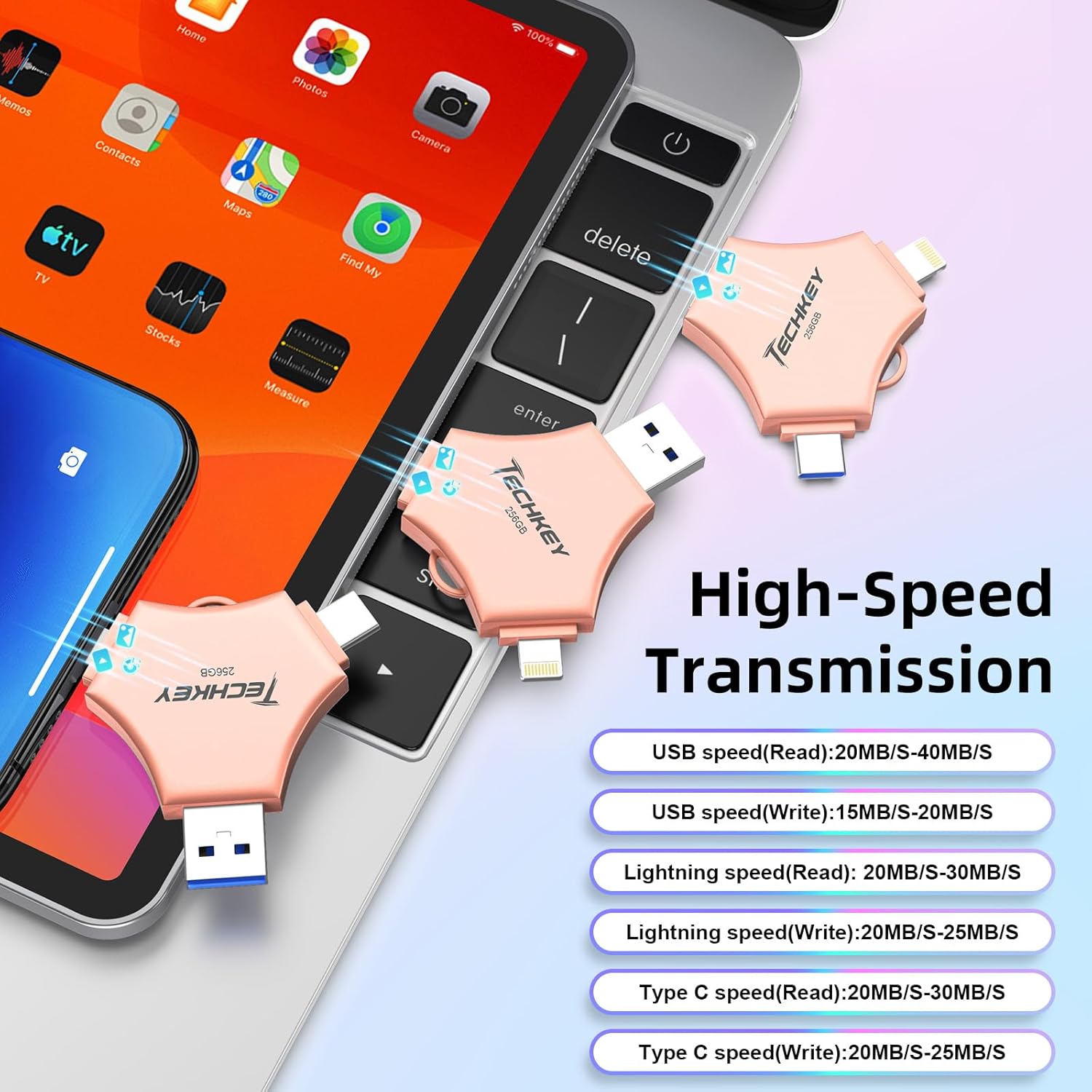
Image: A graphic detailing the high-speed transmission rates for the USB (Read: 20-40MB/s, Write: 15-20MB/s), Lightning (Read: 20-30MB/s, Write: 20-25MB/s), and Type-C (Read: 20-30MB/s, Write: 20-25MB/s) interfaces.
5.2. One-Click Backup (iOS Devices Only)
The "U-Disk" app allows for one-click backup of photos, videos, and contacts from your iOS device to the flash drive.
- Connect the flash drive and open the "U-Disk" app.
- Locate the "One-Click Backup" or similar function within the app.
- Follow the prompts to back up your selected data. This process copies files to the drive, freeing up space on your device. Remember to manually delete files from your device after confirming they are safely backed up on the flash drive.
5.3. 데이터 암호화
To protect your sensitive data, the "U-Disk" app (for iOS) offers encryption features.
- Open the "U-Disk" app with the flash drive connected.
- Navigate to the security or settings section within the app.
- You can choose to enable Touch ID/Passcode to encrypt the entire flash drive or select specific files for encryption.
- Follow the on-screen instructions to set up and manage your encryption preferences.
5.4. On-the-Go Playback
You can directly play media files stored on the flash drive without transferring them to your device's internal storage.
- Store your favorite movies, music, or documents on the flash drive.
- Connect the drive to your device (using the "U-Disk" app for iOS).
- 탐색하다 files on the flash drive through the app or file 관리자.
- 미디어를 선택하세요 file to play it directly.

Image: A visual representation of the flash drive supporting various file formats, including MP4, MOV, RM, RMVB for videos; MP3, AIF, WAV, WMA, AAC for music; BMP, JPG, GIF, ICO, TIFF, PNG for pictures; and PDF, WORD, EXCEL, PPT, HTML, TXT for office documents.
6. 유지관리
- 적절한 취급: Always hold the flash drive by its body, not by the connectors.
- 커넥터 보호: Use the provided protective caps to cover the connectors when not in use to prevent dust and damage.
- 안전한 제거: Always safely eject the flash drive from your computer (PC/Mac) before physically removing it to prevent data corruption. For mobile devices, ensure no data transfer is active before disconnecting.
- 청소: 드라이브 외부를 닦을 때는 부드럽고 마른 천을 사용하십시오. 액체 세척제나 연마성 재질은 사용하지 마십시오.
- 저장: Store the flash drive in a cool, dry place away from extreme temperatures, direct sunlight, and strong magnetic fields.
7. 문제 해결
7.1. 장치가 인식되지 않음
- 연결 확인: Ensure the flash drive is fully and correctly inserted into the port.
- 다른 포트/장치를 사용해 보세요. Test the flash drive on a different USB port, or a different compatible device (e.g., another computer, phone) to determine if the issue is with the drive or the port.
- 장치 재시작: Sometimes, restarting your phone or computer can resolve connection issues.
- iOS 앱: For iOS devices, confirm the "U-Disk" app is installed and updated.
- 안드로이드 OTG: For Android, verify your device supports OTG and that OTG functionality is enabled in settings if required.
7.2. 느린 전송 속도
- USB 포트 유형: Ensure you are using a USB 3.0 port on your computer for optimal speeds. Connecting to a USB 2.0 port will result in slower transfer rates.
- File 크기 유형: 많은 작은 것을 전송합니다 file여러 개의 파일을 한 번에 전송하는 것보다 속도가 느릴 수 있습니다. file 전체 크기가 동일합니다.
- 기기 성능: The speed of your host device (phone, computer) can affect transfer rates.
- 백그라운드 프로세스: Close unnecessary applications on your device during transfer.
7.3. Data Corruption/Loss
- 안전한 배출: Always safely eject the drive from computers. Avoid disconnecting during active data transfer.
- 전력 변동: Ensure stable power supply to your computer during transfers.
- 물리적 손상: Inspect the drive for any visible physical damage.
7.4. App Issues (U-Disk)
- 앱 업데이트: Ensure the "U-Disk" app is updated to the latest version.
- 앱 재설치: 문제가 지속되면 앱을 제거한 후 다시 설치해 보세요.
- iOS 버전: iOS 기기에 iOS 12.1 이상 버전이 설치되어 있는지 확인하십시오.
8. 사양
| 상표 | 테크키 |
| 모델 번호 | 641837950528 |
| 메모리 저장 용량 | 256GB (XNUMX기가바이트) |
| 연결 기술 | USB, Lightning, USB Type C |
| 읽기 속도 | 최대 40MB/s |
| 쓰기 속도 | 최대 80MB/s |
| 제품 크기(LxWxH) | 5.43 x 3.94 x 0.04 인치 |
| 품목 무게 | 2.39 온스 |
| 특징 | Wear Resistant, MFi Certified, Data Encryption |
| 호환되는 운영 체제 | iOS 12.1 and above, OTG Android, Windows 7 and above, macOS 10.6 and above |
9. 보증 및 지원
This Techkey product comes with a standard manufacturer's warranty. Please refer to the packaging or the official Techkey web구체적인 보증 약관은 해당 사이트에서 확인하세요.
For technical support, troubleshooting assistance, or warranty claims, please contact Techkey customer service through their official channels. Contact information can typically be found on the product packaging or the manufacturer's web대지.
참고: 보증을 위해 구매 증빙서류로 구매 영수증을 보관하세요.