
소개
Thank you for choosing the Micool Mini Sleep Earbuds Wireless. These earbuds are designed for ultimate comfort and discretion, especially for sensitive sleepers. Featuring IPX5 waterproofing, Bluetooth 5.3 connectivity, and a lightweight, invisible design, they provide a peaceful audio experience for relaxation, sleep, or discreet listening.

Image: Micool Mini Sleep Earbuds in their charging case.
패키지 내용
- Micool Mini Sleep Earbuds (Left and Right)
- 충전 케이스
- USB-C 충전 케이블
- 사용자 설명서
설정
1. 초기 충전
- 양쪽 이어버드를 충전 케이스에 넣습니다.
- Connect the USB-C charging cable to the port on the charging case and to a power source.
- 충전 케이스의 디지털 디스플레이에는 배터리 잔량이 표시됩니다.tage. 처음 사용하기 전에 이어버드가 완전히 충전되었는지 확인하십시오.
2. 블루투스 페어링
- 충전 케이스를 여세요. 이어버드가 자동으로 페어링 모드로 진입합니다.
- 사용하시는 기기(예: 스마트폰, 태블릿, 노트북)에서 블루투스를 활성화하세요.
- 검색 available Bluetooth devices and select "Micool Q26" (or similar name) from the list.
- 연결되면 오디오 안내가 나오고 이어버드를 사용할 수 있습니다.
작동 지침
이어버드 착용하기
The Micool Mini Sleep Earbuds are designed to fit snugly and discreetly within your ear, making them ideal for side sleepers. Gently insert each earbud into your ear canal until it feels secure and comfortable. The soft silicone ear tips adapt to your ear shape, minimizing pressure for extended wear.
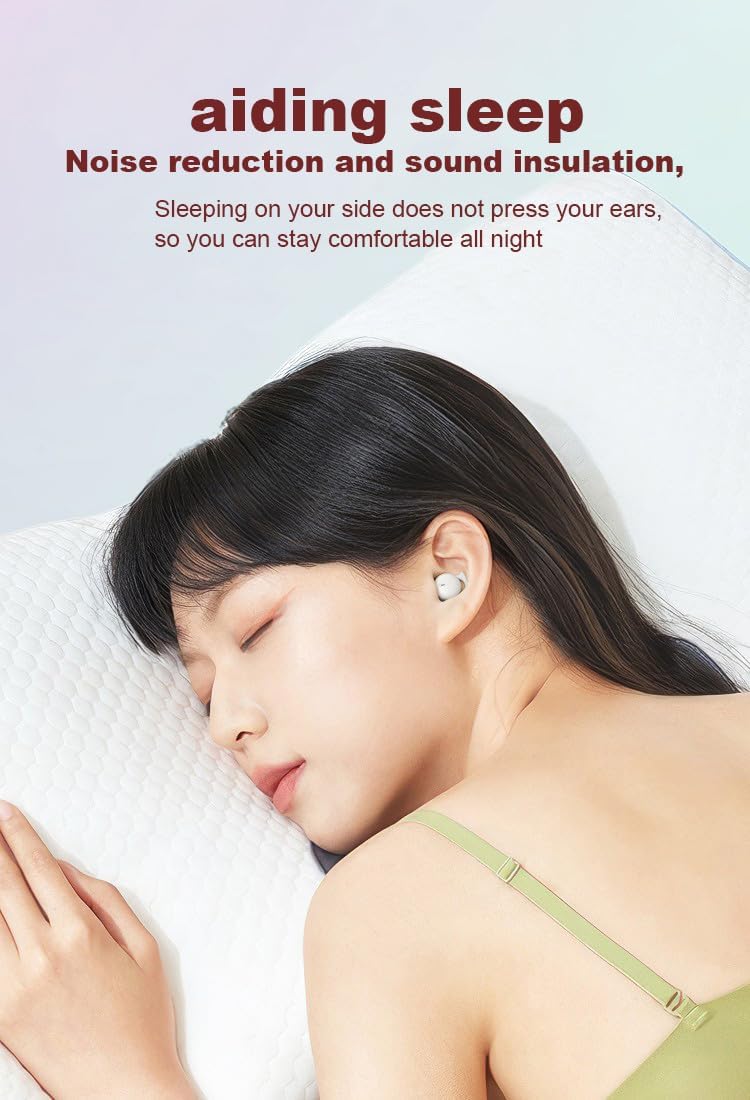
Image: Earbud worn discreetly for sleep.
터치 컨트롤
Each earbud features a touch-sensitive button for easy control of your audio and calls.

Image: Touch button controls diagram.
- 재생/일시 중지: 양쪽 이어버드를 한 번 탭하세요.
- 전화 받기/끊기: 수신 전화나 통화 중일 때 한쪽 이어버드를 한 번 탭합니다.
- 다음 노래: 오른쪽 이어버드를 두 번 탭하세요.
- 이전 노래: 왼쪽 이어버드를 두 번 탭하세요.
- 전화 거부: 전화가 오는 동안 한쪽 이어버드를 2초간 길게 누르세요.
- Voice Assistant 활성화 : 양쪽 이어버드를 세 번 탭하세요.
이어버드 개별 사용
Both earbuds can be used independently. You can use one earbud while the other charges in the case, effectively extending your listening time. Simply remove one earbud from the case to use it in mono mode.
방수 기능(IPX5)
The earbuds are rated IPX5 water-resistant, meaning they can withstand splashes of water and sweat. They are suitable for use during light rain or workouts, but should not be submerged in water.
유지
- 부드럽고 마른 천으로 이어버드와 충전 케이스를 정기적으로 청소하세요.
- 연마성 세척제나 용제를 사용하지 마십시오.
- 충전이 제대로 되도록 이어버드와 케이스의 충전 접점을 깨끗하게 유지하십시오.
- 이어버드를 보호하고 배터리 수명을 유지하기 위해 사용하지 않을 때는 이어버드를 충전 케이스에 보관하세요.
문제 해결
이어버드가 페어링되지 않음
- 두 개의 이어버드가 모두 완전히 충전되었는지 확인하세요.
- 기기의 Bluetooth를 껐다가 다시 켜세요.
- Forget/delete "Micool Q26" from your device's Bluetooth list and attempt to pair again.
- 이어버드를 케이스에 다시 넣고 뚜껑을 닫은 후 몇 초간 기다린 후 열어서 페어링 모드를 다시 시작하세요.
소리가 들리지 않거나 낮은 볼륨
- 기기와 이어버드의 볼륨 레벨을 확인하세요.
- 이어버드가 귀에 제대로 꽂혔는지 확인하세요.
- 이어버드를 기기에 다시 연결하세요.
충전 문제
- USB-C 케이블이 케이스와 전원에 제대로 연결되어 있는지 확인하십시오.
- 이어버드의 충전 접점과 케이스 내부가 깨끗하고 이물질이 없는지 확인하세요.
- 다른 USB-C 케이블이나 전원 어댑터를 사용해 보세요.
명세서
| 모델명 | Q26 |
| 상표 | 미쿨 |
| 연결 기술 | 무선(블루투스 5.3) |
| 방수성 | IPX5 |
| 귀 위치 | 귀에 |
| 폼 팩터 | 귀에 |
| 재료 | 플라스틱 |
| 포함된 구성 요소 | 케이블, 사용설명서 |
| 한국어: | 770029329733 |
| 제조업체 | 미쿨 |
| 첫 번째 이용 가능 날짜 | 12년 2023월 XNUMX일 |
보증 및 지원
Specific warranty information for the Micool Mini Sleep Earbuds (Model Q26) is not provided in the product details. Please refer to the warranty card included in your package or contact Micool customer support for detailed warranty terms and conditions.
For further assistance, technical support, or inquiries, please visit the official Micool website or contact their customer service department. Contact information can typically be found in the included user manual or on the product packaging.