
VENTION FHRB0
VENTION Mini Power Bank FHRB0 User Manual
Model: FHRB0
1. 서론
The VENTION Mini Power Bank FHRB0 is a compact, portable charging solution designed for various mobile devices. It features a 4800mAh capacity, 22.5W Power Delivery (PD) fast charging, and integrated USB-C and Lightning cables for convenience. An LED display provides real-time battery status. This manual provides instructions for safe and efficient use of your power bank.

Image: VENTION Mini Power Bank FHRB0, showcasin디자인과 사용 가능한 색상을 살펴보세요.

Image: The power bank's mini portable size and foldable Lightning interface for easy storage.

Image: The power bank's convenient design, featuring a built-in USB-C cable that doubles as a lanyard.
2. 설정
2.1 언박싱
Carefully remove the power bank from its packaging. Verify that all components are present and undamaged.
2.2 초기 충전
Before first use, it is recommended to fully charge the power bank. This ensures optimal battery performance and accuracy of the LED display.
- 보조 배터리의 USB-C 입력 포트를 찾으세요.
- Connect a USB-C charging cable (not included) to the power bank's input port.
- Connect the other end of the USB-C cable to a compatible power adapter (e.g., wall charger, computer USB port).
- The LED display will illuminate, showing the current battery percentage는 보조 배터리가 충전 중임을 나타냅니다.
- Charging is complete when the LED display shows 100%.

Image: Illustration of the power bank's two-way fast charging capability, highlighting the 18W Max recharging input via USB-C.
3. 사용 설명서
3.1 장치 충전
The VENTION Mini Power Bank offers multiple options for charging your devices:
- 내장된 USB-C 케이블 사용: For devices such as iPhone 15 series and Android smartphones, connect the integrated USB-C cable directly to your device's charging port. This supports up to 22.5W PD fast charging.
- Using the Built-in Lightning Cable: For devices such as iPhone 8-14 series, connect the integrated Lightning cable directly to your device's charging port. This supports up to 12W charging.
- USB-A 포트 사용: For other devices, or to charge a third device simultaneously, use your device's standard USB-A charging cable and connect it to the power bank's USB-A output port.
The power bank can charge up to three devices simultaneously using its built-in cables and USB-A port.

Image: The power bank's cable-ready convenience, demonstrating simultaneous charging for Apple (Lightning, 12W Max) and Android (USB-C, 22.5W Max) devices.

Image: The power bank's three-port output capability, allowing simultaneous charging of a smartwatch, smartphone, and earbuds.
3.2 LED 디지털 디스플레이
내장형 LED 디스플레이는 배터리 잔량을 백분율로 표시합니다.tage of the power bank in real-time (0-100%). This allows you to monitor the power level and recharge the power bank as needed.
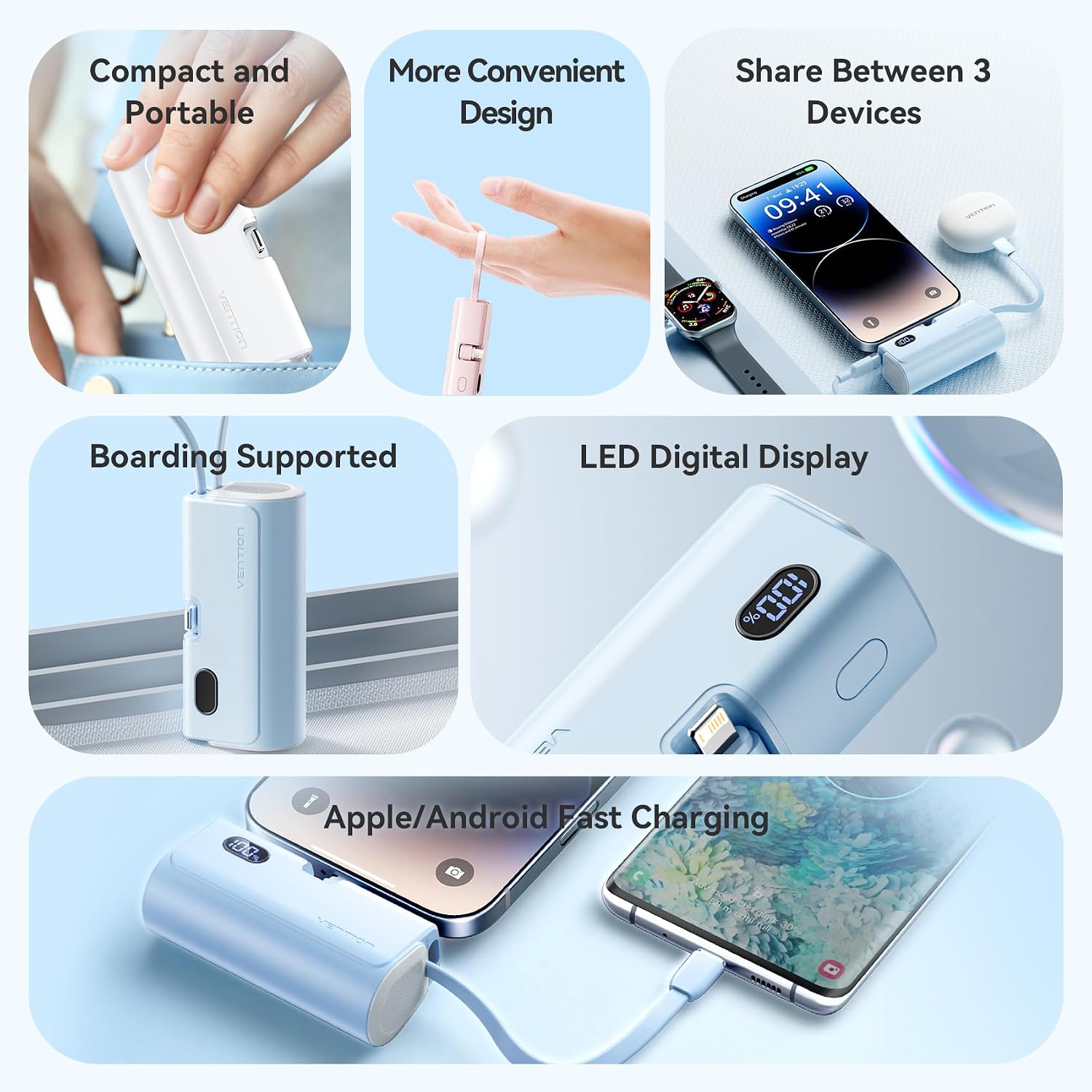
Image: A visual summary of the power bank's features, including its compact design, multi-device charging, and clear LED digital display.
4. 유지관리
4.1 청소
보조 배터리를 청소할 때는 부드럽고 마른 천을 사용하십시오. 액체 세척제, 스프레이 또는 용제는 기기를 손상시킬 수 있으므로 사용하지 마십시오.
4.2 보관
보조 배터리는 직사광선과 극한 온도 변화를 피해 서늘하고 건조한 곳에 보관하십시오. 습도가 높은 환경에 보관하지 마십시오.
4.3 배터리 관리
To prolong the lifespan of the internal battery, avoid completely discharging the power bank. Recharge it regularly, even if not in frequent use. Do not expose the power bank to fire or water.
4.4 케이블 관리
Handle the integrated USB-C and Lightning cables gently. Avoid excessive bending or pulling, which can cause damage to the cables or connectors.
5. 문제 해결
| 문제 | 가능한 원인 | 해결책 |
|---|---|---|
| 보조 배터리가 충전되지 않음 | Charging cable or adapter faulty; power source issue; power bank internal fault. | Ensure the USB-C charging cable and power adapter are working correctly. Try a different power source. |
| 보조 배터리에서 장치가 충전되지 않음 | Power bank battery depleted; incorrect cable connection; device incompatibility; device charging port issue. | Check the power bank's LED display for battery level. Ensure cables are securely connected. Verify device compatibility. Try charging a different device. |
| LED 디스플레이가 작동하지 않음 | 일시적인 소프트웨어 오류; 배터리 부족. | Try charging the power bank or connecting a device to charge. If the issue persists, contact support. |
| 느린 충전 | Non-fast charging compatible cable/device; multiple devices charging simultaneously. | Ensure your device and cable support fast charging. Disconnect other devices to test single-device charging speed. |
6. 사양
- 모델 번호: FHRB0
- 배터리 용량: 4800mAh
- 입력(USB-C): 맥스 맥스 맥스
- Output (Built-in USB-C): 최대 22.5W PD
- Output (Built-in Lightning): 맥스 맥스 맥스
- 포트 수 : 3 (1x Built-in USB-C, 1x Built-in Lightning, 1x USB-A)
- 호환 장치: Smartphones (iOS and Android), Tablets (e.g., iPad), Earbuds (e.g., AirPods)
- 제품 크기: 11.5 x 7.5 x 3cm
- 제품 무게: 144g
- 제조업체: 벤션
7. 보증 정보
This VENTION product is covered by a limited warranty. For specific warranty terms and conditions, please refer to the warranty card included with your purchase or visit the official VENTION web사이트. 보증 청구를 위해 구매 증빙 자료를 보관하세요.
8. 고객 지원
If you encounter any issues or have questions regarding your VENTION Mini Power Bank FHRB0, please contact VENTION customer support or your retailer. Provide your product model number (FHRB0) and a detailed description of the issue for efficient assistance.
Ask a question about this manual
Ask about setup, troubleshooting, compatibility, parts, safety, or missing instructions. Manuals+ will review the question and use this page’s manual context to help answer it.