
소개
Thank you for choosing the Billboard Soul Advance True Wireless Stereo (TWS) Earbuds. These earbuds are designed to provide a superior audio experience with Active Noise Cancellation (ANC), Environmental Noise Cancellation (ENC), and a comfortable, splash-resistant design. This manual will guide you through the setup, operation, and maintenance of your new earbuds.
안전 정보
- Do not expose the earbuds or charging case to extreme temperatures or direct sunlight for extended periods.
- 기기를 떨어뜨리거나 과도한 힘을 가하지 마십시오.
- Keep the earbuds and charging case away from water and liquids, except for light splashes as per IPX4 rating. Do not submerge.
- 제품을 분해하거나 개조하지 마십시오. 그렇게 할 경우 보증이 무효화됩니다.
- 제공된 충전 케이블이나 인증된 동등 제품만 사용하세요.
- Listening at high volumes for prolonged periods can cause hearing damage. Adjust volume to a safe level.
패키지 내용
- Billboard Soul Advance TWS Earbuds (Left and Right)
- 충전 케이스
- USB 충전 케이블
- 사용자 설명서
제품 끝view
Familiarize yourself with the components of your Billboard Soul Advance TWS Earbuds and charging case.
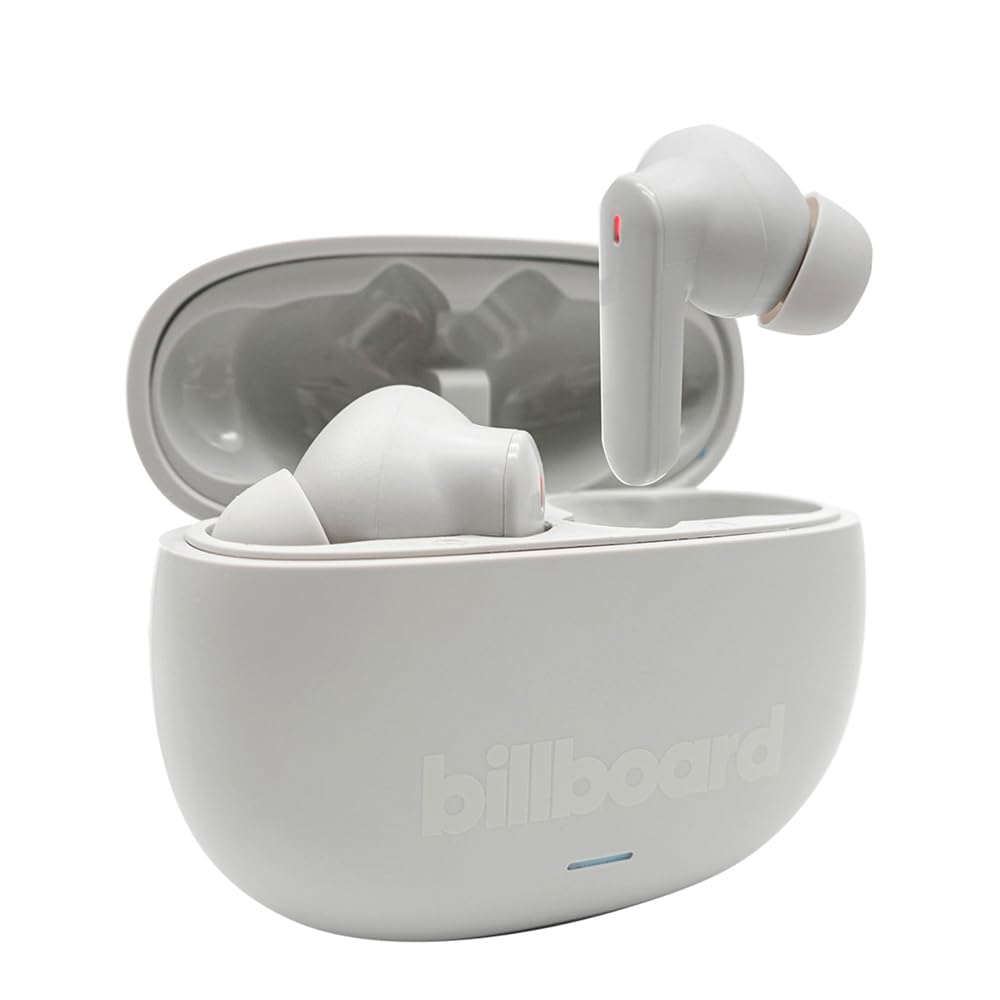
Image: The Billboard Soul Advance TWS Earbuds resting inside their open charging case. The earbuds are grey with red indicator lights visible, and the case is also grey with the 'billboard' logo embossed on the front.

Image: The Billboard Soul Advance TWS Earbuds charging case in a closed position. The case is grey with the 'billboard' logo embossed on the front and a small indicator light at the bottom.
Image: A person holding a single Billboard Soul Advance TWS earbud and the open charging case, demonstrating the compact size and design.
설정
1. 이어버드와 케이스 충전
처음 사용하기 전에 이어버드와 충전 케이스를 완전히 충전하세요.
- 이어버드를 충전 케이스에 넣으세요. 이어버드가 각 슬롯에 제대로 꽂혔는지 확인하세요.
- USB 충전 케이블을 케이스의 충전 포트와 USB 전원(예: 컴퓨터, 벽면 어댑터)에 연결하세요.
- The indicator light on the case will show charging status. Once fully charged, the indicator will change or turn off. A full charge takes approximately 5 hours for the case and earbuds.
2. 장치와 페어링
이어폰을 스마트폰이나 기타 블루투스 지원 기기에 연결하려면 다음 단계를 따르세요.
- Open the charging case. The earbuds will automatically enter pairing mode, indicated by flashing lights on the earbuds.
- 기기의 블루투스 설정으로 이동하여 블루투스가 활성화되어 있는지 확인하세요.
- 검색 available devices and select "Billboard Soul Advance" from the list.
- 연결되면 이어버드 표시등이 더 이상 깜박이지 않습니다.
- 기기에서 Bluetooth가 활성화되어 있는 경우, 이어버드를 케이스에서 꺼내면 마지막으로 페어링된 기기에 자동으로 다시 연결됩니다.
운영
터치 컨트롤
The earbuds feature touch-sensitive controls on their outer surface. Specific functions may vary slightly by device or app.
| 행동 | 기능 |
|---|---|
| 단일 탭(왼쪽/오른쪽) | 음악 재생/일시 정지, 전화 받기/종료 |
| 더블 탭(오른쪽) | 다음 트랙 |
| 더블 탭(왼쪽) | 이전 트랙 |
| 트리플 탭(왼쪽/오른쪽) | 음성 지원 활성화 |
| 길게 누르기(왼쪽/오른쪽) | ANC/투명 모드 전환 |
| Incoming Call Long Press | 전화 거부 |
Active Noise Cancellation (ANC) & Environmental Noise Cancellation (ENC)
The Soul Advance earbuds feature both ANC and ENC for an optimized listening and calling experience.
- 능동형 소음 제거(ANC): Reduces external ambient noise, allowing for a more immersive audio experience. Activate/deactivate by long-pressing an earbud.
- 환경 소음 제거(ENC): Utilizes 4 built-in microphones to filter out background noise during calls, ensuring clearer conversations for both you and the listener. This feature is active automatically during calls.

Image: A graphic illustrating the concept of Ultra ANC (Active Noise Cancellation), showing sound waves being blocked by headphones, emphasizing a quiet listening experience.
유지
청소
- 부드럽고 마른 보푸라기 없는 천으로 이어버드와 충전 케이스를 조심스럽게 닦으세요.
- 연마성 세척제, 알코올, 화학 용제는 사용하지 마세요.
- 최적의 충전을 위해 이어버드와 케이스의 충전 접점이 깨끗하고 건조한지 확인하십시오.
저장
사용하지 않을 때는 이어버드를 충전 케이스에 보관하여 보호하고 충전 상태를 유지하세요.
문제 해결
| 문제 | 해결책 |
|---|---|
| 이어폰이 페어링되지 않음 | 이어버드가 충전되어 있는지 확인하세요. 기기의 Bluetooth를 껐다가 다시 켜세요. Bluetooth 설정에서 기기를 삭제하고 다시 페어링하세요. |
| 하나의 이어폰만 작동 | Place both earbuds back in the case, close it, then open again. Ensure both are charged. |
| 소리가 나지 않습니다 | 기기 볼륨을 확인하세요. 이어폰이 제대로 연결되어 있는지 확인하세요. 다른 오디오 파일을 재생해 보세요. |
| 충전 문제 | Ensure charging cable is securely connected. Clean charging contacts. Try a different USB port or cable. |
명세서
- 모델 이름: Soul Advance
- 연결 기술 : 무선 전화
- 포함된 구성 요소: 충전 스테이션
- 특정 용도: Outdoor activities, Sports
- 충전 시간: 약 5시간
- 호환 장치: 휴대폰, 태블릿
- 방수 수준: IPX4(방수)
- 평균 배터리 수명: 27시간(충전 케이스 포함)
- 귀 위치: 인이어
- 폼 팩터: 인이어
- 소음 제어: 능동 소음 제거

Image: A graphic highlighting long battery life, showing headphones with '40H' and earbuds with '42H*' (battery + case), indicating extended usage times.
공식 제품 영상
Video: Product demonstration video (0:49 duration).
Video: Product feature overview (0:44 duration).
Video: Additional product details (0:44 duration).
Video: Short product highlight (0:24 duration).
Video: Product feature showcase (0:24 duration).
Video: Detailed product review/demonstration (1:57 duration).
Video: Quick product overview (0:34 duration).
Video: Comprehensive product guide (2:00 duration).
보증 및 지원
Your Billboard Soul Advance TWS Earbuds come with a standard manufacturer's warranty. For detailed warranty information, please refer to the warranty card included in your package or visit the official Billboard website. For technical support or customer service, please contact the retailer or manufacturer directly.
For returns, a 30-day free return policy is available from the purchase date.