
1. 서론
This manual provides detailed instructions for the setup, operation, maintenance, and troubleshooting of your Yeabomy Smart Bluetooth Glasses E13C. Please read this manual thoroughly before using the product to ensure proper function and longevity.

A pair of black smart Bluetooth sunglasses, view각도에서 보면,asing the integrated technology in the temples.
2. 제품 오버view
2.1 패키지 내용
패키지에 모든 품목이 들어 있는지 확인하세요.
- Smart Bluetooth Glasses (E13C)
- 자기 충전 케이블
- 청소용 천
- Eyeglasses Storage Bag
- 안경 케이스
- 사용 설명서 (본 문서)
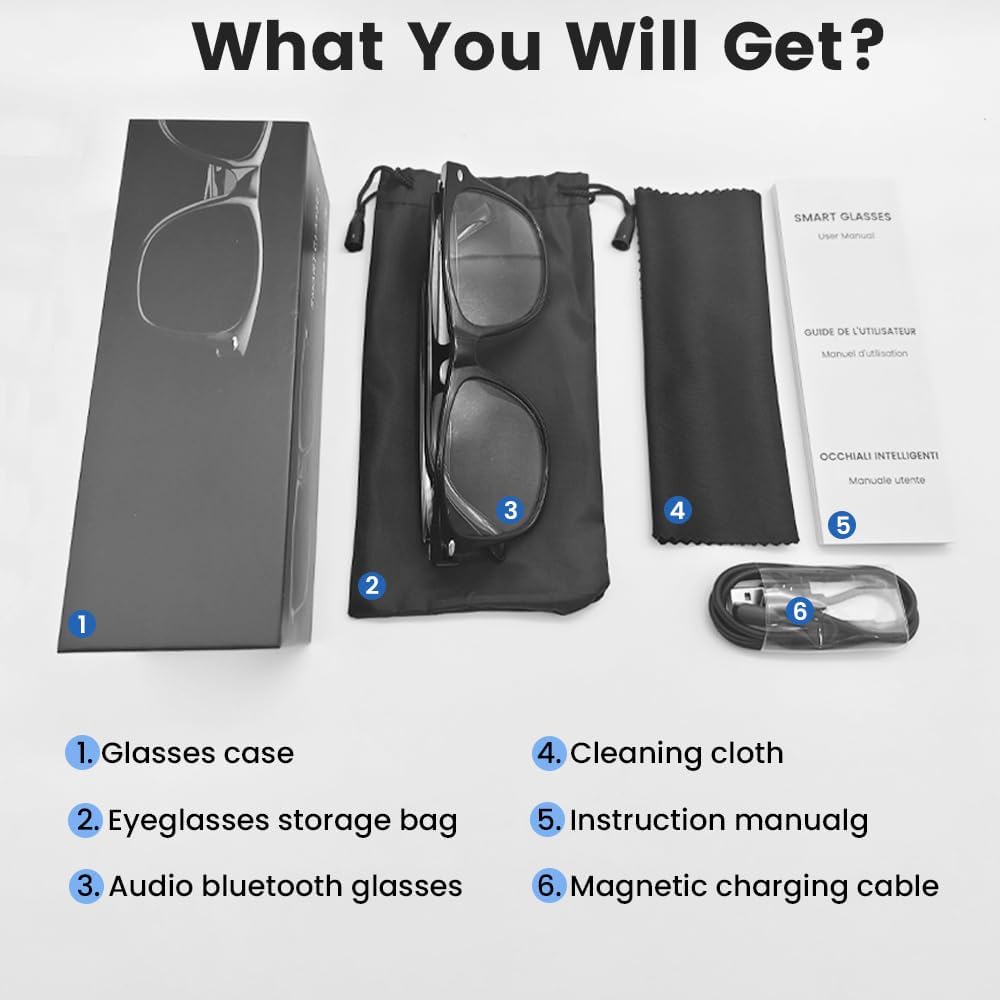
An image displaying the package contents: a glasses case, an eyeglasses storage bag, the audio Bluetooth glasses, a cleaning cloth, an instruction manual, and a magnetic charging cable.
2.2 주요 특징
- 지능형 음성 제어: Operate functions using voice commands.
- 편광 렌즈 : Effective blue light filtering and 100% UV protection. Lenses are replaceable with prescription lenses.
- 폭넓은 호환성: Connects with various devices including smartphones (Android, iOS) and computers via Bluetooth 5.4.
- 원스텝 페어링: Automatic reconnection to the last paired device.
- 방수(IPX5): 땀과 비에 강합니다.
- 가벼운 디자인: Weighs approximately 27g for comfortable extended wear.
- Dual Magnetic Charging: Efficient and secure charging.
- 직관적인 터치 컨트롤: For media playback, calls, and voice assistant activation.
3. 설정
3.1 안경 충전하기
Before first use, fully charge the smart glasses. Use the provided magnetic charging cable.
- Connect the magnetic charging cable to the charging contacts on the temple of the glasses.
- 케이블의 USB 끝부분을 표준 USB 전원 어댑터(별도 구매) 또는 컴퓨터의 USB 포트에 연결하십시오.
- The indicator light will show yellow during charging.
- Charging is complete when the indicator light turns green. A full charge takes approximately 1.5 hours.
The glasses provide approximately 4-6 hours of media playback and over 300 hours of standby time on a full charge.

An illustration showing the magnetic charging cable connecting to the glasses' temple, with indicators for charging (yellow light) and fully charged (green light). Battery capacity, charging time, playback time, and calling time are also displayed.
3.2 블루투스 페어링
To connect your smart glasses to a device:
- 안경이 충전되어 있고 전원이 켜져 있는지 확인하세요.
- 스마트폰이나 다른 기기에서 블루투스를 활성화하세요.
- 검색 available Bluetooth devices. The glasses will appear as "E13".
- Select "E13" to pair. Once paired, the glasses will automatically reconnect to this device when powered on and within range (up to 33 feet).

A person wearing the smart glasses while running, with a smartphone screen showing Bluetooth settings and the glasses (E13) connected. The image highlights the 33ft Bluetooth 5.4 transmission range and voice control functionality.
4. 사용 설명서
4.1 전원 켜기/끄기
- 전원 켜기: Long touch the control area for 5 seconds.
- 전원 끄기 : Long touch the control area for 5 seconds.
4.2 터치 컨트롤
The smart glasses feature intuitive touch controls located on the temples:
- 음악 재생/일시 중지: 한 번 탭
- 다음 트랙: 두 번 탭하기
- 이전 트랙 : 두 번 탭하기
- 전화 받기: 한 번 탭
- 전화 끊기: 한 번 탭
- Voice Assistant 활성화 : Long Touch for 2 seconds
- 원격 촬영: Double click to control your smartphone's camera.

A diagram illustrating the touch control gestures on the smart glasses for various functions: pick up calls, turn on music, open navigation, take photos, previous/next track, play/pause, voice assistant, answer/hang up calls, and power on/off.
4.3 음성 제어
After activating the voice assistant (Long Touch for 2 seconds), you can use voice commands for various functions, such as:
- Making calls (e.g., "Call [Contact Name]")
- Playing music (e.g., "Play [Song Title]")
- 메시지 보내기
- Opening navigation
5. 유지관리
- 청소: 제공된 청소용 천으로 렌즈와 프레임을 부드럽게 닦아주세요. 강한 화학 약품이나 연마성 재질은 사용하지 마십시오.
- 방수 기능: The glasses are IPX5 water-resistant, meaning they can withstand sweat and light rain. Do not submerge them in water or expose them to strong jets of water.
- 저장: When not in use, store the glasses in the provided eyeglasses storage bag or glasses case to protect them from scratches and dust.
- 온도: Avoid exposing the glasses to extreme temperatures (hot or cold) as this can affect battery life and electronic components.

A pair of smart glasses resting on a surface, emphasizing their lightweight design (27g) and comfort for extended wear. A magnified inset shows the dual magnetic charging contacts.
6. 문제 해결
- 전원을 켤 수 없습니다: Ensure the glasses are fully charged. Connect to the magnetic charging cable and check the indicator light.
- 기기와 페어링할 수 없습니다:
- 기기에서 Bluetooth가 활성화되어 있는지 확인하세요.
- Make sure the glasses are within the 33-foot Bluetooth range.
- Turn the glasses off and on again, then try pairing.
- 휴대폰의 Bluetooth 설정에서 해당 기기를 삭제하고 다시 페어링을 시도해 보세요.
- 소리가 나지 않음/볼륨이 낮음:
- Check the volume settings on both the glasses (if applicable via touch control) and your connected device.
- 안경이 Bluetooth를 통해 제대로 연결되었는지 확인하세요.
- Confirm that the audio output on your device is set to the smart glasses.
- 터치 컨트롤이 응답하지 않음: Ensure the glasses are powered on and connected. Try restarting the glasses.
7. 사양
| 모델 | E13C |
| 상표 | Yeabomy |
| 연결 기술 | 블루투스 5.4 |
| 운영 체제 호환성 | 안드로이드, iOS 기기 |
| 특별 기능 | Music Player, Phone Call, Voice Control, UV Protection, Polarized Lenses, Remote Photography |
| 배터리 용량 | 1 Amp Hours (80mAh per temple) |
| 충전 시간 | 약 1.5시간 |
| Continuous Playback Time (Music) | 약 5시간 |
| Continuous Calling Time | 약 4시간 |
| 대기 시간 | 300시간 이상 |
| 품목 무게 | 0.07파운드(약 27g) |
| 방수성 | IPX5 |
| 패키지 크기 | 6.65 x 2.4 x 2.24 인치 |
| 화면 크기 | 1.96인치 (화면 대각선 길이) |
| 메모리 저장 용량 | 128메가바이트 |
| GPS | GPS 없음 |

An image detailing the physical dimensions of the smart glasses, including lens width, frame width, and temple length. It also shows various face shapes (oval, triangle, round, square, diamond) indicating suitability.
8. 보증 및 지원
For warranty information or technical support, please refer to the contact details provided with your purchase documentation or visit the official Yeabomy web사이트. 보증 청구를 위해 구매 증빙 자료를 보관하세요.