
KTC A27Q7
KTC 27-inch MegPad A27Q7 Portable Smart Touchscreen Monitor User Manual
Comprehensive guide for setup, operation, and maintenance of your KTC MegPad A27Q7.
1. 서론
The KTC 27-inch MegPad A27Q7 is a versatile portable touchscreen monitor designed for a wide range of uses, from entertainment to productivity. Featuring an EDLA-certified Android 14 operating system, a powerful Octa-core Qualcomm SM6115 chip, 8GB RAM, and 128GB internal storage, it offers a smooth and responsive user experience. Its full swivel rotation, long-lasting battery, and built-in camera make it an adaptable device for various environments.

Figure 1: The KTC MegPad A27Q7 in a home setting, showcasing its portability and sleek design.
2. 패키지 내용
Upon unboxing your KTC MegPad A27Q7, ensure all components are present and undamaged. The package typically includes:
- KTC 27-inch Smart Mobile Screen (MegPad A27Q7)
- Base with silent universal wheels
- Telescopic rod/stand assembly
- 원격 제어
- AAA 배터리 2개(리모컨용)
- 전원 어댑터 및 케이블
- 십자 드라이버
- Mounting screws (for base assembly)
- 사용자 가이드(이 매뉴얼)

Figure 2: All included components of the KTC MegPad A27Q7, neatly arranged for inspection.
3. 설치 및 조립
Follow these steps to assemble your KTC MegPad A27Q7. It is recommended to perform assembly on a soft, flat surface to prevent scratches.
- 베이스 준비: Place the Styrofoam packaging flat on the floor. Position the circular base of the stand onto the designated slot in the Styrofoam.
- Attach the Telescopic Rod: Carefully align the bottom of the telescopic rod with the connection point on the base. Push down firmly until it clicks into place, ensuring a secure connection.
- 기지를 확보하세요: Using the provided Phillips head screwdriver and screws, fasten the base to the telescopic rod from underneath. Ensure all screws are tightened securely.
- Mount the Screen: Slide the screen onto the top of the telescopic rod. Pay attention to the arrows or guides on the screen's back plate and the rod to ensure correct orientation. The screen should slide down and lock into place.
- 전원 케이블 연결: Locate the USB-C port on the back of the screen. Connect the power cable to this port.
- 리모컨 배터리 설치: Open the battery compartment on the back of the remote control and insert the two AAA batteries, observing polarity.
- 초기 전원 켜기: Plug the power adapter into a wall outlet. Press and hold the power button on the back of the screen for 3 seconds to power on the device.
- 리모컨 페어링: Follow the on-screen instructions to pair your remote control with the MegPad. This usually involves pressing specific buttons on the remote simultaneously until an indicator light blinks.
Video 1: A detailed guide on unboxing and assembling the KTC MegPad A27Q7, demonstrating each step for a smooth setup process.

그림 3: 후면 view of the MegPad screen, highlighting the mounting interface and connectivity options.
4. 사용 설명서
4.1 전원 켜기/끄기
To power on, press and hold the power button on the back of the screen for 3 seconds. To power off, press and hold the power button again, then select "Power Off" from the on-screen menu.
4.2 터치스크린 및 리모컨
The MegPad features a responsive 10-point Incell touchscreen for direct interaction. Alternatively, use the included remote control for navigation, volume adjustment, and accessing various functions. The remote also includes a "flying mouse" feature for precise cursor control.
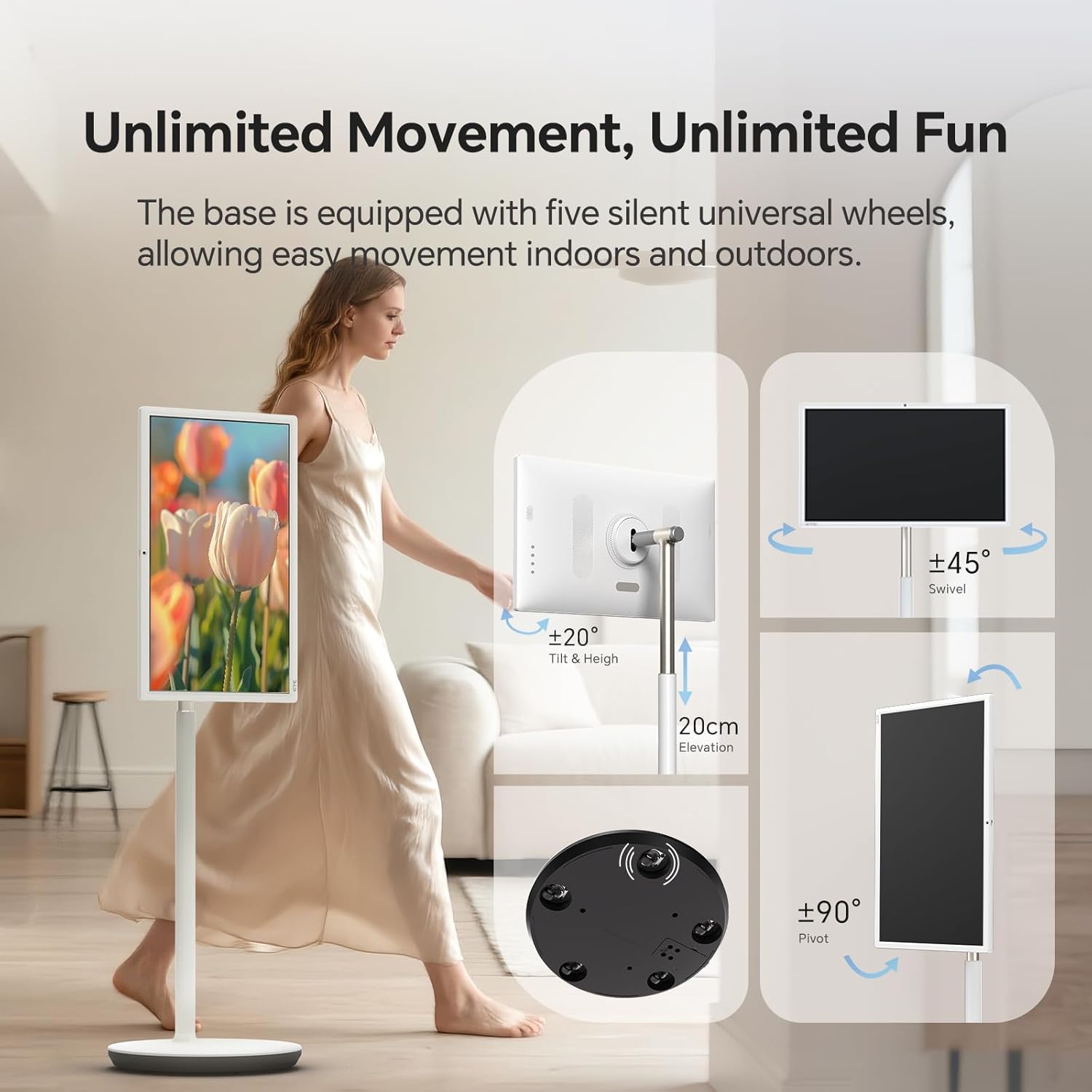
Figure 4: User interacting with the 10-point touchscreen for intuitive control.

Figure 5: The remote control provides convenient operation from a distance.
4.3 안드로이드 운영체제 및 애플리케이션
The MegPad runs on EDLA-certified Android 14 OS, powered by a Qualcomm SM6115 Octa-core CPU with 8GB RAM and 128GB storage. This allows you to download and install a wide array of applications directly from the Google Play Store, including streaming services, social media, and productivity tools.

Figure 6: The Android 14 OS interface with access to Google Play Store applications.
4.4 화면 조정
The screen offers full adjustability, allowing you to rotate, tilt, and lift it to achieve the optimal viewing angle. The base is equipped with five silent universal wheels for easy movement across different locations.

Figure 7: Multi-angle adjustment features for customized view주고받음.
4.5 Connectivity and Screen Mirroring
The MegPad supports Wifi5 wireless connection for internet access and content sharing. It also features a Type-C interface for easy device pairing and full-function output. Screen mirroring is supported via Apple AirPlay, Miracast, and Android DLNA, allowing you to cast content from your mobile phone, tablet, or laptop.

Figure 8: Wireless screen casting in action, displaying content from a phone to the MegPad.
4.6 Built-in Camera and Audio
An integrated camera and 4x5W speakers enable clear video calls and business meetings. The monitor also incorporates low blue light technology to reduce eye fatigue during extended use.

Figure 9: The built-in camera facilitates video conferencing and online interactions.
4.7 Battery Life and Mobility
The 9500mAh built-in battery provides 4-6 hours of continuous use, offering flexibility to enjoy content without a constant power connection. The rolling design with silent universal wheels allows for easy movement between rooms or even outdoors.

Figure 10: Enjoy extended usage with the long-lasting battery, perfect for various settings.
5. 유지관리
To ensure the longevity and optimal performance of your KTC MegPad A27Q7, follow these maintenance guidelines:
- 화면 청소: 전자제품 전용으로 제작된 부드럽고 보풀 없는 천을 사용하세요. 잘 지워지지 않는 얼룩은 가볍게 닦아내세요.amp천에 물이나 화면에 안전한 세척액을 묻혀 닦아주세요. 강한 화학 물질이나 연마재는 사용하지 마세요.
- 스탠드와 받침대 청소하기: Wipe down the stand and base with a soft, damp cloth. Ensure no liquid enters any openings.
- 배터리 관리 : To maximize battery life, avoid fully discharging the battery frequently. Charge the device when the battery level is low. If storing the device for an extended period, charge it to about 50-60% and store in a cool, dry place.
- 저장: When not in use, store the MegPad in a clean, dry environment away from direct sunlight and extreme temperatures.
6. 문제 해결
If you encounter issues with your KTC MegPad A27Q7, refer to the following common troubleshooting steps:
- 장치 전원이 켜지지 않음:
- 전원 어댑터가 장치와 작동하는 전원 콘센트에 모두 단단히 연결되어 있는지 확인하세요.
- 다른 장치를 연결하여 전원 콘센트가 작동하는지 확인하세요.
- Charge the device for at least 30 minutes before attempting to power it on again.
- If the device is stuck in a boot loop (repeatedly showing the logo and turning off), try performing a hard reset by pressing and holding the power and volume buttons simultaneously for several seconds until the device restarts.
- 터치스크린이 반응하지 않음:
- 장치를 다시 시작합니다.
- 화면이 깨끗하고 이물질이나 습기가 없는지 확인하세요.
- 원격 제어가 작동하지 않음:
- 리모컨의 AAA 배터리를 확인하고 필요하면 새 배터리로 교체하세요.
- 리모컨과 장치 사이에 장애물이 없는지 확인하세요.
- Re-pair the remote control with the MegPad by following the on-screen instructions during initial setup or in the device settings.
- Wi-Fi 연결 없음:
- Wi-Fi 라우터가 켜져 있고 올바르게 작동하는지 확인하세요.
- 다른 기기가 동일한 Wi-Fi 네트워크에 연결할 수 있는지 확인하세요.
- Restart the MegPad and your Wi-Fi router.
- Go to "Settings" > "Network & Internet" and ensure Wi-Fi is enabled and you are connected to the correct network.
Video 2: Demonstration of a boot loop issue, where the device repeatedly shows the logo and turns off, along with a user's attempt at troubleshooting.
7. 사양
| 특징 | 세부 사항 |
|---|---|
| 상표 | KTC |
| 모델명 | A27Q7 |
| 화면 크기 | 27인치 |
| 해결 | 1920x1080 FHD 1080p |
| 디스플레이 유형 | 액정표시장치 |
| 새로 고침 빈도 | 60Hz |
| 대비율 | 4000시 1분 |
| 운영 체제 | EDLA-Certified Android 14 |
| CPU | Octa-core Qualcomm SM6115 |
| 숫양 | 8GB |
| 내부 저장소 | 128GB |
| 배터리 용량 | 9500mAh (4-6 hours use) |
| 연결성 | Wifi5, Bluetooth, USB Type-C |
| 스피커 | 4x5W Built-in Speakers |
| 카메라 | 내장형 |
| 특별 기능 | 10-point Touch, Low Blue Light, Full Swivel Rotation, Universal Wheels |
| 품목 무게 | 40.32 파운드 |
| 품목 치수(D x W x H) | 38인치 깊이 x 9인치 너비 x 20인치 높이 |
8. 보증 및 지원
The KTC MegPad A27Q7 comes with a 1년 제조업체 보증. For any issues during installation or use, please contact KTC-Official through the Amazon platform for consultation. Our professional engineers are available to provide solutions as soon as possible.
For further assistance, please refer to the contact information provided in your purchase documentation or visit the official KTC web대지.
Ask a question about this manual
Ask about setup, troubleshooting, compatibility, parts, safety, or missing instructions. Manuals+ will review the question and use this page’s manual context to help answer it.