
1. 서론
Thank you for choosing the Pelsee P12 Pro Max Mirror Dash Cam. This advanced device is designed to enhance your driving safety and recording capabilities with its dual 4K+2.5K resolution, superior night vision, and intelligent driver assistance systems. This manual provides detailed instructions for installation, operation, and maintenance to ensure optimal performance and longevity of your dash cam.
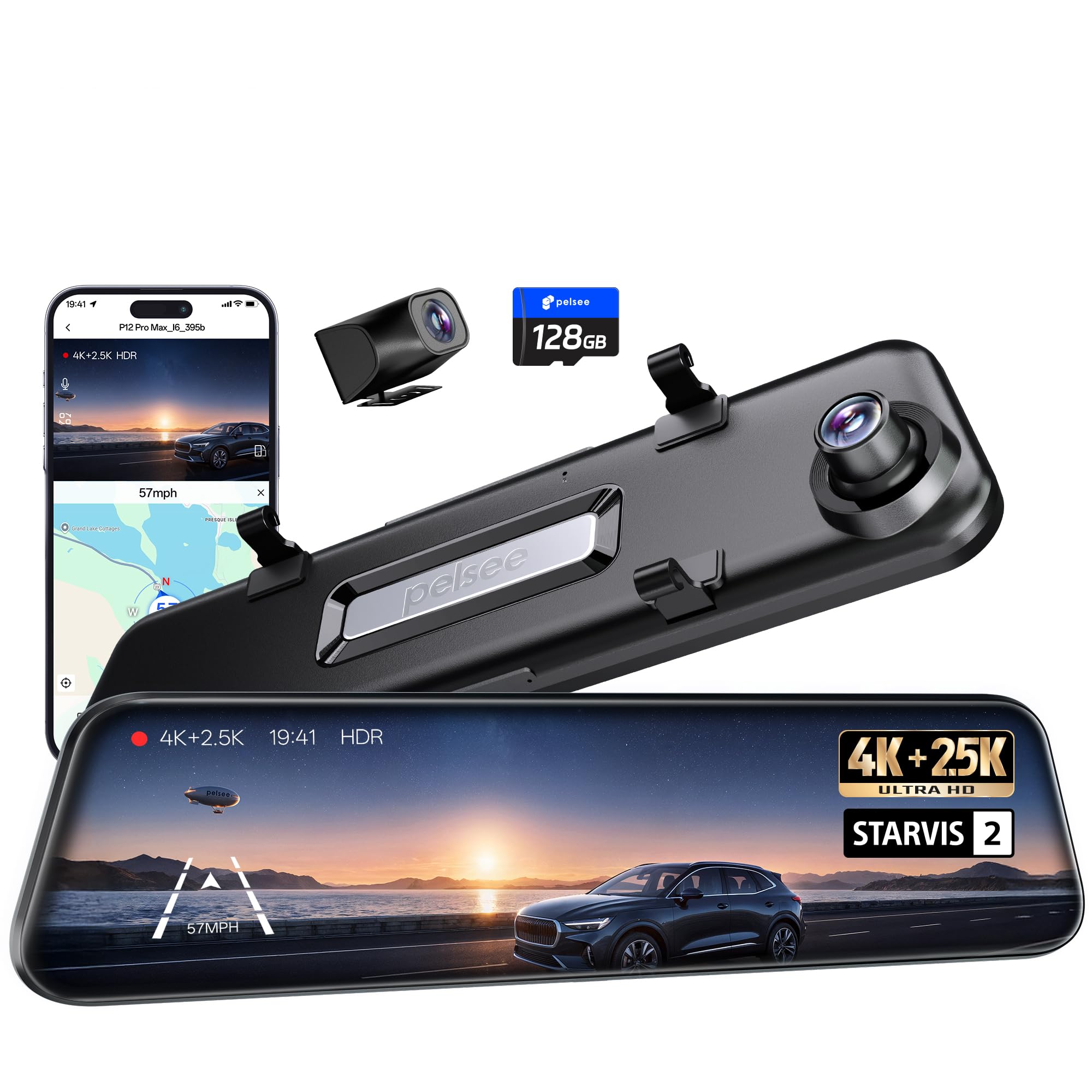
Image: The Pelsee P12 Pro Max Mirror Dash Cam, showcasing its sleek design and integrated front camera.
2. 상자 안에 무엇이 들어있나요?
모든 품목이 들어 있는지 확인하려면 패키지 내용물을 확인하세요.
- 1 x 4K Mirror Dash Camera (P12 Pro Max)
- 1 x 2.5K Rear Camera Kit (with 33ft rear camera cable)
- 1 x OBD Hardwire Kit
- 1 x GPS 모듈
- 1 x 128GB 메모리 카드
- 1 x 11.5ft Type-C Car Charger
- 4 x Rubber Straps
- 3M 접착 패드 2개
- 간편 분해 도구 1개
- 1 x 사용자 설명서

Image: All components included in the Pelsee P12 Pro Max package, laid out for inspection.
3. 설정 및 설치
Follow these steps to properly install your Pelsee P12 Pro Max Mirror Dash Cam:
- Mounting the Mirror Dash Cam: Use the provided rubber straps to securely attach the mirror dash cam over your existing rearview mirror. Ensure the front camera lens is positioned correctly for an unobstructed view 도로의.
- 후방 카메라 설치: Mount the 2.5K rear camera at the back of your vehicle, typically above the license plate or on the rear window. The 33ft cable is designed for compatibility with larger vehicles. Route the cable neatly to the front of the vehicle, tucking it under trim panels for a clean installation.
- GPS 모듈 연결하기: Plug the GPS module into the designated port on the dash cam. Position the module on your dashboard or windshield where it has a clear view of the sky for accurate speed and location tracking.
- 장치에 전원 공급:
- 표준 전력: Connect the 11.5ft Type-C car charger to your vehicle's cigarette lighter socket.
- 24/7 Parking Monitoring (Recommended): Use the included OBD Hardwire Kit. Plug it into your car's OBD-II port. This provides continuous power for parking surveillance without draining your car battery, thanks to its low voltag전자 보호.
- 메모리 카드 삽입: Insert the 128GB MicroSD card into the TF card slot on the dash cam. Ensure it is inserted correctly until it clicks into place.

Image: The Pelsee P12 Pro Max Mirror Dash Cam securely mounted over a vehicle's existing rearview 거울.

Image: Illustration showing the simplicity of OBD hardwire kit installation compared to traditional hardwiring methods.
4. 사용 설명서
4.1. 기본 동작
- 전원 켜기/끄기: The device will automatically power on/off with your vehicle's ignition when connected to power.
- 터치 스크린 제어: The 12-inch touch screen allows intuitive navigation through menus and settings. Swipe left/right to switch between front, rear, and split-screen views. Tap to access menu options.
- 음성 제어: Use simple voice commands for hands-free operation. Examples include: "Turn on screen," "Show rear camera," "Take picture," "Lock the video."
4.2. Driving Assistance Systems
The P12 Pro Max is equipped with advanced driving assistance features:
- ADAS(첨단 운전자 보조 시스템): Provides voice alerts for critical road scenarios such as front vehicle start, lane departure, forward collision, and pedestrian detection.
- BSD (Blind Spot Detection): Monitors areas your rearview mirror cannot see, detecting approaching vehicles and providing timely visual and audible alerts to reduce collision risks during lane changes.
- Reverse Assistance: 후진 시 화면에 자동으로 후방 카메라가 표시됩니다. view with clear grid lines for safer parking.

Image: Visual representation of ADAS features like Forward Collision Warning and Lane Departure Warning on the dash cam display.

Image: Visuals demonstrating Blind Spot Detection (BSD) and Lane Change Assist (LCA) functionality.

이미지: 후면view mirror display showing parking guidelines for reverse assistance.
4.3. 연결성 및 앱 제어
- 듀얼 밴드 Wi-Fi (2.4GHz 및 5.8GHz): Connect your smartphone to the dash cam via the "Pelsee Cam" app. The 5.8GHz frequency ensures faster video previews and downloads (up to 20MB/s).
- Pelsee Cam App: Use the dedicated app to configure settings, preview 라이브 푸tage, playback recorded videos, download, edit, and share your videos effortlessly.
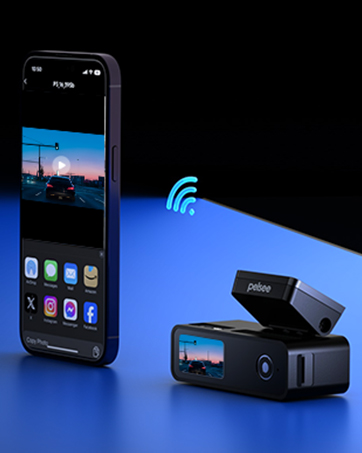
Image: A smartphone displaying the Pelsee Cam app interface, showing live footage and control options.
4.4. 주차 모드
With the OBD Hardwire Kit, the dash cam offers 24/7 parking monitoring:
- 풀컬러 야간 투시경: Records clear, colorful footage during time-lapse parking surveillance, even in low-light conditions.
- 낮은 볼륨tage 보호: Prevents your car battery from draining during extended parking monitoring.

Image: A side-by-side comparison illustrating the superior clarity and color of Pelsee's low-light color night vision compared to standard night vision.
5. 유지관리
- SD 카드 관리 : Regularly format the 128GB memory card (at least once a month) to ensure optimal recording performance and prevent data corruption.
- 청소: Use a soft, dry cloth to clean the camera lenses and the mirror screen. Avoid abrasive materials or harsh chemicals.
- 펌웨어 업데이트: Check the Pelsee web기기에 최신 기능과 버그 수정 사항이 적용되도록 웹사이트 또는 앱을 정기적으로 방문하여 펌웨어 업데이트를 확인하십시오.
6. 문제 해결
- Screen Freezing/Rebooting: If the screen freezes or the device reboots unexpectedly, try updating the firmware. Ensure the SD card is properly formatted and not corrupted.
- 야간 시력이 좋지 않음: Ensure the camera lenses are clean. Verify that HDR/WDR settings are enabled for optimal low-light performance.
- Wi-Fi 연결 문제: Ensure you are within range of the dash cam's Wi-Fi signal. Try restarting both the dash cam and your smartphone's Wi-Fi.
- OBD Hardwire Kit Compatibility: The included OBD hardwire kit is not suitable for hybrid vehicles. For hybrid vehicles, an ACC Hardwire Kit (sold separately, ASIN: B0C7QY4K89) may be required.
- Rear Camera Cable Length: The upgraded 33ft rear camera cable offers improved compatibility with larger vehicles. The P12 Pro Max is not compatible with the 4-pin rear extension cable (ASIN: B0BKQ6MPWS).
7. 사양
| 특징 | 세부 사항 |
|---|---|
| 모델명 | P12 프로 맥스 |
| 전면 카메라 센서 | 스타비스 2 IMX678 |
| 후방 카메라 센서 | STARVIS IMX335 |
| 비디오 캡처 해상도 | Front 4K (2160p), Rear 2.5K (1440p) |
| 표시하다 | 12 인치 터치 스크린 |
| 연결 기술 | 듀얼 밴드 Wi-Fi (2.4GHz 및 5.8GHz) |
| 특별 기능 | Color Night Vision, ADAS, BSD, Voice Control, GPS Module, OBD Hardwire Kit |
| 메모리 카드 포함 | 128GB |
| 후방 카메라 케이블 길이 | 33 피트 |
| 제품 치수 | 1.8 x 12 x 3.3 인치 |
8. 보증 및 지원
The Pelsee P12 Pro Max Mirror Dash Cam comes with an 18-month warranty. For any technical assistance, troubleshooting, or warranty claims, please contact Pelsee customer support:
- 이메일: support@pelsee.com

Image: Details on Pelsee's 30-day free return, 30-day money-back guarantee, and 18-month warranty, along with customer support email.
9. 공식 제품 영상
Video: An official product video from Pelsee US demonstrating the Smart Driving System features of the dash cam, including ADAS and BSD functionalities.