
Spectra Projection Helios
Spectra Projection Helios Fresnel ALR Projector Screen (120-inch) User Manual
Model: Helios
소개
This manual provides comprehensive instructions for the setup, operation, maintenance, and troubleshooting of your Spectra Projection Helios Fresnel ALR Projector Screen. Designed for ultra short throw (UST) projectors, this 120-inch screen utilizes advanced Fresnel Ambient Light Rejecting (ALR) technology to deliver bright and vivid images even in well-lit environments.
Please read this manual thoroughly before installation and use to ensure optimal performance and longevity of your projector screen.
설정 및 설치
1. 풀기
- 포장을 조심스럽게 열고 모든 구성품을 꺼내세요.
- Inspect the screen and frame for any signs of damage. If damage is found, contact customer support immediately.
- Ensure all parts listed in the packing list (refer to your product packaging) are present.
2. 벽 장착
The Spectra Projection Helios screen is designed for wall mounting. Professional installation is recommended due to the size and precision required for optimal view주고받음.
- 위치 선택: Choose a flat wall surface free from obstructions. Ensure the wall can support the screen's weight (approximately 30 pounds).
- 측정 및 표시: Determine the desired height and center point for the screen. Use a level to mark the positions for the mounting brackets according to the provided template (if included) or measurements in the assembly guide.
- 브라켓 설치: Securely attach the wall mounting brackets to the marked positions using appropriate hardware for your wall type (e.g., wall anchors for drywall, screws for studs).
- Assemble Frame (if required): Follow the separate assembly instructions for the screen frame.
- Attach Screen Material: Carefully attach the screen material to the frame, ensuring it is taut and wrinkle-free.
- 화면 장착: With assistance, lift the assembled screen and carefully hook it onto the installed wall brackets. Ensure it is securely seated and level.

Figure 1: The Spectra Projection Helios screen installed with a UST projector.
3. 프로젝터 배치
This screen is specifically designed for Ultra Short Throw (UST) projectors. The projector must be placed directly below the screen, very close to the wall, projecting upwards onto the screen surface. Refer to your projector's manual for exact placement distances and keystone correction settings.
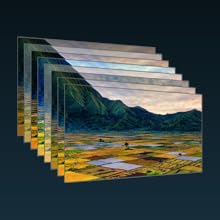
Figure 2: Simulated surface detail of the Fresnel ALR screen, illustrating its light-directing properties.
작동 지침
The Spectra Projection Helios screen is a passive display surface. Its operation is directly linked to your Ultra Short Throw projector. Ensure your projector is correctly aligned and calibrated for the best view경험.
Ambient Light Rejection (ALR) Technology
The screen features advanced Fresnel ALR technology. This specialized optical surface is engineered to reflect light from the UST projector directly to the viewer while absorbing or deflecting ambient light from other angles. This results in a bright, high-contrast image even in rooms with significant ambient light, making it suitable for daytime view주고받음.

Figure 3: Illustration of Fresnel ALR technology, showing light paths.
8-Layer Optical Surface Structure
The screen's performance is enhanced by an 8-layer optical surface structure. Each layer contributes to image quality, color accuracy, and durability. These layers include anti-glare, color plane, diffusion, columnar, speckle diffusion, Fresnel, reflecting, and blackened layers, working in concert to optimize the projected image.

그림 4: 상세 view of the 8-layer optical surface structure.
유지
화면 표면 청소
- 먼지 제거: Gently wipe the screen surface with a soft, dry, lint-free microfiber cloth to remove dust.
- 얼룩 청소: For smudges or fingerprints, lightly dampen a clean microfiber cloth with distilled water. Wipe the affected area gently in one direction. Do not rub vigorously.
- 화학 물질을 피하세요: Never use harsh chemicals, solvents, alcohol-based cleaners, or abrasive materials on the screen surface, as these can damage the optical layers.
- 압력: Do not apply excessive pressure when cleaning, as this can cause permanent damage or distortion to the screen material.
일반 관리
- 화면 표면을 맨손으로 직접 만지지 마십시오.
- Keep the screen away from direct sunlight or strong heat sources when not in use, if possible, to prevent material degradation.
- Ensure the screen is not exposed to sharp objects that could scratch or puncture the surface.
문제 해결
| 문제 | 가능한 원인 | 해결책 |
|---|---|---|
| Image appears dim or washed out. | Incorrect projector placement; excessive ambient light; projector settings. |
|
| Image has hot spots or uneven brightness. | Projector misalignment; screen not perfectly flat. |
|
| Visible lines or patterns on the screen. | Moiré effect (interaction between projector pixels and screen texture); screen damage. |
|
| Dust or smudges on the screen. | Accumulated dust; accidental touching. |
|
If the problem persists after attempting these solutions, please contact Spectra Projection customer support.
명세서
| 특징 | 세부 사항 |
|---|---|
| 상표 | Spectra Projection |
| 모델명 | 헬리오스 |
| 디스플레이 치수 | 120인치 |
| 제품 치수(폭 x 높이) | 폭 104.6인치 x 높이 49인치 |
| 재료 | Fresnel (Ambient Light Rejecting) |
| 장착 유형 | 벽걸이형 |
| 품목 무게 | 30파운드 |
| 호환성 | Ultra Short Throw (UST) Projectors |
보증 정보
For detailed warranty information regarding your Spectra Projection Helios Fresnel ALR Projector Screen, please refer to the warranty card included with your product or visit the official Spectra Projection web사이트. 보증 약관은 지역 및 소매업체에 따라 다를 수 있습니다.
고객 지원
If you require assistance, have questions about your product, or need technical support, please contact Spectra Projection customer service. Contact details can typically be found on the manufacturer's web사이트 또는 제품 포장에 표시되어 있습니다.
온라인 리소스: 방문하세요 Spectra Projection brand page on Amazon 추가 제품 정보 및 지원은 여기를 참조하세요.
Ask a question about this manual
Ask about setup, troubleshooting, compatibility, parts, safety, or missing instructions. Manuals+ will review the question and use this page’s manual context to help answer it.