
소개
Thank you for choosing the BougeRV CRD2 49L Portable Fridge. This manual provides essential information for the safe and efficient operation, maintenance, and troubleshooting of your new portable refrigerator. Please read it thoroughly before use and retain it for future reference.
The BougeRV CRD2 is a versatile dual-zone portable fridge/freezer designed for various applications, including automotive, camping, and outdoor use. It features a 173Wh rechargeable battery, app control, and robust construction for reliable performance.

이미지: 이상view of the BougeRV CRD2 49L Portable Fridge, showcasing its compact design and dual-lid access.
안전 지침
- 전원 공급 장치 볼륨을 확인하십시오.tage는 기기의 사양과 일치합니다.
- 전원 코드가 손상된 경우 제품을 작동하지 마십시오. 교체를 위해 고객 지원 센터에 문의하십시오.
- 환기구에 장애물이 없도록 하십시오.
- 제조사가 권장하는 유형이 아닌 한 보관 공간 안에서는 전기 제품을 사용하지 마십시오.
- 직사광선이나 열원 근처에 제품을 두지 마십시오.
- 제품을 물에 담그거나 폭우에 노출시키지 마십시오.
- 청소나 유지관리를 하기 전에는 항상 전원 공급장치를 분리하세요.
- 본 기기는 신체적, 감각적 또는 정신적 능력이 저하된 사람(어린이 포함)이나 경험 및 지식이 부족한 사람이 사용하도록 의도된 것이 아니며, 안전을 책임질 사람으로부터 기기 사용에 관한 감독이나 지시를 받은 경우에만 사용할 수 있습니다.
상자 안에 무엇이 들어있나요?
포장을 풀 때 모든 구성품이 들어 있는지 확인하세요.
- BougeRV CRD2 Portable Fridge
- 173 Wh Rechargeable Battery
- 2 x Storage Baskets
- DC 전원 케이블 (12/24V)
- AC 어댑터(220V)
- 사용 설명서 (본 문서)
설정
1. 풀기 및 배치
- 모든 포장재를 제거하세요.
- Place the fridge on a flat, stable surface. Ensure there is adequate ventilation around the unit (at least 10 cm clearance on all sides).
- Allow the fridge to stand upright for at least 6 hours before connecting to power, especially if it was transported horizontally. This allows the refrigerant to settle.
2. 배터리 설치
The 173Wh rechargeable battery provides wireless operation for extended periods.
- Locate the battery compartment on the side of the fridge.
- Insert the 173Wh battery into the compartment until it clicks securely into place.
- 배터리 덮개를 닫습니다.
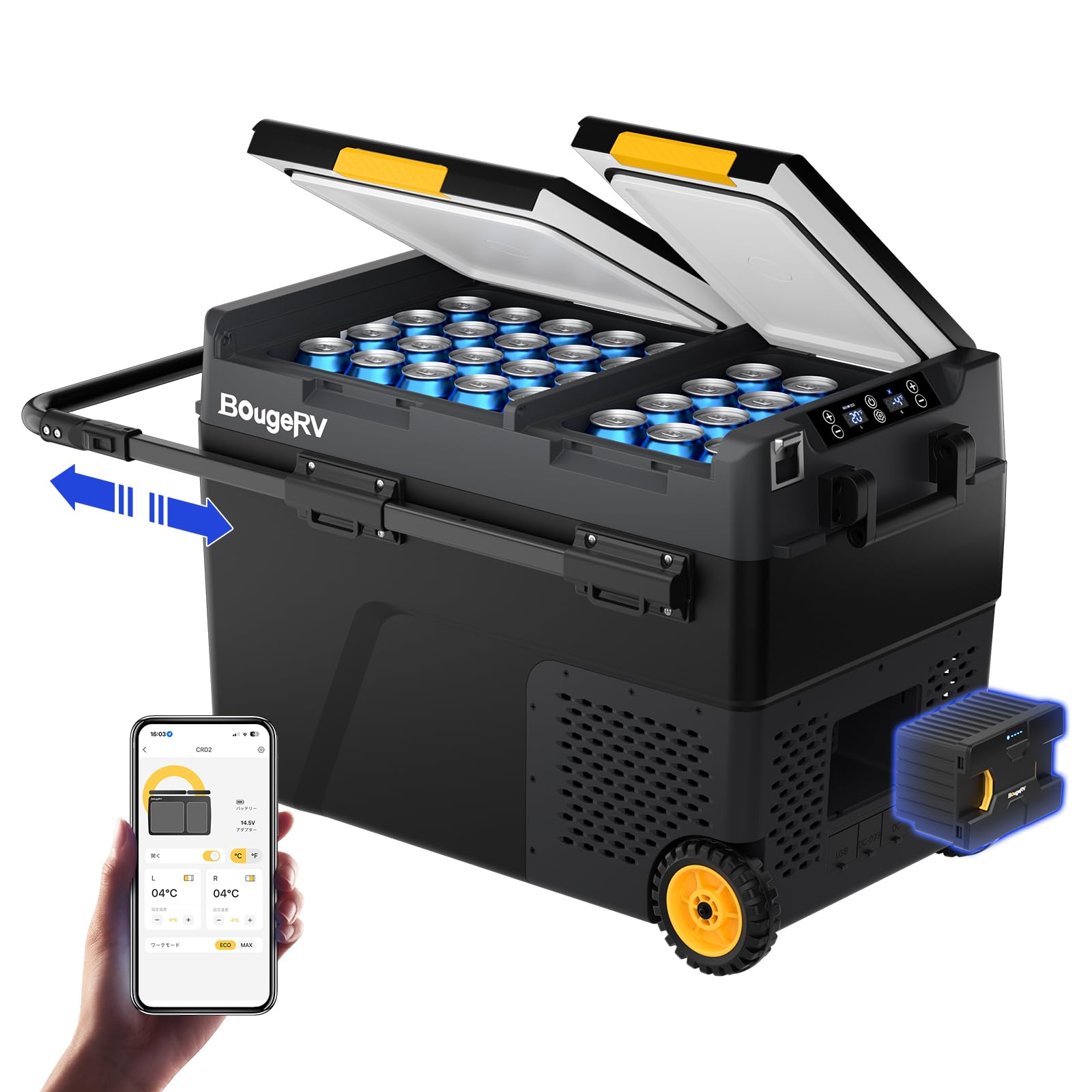
Image: Illustration of the 173Wh BougeRV battery being installed into the side compartment of the portable fridge.
3. 전원 연결
The BougeRV CRD2 offers multiple power options:
- 교류 전원(220V): Use the provided AC adapter to connect the fridge to a standard wall outlet.
- DC 전원(12/24V): Use the provided DC cable to connect the fridge to a car cigarette lighter socket or other 12V/24V power source.
- 태양열 충전: The integrated 173Wh battery can be directly charged by a compatible BougeRV 100W foldable solar panel (sold separately). Connect the solar panel to the designated input port.

Image: Demonstrates the various power options for the BougeRV CRD2, including AC (220V), DC (12/24V) from a vehicle, and direct charging via a solar panel.
4. 앱 제어 설정
Control your fridge remotely via the BougeRV app:
- Download the BougeRV app from your smartphone's app store.
- Ensure your fridge is powered on and Bluetooth is enabled on your smartphone.
- Open the app and follow the on-screen instructions to pair with your CRD2 fridge. The app allows you to turn the unit on/off, adjust temperatures, set modes, and monitor status within a 10-meter range.
작동 지침
1. 전원 켜기 / 끄기
Press and hold the power button on the control panel to turn the fridge on or off. The display will illuminate when powered on.
2. 듀얼 존 온도 조절
The CRD2 features two independently controllable zones with separate doors, preventing temperature and odor mixing. Each zone can be set between -20°C and 20°C.
- Use the control panel or the BougeRV app to select and adjust the temperature for each zone (Left and Right).
- You can configure the zones in four ways: Freezer/Fridge, Fridge/Freezer, two Freezer compartments, or two Fridge compartments.
- It is also possible to deactivate one zone if not needed.

Image: Illustrates the dual-zone functionality of the BougeRV CRD2, showing how each compartment can be set as a fridge or freezer independently.
3. 냉방 모드 (ECO/MAX)
Select the desired cooling mode based on your needs:
- ECO 모드(40W): For energy saving, ideal for maintaining temperature over longer periods.
- MAX 모드(55W): For rapid cooling, quickly bringing the temperature down from 25°C to 0°C in approximately 15 minutes.
4. Battery Protection System
The fridge features a 3-stage battery monitoring system to protect your vehicle's battery from excessive discharge. It will automatically shut off if the voltage drops below a set level. Adjust the protection level (High, Medium, Low) via the control panel or app as needed.
5. 휴대성 특징
The CRD2 is designed for easy transport:
- 견고한 휠: All-terrain wheels allow for easy movement over various surfaces.
- Extendable Aluminum Handle: Pull the retractable handle for comfortable towing.
- 진동 방지 설계: Ensures reliable cooling performance even on inclines up to 40°.

Image: A family demonstrates the portability of the BougeRV CRD2, highlighting its rugged wheels and retractable aluminum handle for easy transport.
6. 추가 기능
- LED 조명: Internal LED light for visibility in low-light conditions.
- USB 포트: Two USB ports for charging small electronic devices.
- Adjustable Side Door: Provides flexibility for access.
유지
1. 청소
- 청소하기 전에 항상 전원 공급 장치를 분리하십시오.
- 광고로 내부 및 외부 표면 청소amp 천과 순한 세제를 사용하세요. 연마성 세제나 용제는 사용하지 마세요.
- Ensure the drainage plug is open to remove any accumulated water.
- 적절한 공기 흐름을 보장하고 과열을 방지하기 위해 환풍구를 정기적으로 청소하세요.
2. 보관
- When storing the fridge for an extended period, ensure it is clean and dry.
- 냄새와 곰팡이가 생기는 것을 막으려면 뚜껑을 살짝 열어 두세요.
- 건조하고 통풍이 잘 되는 곳에 보관하고, 직사광선과 극한의 온도를 피하세요.
3. 배터리 관리
- For optimal battery life, fully charge the 173Wh battery before long-term storage.
- Recharge the battery every 3-6 months if not in use to prevent deep discharge.
문제 해결
| 문제 | 가능한 원인 | 해결책 |
|---|---|---|
| 냉장고가 켜지지 않음 | No power supply; Damaged power cord; Battery depleted; Blown fuse. | Check power connection; Replace power cord; Charge battery; Check/replace fuse. |
| Fridge not cooling effectively | Temperature setting too high; Poor ventilation; Overloaded compartment; Door not sealed properly; ECO mode active. | Lower temperature setting; Ensure proper clearance; Do not overload; Check door seal; Switch to MAX mode. |
| 비정상적인 소음 | Appliance not level; Objects inside rattling; Fan obstruction. | Place on a level surface; Secure items inside; Check for fan obstructions. |
| 앱 연결 문제 | Bluetooth off; Fridge out of range; App not updated. | Ensure Bluetooth is on; Move closer to fridge (within 10m); Update app to latest version. |
명세서
| 특징 | 세부 사항 |
|---|---|
| 모델 | CRD2 |
| 용량 | 49리터 |
| 치수(길이 x 너비 x 높이) | 83cm x 49cm x 57cm |
| 온도 범위 | -20°C to 20°C (Dual Zone) |
| 냉각 방식 | 압축기 |
| 전원 입력 | 12V/24V 직류, 220V 교류 |
| 배터리 용량 | 173 Wh (Integrated) |
| 소음 수준 | ≤45dB (데시벨) |
| 특별 기능 | Dual Zone, Dual Door, App Control, Wheels, Extendable Handle, USB Ports |

Image: Visual representation of the 49L internal capacity of the BougeRV CRD2, illustrating how many cans or bottles it can hold.

Image: A graphic demonstrating the quiet operation of the BougeRV CRD2, with a noise level of 45dB, comparable to a quiet conversation.
보증 및 지원
보증 정보
BougeRV products are covered by a limited warranty. Please refer to the warranty card included with your purchase or visit the official BougeRV website for detailed warranty terms and conditions. The warranty typically covers manufacturing defects and malfunctions under normal use.
고객 지원
If you encounter any issues or have questions regarding your BougeRV CRD2 Portable Fridge, please contact BougeRV customer support. You can find contact information on the official BougeRV web사이트나 구매 플랫폼을 통해서도 구매하실 수 있습니다.
When contacting support, please have your model number (CRD2) and purchase details readily available.