
1. 서론
This manual provides essential information for the safe and efficient operation of the INVT GD10-0R7G-S2-B Single-Phase 230V 0.75KW VFD Frequency AC Drive. The GD10 series min-economy inverters are designed for small power OEM applications, offering advanced features such as vectorization V/F control, PID function, multi-step speed control, DC braking, and Modbus communication, all within a compact design. Please read this manual thoroughly before installation, operation, or maintenance.
2. 안전 정보
⚠ WARNING: Risk of electric shock.
- Read this manual completely before installing or operating the device.
- Wait at least 5 minutes after disconnecting power before proceeding with any work on the unit to allow capacitors to discharge.
⚠ WARNING: Hot surfaces.
- The surfaces of the base are hot during and after operation. Do not touch the device during operation or immediately after power-off.
Only qualified personnel should perform installation, wiring, and maintenance. Ensure all local and national electrical codes are followed.
3. 제품 오버view
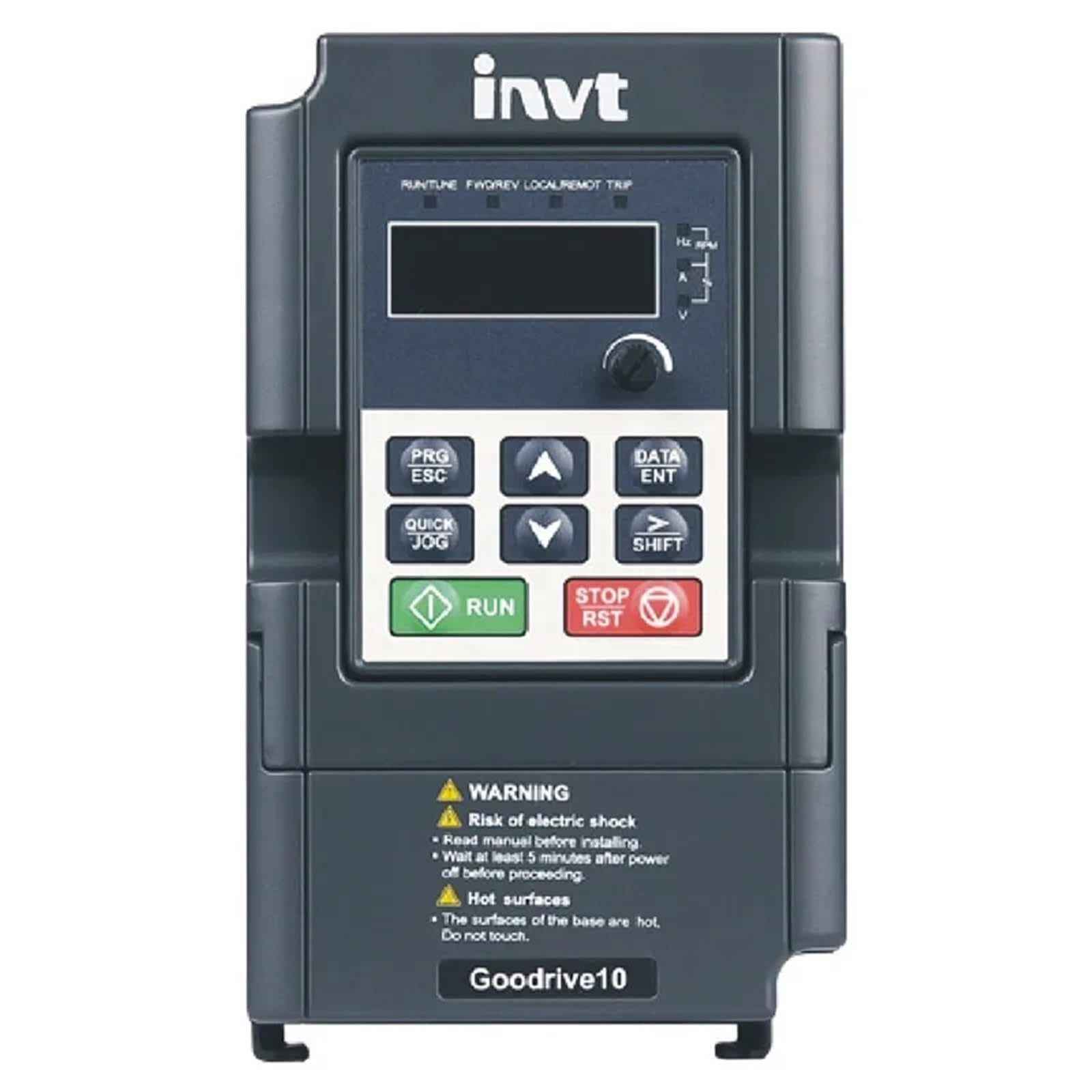
Figure 3.1: INVT GD10-0R7G-S2-B VFD Front Panel
The image displays the front panel of the INVT GD10-0R7G-S2-B VFD. It features a digital display for operational data, navigation buttons (PRG/ESC, DATA/ENT, QUICK JOG, SHIFT, UP, DOWN arrows), and dedicated RUN and STOP/RST buttons for direct control. Below the control interface, important safety warnings regarding electric shock and hot surfaces are clearly visible. The device is labeled "Goodrive10" at the bottom.
주요 특징:
- V/F control mode for versatile motor speed regulation.
- Natural cooling design, suitable for environments with cotton and dust, reducing maintenance needs.
- Compact, mini structure for less installation space.
- Advanced functions including vectorization V/F control, PID function, multi-step speed control, DC braking, and Modbus communication.
4. 설정 및 설치
Proper installation is critical for the safe and reliable operation of the VFD.
4.1. 장착:
Mount the VFD in a vertical position on a flat, non-flammable surface, ensuring adequate ventilation. Maintain sufficient clearance around the unit for heat dissipation, especially given its natural cooling design.
4.2. 배선:
Connect the input power to the designated terminals. For the GD10-0R7G-S2-B model, ensure a single-phase 230V AC power supply. Connect the motor to the output terminals. All wiring must comply with local electrical codes and standards. Use appropriate wire gauges for the rated current.
- 입력 Voltage: Single-phase 230V (±10%)
- 입력 주파수 : 50Hz or 60Hz (Allowed range: 47~63Hz)
- 출력 볼륨tage: 입력 볼륨과 동일tage with deviation less than 5%
- 출력 주파수: 50Hz/60Hz (Fluctuation range: 5%)
Refer to the detailed wiring diagrams in the complete product manual for specific terminal connections and safety grounding instructions.
5. 사용 설명서
The VFD features an intuitive control panel for easy operation.
5.1. 제어판 기능:
- 표시하다: Shows operational parameters such as frequency, current, voltage, and RPM.
- PRG/ESC: Enters/exits programming mode, or cancels current operation.
- 데이터/엔터프라이즈: Confirms parameter settings or enters data.
- ▲ (Up) / ▼ (Down): Navigates menus, adjusts parameter values.
- QUICK JOG: Initiates a quick jog operation (specific function depends on parameter settings).
- 옮기다: Shifts cursor position during parameter editing.
- 실행 : 모터를 시작합니다.
- 정지/RST: 모터를 멈추거나 오류 조건을 재설정합니다.
5.2. 기본 작동 :
- Ensure the VFD is properly wired and powered on.
- The display will show the current operating status or default frequency.
- 를 누르세요 달리다 모터를 시동하는 버튼입니다.
- 사용하세요 ▲ 그리고 ▼ buttons to adjust the output frequency (and thus motor speed) if configured for panel control.
- 를 누르세요 정지/RST 모터를 멈추는 버튼입니다.
For advanced settings, such as PID control, multi-step speed, or Modbus communication, refer to the detailed programming section of the full INVT GD10 series manual.
6. 유지관리
정기적인 유지관리는 VFD의 수명과 최적의 성능을 보장합니다.
- 청소: VFD를 깨끗하고 먼지나 이물질이 없도록 유지하십시오. 부드럽고 마른 천을 사용하여 청소하십시오. 액체 세제는 사용하지 마십시오.
- 통풍: Ensure that the ventilation openings are not obstructed to allow for proper natural cooling.
- 사이: Periodically check all electrical connections for tightness. Loose connections can cause overheating and malfunction.
- 환경: Operate the VFD within its specified environmental conditions (temperature, humidity, dust level).
- 점검: Visually inspect the unit for any signs of damage, discoloration, or unusual odors.
Always disconnect power and wait for at least 5 minutes before performing any maintenance.
7. 문제 해결
If you encounter issues with your VFD, consider the following basic troubleshooting steps:
- 전원 없음: Check the input power supply and all circuit breakers. Ensure connections are secure.
- 모터가 작동하지 않음: Verify that the RUN command is active. Check motor wiring and ensure the motor is not overloaded.
- Overload Trip: Reduce the load on the motor. Check for mechanical issues with the motor or driven equipment. The VFD has an overload capability of 150% of rated current for 1 minute.
- 비정상적인 소음/진동: Check motor mounting, coupling, and VFD installation.
- 디스플레이 오류: If the display shows an error code, consult the comprehensive INVT GD10 series manual for specific fault code definitions and corrective actions.
If the problem persists after basic troubleshooting, contact qualified technical support. Do not attempt to repair the unit yourself.
8. 사양
8.1. Rated Specifications (Single-Phase 230V GD10 Series)
| 모델 | 출력 전력(kW) | 입력 전류(A) | 출력 전류 (A) |
|---|---|---|---|
| GD10-0R2G-S2-B | 0.2 | 4.9 | 1.6 |
| GD10-0R4G-S2-B | 0.4 | 6.5 | 2.5 |
| GD10-0R7G-S2-B | 0.75 | 9.3 | 4.2 |
| GD10-1R5G-S2-B | 1.5 | 15.7 | 7.5 |
| GD10-2R2G-S2-B | 2.2 | 24 | 11 |
8.2. 기술 사양
- 제어 모드: V / f 제어
- 최대 출력 주파수: 200Hz
- Adjustable-Speed Ratio: 0.111111111
- 과부하 기능: 150분 동안 정격 전류의 1%
- Analog Input Resolution: <=20mV
- Digital Input Resolution: 2ms 미만
- 아날로그 입력/출력: Input 0-10V or 0-20mA, Output 0-10V
8.3. 물리적 사양
- 패키지 크기: 1.18 x 0.79 x 0.39 인치
- 품목 무게: 1.76온스(50그램)
- 모델 이름: EFZRZYJ
- 제조업체: EFZRZYJ
9. 보증 및 지원
For information regarding product warranty, please refer to the warranty card included with your purchase or contact the seller directly.
For technical support, troubleshooting assistance beyond this manual, or spare parts inquiries, please contact the manufacturer or your authorized distributor. Provide your product model number (GD10-0R7G-S2-B) and serial number (if applicable) when seeking support.