
소개
구매해주셔서 감사합니다asing the Sigma 50mm F2 DG Contemporary lens. This manual provides essential information for the safe and effective use of your new lens. Please read it thoroughly before using the product and keep it for future reference.
안전 예방 조치
- Do not look at the sun or other strong light sources through the lens, as this can cause permanent vision damage.
- 화재 위험을 방지하기 위해 사용하지 않을 때는 렌즈를 직사광선을 피해 보관하십시오.
- Avoid exposing the lens to extreme temperatures, humidity, or dust.
- 렌즈를 분해하거나 개조하지 마십시오. 수리는 반드시 공인 서비스 담당자만 수행해야 합니다.
- 어린이의 손이 닿지 않는 곳에 보관하세요.
패키지 내용
패키지에 모든 품목이 들어 있는지 확인하세요.
- Sigma 50mm F2 DG Contemporary Lens
- Lens Hood (LH633-02S)
- 전면 렌즈 캡
- 후면 렌즈 캡
- 사용 설명서(본 문서)
렌즈의 부분
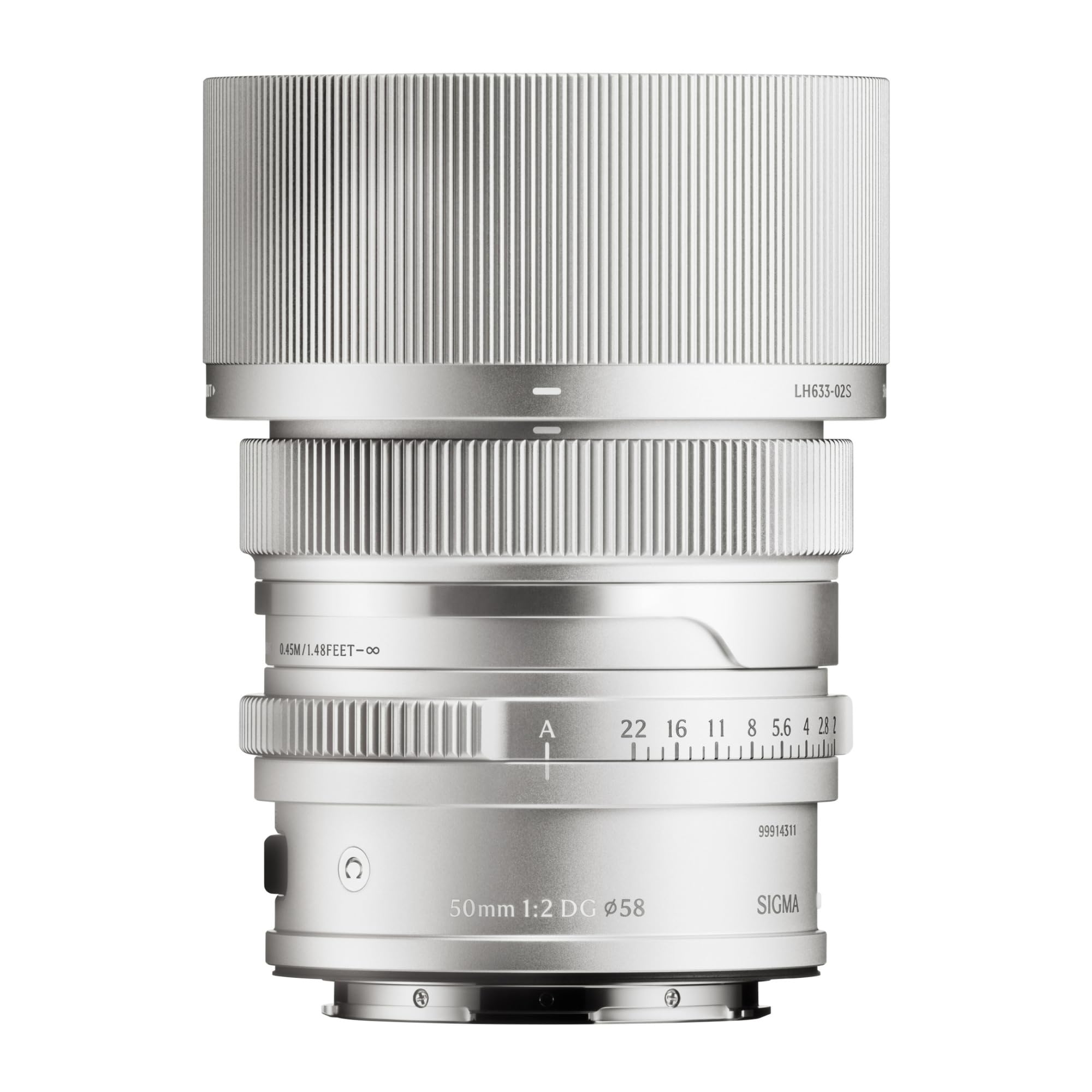
This image displays the Sigma 50mm F2 DG Contemporary lens, a prime lens designed for L-mount cameras. It features a sleek silver finish and a compact design, suitable for various photographic applications.
The Sigma 50mm F2 DG Contemporary lens features several key components:
- 초점 링: 수동 초점 조절에 사용됩니다.
- 조리개 링: 렌즈 조리개를 직접 제어할 수 있습니다.
- 렌즈 마운트: Connects the lens to the camera body (L-Mount).
- Lens Hood Attachment Point: Where the dedicated lens hood is secured.

The image shows the LH633-02S lens hood, a cylindrical accessory with a ribbed exterior, designed to attach to the Sigma 50mm F2 DG Contemporary lens. It helps to prevent stray light from entering the lens, reducing flare and ghosting, and offers protection to the front element.
설정
렌즈 부착하기
- 카메라와 렌즈의 전원이 꺼져 있는지 확인하세요.
- 렌즈에서 뒷 렌즈 캡을 제거하고 카메라에서 바디 캡을 제거합니다.
- Align the mounting index on the lens with the mounting index on the camera body.
- 렌즈를 카메라 마운트에 삽입하고 딸깍 소리가 나면서 제자리에 고정될 때까지 시계 방향으로 돌리십시오. 렌즈를 무리하게 끼우지 마십시오.
Attaching the Lens Hood (LH633-02S)
- 렌즈 후드의 빨간색 점을 렌즈 앞면의 빨간색 점에 맞춥니다.
- Rotate the lens hood clockwise until it locks securely into position.
- To remove, press the release button on the lens hood and rotate counter-clockwise.
운영
초점 맞추기
이 렌즈는 자동 초점(AF)과 수동 초점(MF)을 모두 지원합니다.
- 자동 초점 : Set your camera's focus mode to AF. The lens will automatically focus when the shutter button is half-pressed.
- 수동 초점: Set your camera's focus mode to MF. Rotate the focus ring on the lens to adjust focus manually. Use your camera's focus peaking or magnification features for precise focusing.
조리개 제어
The lens features an aperture ring for direct control over the aperture setting. You can also control the aperture through your camera body, depending on your camera's settings and mode.
호환 카메라
This lens is designed for L-Mount cameras, including models such as Leica SL, Leica TL2, and Leica CL.
유지
렌즈 청소
- 블로어 브러시를 사용하여 렌즈 표면의 먼지를 제거합니다.
- 얼룩이나 지문이 묻었을 경우, 안경 렌즈 전용으로 제작된 깨끗하고 부드러운 극세사 천을 사용하십시오. 렌즈에 직접 닿지 않도록 천에 소량의 렌즈 세척액을 묻혀 닦으십시오.
- Never use abrasive materials, solvents, or harsh chemicals to clean the lens.
저장
- 사용하지 않을 때는 앞면과 뒷면 렌즈 캡을 모두 씌우십시오.
- 렌즈는 직사광선과 높은 습도를 피해 서늘하고 건조한 곳에 보관하십시오.
- 장기간 보관할 경우 곰팡이 발생을 방지하기 위해 건조제를 사용하는 것을 고려하세요.
문제 해결
- 카메라가 렌즈를 인식하지 못합니다: Ensure the lens is securely attached to the camera body. Power off and restart the camera. Check for any firmware updates for both the lens and camera.
- 자동 초점이 작동하지 않습니다: Verify the camera's focus mode is set to AF. Ensure there is sufficient light and contrast in the scene for the autofocus system to operate effectively.
- 이미지가 흐릿합니다. Check that the lens is properly focused. Ensure the shutter speed is fast enough to prevent camera shake, especially in low light. Clean the lens elements if smudges are present.
- Lens hood difficult to attach/remove: Ensure proper alignment of the red dots. Do not force the hood; it should click into place smoothly.
명세서
| 모델명 | 31S969 |
| 초점거리 | 50mm |
| 최대 조리개 | F2 |
| 최소 조리개 | F2 |
| 렌즈 유형 | 단초렌즈 |
| 호환 가능한 마운팅 | 라이카 L |
| 초점 유형 | 자동 초점 |
| 이미지 안정화 | 이미지 안정화 기능 없음 |
| 방수 레벨 | 방수가 되지 않음 |
| 품목 무게 | 2 파운드 |
보증 및 지원
보증 정보
이 제품에는 다음이 포함되어 있습니다. 9년 보증. Please retain your proof of purchase for warranty claims. The warranty covers manufacturing defects under normal use. It does not cover damage caused by misuse, accidents, unauthorized repairs, or normal wear and tear.
고객 지원
For technical assistance, service, or warranty inquiries, please contact Sigma customer support through their official website or the retailer where you purchased the product. Have your model number (31S969) and proof of purchase ready when contacting support.