
1. 서론
Welcome to the user manual for your ASUS NUC 15 Pro Tall Barebones Mini PC. This guide provides essential information for setting up, operating, maintaining, and troubleshooting your new mini PC. This barebones kit features an Intel Series 2 Core 7 240H processor, supports dual-channel DDR5 RAM, offers a dual storage design, Thunderbolt™ 4, Wi-Fi 7, Bluetooth 5.4, and toolless chassis access for easy upgrades. A VESA mount is included for flexible placement.
2. 상자 안에 무엇이 들어있나요?
- ASUS NUC 15 Pro Tall Mini PC Unit (Model: RNUC15CRHC70000U)
- VESA 마운트
- AC 전원 어댑터
- 전원 코드
3. 제품 오버view
Familiarize yourself with the physical layout and connectivity options of your ASUS NUC 15 Pro Tall Mini PC.
3.1 전면 패널

Image: Front panel of the ASUS NUC 15 Pro Tall Mini PC, highlighting the USB ports, audio jack, and power button.
- 전원 버튼: 장치의 전원을 켜거나 끕니다.
- USB 3.2 Gen 2x2 Type-C Port: For high-speed data transfer and connecting compatible Type-C devices.
- USB 3.2 Gen2 Type-A 포트 2개: USB 주변기기를 연결합니다.
- 오디오 잭 : 헤드폰이나 스피커를 연결합니다.
3.2 후면 패널

Image: Rear panel of the ASUS NUC 15 Pro Tall Mini PC, detailing the power input, display outputs, network, and additional USB/Thunderbolt ports.
- DC 입력: 전원 입력 커넥터.
- 2x HDMI 2.1 (TMDS) Ports: 디스플레이 연결용입니다.
- 2.5Gb 이더넷 포트: 유선 네트워크 연결을 위해.
- USB 3.2 Gen2 Type-A 포트: USB 주변기기를 연결합니다.
- USB 2.0 A형 포트: USB 주변기기를 연결합니다.
- 2x Thunderbolt™ 4 Ports: For high-speed data transfer, display output, and power delivery to compatible devices.
- Security Mechanism for Power Cable: To secure the power cable connection.
3.3 내부 디자인
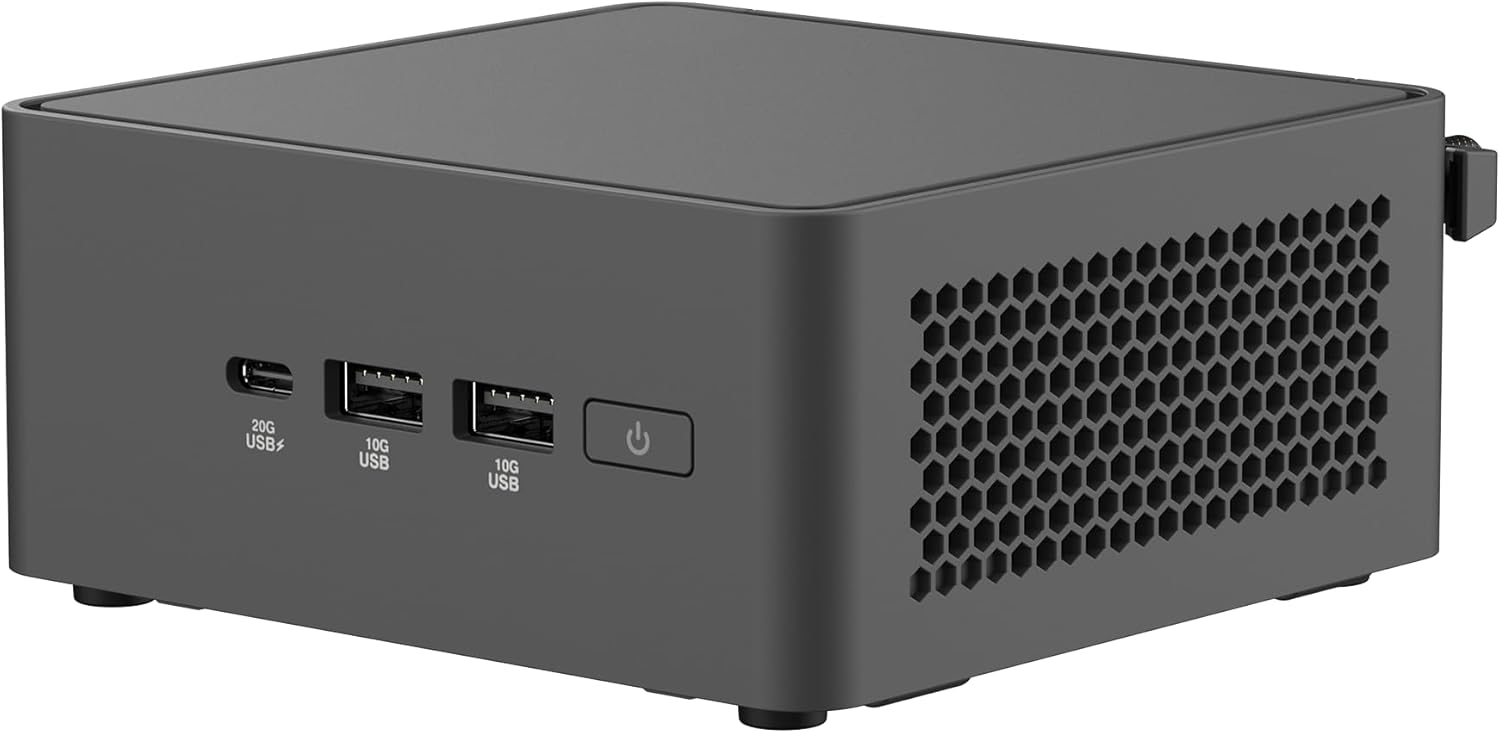
Image: The ASUS NUC 15 Pro Tall Mini PC with its top cover open, illustrating the toolless access for installing or upgrading RAM and storage components.
The chassis features a toolless design, allowing for easy access to internal components for RAM and storage upgrades. This design simplifies maintenance and customization.
4. 설정
Follow these steps for the initial setup of your ASUS NUC 15 Pro Tall Mini PC.
- 짐 풀기: 포장에서 모든 구성 요소를 조심스럽게 제거합니다.
- 장착(선택 사항): If using the included VESA mount, attach it to the rear of a compatible display or a wall mount. Secure the mini PC to the VESA mount. This allows for a clutter-free workspace.

Image: The ASUS NUC 15 Pro Tall Mini PC shown mounted on the back of a display, demonstrating its VESA mounting capability for flexible configuration.
- 주변 장치 연결:
- Connect your monitor(s) to the HDMI 2.1 or Thunderbolt 4 ports. The device supports up to four 4K displays.
- 키보드와 마우스를 사용 가능한 USB 포트에 연결하세요.
- For wired network access, connect an Ethernet cable to the 2.5Gb Ethernet port.
- Connect speakers or headphones to the audio jack on the front panel.
- 전원 연결: Connect the AC power adapter to the DC-In port on the rear panel, then plug the power cord into an electrical outlet.
- 초기 전원 켜기: 전면 패널의 전원 버튼을 눌러 미니 PC를 켭니다.
- 운영 체제 설치: As a barebones unit, an operating system (e.g., Windows) will need to be installed. Follow the operating system's installation instructions.
5. 운영
This section covers basic operation of your mini PC.
5.1 전원 켜기/끄기
Press the power button on the front panel to turn the unit on. To shut down, use the operating system's shutdown procedure. A short press of the power button can also put the system to sleep.
5.2 디스플레이 구성
Utilize the HDMI 2.1 and Thunderbolt 4 ports to connect multiple displays. Refer to your operating system's display settings for configuring multi-monitor setups. The device supports headless emulation and a sync power-off feature for energy efficiency.
5.3 연결성
- 와이파이 7: 고속 인터넷 접속을 위해 무선 네트워크에 연결하세요.
- 블루투스 5.4 : Pair with compatible Bluetooth devices such as keyboards, mice, and audio peripherals.
- USB 포트: Use the various USB ports (USB 3.2 Gen 2x2 Type-C, USB 3.2 Gen2 Type-A, USB 2.0 Type-A) for connecting external devices and data transfer.
- 썬더볼트™ 4: For high-speed data transfer and connecting advanced peripherals.
6. 유지관리
Proper maintenance ensures the longevity and optimal performance of your mini PC.
6.1 Toolless Chassis Access for Upgrades
The mini PC features a toolless 2.0 chassis design for easy upgrades. To access internal components:
- Ensure the device is powered off and disconnected from all power sources.
- Follow the instructions in the detailed hardware guide (typically provided with barebones kits) to open the chassis.
- Install or upgrade DDR5 RAM modules (up to 96GB supported).
- Install or upgrade SSD storage drives (dual storage design).
- 본체를 단단히 닫으십시오.
6.2 냉각 시스템
The advanced cooling system is designed to maintain optimal performance and reliability. Ensure proper ventilation around the unit to prevent overheating. Avoid blocking air vents.
6.3 청소
Use a soft, dry cloth to clean the exterior of the mini PC. Do not use liquid cleaners or aerosols, as they may damage the components.
7. 문제 해결
이 섹션에서는 일반적으로 발생할 수 있는 문제에 대한 해결책을 제공합니다.
7.1 전원 없음
- Verify the power adapter and cord are securely connected to the mini PC and a working electrical outlet.
- 전원 버튼을 확실하게 눌렀는지 확인하세요.
7.2 디스플레이 출력 없음
- Check all display cable connections (HDMI, Thunderbolt).
- 모니터의 전원이 켜져 있고 올바른 입력 소스로 설정되어 있는지 확인하세요.
- 여러 대의 디스플레이를 사용하는 경우, 문제를 파악하기 위해 한 번에 한 대의 디스플레이만 연결해 보세요.
7.3 System Instability or Overheating
- Ensure the mini PC has adequate ventilation and its air vents are not obstructed.
- Update drivers and BIOS to the latest versions from the ASUS support web대지.
- 문제가 지속될 경우 ASUS 지원팀에 문의하십시오. web사이트를 방문하거나 고객 서비스에 문의하세요.
7.4 연결 문제(Wi-Fi/Bluetooth)
- 운영체제 설정에서 Wi-Fi와 블루투스가 활성화되어 있는지 확인하십시오.
- 최신 무선 드라이버가 설치되어 있는지 확인하십시오.
- Verify that your router or Bluetooth device is functioning correctly and within range.
8. 사양
| 특징 | 세부 사항 |
|---|---|
| 모델명 | RNUC15CRHC70000U |
| 프로세서 | Intel Series 2 Core 7 240H (2.5 GHz) |
| 숫양 | 최대 96GB DDR5 |
| 저장 | Dual Storage Design (SSD, PCIE x 4 interface) |
| 그래픽 코프로세서 | 인텔 그래픽(통합) |
| 최대 화면 해상도 | 3840x2160 픽셀(4K) |
| 디스플레이 출력 | 2x HDMI 2.1, 2x Thunderbolt™ 4 (Supports up to 4x 4K displays) |
| 무선 연결 | Wi-Fi 7 (802.11.be), 블루투스 5.4 |
| 이더넷 | 2.5Gb 이더넷 |
| USB 포트(전면) | 1x USB 3.2 Gen 2x2 Type-C, 2x USB 3.2 Gen2 Type-A |
| USB 포트(후면) | 1x USB 3.2 Gen2 Type-A, 1x USB 2.0 Type-A |
| 운영 체제 | Windows (Barebones kit, OS not included) |
| 치수(길이x너비x높이) | 4.61 x 4.41 x 2.13 인치 |
| 품목 무게 | 12.8 온스 |
| 색상 | 검은색 |
9. 보증 및 지원
Your ASUS NUC 15 Pro Tall Barebones Mini PC comes with a standard manufacturer's warranty. Please refer to the warranty card included with your product or visit the official ASUS support web자세한 보증 약관은 해당 사이트에서 확인하세요.
For technical assistance, driver downloads, or further support, please visit the ASUS support website. You can find the latest information and contact options at www.asus.com/support.