
소개
The CAMBOFOTO 84" Phone Tripod (Model S202) is a versatile and portable support system designed for various devices including smartphones, cameras, monitors, and projectors. It features an adjustable height up to 84 inches, a flexible gooseneck for multi-angle adjustments, and a wireless remote control for convenient operation. This manual provides detailed instructions for assembly, operation, maintenance, and troubleshooting to ensure optimal performance and longevity of your tripod.
상자 안에 무엇이 들어있나요?
조립을 진행하기 전에 모든 구성품이 있는지 확인하십시오.
- 1x 삼각대 스탠드
- 1x Gooseneck
- 1x 전화 홀더
- 1x 무선 리모콘
- 1x 운반 가방

설치 지침
Follow these steps to set up your CAMBOFOTO tripod.
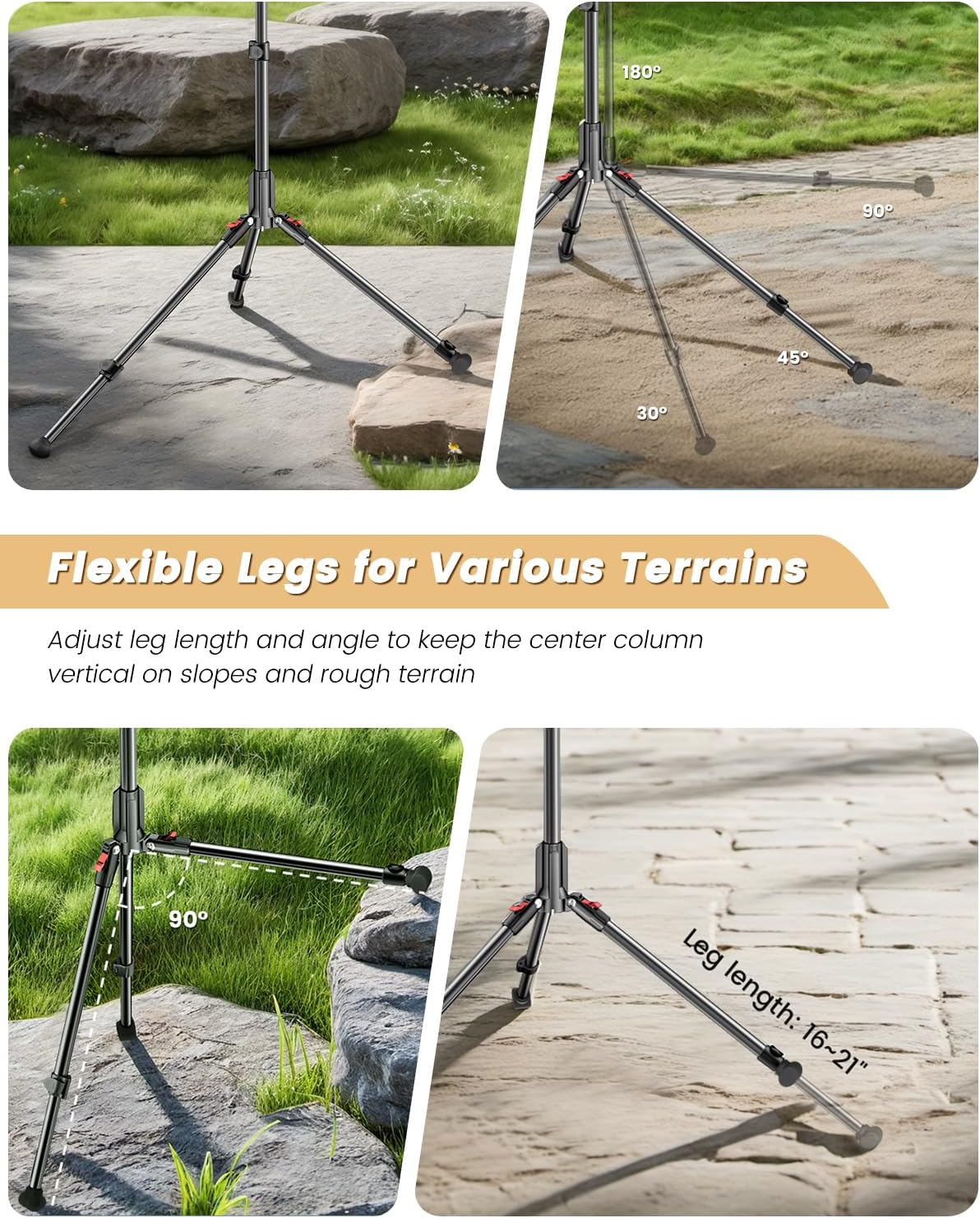
- 삼각대 다리를 펼치세요: Gently spread the tripod legs outwards until they are fully extended and stable. The legs can be adjusted to different angles and lengths for stability on various terrains.
- 중앙 열을 확장하세요: Loosen the locking knobs on the center column and extend it to your desired height. Securely tighten the locking knobs to prevent slippage.
- 구즈넥을 부착하세요: Screw the flexible gooseneck onto the 1/4" standard screw thread at the top of the tripod's center column. Ensure it is tightened securely.
- 휴대폰 홀더 부착: Mount the phone holder onto the ball head at the end of the gooseneck. Adjust the angle of the phone holder as needed and tighten the locking mechanism. The phone holder accommodates devices 2.8-3.6 inches wide.
- 무선 리모컨을 페어링하세요:
- Turn on the wireless remote.
- Enable Bluetooth on your smartphone (iPhone or Android).
- 검색 available devices and select the remote control to pair.
- Once paired, you can use the remote to trigger your phone's camera shutter from up to 30 feet away.

Video: A demonstration of the CAMBOFOTO 84" Phone Tripod Stand, showcasing its assembly and features, including the gooseneck and remote control.
작동 지침
Maximize the functionality of your tripod with these operating guidelines.
- 높이 조절: Loosen the quick-release levers on the telescopic legs and center column to extend or retract the tripod to your desired height (from 17.3 inches to 84 inches). Ensure all levers are securely locked after adjustment.
- 다리 각도 조절하기: The tripod legs feature adjustable angles. Press the leg angle adjustment tabs near the top of each leg to set them at different spreads for enhanced stability or to adapt to sloped surfaces.
- Using the Flexible Gooseneck: The 9.8-inch steel gooseneck can be bent and positioned at any angle (360° multi-angle adjustments) to achieve precise camera framing. Its robust construction maintains positional memory.
- 기기 보안 강화: 휴대폰 거치대 뚜껑을 여세요amp, insert your smartphone, and ensure it is held firmly. The 360° swivel ball head allows for easy rotation between portrait and landscape orientations.
- Enhancing Stability with Counterweight: For added stability, especially in windy conditions or when using heavier devices, utilize the integrated counterweight hook. Attach a weight (e.g., a bag, sandbag) to the hook located at the bottom of the center column. The tripod supports up to 11 lbs, and the counterweight hook can support up to 33 lbs.
- 셀카봉으로 사용하기: When fully collapsed and with the gooseneck and phone holder attached, the tripod can function as a tall selfie stick for self-portraits and group photos.


유지
Proper care ensures the longevity and performance of your tripod.
- 청소: 삼각대는 사용 후 매번 부드럽고 마른 천으로 닦아 먼지와 오염물을 제거하십시오. 잘 지워지지 않는 얼룩은 약간 거친 천으로 닦아내십시오.amp 부드러운 천과 순한 비누로 닦은 후 완전히 말리세요. 강한 화학 약품이나 연마성 세척제는 사용하지 마세요.
- 매끄럽게 하기: Periodically check the moving parts and locking mechanisms. If they become stiff, apply a small amount of silicone-based lubricant.
- 저장: 삼각대는 전용 가방에 넣어 직사광선과 극한 온도 변화를 피해 서늘하고 건조한 곳에 보관하십시오. 보관하기 전에 모든 부품이 깨끗하고 건조한지 확인하십시오.
- 점검: Regularly inspect the tripod for any signs of wear, damage, or loose parts. Tighten any loose screws or connections.
문제 해결
일반적인 문제에 대한 해결책은 이 섹션을 참조하세요.
- 삼각대가 불안정합니다.
- Ensure all leg sections and the center column are fully extended and their locking mechanisms are securely tightened.
- Adjust the leg angles to create a wider base, especially on uneven surfaces.
- Utilize the counterweight hook by attaching a weight to it for increased stability.
- 무선 리모컨이 연결되지 않습니다.
- Ensure the remote control is turned on and has sufficient battery power.
- 스마트폰에서 Bluetooth가 활성화되어 있는지 확인하세요.
- 휴대폰의 블루투스 설정에서 리모컨의 연결을 해제한 후 다시 연결하세요.
- Ensure you are within the 30-foot operating range of the remote.
- Gooseneck does not hold position:
- Ensure the gooseneck is securely screwed into the tripod.
- Check if the device attached to the gooseneck exceeds the recommended weight capacity (11 lbs).
명세서
| 특징 | 세부 사항 |
|---|---|
| 상표 | CAMBOFOTO |
| 모델명 | S202 |
| 재료 | 알루미늄, 플라스틱 |
| 품목 무게 | 1.5 파운드 |
| 중량 제한 | 11 파운드 |
| 최대 높이 | 84 인치 |
| 최소 높이 | 17.3 인치 |
| 접힌 크기 | 17.3 인치 |
| Leg Diameter (Base Spread) | 최대 3.7피트 |
| 구즈넥 길이 | 9.8 인치 |
| Phone Holder Grip Width | 2.8 - 3.6인치 |
| 원격 제어 범위 | 최대 30피트 |
| 호환 장치 | Camera, Monitor, Projectors, Telescope, Compact Camcorder, Smartphones |
보증 및 지원
보증: The CAMBOFOTO 84" Phone Tripod (Model S202) comes with a 1-year after-sales warranty from the date of purchase. This warranty covers manufacturing defects and material flaws under normal use.
지원하다: For any questions, technical assistance, or warranty claims, please contact CAMBOFOTO customer service. Refer to the contact information provided with your product packaging or visit the official CAMBOFOTO web지원 세부 정보 사이트.