
HTC TWS6
HTC 무선 이어버드 TWS6 5.3 사용 설명서
모델: TWS6
소개
Welcome and thank you for choosing the HTC Wireless Earbuds TWS6 5.3. This manual provides detailed instructions to help you set up, operate, and maintain your earbuds for optimal performance. Please read this manual thoroughly before using your device.
패키지 내용
패키지에 모든 품목이 들어 있는지 확인하세요.
- 2 x HTC Earbuds
- 1 x USB-C 충전 케이블
- 1 x 충전 케이스
- 2 Pairs x Rubber Eartips (S/L)
- 1 x Quick Start Guide (physical document)

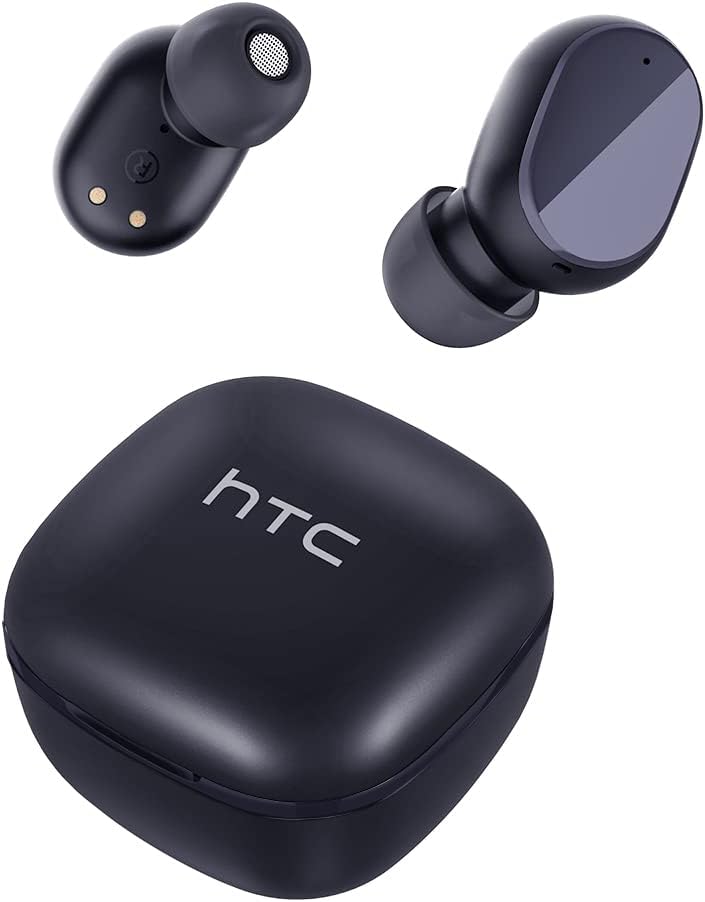
제품 끝view
Familiarize yourself with the components of your HTC TWS6 earbuds.

설정
이어버드 및 케이스 충전하기
처음 사용하기 전에 이어버드와 충전 케이스를 완전히 충전하세요.
- 이어버드를 충전 케이스에 넣으세요.
- USB-C 케이블을 케이스의 충전 포트와 전원에 연결하세요.
- 케이스의 표시등은 충전 상태를 보여줍니다.
- A full charge provides approximately 5 hours of playback for earbuds and up to 22 hours with the charging case.

블루투스 페어링
다음 단계에 따라 이어폰을 기기와 페어링하세요.
- 충전 케이스를 여세요. 이어버드가 자동으로 페어링 모드로 진입합니다.
- 기기(스마트폰, 태블릿 등)에서 Bluetooth를 활성화하세요.
- 검색 사용 가능한 블루투스 장치 목록에 "HTC TWS6"이 표시됩니다.
- Select "HTC TWS6" to connect. A voice prompt will confirm successful pairing.

이어버드 착용하기
For optimal sound quality and comfort, choose the correct eartip size and wear the earbuds properly.
- Select the eartips (S, M, L) that best fit your ears.
- 각 이어버드를 귀의 귀에 조심스럽게 넣으세요.
- Rotate slightly to ensure a secure and comfortable fit.
작동 지침
스마트 터치 컨트롤
The HTC TWS6 earbuds feature intuitive touch controls:
- 음악 재생/일시 중지: 양쪽 이어버드를 한 번 탭하세요.
- 다음 트랙: 오른쪽 이어버드를 두 번 탭하세요.
- 이전 트랙 : 왼쪽 이어버드를 두 번 탭하세요.
- 볼륨 업: 오른쪽 이어버드를 세 번 탭하세요.
- 볼륨 작게 : 왼쪽 이어버드를 세 번 탭합니다.
- 전화 받기/종료: 양쪽 이어버드를 한 번 탭하세요.
- 전화 거부: 양쪽 이어버드를 2초 동안 길게 누릅니다.
- Voice Assistant 활성화 : 양쪽 이어버드를 3초 동안 길게 누릅니다.

전원 켜기/끄기
이어버드는 충전 케이스에서 꺼내면 자동으로 켜지고, 케이스에 다시 넣고 뚜껑을 닫으면 자동으로 꺼집니다.
To manually power on, press and hold the touch area for 3 seconds. To manually power off, press and hold the touch area for 5 seconds.
유지 보수 및 관리
청소
최적의 성능과 위생을 유지하려면 이어버드와 충전 케이스를 정기적으로 청소하세요.
- 부드럽고 마른 보푸라기 없는 천으로 이어폰과 충전 케이스를 닦으세요.
- 이어팁을 제거하고 순한 비누와 물로 세척한 후, 다시 부착하기 전에 완전히 말리세요.
- 연마성 세척제나 용제를 사용하지 마십시오.
방수 기능(IPX5)
The HTC TWS6 earbuds are IPX5 sweatproof, meaning they are resistant to splashes and sweat.
메모: They are not designed for submersion in water. Avoid exposing them to heavy rain, showering, or swimming. Ensure the charging port is dry before charging.

저장
사용하지 않을 때는 이어버드를 충전 케이스에 보관하여 보호하고 충전 상태를 유지하세요.
극한의 온도를 피해 서늘하고 건조한 곳에 보관하세요.
문제 해결
| 문제 | 해결책 |
|---|---|
| 이어폰이 페어링되지 않음 | Ensure earbuds are charged. Turn off and on Bluetooth on your device. Forget "HTC TWS6" from your device's Bluetooth list and re-pair. |
| 하나의 이어폰만 작동 | 이어버드 두 개를 모두 충전 케이스에 넣고 뚜껑을 닫았다가 다시 여세요. 두 이어버드가 모두 충전되었는지 확인하세요. |
| 볼륨이 낮거나 음질이 좋지 않음 | Adjust volume on your device. Clean eartips and earbud mesh. Try different eartip sizes for a better seal. |
| 충전 문제 | Check USB-C cable and power adapter. Ensure charging contacts on earbuds and case are clean and dry. |
| 이어버드가 자주 끊어집니다 | Ensure your device is within the Bluetooth range (approx. 10 meters/33 feet) and there are no significant obstructions. |
문제가 지속될 경우 고객 지원팀에 문의하십시오.
명세서
| 특징 | 세부 사항 |
|---|---|
| 모델명 | TWS6 |
| 블루투스 버전 | 5.3 |
| 연결 기술 | 무선 전화 |
| 무선 통신 기술 | 블루투스 |
| 배터리 수명(이어버드) | 5시간 |
| 총 재생 시간(케이스 포함) | 22시간 |
| 충전 시간(케이스) | 약 5시간 |
| 방수 레벨 | IPX5(방수) |
| 제어 방법 | 만지다 |
| 마이크로폰 | 예 (ENC 포함) |
| 호환 장치 | Android and iOS Smartphones, Gaming Devices |
| 재료 | 플라스틱 |
| 품목 무게 | 3.17 온스 |
| 한국어: | 734257974554 |
| 소음 제어 | 적응형 소음 제거 |
| 오디오 드라이버 유형 | 동적 드라이버 |
| 임피던스 | 199.99옴 |
보증 및 지원
HTC provides a 360-day warranty extension for this product, as detailed in the product information.
For technical assistance, warranty claims, or any inquiries, please contact HTC customer support.
고객 지원: Refer to the contact information provided in your product packaging or visit the official HTC web최신 지원 옵션은 사이트에서 확인하세요.
Ask a question about this manual
Ask about setup, troubleshooting, compatibility, parts, safety, or missing instructions. Manuals+ will review the question and use this page’s manual context to help answer it.