
1. 제품 오버view
The Mcdodo CH-2462 MagQ Qi2 is a versatile 3-in-1 magnetic wireless charging stand designed to efficiently charge your iPhone, AirPods, and Apple Watch simultaneously. It integrates Qi2 technology for optimized performance and features a compact, foldable design for portability and adjustable view각도를 나타냅니다.

Image 1.1: The Mcdodo CH-2462 charging stand with an iPhone, Apple Watch, and AirPods in charging positions.
2. 패키지 내용
패키지에 모든 품목이 들어 있는지 확인하세요.
- Mcdodo MagQ 3-in-1 Wireless Charging Stand (x1)
- USB-C 충전 케이블(x1)
- 사용 설명서(x1)
- 보증서(x1)

Image 2.1: The retail packaging for the Mcdodo CH-2462, illustrating the product and its key features.
3. 설정 지침
- 스탠드를 개봉하세요: Carefully remove the charging stand and all accessories from the packaging.
- 전원 연결: Insert the provided USB-C charging cable into the USB-C port on the back of the charging stand. Connect the other end of the USB-C cable to a compatible power adapter (PD/QC supported, 30W recommended for optimal performance, not included).
- 놓기: Place the charging stand on a stable, flat surface away from direct sunlight or heat sources.
- 전원 켜기: Once connected to a power source, the stand is ready for use. There is no separate power button.

Image 3.1: The Mcdodo CH-2462 stand set up on a desk, charging an iPhone, Apple Watch, and AirPods.
4. 사용 설명서
4.1 iPhone 충전하기
- Ensure your iPhone is compatible with MagSafe/Qi2 wireless charging (iPhone 12 and later models).
- 아이폰을 자석 충전 패드 위에 올려놓으세요. 자석이 자동으로 기기를 최적의 상태로 정렬하여 충전해 줍니다.
- A charging indicator will appear on your iPhone screen, confirming that charging has begun.
4.2 AirPods 충전하기
- Place your AirPods charging case (compatible with wireless charging) onto the designated flat charging area at the base of the stand.
- The charging indicator on your AirPods case will illuminate, indicating that charging is active.
4.3 Apple Watch 충전하기
- Place your Apple Watch onto the dedicated charging puck located on the stand.
- Ensure the watch is properly seated on the puck. The watch display will show a charging icon.
4.4 조정 가능 View잉 앵글
The stand features an adjustable design for comfortable viewing:
- 기울기 조정: The iPhone charging pad can be tilted up to 30 degrees for an optimal view잉 각도.
- 회전: The iPhone can be rotated 360 degrees while on the magnetic pad, allowing for both portrait and landscape orientations.
- 접이식 디자인 : The entire stand can be folded for compact storage and easy transport.
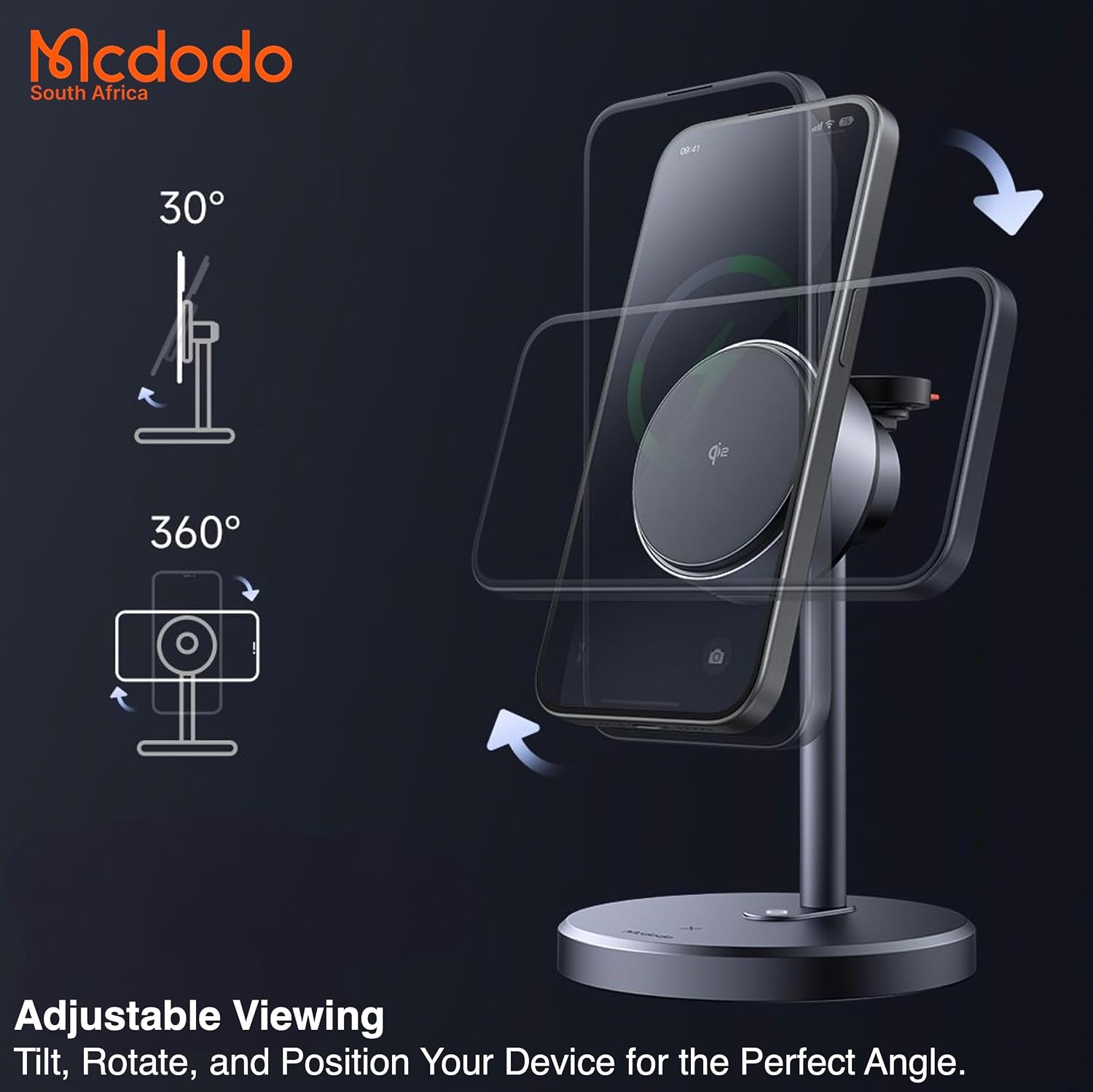
Image 4.1: Diagram illustrating the 30-degree tilt and 360-degree rotation features of the charging stand.
5. 유지관리
- 청소: Disconnect the power before cleaning. Use a soft, dry cloth to wipe the surface of the charging stand. Do not use abrasive cleaners, solvents, or immerse the device in water.
- 저장: When not in use, especially during travel, fold the stand to its compact form. Store it in a cool, dry place.
- 장애물을 피하십시오: Ensure no foreign objects are placed between your devices and the charging surfaces, as this can hinder charging efficiency and potentially cause overheating.
6. 문제 해결
- 장치가 충전되지 않음:
- Ensure the charging stand is properly connected to a working power outlet and a compatible power adapter.
- 충전 패드에 기기가 올바르게 놓여 있는지 확인하십시오. 아이폰의 경우, MagSafe가 제대로 정렬되었는지 확인하십시오.
- Check if your device is wireless charging compatible.
- Remove any thick phone cases or metallic objects that might interfere with wireless charging.
- 느린 충전:
- Ensure you are using a Power Delivery (PD) or Quick Charge (QC) compatible power adapter with sufficient wattage (30W recommended). Lower wattag전자 어댑터를 사용하면 충전 속도가 느려질 수 있습니다.
- 기기가 빠른 무선 충전을 지원하는지 확인하세요.
- 과열:
- Some heat generation during wireless charging is normal. If the device or charger becomes excessively hot, remove the device immediately.
- Ensure there is adequate ventilation around the stand and no foreign objects are present.
- 과열 현상이 지속될 경우 사용을 중단하고 고객 지원팀에 문의하십시오.
7. 사양
| 특징 | 사양 |
|---|---|
| 모델 번호 | CH-2462 |
| 총 출력 | 맥스 맥스 맥스 |
| iPhone Charging Output | 15W / 10W / 7.5W / 5W |
| AirPods Charging Output | 5W |
| Apple Watch Charging Output | 2.5와트 |
| 입력 | USB-C (PD/QC Supported) |
| 입력 Voltage | 15V(교류) |
| 출력 전류 | 10A |
| 전원 어댑터 와트tage (추천) | 30와트 |
| 인증 | Qi2, CE, FCC |
| 호환성 | iPhone 12 and later, Qi-supported earbuds, Apple Watch models |
| 재료 | PC / Aluminum Alloy / Silicone |
| 제품 무게 | 10그램 |

Image 7.1: A document confirming Qi2 certification for the Mcdodo CH-2462 charging stand.
8. 보증 및 지원
8.1 보증 정보
This Mcdodo CH-2462 charging stand is covered by a Distributor Warranty. Please refer to the included Warranty Card for specific terms, conditions, and duration of the warranty period. Keep your proof of purchase for warranty claims.
8.2 고객 지원
For technical assistance, troubleshooting not covered in this manual, or warranty inquiries, please contact your local distributor or the retailer from whom you purchased the product. Contact information can typically be found on the product packaging or the retailer's web대지.