
osee GoStream Deck Kit
Osee GoStream 데크 키트 사용 설명서
Model: GoStream Deck Kit
Brand: osee
1. 제품 오버view
The Osee GoStream Deck Kit is an all-in-one professional video switcher and audio mixer designed for multiple live streaming applications. It features 4 HDMI inputs, 2 HDMI outputs, and USB-C I/O, all integrated with a built-in 14-inch monitor. This comprehensive kit provides a streamlined solution for live video production.
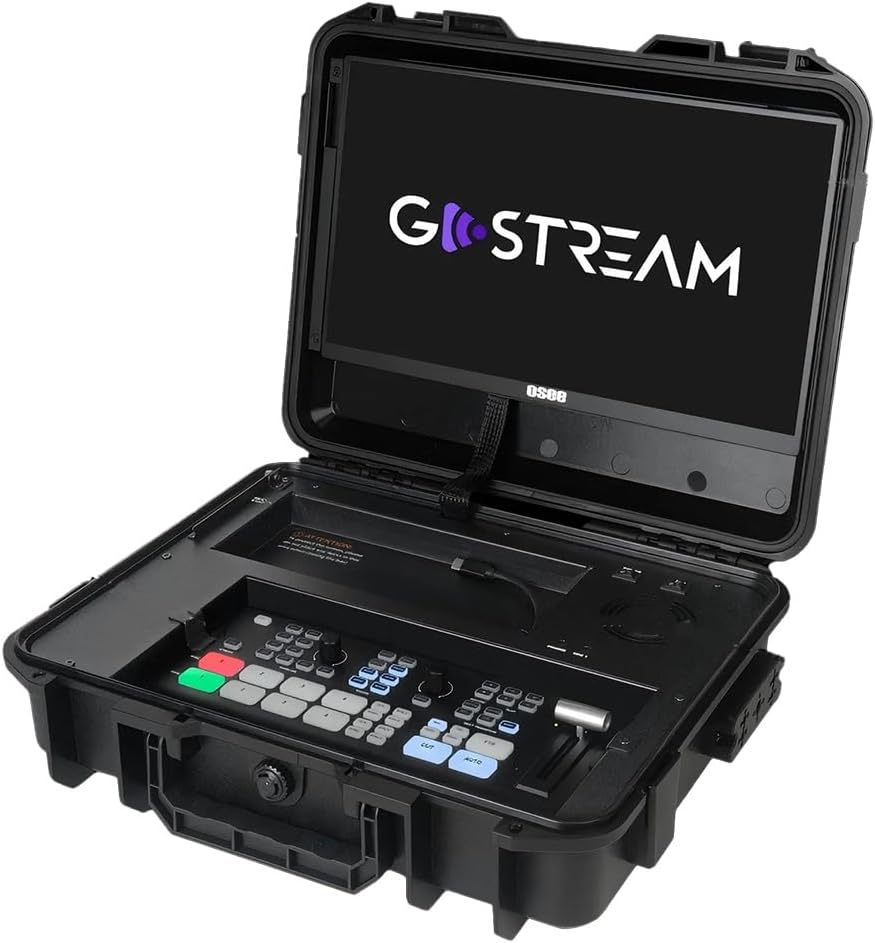
Figure 1.1: The GoStream Deck Kit with its integrated 14-inch monitor and control surface.
주요 특징:
- 올인원 패키지: Includes GoStream Deck switcher, 14'' 1080*1920 screen, silent fan, and 3 Cheese Plates with 1/4'' & 3/8'' Thread.
- Rich Connection Ports: 4 HDMI inputs, 2 HDMI outputs, and 2 USB ports for flexible monitoring and streaming.
- 통합 제어판: Built-in operation menu eliminates the need for a separate computer.
- High-efficiency Macro Buttons: Up to 8 Macros, import/exportable via SD card for improved workflow.
- Unparalleled Super Source Feature: Advanced composition capabilities for enhanced live streaming.
- 오디오 믹서 : 2 Channel Analog Audio Inputs, 4 Channel HDMI Embedded Audio Inputs, 1 Channel AUX Embedded Audio Input, 1 Channel PGM Audio Monitoring with selectable On/Off/Audio-Follow-Video and gain control.
2. 설정 및 연결
This section details the initial setup and various connectivity options for your GoStream Deck Kit.
2.1 물리적 설정
Unpack all components from the GoStream Deck Kit. Ensure the 14-inch monitor is securely positioned. The silent fan is integrated for optimal performance during operation.

Figure 2.1: Components of the Mobile Live Studio All-in-One Kit.
2.2 입력/출력 연결
The GoStream Deck Kit offers a variety of ports for connecting cameras, monitors, and other devices.

Figure 2.2: Rear panel with all available input and output ports.
- HDMI 입력(IN 1-4): Connect your cameras or other HDMI video sources here.
- HDMI 출력(OUT 1-2): Use these for program output to external monitors or recorders. One output can be configured for multiview monitoring, while the other provides the program feed.
- USB Ports (USB 1-2): USB 1 is typically used for connecting to a computer for software control and streaming. USB 2 can accommodate a USB-C webcam for an additional input or other USB devices.
- Audio Inputs (MIC 1, MIC 2, AUX): Connect external microphones or audio mixers. The device also supports embedded audio from HDMI inputs.
- 이더넷: For network connectivity, including NDI sources if supported by the firmware.
- Power (DC IN): 제공된 전원 어댑터를 연결하세요.
2.3 Expandable Cheese Plates
The kit includes 3 cheese plates with 1/4'' & 3/8'' threads, allowing for versatile mounting of accessories like cameras, lights, or additional monitors.

Figure 2.3: GoStream Deck Kit with expandable cheese plates for accessory mounting.
3. 사용 설명서
Learn how to effectively operate your GoStream Deck Kit for live video production.
3.1 제어판 레이아웃
The integrated control panel provides intuitive access to all key functions.

그림 3.1: 상세 view of the GoStream Deck control panel.
3.2 Switching and Transitions
Use the program and preview buttons to switch between video sources. The device supports various transition effects.
Video 3.1: Demonstrates the Osee GoStream Deck's switching and transition capabilities, including HDMI inputs, USB connectivity, and audio mixing. (Source: V-feast)
- Program (PGM) Buttons: Select the live output source.
- 사전view (PVW) Buttons: Select the next source to go live.
- Transition Buttons (MIX, WIPE, DIP): Apply different visual effects between program and preview.
- T바: Manually control the speed and progression of transitions.
- 자동 버튼: Automatically execute the selected transition.
3.3 오디오 믹싱
Control audio levels for each input source using the dedicated audio mixer section.
- 입력 레벨 조절 노브: Adjust the volume for each microphone and HDMI input.
- Audio-Follow-Video (AFV): Enable or disable AFV per channel to automatically switch audio with video.
- 헤드폰 잭: Monitor the master audio output.
3.4 녹음 및 재생
Record your live stream directly to an SD card inserted into the dedicated slot. You can also load graphics and videos for playback during your stream.
- 녹음 버튼: Start and stop recording the program output.
- SD 카드 슬롯: Insert an SD card for recording and media playback.
- 재생 컨트롤: Manage loaded video clips and graphics.
4. 고급 기능
4.1 Super Source
The Super Source feature allows for advanced multi-layer compositions, enabling you to combine multiple video sources into a single output with customizable layouts.
4.2 Macro Buttons
Program up to 8 macros to automate complex sequences of actions, greatly improving efficiency for live streaming and video production. Macro files can be imported from or exported to an SD card for sharing.
4.3 Multi-Platform Streaming
The GoStream Deck Kit supports direct streaming to multiple platforms simultaneously via its built-in software and Ethernet port. This includes popular services like YouTube, Twitch, and Facebook.
4.4 이식성
The compact design of the GoStream Deck Kit ensures ultimate portability and durability, making mobile live streaming accessible anywhere.

Figure 4.1: The GoStream Deck Kit is designed for easy transport.
5. 유지관리
Regular maintenance ensures the longevity and optimal performance of your GoStream Deck Kit.
- 청소: Use a soft, dry cloth to clean the exterior surfaces. For the screen, use a screen-specific cleaning solution and microfiber cloth. Avoid abrasive cleaners or solvents.
- 통풍: Ensure the silent fan and ventilation openings are clear of dust and obstructions to prevent overheating.
- 펌웨어 업데이트: Periodically check the osee official website for firmware updates. Updates can improve performance, add new features, and resolve bugs. Follow the provided instructions carefully when updating firmware.
- 저장: When not in use, store the kit in a cool, dry place, preferably in its original case, to protect it from dust and physical damage.
6. 문제 해결
이 섹션에서는 일반적으로 발생할 수 있는 문제에 대한 해결책을 제공합니다.
- 비디오 출력 없음:
- HDMI 케이블 연결 상태를 모두 확인하십시오.
- Ensure the correct input source is selected on the GoStream Deck.
- Verify that the external monitor is powered on and set to the correct input.
- Confirm that the camera or video source is outputting a compatible signal.
- 오디오 없음:
- 마이크 연결 상태를 확인하고 (필요한 경우) 전원이 공급되는지 확인하십시오.
- Verify audio levels on the GoStream Deck's audio mixer.
- Ensure Audio-Follow-Video (AFV) is correctly configured for embedded audio.
- Check audio output settings on your streaming software or recording device.
- 스트리밍 문제:
- 인터넷 연결 안정성을 확인하십시오.
- Check streaming platform settings (stream key, server URL).
- Ensure sufficient upload bandwidth.
- Reduce video quality settings if experiencing buffering or dropped frames.
- 장치가 응답하지 않음:
- Perform a power cycle (turn off, unplug, wait 30 seconds, plug back in, turn on).
- If connected to a computer, try restarting the computer and the GoStream Deck.
7. 사양
| 특징 | 세부 사항 |
|---|---|
| 패키지 크기 | 14 x 11 x 5 인치 |
| 품목 무게 | 11파운드 |
| 커넥터 유형 | HDMI |
| 상표 | osee |
| 호환 장치 | Laptop, Television, Digital Camera |
| 케이블 유형 | HDMI |
| 포트 수 | 6 |
| 제조업체 | osee |
| 원산지 | 중국 |
| 첫 번째 이용 가능 날짜 | 7년 2025월 XNUMX일 |
8. 보증 및 지원
For warranty information and technical support, please refer to the official osee web사이트를 방문하거나 고객 서비스에 직접 문의하세요. 보증 청구에 대비해 구매 증빙 자료로 구매 영수증을 보관하세요.
온라인 리소스:
- 방문하세요 osee Store on Amazon 제품 정보 및 업데이트를 확인하세요.
Ask a question about this manual
Ask about setup, troubleshooting, compatibility, parts, safety, or missing instructions. Manuals+ will review the question and use this page’s manual context to help answer it.