
PGST PGST107F-US-A
PGST 가정용 보안 시스템 사용자 설명서
Model: PGST107F-US-A
1. 서론
The PGST Home Security System is a comprehensive, DIY wireless WIFI/4G burglar alarm system designed to provide real-time alerts and enhance the security of your home or business. This system offers advanced features such as instant notifications, customizable protection zones, and compatibility with smart home platforms like Alexa and Google Assistant, all without recurring monthly fees.
It is highly customizable and expandable, allowing you to add various sensors and devices to meet your evolving security needs. The system is designed for easy installation and user-friendly operation, making it accessible for all users.

Image: The PGST Home Security System offers no subscription fees, providing a cost-effective security solution.
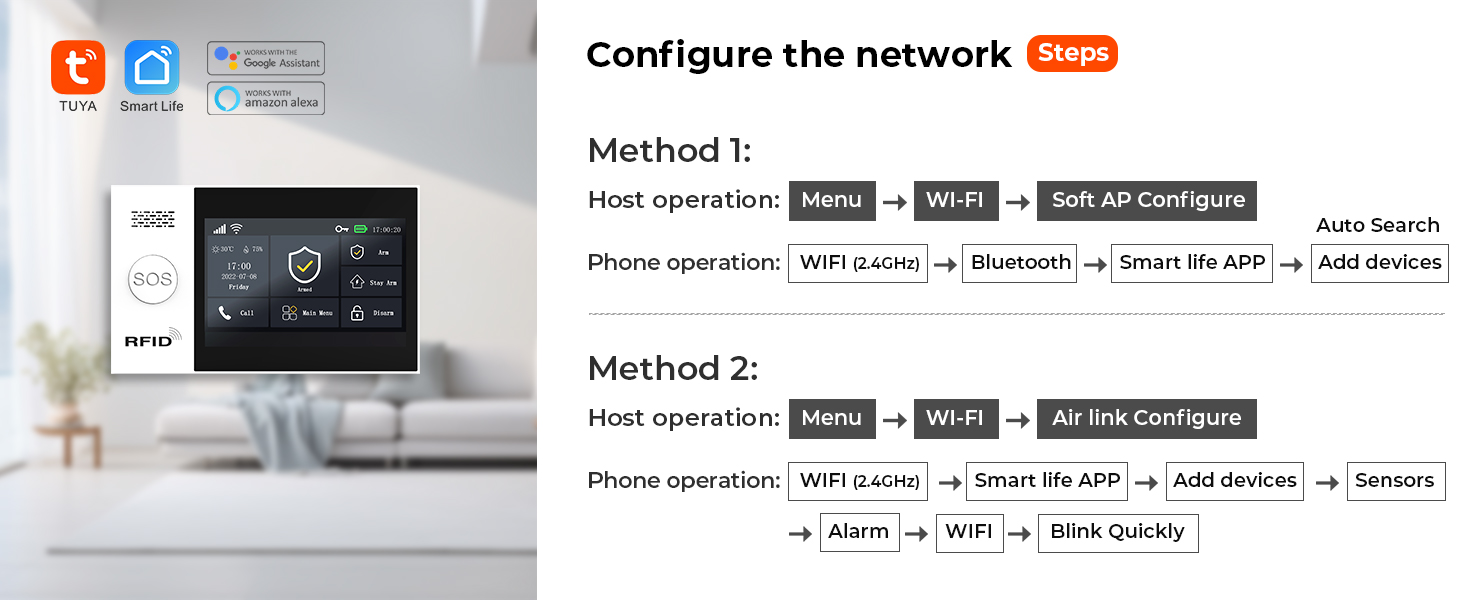
Image: The system is versatile and can be used in various environments, including homes, offices, warehouses, and supermarkets.
2. 구성 요소
Your 8-Piece PGST Home Security System kit includes the following components:
- 1 x PGST107F Alarm Host (Main Control Panel)
- Door/Window Sensors (Multiple, quantity depends on kit)
- PIR Motion Detectors (Multiple, quantity depends on kit)
- Remote Controls (Key fobs)
- 무선 주파수 식별(RFID) Tags
- 전원 어댑터
- 장착 하드웨어

이미지: 이상view of the PGST 8-Piece Home Security System components, including the main panel, motion sensor, door sensor, remote controls, and RFID tags.

이미지: 자세한 view of the door/window sensor, which uses magnetic field technology to detect opening and closing.

Image: A PIR motion detector, designed to detect intruder movement within its wide-angle detection range.
3. 설정 및 설치
The PGST Home Security System is designed for easy DIY installation. Follow these steps to set up your system:
3.1 메인 제어판 설치
- Choose a central location for the alarm host, preferably near a power outlet and within Wi-Fi range.
- Mount the host securely to a wall using the provided screws or place it on a flat surface.
- Connect the power adapter to the host and plug it into a power outlet.
- The 4.3-inch TFT colorful display screen will light up.

Image: The 4.3-inch TFT colorful display screen of the main control panel, which provides multi-function capabilities including APP notification and voice intercom.
3.2 센서 설치
Install door/window sensors and motion detectors in key areas of your home:
- 문/창 센서: Attach the two parts of the sensor to a door/window frame and the door/window itself, ensuring they are aligned and close to each other when the door/window is closed.
- PIR 동작 감지기: Mount motion detectors in corners or areas with high traffic, ensuring they have a clear line of sight to detect movement. The detection angle is approximately 110 degrees.

Image: The system supports voice control via Alexa and Google Assistant, allowing for convenient arming and disarming.
3.3 네트워크 구성
Connect your alarm host to your home network using the Smart Life or Tuya APP:
Method 1: Soft AP Configure
- On the host: Go to 메뉴 → 와이파이 → 소프트 AP 구성.
- On your phone: Open the Smart Life APP, go to 와이파이(2.4GHz) → 블루투스 → 스마트 라이프 APP → 장치 추가.
Method 2: Airlink Configure
- On the host: Go to 메뉴 → 와이파이 → 에어링크 구성.
- On your phone: Open the Smart Life APP, go to 와이파이(2.4GHz) → 스마트 라이프 APP → 장치 추가 → 센서 → 경보 → 와이파이 → 빠르게 깜박임.

Image: The system supports voice control via Alexa and Google Assistant for convenient arming and disarming.

Image: The system allows you to preset up to five family numbers to ensure no alert is missed, enhancing home safety.
4. 시스템 운영
The PGST Home Security System offers multiple ways to control and monitor your home security.
4.1 무장 및 무장해제
- Via Smart Life/Tuya APP: You can arm or disarm the system anytime, anywhere, directly from your smartphone.
- 제어판을 통해: Use the touch screen interface on the alarm host to arm, disarm, or set to stay arm mode.
- 원격 제어를 통해: Use the included key fobs for quick arming and disarming.
- 음성 제어: Integrate with Alexa or Google Assistant to arm or disarm using voice commands (e.g., "Alexa, Disarm my home!").

Image: The system allows for scheduled arming and disarming via the app, saving time and effort for daily routines.
4.2 Real-Time Alerts and Notifications
The system provides instant alerts to your smartphone when motion is detected or sensors are triggered.
- 앱 푸시 알림: Receive immediate alerts directly to your Smart Life/Tuya APP.
- Preset Alarm Calls: The system can dial up to 5 preset numbers in case of an alarm, ensuring no critical information is missed.
- SMS 알림: If a SIM card is installed (optional), the system can send text messages for alerts.

Image: The system can dial up to 5 preset numbers sequentially if a busy line is encountered, ensuring alarm information is not missed.

Image: When an entry attempt is detected by a door sensor or PIR detector, the system pushes alerts to your phone via the app and can initiate calls.
4.3 SOS 기능
The system includes an SOS button on the main panel and remote controls for emergency situations. Pressing the SOS button will trigger an immediate alarm and notify preset contacts.

Image: The SOS button provides an easy way for elderly individuals or children to send an emergency alert if unexpected events occur.
4.4 Anti-Demolition Alarm
The alarm host features an anti-demolition function. If the host is detached from its mounting position, it will trigger an alarm and send a call or text message to the host.

Image: The anti-demolition feature ensures that if the alarm host is tampered with or removed, an immediate alert is sent.
4.5 Voice Intercom (with linked cameras)
If compatible cameras are linked to your system, you can use the voice intercom feature via the app to communicate and deter intruders.
Video: This video demonstrates the voice intercom feature, showing how linked cameras can be used to scare away potential intruders by allowing two-way audio communication through the app.
5. 유지관리
Regular maintenance ensures the optimal performance of your PGST Home Security System.
- 배터리 점검: Monitor the battery levels of your wireless sensors. The system will notify you via the app when a sensor's battery is low.
- 청소: Periodically clean the alarm host and sensors with a soft, dry cloth. Avoid using abrasive cleaners or solvents.
- 소프트웨어 업데이트: Ensure your Smart Life/Tuya APP and alarm host firmware are up to date for the latest features and security enhancements.

Image: The system provides alerts for low battery levels in wireless sensors, pushing notifications to your app for timely replacement.
6. 문제 해결
If you encounter issues with your PGST Home Security System, refer to the following common troubleshooting steps:
- No Connection to Wi-Fi:
- Wi-Fi 네트워크가 2.4GHz 대역인지 확인하십시오. 본 시스템은 5GHz 네트워크를 지원하지 않습니다.
- 정확한지 Wi-Fi 비밀번호를 확인하세요.
- Move the alarm host closer to your Wi-Fi router.
- Restart your router and the alarm host.
- 센서가 경보를 울리지 않음:
- Verify that the sensors are properly paired with the alarm host. Refer to the pairing instructions in the app.
- Check sensor battery levels.
- Ensure door/window sensors are correctly aligned when closed.
- For motion detectors, ensure no obstructions are blocking the detection area.
- 앱 알림 없음:
- Check your phone's notification settings for the Smart Life/Tuya APP to ensure notifications are enabled.
- Verify that the alarm host is connected to the internet.
- Ensure the app is running in the background or has necessary permissions.
- 허위 경보:
- Adjust the sensitivity settings of motion detectors if available in the app.
- Ensure motion detectors are not placed near heat sources, direct sunlight, or areas with drafts that could cause false triggers.
- Check for loose or improperly installed sensors.
For persistent issues, please contact PGST customer support.
7. 사양
| 특징 | 세부 사항 |
|---|---|
| 상표 | PGST |
| 모델 번호 | PGST107F-US-A |
| 색상 | 하얀색 |
| 전원 | 코드식 전기 |
| 호환 장치 | Smartphone, Tablet (Smart Life/Tuya APP), Alexa, Google Assistant |
| 연결 기술 | Wireless (WIFI/4G) |
| 설치 유형 | 나사로 고정 |
| 경고 유형 | Audio & Motion, APP Push, Call, SMS |
| 제어 방법 | 앱, 원격, 음성 |
| 품목 치수(L x W x H) | 8.6 x 5.9 x 3.9 인치 |
| 품목 무게 | 1.2파운드 |
| 디스플레이 화면 | 4.3-inch TFT Colorful Display |
| 지원 언어 | 10 languages (Chinese, English, German, Russian, Spanish, Polish, Italian, French, Portuguese, Greek) |

Image: The system supports 10 languages for menu display, voice operation prompts, and alarm SMS settings, offering flexibility for users.
8. 보증 및 지원
PGST offers a 1년 보증 for the PGST Home Security System. This warranty covers manufacturing defects and ensures your product functions as intended under normal use.
If you have any questions, require technical assistance, or need to claim warranty service, please contact PGST customer support through the following channels:
- 제품 포장에 제공된 연락처 정보를 참조하세요.
- Visit the official PGST store on Amazon: PGST Store
- Contact the seller directly via your Amazon order history.
Please have your product model number (PGST107F-US-A) and purchase details ready when contacting support.
Ask a question about this manual
Ask about setup, troubleshooting, compatibility, parts, safety, or missing instructions. Manuals+ will review the question and use this page’s manual context to help answer it.