
소개
Thank you for choosing the CHUWI Wireless Mouse S1. This 2.4GHz USB computer mouse is designed for comfort and efficiency, featuring a 1600 DPI optical sensor with 3-level adjustable DPI settings, long battery life, and broad compatibility with various devices. This manual provides essential information for setting up, operating, maintaining, and troubleshooting your new wireless mouse.
패키지 내용
패키지에 모든 품목이 들어 있는지 확인하세요.
- CHUWI Wireless Mouse
- USB 수신기
- 사용자 문서
- AA 배터리 1개(사전 설치 또는 별도 포함)
설치 가이드
Follow these steps to set up your CHUWI Wireless Mouse S1:
- USB 수신기를 찾으세요: Gently remove the bottom cover of the mouse by sliding it downward. The USB receiver and the battery compartment are located inside.
- 배터리 설치: Insert the provided AA battery into the battery compartment, ensuring correct polarity.
- USB 수신기를 꺼내세요: Take out the small USB receiver from its storage slot.
- 장치에 연결: USB 수신기를 컴퓨터, 노트북 또는 태블릿의 사용 가능한 USB 포트에 꽂으세요.
- 덮개를 닫으십시오: Replace the bottom cover of the mouse.
- 전원 켜기: Slide the power switch at the bottom of the mouse to the "on" position. The mouse should now be ready for use.

Figure 1: Locating the USB receiver and installing the AA battery.
작동 지침
마우스 연결
The CHUWI Wireless Mouse S1 uses 2.4G wireless technology for a stable connection up to 33 feet (10 meters). Once the USB receiver is plugged into your device and the mouse is powered on, it will automatically establish a connection. No complex pairing is required.

Figure 2: Establishing a 2.4G wireless connection.
DPI 조정
The mouse features three adjustable DPI (Dots Per Inch) settings: 800, 1200, and 1600. To switch between DPI levels, simply press the DPI button located below the scroll wheel. Each press cycles through the available settings, allowing you to adjust cursor sensitivity for different tasks such as general browsing, office work, graphic design, or gaming.

Figure 3: Adjusting DPI settings with the dedicated button.
탐색 버튼
The mouse is equipped with convenient forward and back buttons on the side. These buttons allow for quick navigation through web pages, documents, and folders, enhancing your workflow efficiency.
무음 클릭 기능
The CHUWI Wireless Mouse S1 is designed with silent click buttons, making it suitable for quiet environments such as libraries, offices, or late-night use. This feature minimizes click noise without compromising tactile feedback.

Figure 4: The silent click feature for quiet operation.
인체공학적 디자인
The mouse features an ergonomic design that conforms to the natural curve of your hand, providing a comfortable grip for extended use. Its compact and lightweight build, along with rubber-coated side grips, helps reduce hand fatigue. The design is ambidextrous, accommodating both left-handed and right-handed users.

그림 5: 편안한 사용을 위한 인체공학적 디자인.
배터리 정보
The CHUWI Wireless Mouse S1 is powered by a single AA battery, offering an approximate battery life of 12-15 months. The mouse is designed for convenience with no on/off switch; simply pick it up and start using it. This design eliminates the need for frequent charging, providing hassle-free use for mobile work and daily tasks.
유지
To ensure optimal performance and longevity of your CHUWI Wireless Mouse S1:
- 청소: 부드럽고 마른 천을 사용하여 마우스 표면을 닦으세요. 잘 지워지지 않는 오염의 경우, 살짝 damp천에 물이나 순한 세척액을 묻혀 닦아주세요. 강한 화학 물질이나 연마재는 사용하지 마세요.
- 센서 유지 보수: Periodically clean the optical sensor area at the bottom of the mouse with a cotton swab to prevent dust buildup, which can affect tracking performance.
- 저장: When not in use for extended periods, consider removing the AA battery to prevent potential leakage. Store the USB receiver in its designated slot within the mouse to prevent loss.
- 환경 보호: The mouse features a splash-proof and dust-proof design, contributing to its durability. However, avoid exposing it to excessive moisture or dust.
문제 해결
If you encounter issues with your CHUWI Wireless Mouse S1, refer to the following common solutions:
- 마우스가 응답하지 않음:
- AA 배터리가 올바르게 장착되었는지, 그리고 충전량이 충분한지 확인하십시오. 필요한 경우 배터리를 교체하십시오.
- USB 수신기가 컴퓨터의 정상 작동하는 USB 포트에 제대로 꽂혀 있는지 확인하세요. 다른 USB 포트에 연결해 보세요.
- Make sure the mouse's power switch (if present, though this model is designed to be always on when battery is inserted) is in the 'on' position.
- 컴퓨터를 다시 시작하세요.
- 불규칙한 커서 움직임:
- 마우스 바닥의 광학 센서를 청소하세요.
- 마우스를 사용할 때는 적절한 표면을 사용하십시오. 반사율이 높거나 투명한 표면은 트래킹에 영향을 줄 수 있습니다. 마우스 패드를 사용하는 것이 좋습니다.
- Check for interference from other wireless devices. Move the mouse closer to the USB receiver.
- 연결 문제:
- If the connection is unstable, try plugging the USB receiver into a different USB port, preferably one closer to the mouse.
- Ensure there are no large metal objects between the mouse and the receiver that could block the signal.
- 버튼이 작동하지 않음:
- Check if the mouse is properly connected and powered on.
- 다른 컴퓨터에서 마우스를 테스트하여 문제가 마우스에 있는지, 아니면 컴퓨터 설정에 있는지 확인하세요.
명세서
Detailed specifications for the CHUWI Wireless Mouse S1:
| 제품 치수 | 3.89 x 2.36 x 0.04 인치 |
| 품목 무게 | 1.76 온스 |
| 품목 모델 번호 | CHUWI Wireless Mouse S1 |
| 배터리 | AA 배터리 1개 (포함) |
| 연결 기술 | 2.4G 무선(USB 수신기) |
| 움직임 감지 기술 | 광학 |
| DPI 설정 | 800, 1200, 1600 (조절 가능) |
| 버튼 | 4 (Left, Right, Scroll Wheel/Middle, DPI, Forward, Back) |
| 색상 | 검은색 |
| 호환성 | PC, Mac, Laptop, Windows Tablets (Universal USB interface) |
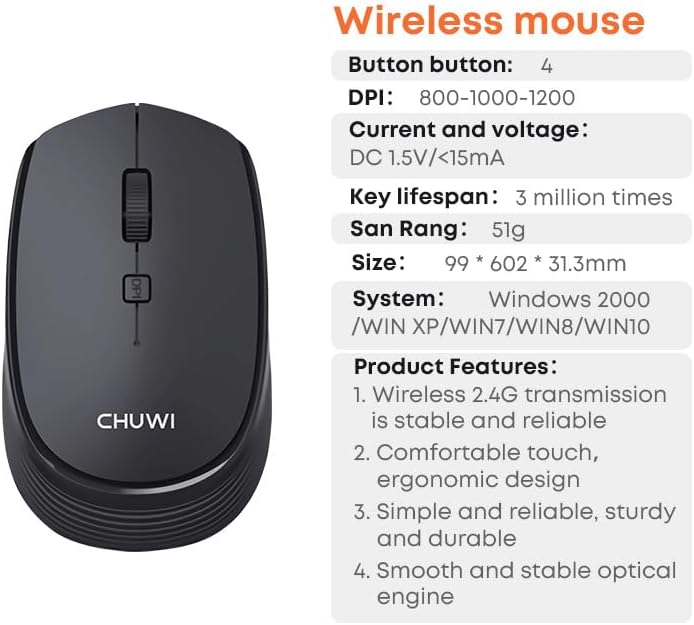
Figure 6: CHUWI Wireless Mouse S1 and its key specifications.
보증 및 지원
CHUWI is committed to providing high-quality products and excellent customer service. While specific warranty details for this mouse are not provided, CHUWI generally offers professional support for its products.
- 전문가 지원: CHUWI offers lifetime factory professional support.
- 온라인 지원: 24 hours of online support is available to assist with any issues or questions you may have.
For further assistance, please visit the official CHUWI web사이트를 방문하거나 고객 서비스에 직접 문의하세요.