
1. 서론
구매해주셔서 감사합니다asing the SMSL PL200T MQA-CD Transport. This high-fidelity audio device is designed to provide exceptional sound quality and versatile connectivity for your home audio system. The PL200T features MQA-CD decoding, a self-developed P.A.S.S. Servo System for precise CD reading, and multiple input/output options including USB, Optical, Coaxial, AES/EBU, and I2S. This manual provides essential information for setting up, operating, and maintaining your device.
2. 안전 정보
기기를 사용하기 전에 모든 안전 지침을 읽고 숙지하십시오. 나중에 참조할 수 있도록 이 설명서를 보관하십시오.
- 기기를 비, 습기 또는 극한의 온도에 노출시키지 마세요.
- 과열을 방지하려면 장치 주변에 적절한 환기가 이루어지도록 하십시오.
- Use only the specified power supply (AC 100-240V) or compatible USB/DC power sources.
- c를 열지 마세요asing; 내부에는 사용자가 수리할 수 있는 부품이 없습니다. 모든 수리는 자격을 갖춘 전문가에게 맡기십시오.
- 어린이의 손이 닿지 않는 곳에 보관하세요.
3. 패키지 내용
패키지에 모든 품목이 들어 있는지 확인하세요.
- 1x SMSL PL200T MQA-CD Transport
- 1x 원격 제어
- 1x USB 케이블
- 1x AC 전원 케이블
- 1x 사용자 설명서
4. 제품 오버view
The SMSL PL200T features a sleek design with a CNC machined aluminum chassis and a tempered glass IPS display. The transparent acrylic CD lid provides dust protection while allowing visibility of the disc.

그림 4.1: 전면 view of the SMSL PL200T CD Transport and its remote control. The unit features a transparent CD lid, a large display, and tactile buttons.

Figure 4.2: Rear panel of the SMSL PL200T, highlighting the various output ports including I2S, AES/EBU, Coaxial, Optical, Clock Input, USB Input, and AC power input.
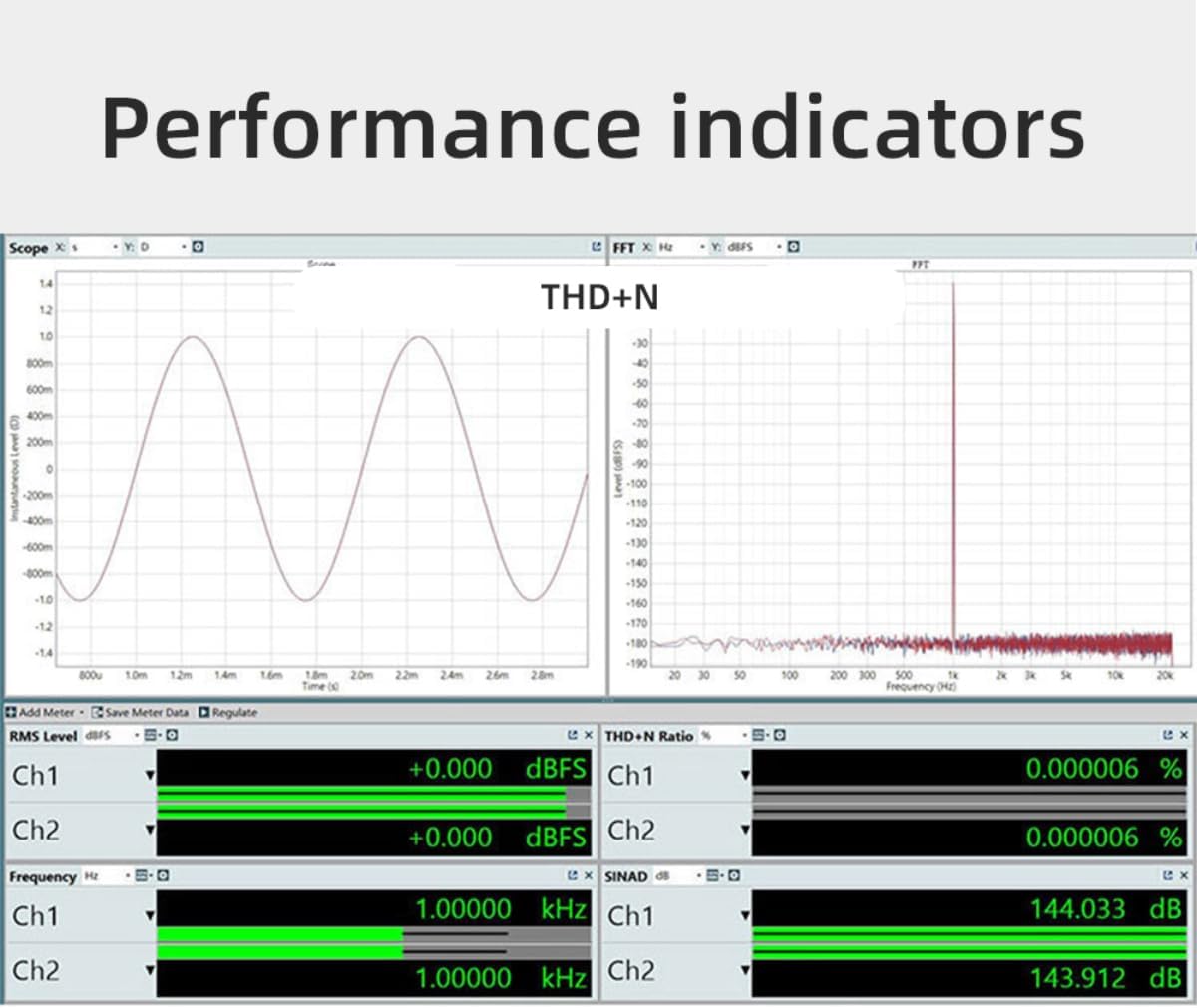
Figure 4.3: Detailed diagram illustrating the numbered components of the PL200T, including the Lid, Disc Pressure, Disc Placement Area, control buttons, display screen, and various input/output ports on the rear panel.
4.1 P.A.S.S. Servo System
The PL200T incorporates SMSL's self-developed Precision Access Servo System (P.A.S.S.) for fast response and precise CD reading. This system, combined with a self-developed vibration damper, ensures excellent mechanical anti-vibration performance.

그림 4.4: View of the internal P.A.S.S. (Precision Access Servo System) mechanism, designed for accurate and stable CD playback.
5. 설정
5.1 전원 연결
The PL200T offers triple power flexibility, supporting AC, USB, and DC port external power supply.

Figure 5.1: Illustration of the three power input options: AC Input Interface (100-240V), DC Input Interface (5V/1A), and USB Input Port (5V/1A USB IN). Connect the appropriate power cable to the unit.
5.2 오디오 출력 연결
Connect the PL200T to your amplifier or DAC using one of the available digital outputs:
- 광 출력: For standard digital audio connection.
- 동축 출력: For standard digital audio connection.
- AES/EBU 출력: Professional balanced digital audio connection.
- I2S Output: High-performance digital audio interface, typically via HDMI connector.
5.3 Clock Input Connection
The PL200T supports external clock input for enhanced synchronization. Connect a 44.1kHz word clock or a 10MHz standard/atomic clock to the BNC connector. Input impedance matching of 50 or 75Ω is possible.
5.4 USB Input Connection
Connect your computer or other USB audio source to the USB input port. The PL200T supports up to 32Bit/768kHz and DSD512 via USB. No drivers are needed for Mac, Android, or Linux operating systems.

그림 5.2: 내부 view showing the XMOS chip responsible for handling USB audio input, supporting high-resolution audio formats.
6. 사용 설명서
6.1 기본 CD 재생
- Gently lift the transparent acrylic lid.
- Place a CD onto the disc placement area, ensuring it is centered.
- 뚜껑을 닫으세요.
- Press the 'Play' button on the front panel or remote control to start playback.
- Use the 'Previous', 'Next', and 'Stop' buttons for track navigation and playback control.
6.2 MQA-CD Decoding
The PL200T fully decodes MQA-CDs with 8x unfolding, supporting resolutions up to 384kHz. When an MQA-CD is inserted, the device will automatically detect and decode the MQA stream, indicated on the display.
6.3 USB 오디오 재생
When connected via USB, the PL200T functions as a high-resolution USB audio interface. Ensure your computer's audio output is set to the PL200T. Play audio files from your computer, and the PL200T will process them at resolutions up to 32Bit/768kHz PCM or DSD512.
6.4 디스플레이 및 제어
The tempered glass IPS display shows real-time track information, sampling rates, and other operational details. The piano-style tactile buttons and function knob provide intuitive control over the device.
7. 유지관리
To ensure the longevity and optimal performance of your SMSL PL200T, follow these maintenance guidelines:
- 청소: Use a soft, dry cloth to clean the exterior. For stubborn marks, a slightly damp 천을 사용할 수 있지만, 기기 내부로 액체가 들어가지 않도록 하십시오. 연마성 세척제나 용제를 사용하지 마십시오.
- 먼지 보호 : The transparent acrylic CD lid helps protect the internal components from dust. Keep the lid closed when not in use.
- 디스크 취급 : CD를 다룰 때는 항상 가장자리를 잡고 다루세요. 지문이나 흠집이 생기면 재생 품질에 영향을 줄 수 있습니다.
- 통풍: Ensure the device is placed in a location with adequate airflow to prevent heat buildup.
8. 문제 해결
If you encounter any issues with your SMSL PL200T, please refer to the following common troubleshooting steps:
- 전원 없음: Ensure the power cable is securely connected to both the device and a working power outlet. Try a different power source or cable.
- 사운드 출력 없음: Verify that the correct output (Optical, Coaxial, AES/EBU, I2S) is selected on your connected amplifier/DAC. Check all audio cables for secure connections. Ensure the volume on your amplifier/DAC is not muted or set too low.
- CD가 읽히지 않음: Ensure the CD is clean and free of scratches. Make sure the CD is placed correctly on the disc placement area and the lid is fully closed.
- USB 오디오 문제: Confirm the USB cable is connected properly. For Windows, ensure necessary drivers are installed if prompted (Mac, Android, Linux are driverless). Check your computer's sound settings to ensure the PL200T is selected as the output device.
- 원격 제어가 작동하지 않음: Check the battery in the remote control. Ensure there are no obstructions between the remote and the device's IR receiver.
If the problem persists, please contact AOSHIDA customer support for further assistance.
9. 사양
Detailed technical specifications for the SMSL PL200T MQA-CD Transport:

Figure 9.1: Diagram showing the dimensions of the SMSL PL200T and a table summarizing its key technical specifications.
| 특징 | 세부 사항 |
|---|---|
| 입력 | USB Audio / CD Player / Clock |
| 산출 | Optical / Coaxial / AES / EBU / I2S |
| USB 전송 | USB 2.0 비동기화 |
| USB 호환성 | Windows 7 / 8 / 8.1 / 10 / 11 (Need Driver), Mac OSX 10.6 above, Android system, iOS, Linux (Driverless) |
| I2S Output Max Samp링율 | PCM: 44.1kHz ~ 768kHz, DSD: 2.8224 ~ 22.5792MHz |
| Optical/Coaxial/AES/EBU Output Max Samp링율 | PCM: 24bit/192kHz |
| MQA 디코딩 | 8-fold expansion up to 384kHz (Automatically converts to 192kHz due to SPDIF limitation) |
| Clock Input Frequency | 44.1kHz or 10MHz |
| Clock Input Impedance | 50옴 또는 75옴 |
| Clock Input Waveform | Square wave or Sine wave |
| Clock Input Level | Square wave: TTL level, Sine wave: >1Vrms |
| 전력 소비 | 15와트 |
| 대기 전력 | <0.5W |
| 크기 (WxHxD) | 200x42x175mm |
| 무게 | 1.62kg / 3.57lbs |
9.1 성과 지표
The PL200T is engineered for high performance, as indicated by its low Total Harmonic Distortion plus Noise (THD+N) and excellent jitter characteristics.

Figure 9.2: Graph illustrating the THD+N (Total Harmonic Distortion plus Noise) performance of the PL200T, demonstrating its low distortion levels.

Figure 9.3: Graph illustrating typical digital audio jitter performance, indicating the device's precision in timing.
10. 보증 및 지원
For warranty information and customer support, please refer to the documentation included with your product or visit the official AOSHIDA website. If you require technical assistance or have questions regarding your SMSL PL200T, please contact AOSHIDA customer service.
연락처 정보는 일반적으로 제조업체 웹사이트에서 찾을 수 있습니다. web사이트 또는 제품 포장.