소개
This manual provides detailed instructions for the proper use and maintenance of your 82Ms-A Scientific Calculator. Designed for students and professionals, this calculator features a 2-line display, multi-function keys, and supports up to 240 functions, including trigonometric calculations. Please read this manual thoroughly to ensure optimal performance and longevity of your device.
상자 안에 무엇이 들어있나요?

Image: The 82Ms-A Scientific Calculator as packaged, indicating one unit is included.
- 82Ms-A Scientific Calculator (1 unit)
- 사용 설명서 (본 문서)
설정
배터리 설치

이미지: 자세한 view showing the open battery compartment of the calculator, revealing two AAA batteries.
The 82Ms-A Scientific Calculator is powered by a long-lasting battery. To install or replace batteries:
- 계산기가 켜져 있는지 확인하세요 끄다.
- 계산기 뒷면에서 배터리 덮개를 찾으세요.
- Slide the cover off in the direction indicated by the arrow (if present).
- Insert new batteries, ensuring correct polarity (+/-) as marked inside the compartment.
- 배터리 칸 덮개를 딸깍 소리가 나며 제자리에 단단히 고정될 때까지 다시 끼웁니다.
작동 지침
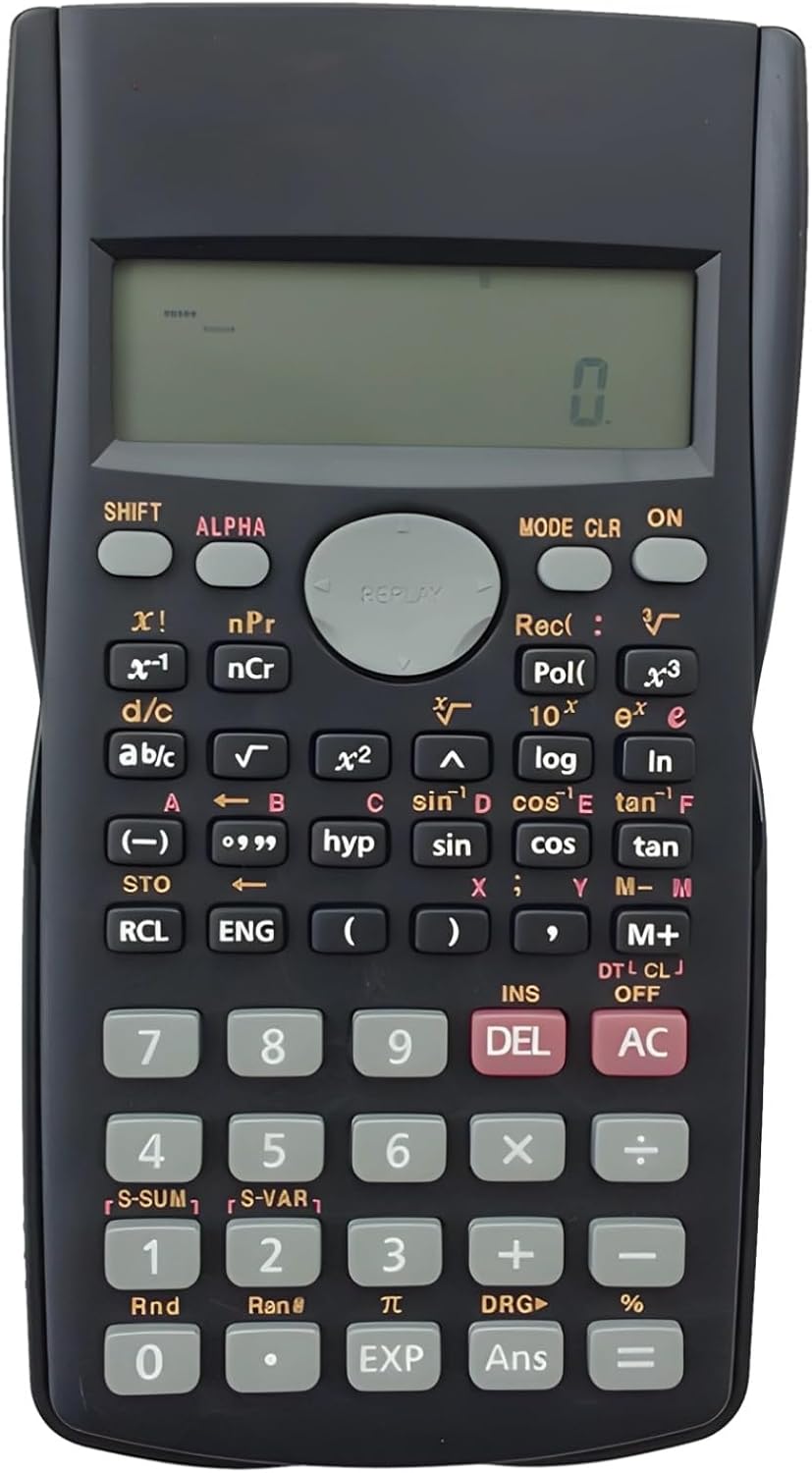
Image: The full layout of the 82Ms-A Scientific Calculator, highlighting its 2-line display and various function keys.
전원 켜기/끄기
- 켜려면: 누르세요 ON 열쇠.
- 끄려면 누르세요 옮기다 그 다음에 AC (떨어져서).
기본 계산
숫자 키패드를 사용하여 숫자를 입력하십시오. +, -, ×, 그리고 ÷ keys for standard arithmetic operations. Press = 결과를 표시합니다.
Multi-Function Keys and 2-Line Display
The calculator features a 2-line display, showing both the input expression and the result simultaneously. Many keys have multiple functions, indicated by colored labels above or below them. These functions are accessed using the 옮기다 그리고 알파 열쇠.
- 옮기다: Activates the yellow-labeled functions. Press 옮기다, then the desired key.
- 알파: Activates the red-labeled functions (variables, constants). Press 알파, then the desired key.
- 방법: Changes the calculator's mode (e.g., COMP, STAT, EQN). Press 방법 repeatedly to cycle through options.
- 클록: Clears specific data or settings. Press 옮기다 그 다음에 클록 to access clear options.
- 델커서 위치의 문자를 삭제합니다.
- AC: Clears all input and returns to the initial state.
고급 기능
The 82Ms-A supports 240 functions, including trigonometric (sin, cos, tan), logarithmic (log, ln), power (x², x³), roots (√, ³√), fractions (a b/c), and statistical calculations. Refer to the specific key labels and their SHIFT/ALPHA functions for detailed usage.
- 삼각 함수: 사용 죄, 코사인, 탠 껍질 keys. For inverse functions (sin⁻¹, cos⁻¹, tan⁻¹), use 옮기다 with these keys.
- 로그 함수: 사용 통나무 (10진법) 그리고 ln (natural logarithm) keys.
- 거듭제곱 및 루트 함수: 사용 x² 제곱을 위해, 옮기다 그 다음에 x² for square root (√). For other powers and roots, use x³ or 옮기다 그 다음에 x³ (³√).
- 분수: 사용하세요 알파벳 key to input and convert fractions.
유지
청소
계산기를 청소하려면 부드럽고 마른 천을 사용하세요. 잘 지워지지 않는 오염의 경우, 가볍게 두드리세요.ampen the cloth with water or a mild, non-abrasive cleaner. Do not use strong solvents, alcohol, or abrasive cleaners, as these can damage the casing와 디스플레이.
저장
계산기는 직사광선과 극한 온도 변화를 피해 서늘하고 건조한 곳에 보관하십시오. 장기간 보관할 경우 누액을 방지하기 위해 배터리를 제거하는 것이 좋습니다.
문제 해결
| 문제 | 가능한 원인 | 해결책 |
|---|---|---|
| 계산기가 켜지지 않습니다. | 배터리가 방전되었거나 잘못 설치되었습니다. | 배터리를 새 배터리로 교체하고 극성이 올바른지 확인하세요. |
| 디스플레이가 어둡거나 아무것도 표시되지 않습니다. | 배터리 전원이 부족합니다. | 배터리를 교체하세요. |
| 잘못된 계산 결과입니다. | Incorrect mode setting or previous calculation error. | 누르다 AC to clear. Check the current mode using the 방법 key and adjust if necessary. |
| 키가 반응하지 않습니다. | 키 사이에 먼지나 이물질이 끼어 있을 수 있습니다. 내부 고장일 수 있습니다. | 키 주변을 부드럽게 닦아주세요. 문제가 지속되면 고객 지원팀에 문의하십시오. |
명세서

Image: The 82Ms-A Scientific Calculator with its length, width, and thickness measurements indicated.
| 특징 | 세부 사항 |
|---|---|
| 모델 번호 | 71T71524TQPRRJC1J26SKQF |
| 디스플레이 유형 | 2 라인 표시 |
| 기능 수 | 최대 240개 기능 |
| 전원 | 배터리 구동 |
| 치수(길이 x 너비 x 높이) | 6.1 x 3.27 x 0.39 인치 |
| 품목 무게 | 5.3 온스 |
| 색상 | 검은색 |
| 재료 | 플라스틱 |
보증 및 지원
Specific warranty information for this product is not provided within this manual. For warranty details, technical support, or service inquiries, please refer to the product packaging or contact the retailer from whom the product was purchased. Keep your purchase receipt as proof of purchase.


