
소개
데view A5 is a versatile 5.5-inch touch screen camera field monitor designed to enhance your filmmaking and photography experience. It features a vibrant Full HD 1920x1080 IPS panel with 600nits brightness, ensuring clear and color-accurate visuals in various lighting conditions. Supporting 4K/60Hz HDMI 2.0 input and output, this monitor provides real-time monitoring and advanced tools like HDR, waveform, histogram, and custom 3D LUT support for precise exposure and color control. Its lightweight design and flexible power options make it suitable for both studio and on-location use.
상자 안에 무엇이 들어있나요?
Upon unboxing your Desview A5 monitor, please ensure all the following items are present:
- 1x 데스view A5 모니터
- 1x 모니터 마운트
- 1x 선쉐이드
- 1x HDMI 케이블
- 1x 마이크로 HDMI 케이블
- 1x U disk (for LUTs)
- 1x 설치 도구
- 1x Dust Cloth
- 1x 사용자 설명서
- 1x 운반 케이스

설정
모니터 장착
Attach the included monitor mount to the 1/4" screw hole located on the bottom or side of the Desview A5 monitor. Secure the mount firmly using the installation tool. Then, attach the monitor to your camera's cold shoe mount or any compatible rig.

Connecting HDMI Cables
Connect your camera's HDMI output to the HDMI-IN port on the Desview A5 monitor using the provided HDMI or Micro HDMI cable. If you need to output the video signal to another monitor, use the HDMI-OUT port.
모니터 전원 공급
데view A5 offers multiple power options:
- NP-F 시리즈 배터리: Insert a compatible NP-F series battery (NP-F550/F750/F970) into the battery compartment on the back of the monitor. (Battery not included).
- Type-C 입력: Connect a Type-C cable to the Type-C port for power.
- DC 12V 입력: Use a DC 12V power adapter (not included) with the DC-IN port.

모니터 작동
Touch Screen & Control Knob
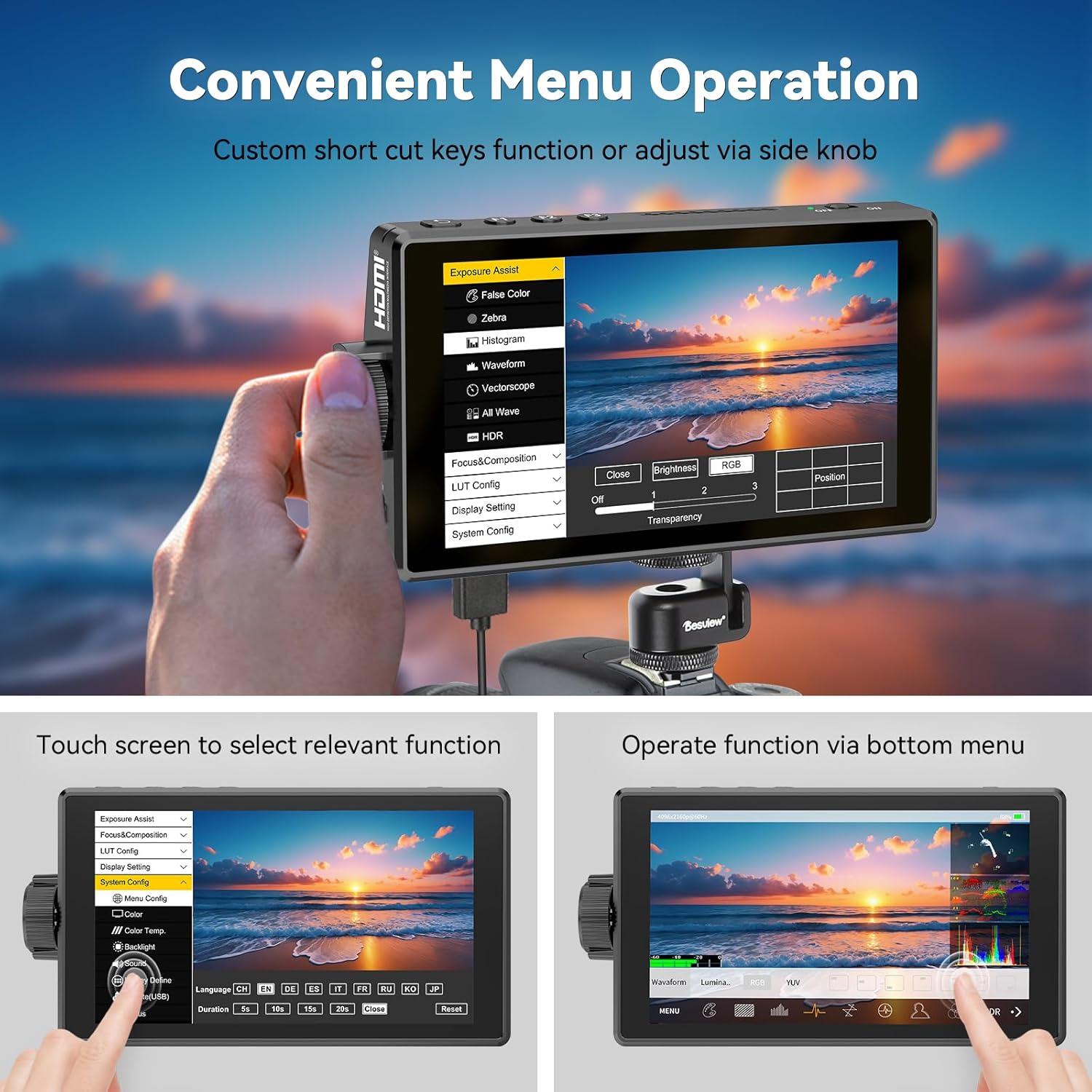
데view A5 features a responsive touch screen for intuitive menu navigation. You can also use the side scroll knob to adjust settings. User-customizable shortcut keys (F1, F2, F3) are available for quick access to frequently used functions. A touch-lock key prevents accidental changes during filming.

Advanced Monitoring Tools
The monitor includes a suite of professional tools to assist with accurate exposure and focus:
- HDR: High Dynamic Range support for improved contrast and color.
- 파형 : Visual representation of video signal luminance.
- 히스토그램 : 이미지의 톤 분포를 표시합니다.
- 포커스 피킹: 정확한 수동 초점을 위해 초점이 맞춰진 영역을 강조 표시합니다.
- 거짓 색상 : 적절한 노출 수준을 설정하는 데 도움이 됩니다.
- 얼룩말: 과다 노출된 영역을 나타냅니다.
- 벡터스코프: 색상의 채도와 색조를 분석합니다.
- 그리드 라인: 작문을 돕습니다.
- 오디오 미터: 오디오 입력 레벨을 모니터링합니다.
- Safe Area & Mark Ratio: Ensures content is within broadcast-safe zones.

사용자 정의 3D LUT 지원
데view A5 allows you to upload custom 3D LUTs (Look Up Tables) via the included U disk. This feature is invaluable for on-set color grading, enabling you to preview 당신의 푸tage with desired color profiles for a cinematic look.

디스플레이 설정
Adjust various display settings to suit your needs, including aspect ratio, display flip, zoom, pixel-to-pixel mapping, HV delay, freeze frame, and anamorphic de-squeeze.
유지
Des의 수명 연장과 최적의 성능을 보장하기 위해view A5 monitor, follow these maintenance guidelines:
- 청소: Use the provided dust cloth to gently wipe the screen and body of the monitor. Avoid using harsh chemicals or abrasive materials.
- 저장: When not in use, store the monitor in its carry case to protect it from dust, scratches, and impacts.
- 양산: Utilize the detachable sunshade to protect the screen from direct sunlight and reduce glare, especially during outdoor shoots.

문제 해결
Des 사용 중 문제가 발생하면view A5 monitor, please refer to the following common troubleshooting steps:
- 신호 없음: Ensure all HDMI cables are securely connected to both the camera and the monitor. Verify that your camera's HDMI output is enabled and configured correctly.
- 전원 없음: Check the battery level or power connection. Ensure the power source is providing adequate voltage (e.g., fully charged NP-F battery, correct DC adapter).
- 화면 깜빡임/왜곡: Try a different HDMI cable or adjust the resolution settings on your camera. Ensure the monitor's firmware is up to date.
- 터치 스크린이 응답하지 않음: Check if the touch-lock function is enabled. Disable it if necessary. Restart the monitor.
For persistent issues, please consult the detailed user manual or contact Desview 고객 지원.
명세서
| 특징 | 사양 |
|---|---|
| 상표 | 데스view |
| 모델 번호 | A5 |
| 화면 크기 | 5.5 인치 |
| 해결 | FHD 1080p (1920x1080 Pixels) |
| 명도 | 제곱미터당 600 칸델라 |
| 대비율 | 1400시 1분 |
| View잉 각도 | 178도 |
| 디스플레이 유형 | IPS |
| HDMI 입력/출력 | 4K/60Hz HDMI 2.0 |
| 전원 옵션 | Type-C, NP-F Series Batteries, DC 12V Input |
| 품목 치수(D x W x H) | 1인치 깊이 x 5.7인치 너비 x 3.2인치 높이 |
| 무게 | 340그램(대략) |
| 추가 기능 | Touchscreen, Side Knob Navigation, User-customizable shortcut keys, HDR, 3D LUT Support, Waveform, Histogram, Focus Peaking |
보증 및 지원
데view A5 Touch Screen Camera Field Monitor comes with a 1년 보증. For technical support, warranty claims, or any product-related inquiries, please contact Desview 고객 서비스는 공식 웹사이트를 통해 제공됩니다. web제품을 구매한 사이트 또는 소매점에 문의하십시오. 보증 확인을 위해 구매 증빙 자료를 보관하십시오.