
1. 제품 오버view
The atomberg Studio Nexus 1200mm BLDC Ceiling Fan is designed for efficient air circulation and modern aesthetics. It features a Brushless Direct Current (BLDC) motor for energy savings, a BEE 5-star rating, and quiet operation. This fan includes a remote control for convenient adjustments and a unique Moonbeam Light function.
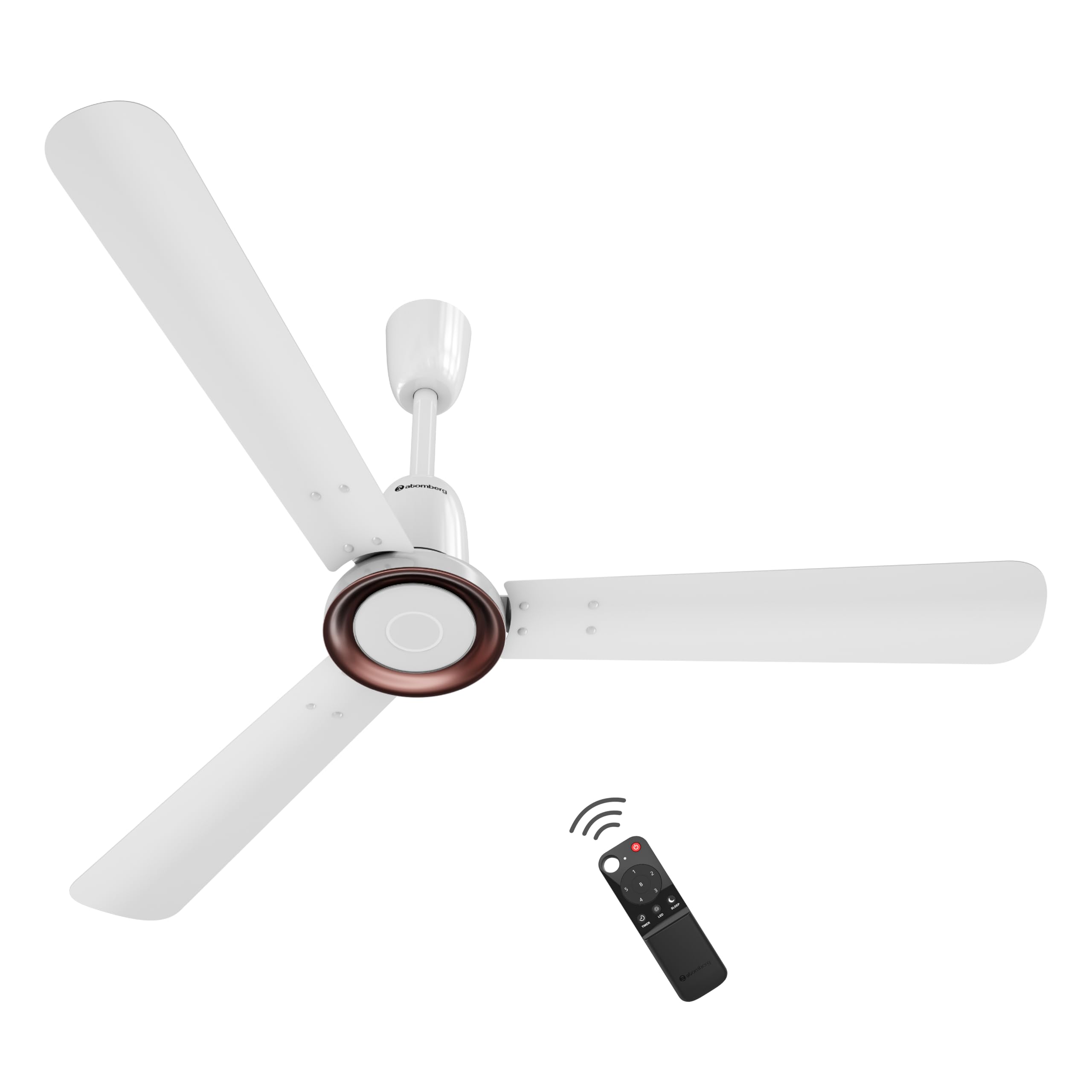
Figure 1: atomberg Studio Nexus 1200mm BLDC Ceiling Fan (Gloss White)
주요 특징:
- 에너지 효율이 뛰어난 BLDC 모터: Consumes only 35W at top speed, saving up to 65% electricity compared to unrated fans.
- BEE 5성급 등급 획득: 높은 에너지 효율 인증을 받았습니다.
- 높은 공기 공급량: Provides 230 CMM (Cubic Meters Per Minute) for optimal airflow.
- 저소음 작동: Operates at less than 57 dB, ensuring a quiet environment.
- 스마트 적외선 리모컨: Allows adjustment of speed, Boost Mode, Timer, and Sleep Mode.
- Moonbeam Light: Integrated night light with two intensity levels, providing visual feedback for remote commands.
- 사물인터넷 연결성: Supports smart control (details for app control are typically provided in a separate IoT guide).
- 모던 미니멀리스트 디자인: Features a premium metallic body trim and wide designer curved blades.

Figure 2: Advanced Air+ Technology for enhanced air delivery and comfort.

그림 3: 이상view of best-in-class performance, including remote operation, high air delivery, and low noise.
2. 안전 정보
설치 및 사용 전에 모든 안전 지침을 주의 깊게 읽어 주십시오. 나중에 참조할 수 있도록 이 설명서를 보관하십시오.
- 설치, 청소 또는 유지관리를 하기 전에 전원 공급이 차단되었는지 확인하세요.
- 설치는 해당 지역의 전기 규정에 따라 자격을 갖춘 전기 기술자가 수행해야 합니다.
- Mount the fan securely to a ceiling structure capable of supporting its weight.
- 선풍기 작동 중에는 손, 머리카락, 옷이 날개에 닿지 않도록 하십시오.
- 선풍기를 직접 수리하거나 개조하지 마십시오. 고객 지원팀에 문의하여 도움을 받으십시오.
3. 패키지 내용
설치를 진행하기 전에 패키지에 모든 구성품이 포함되어 있는지 확인하십시오.
- Blade set (1 Unit)
- Remote (1 Unit)
- Motor box (1 Unit)
- Canopy set (1 Unit)
- Downrod (1 Unit)
- Shackle kit (1 Unit)
- Manual Leaflet & Warranty card (1 Unit)
4. 설치
The atomberg Studio Nexus fan is designed for versatile installation, accommodating both standard and false/low ceilings.
천장 호환성:
- For Standard Ceilings: Use both the bottom and top canopy for a complete finish.
- For Low Height or False Ceilings: An additional ceiling plate is provided. Use this ceiling plate with the bottom canopy for a flush installation.
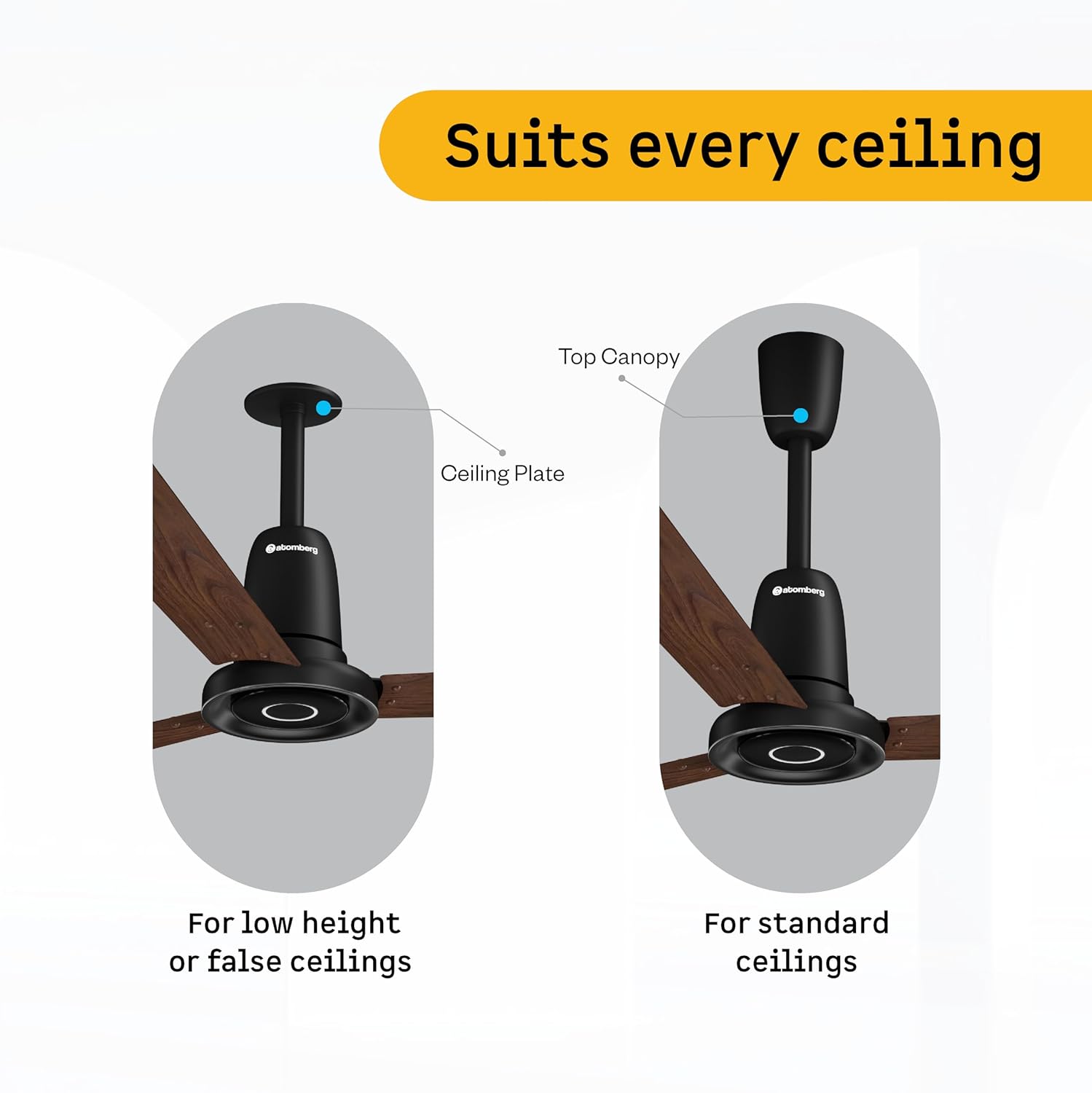
Figure 4: Illustration of ceiling fan installation for different ceiling types.
Detailed installation steps are provided in the included manual leaflet. It is recommended to have the fan installed by a professional.
5. 운영
Control your atomberg Studio Nexus fan using the included Smart IR Remote or through IoT connectivity.
리모컨 사용하기:
The universal IR remote allows for easy control of various fan functions. No pairing is required.

Figure 5: Smart IR Remote Control for the Studio Nexus fan.
- 전원 켜기/끄기: 전원 버튼을 눌러 팬을 켜거나 끕니다.
- 속도 조정 : Use the numbered buttons (1-6) to select your desired fan speed.
- 부스트 모드: Activates the highest fan speed for rapid cooling.
- 타이머 모드: Set the fan to switch off automatically after a pre-set number of hours.
- 수면 모드 : Gradually decreases the fan's speed every two hours for comfortable sleep.
- LED 조명 제어: Turn the Moonbeam Light ON or OFF.
Moonbeam Light Function:
The integrated Moonbeam Light serves as a night light and provides visual feedback.
- It has two intensity levels, adjustable via the remote.
- The light blinks in response to remote commands (e.g., power on/off, speed change, timer, sleep mode) to confirm action.
IoT and App Control:
For advanced control and smart home integration, refer to the dedicated IoT setup guide or the atomberg app for instructions on connecting and controlling your fan via a smart device.
6. 유지관리
정기적인 유지관리를 통해 팬의 최적의 성능과 수명을 보장할 수 있습니다.
- 청소: 팬 날개와 모터 하우징을 주기적으로 부드러운 천으로 닦아주세요.amp 천. 연마성 세척제나 용매를 사용하지 마십시오.
- 블레이드 검사: Check blades for any damage or warping. Damaged blades can cause imbalance and noise.
- 안전한 장착: Ensure all mounting hardware remains tight and secure.
- 매끄럽게 하기: BLDC 모터는 유지보수가 필요 없는 작동을 위해 설계되었으며 윤활이 필요하지 않습니다.
청소나 유지 관리를 수행하기 전에 항상 전원을 차단하십시오.
7. 문제 해결
If you encounter issues with your atomberg Studio Nexus fan, refer to the following common troubleshooting tips:
- 팬이 켜지지 않음:
- Check if the main power supply to the fan is on.
- 리모컨 배터리가 방전되지 않았는지 확인하세요.
- Verify that the remote control is pointed directly at the fan's receiver.
- 선풍기 흔들림:
- Ensure all blade screws are tightened securely.
- Check that the downrod and mounting bracket are firmly attached to the ceiling.
- 날개가 휘거나 손상되지 않았는지 확인하십시오.
- 리모콘이 응답하지 않음:
- 리모컨 배터리를 교체하세요.
- 리모컨과 팬 사이에 장애물이 없는지 확인하세요.
- Moonbeam Light Not Working:
- Check if the light function is enabled via the remote.
- 문제가 지속되면 고객 지원에 문의하십시오.
For issues not covered here, please contact atomberg customer support.
8. 사양
Detailed technical specifications for the atomberg Studio Nexus 1200mm BLDC Ceiling Fan:
| 특징 | 사양 |
|---|---|
| 상표 | 아톰베르크 |
| 모델명 | Studio Nexus |
| 색상 | 광택 화이트 |
| 선풍기 디자인 | 천장 선풍기 |
| 전원 | 코드식 전기 |
| 제품 크기(D x W x H) | 57D x 29W x 25.5H 센티미터 |
| 객실 유형 | 침실, 식당, 홈 오피스, 거실, 서재 |
| 특별 기능 | BLDC Motor with Remote, Low noise, Boost Mode, Timer, Moonbeam Light |
| 장착 유형 | 천장 마운트 |
| 컨트롤러 유형 | Button Control, Remote Control, App |
| 속도의 수 | 6 |
| 소음 수준 | 57데시벨 |
| 왓tage | 35 와트 |
| 블레이드 수 | 3 |
| 기류 용량 | 분당 230 세제곱미터 |
| 속도 | 360 RPM |
| 권tage | 220 볼트 |
| 실내 실외 사용 | 실내 |
| 재료 유형 | 알류미늄 |
| 블레이드 소재 | 알류미늄 |
| 사양 충족 | BEE 5 Star |
| 블레이드 길이 | 1200 밀리미터 |
| 품목 무게 | 4.2 킬로그램 |
| 원산지 | 인도 |
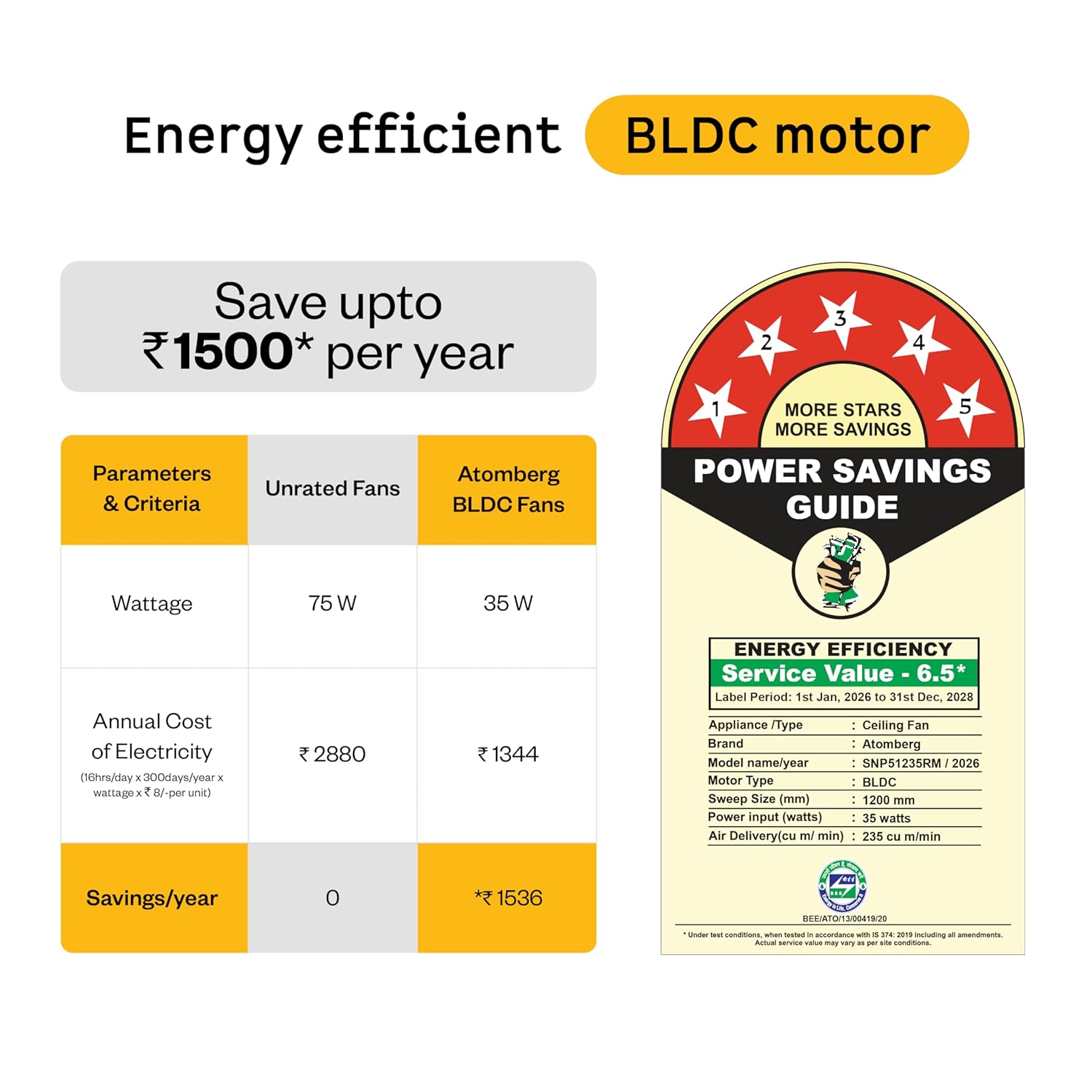
Figure 6: Energy Efficiency Guide for atomberg BLDC motor, highlighting 5-star rating and electricity savings.
9. 보증 및 지원
Your atomberg Studio Nexus ceiling fan comes with comprehensive warranty coverage and dedicated customer support.
보증 정보:
- 표준 보증: 구매 시 3년 보증이 포함됩니다.
- 연장 보증: An additional 2-year warranty can be availed by registering your product on the official atomberg website. This extends the total warranty period to 5 years.
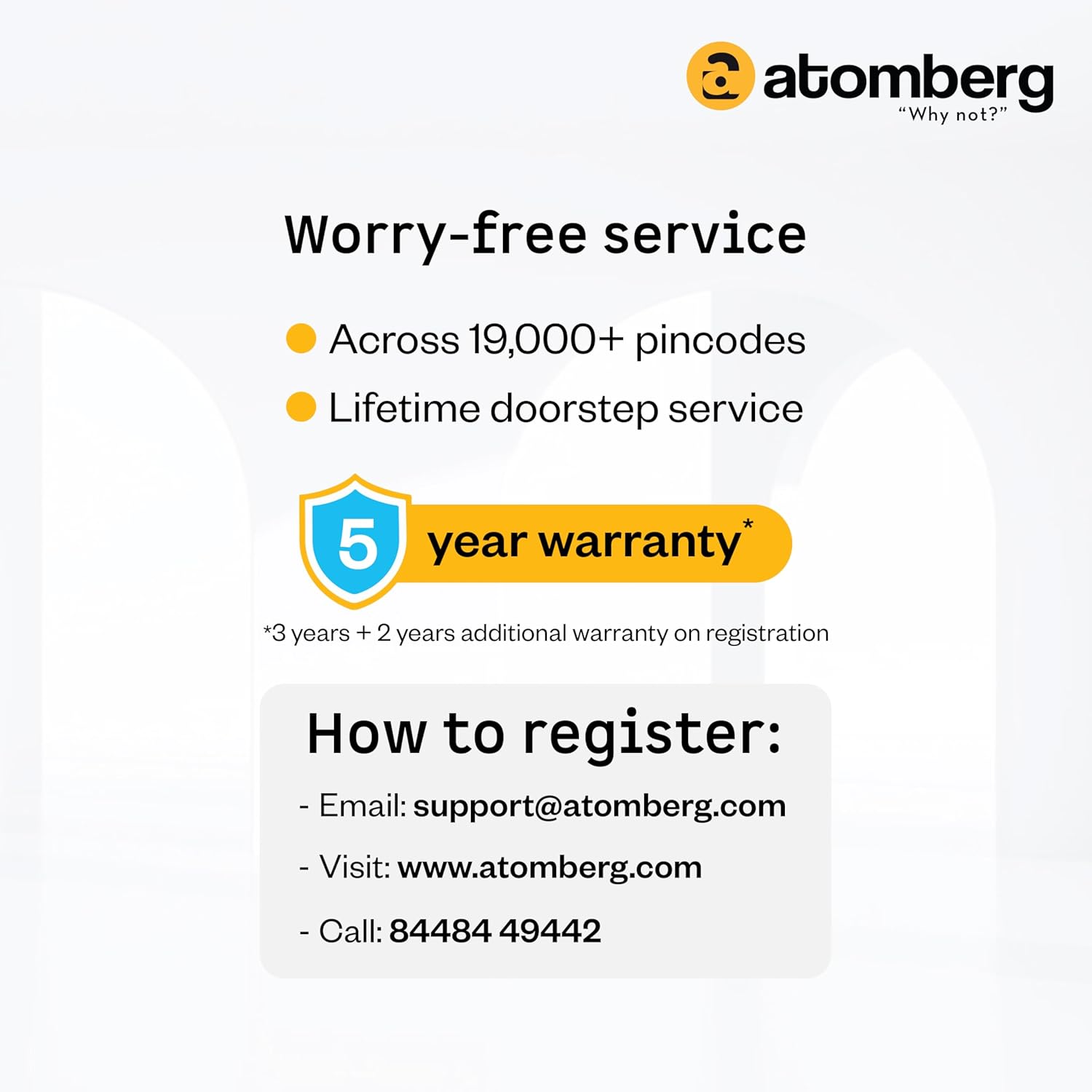
Figure 7: Warranty details and registration process for extended coverage.
고객 지원:
For any queries, technical assistance, or warranty claims, please contact atomberg customer support:
- 이메일: support@atomberg.com
- 핸드폰: 08448449442
- Web대지: 아톰버그 공식 웹사이트를 방문하세요. website for product registration and further information.