
1. 서론
This manual provides detailed instructions for the installation, operation, and maintenance of your PGST A107F-EU-A Wireless Home Alarm System. This intelligent security system offers comprehensive protection for your home or property, featuring 4G connectivity, Tuya App integration, and compatibility with smart assistants like Alexa and Google Assistant. Please read this manual thoroughly before using the system to ensure proper functionality and safety.
2. 패키지 내용
Carefully unpack the box and verify that all the following components are included:
- 1 x PGST A107F Main Control Panel
- 1 x 전원 어댑터(5V 2A)
- 2 x 원격 제어
- RFID 2개 Tags
- 1 x Wireless Door/Window Sensor
- 1 x Wireless PIR Motion Sensor
- 1 x Wireless Siren
- 장착 하드웨어(나사, 앵커)
- 사용 설명서 (본 문서)
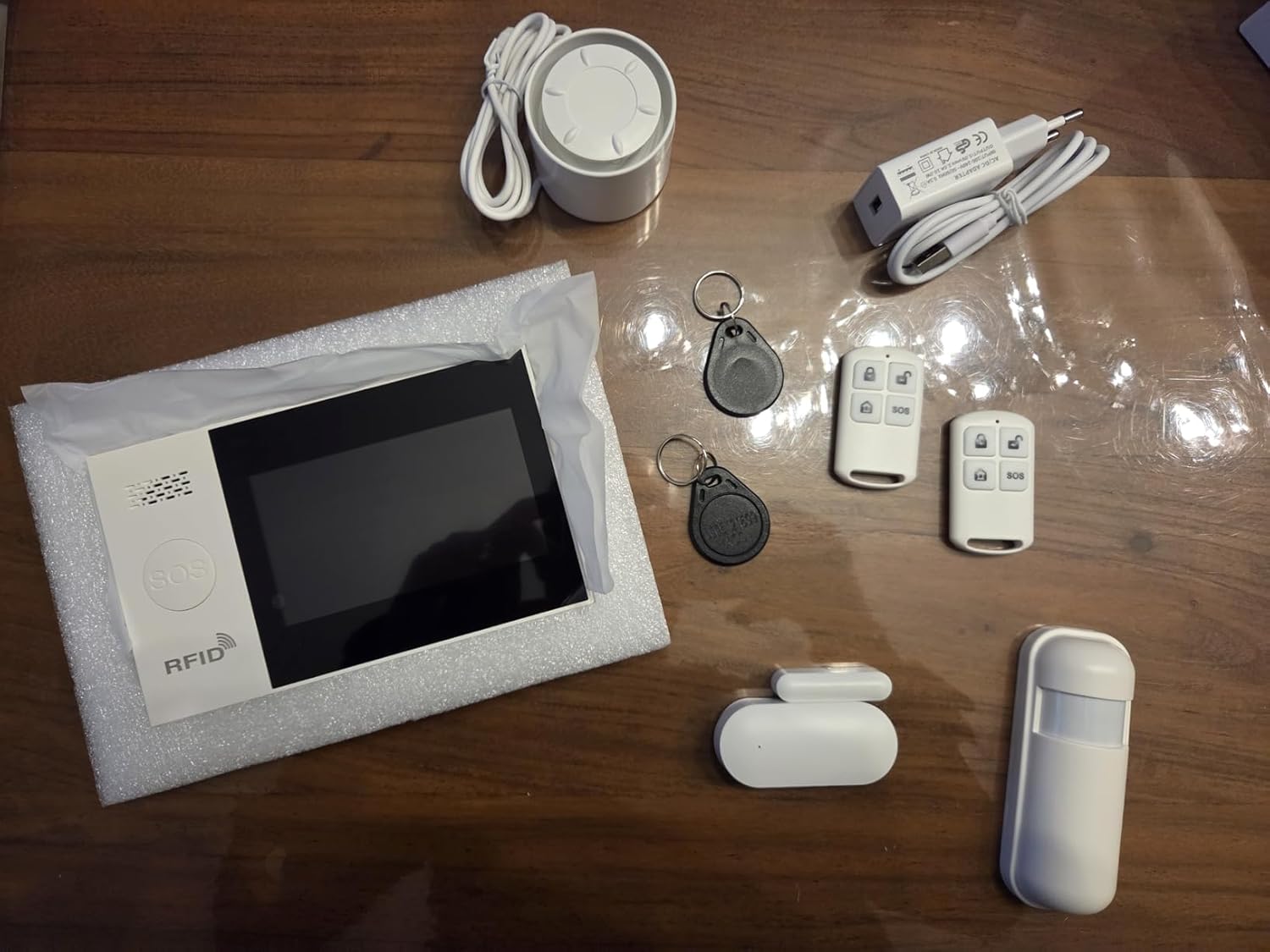
이미지 2.1: 이상view of the PGST A107F-EU-A Wireless Home Alarm System components, including the main panel, remote controls, RFID tags, siren, power adapter, door/window sensor, and motion sensor.
3. 제품 오버view
The PGST A107F-EU-A system consists of a central control panel and various wireless sensors and accessories. The main panel acts as the brain of the system, processing signals from sensors and communicating alerts via 4G, SMS, or the Tuya App.
3.1 메인 컨트롤 패널
The main control panel features a display, touch keypad, SOS button, and RFID reader. It houses the SIM card slot for 4G communication and connects to your home Wi-Fi network for app control.

이미지 3.1: 앞면 view of the PGST A107F-EU-A Main Control Panel, showing the display, keypad, SOS button, and RFID reader.

이미지 3.2: 측면 view of the PGST A107F-EU-A Main Control Panel, illustrating its slim profile.
3.2 SIM Card Slot and Connections
The back of the main panel provides access to the SIM card slot and power input. Ensure the SIM card is inserted correctly for 4G functionality.

이미지 3.3: 뒤 view of the PGST A107F-EU-A Main Control Panel with the cover removed, showing the SIM card slot and internal components. The IMEI number is visible: 863957076386736.
4. 설정
4.1 초기 전원 켜기
- Connect the provided power adapter to the main control panel and plug it into a power outlet.
- The panel will power on and initiate its startup sequence.
4.2 SIM 카드 설치 (4G 기능 사용 시)
- Ensure the main panel is powered off.
- Locate the SIM card slot on the back of the main panel (refer to Image 3.3).
- 표준 4G SIM 카드를 올바른 방향으로 슬롯에 삽입하십시오.
- Replace the cover and power on the panel. The system will attempt to connect to the 4G network.
4.3 Tuya 앱 통합
- 스마트폰 앱스토어(iOS 또는 Android)에서 "Tuya Smart" 또는 "Smart Life" 앱을 다운로드하세요.
- 새 계정을 등록하거나 이미 계정이 있는 경우 로그인하세요.
- On the app, tap "Add Device" or the "+" icon.
- Select "Security & Video Surveillance" > "Alarm (Wi-Fi)" or search for "Alarm System".
- Follow the on-screen instructions to connect the alarm panel to your home Wi-Fi network. This typically involves putting the panel into pairing mode (refer to the panel's display for instructions) and entering your Wi-Fi credentials in the app.
4.4 센서 페어링
The system comes with pre-paired sensors. If you need to add new sensors or re-pair existing ones:
- On the main panel, navigate to the "Sensor Management" or "Add Sensor" menu.
- Select the type of sensor you wish to add (e.g., Door Sensor, Motion Sensor).
- Activate the sensor (e.g., separate the two parts of a door sensor, or trigger a motion sensor). The panel will detect the sensor and prompt you to confirm pairing.
- Assign the sensor to a specific zone (e.g., "Main Door," "Living Room").
4.5 Remote Control and RFID Tag 편성
Remote controls and RFID tags are typically pre-paired. To add new ones:
- On the main panel, navigate to the "Remote Control Management" or "RFID Tag Management" menu.
- Follow the on-screen instructions to put the panel into pairing mode.
- For remote controls, press any button on the remote. For RFID tags, 탭하세요 tag against the RFID reader on the main panel.
- Confirm the pairing on the panel.
5. 시스템 운영
5.1 무장 및 무장해제
The system can be armed or disarmed using the main panel, remote controls, RFID tags, or the Tuya App.
- 무장(외출 모드): Activates all sensors. Any triggered sensor will set off the alarm.
- 홈 암(스테이 모드): Activates perimeter sensors (e.g., door/window sensors) while allowing free movement within the property (e.g., motion sensors are disarmed).
- 무장 해제: Deactivates all sensors, allowing free entry and exit without triggering the alarm.
5.2 SOS 기능
In an emergency, press the SOS button on the main panel or the remote control. The system will immediately trigger the alarm and send emergency notifications to pre-configured contacts via 4G call, SMS, and Tuya App alerts.
5.3 구역 관리
Each sensor is assigned to a zone. You can customize zone types (e.g., 24-hour zone, delay zone, home arm zone) through the main panel settings or the Tuya App to suit your security needs.
5.4 Voice Control with Alexa & Google Assistant
After integrating the Tuya App with Amazon Alexa or Google Assistant, you can use voice commands to control your alarm system. Examples에는 다음이 포함됩니다.
- "Alexa, arm the alarm."
- "헤이 구글, 경보를 해제해 줘."
- "Alexa, what is the status of the alarm?"
Refer to the Tuya App's integration guide for specific voice commands and setup instructions.
5.5 즉시 알림
Upon an alarm trigger, the system will send instant alerts:
- 4G Call: Dials pre-set emergency numbers.
- 문자: Sends text messages to pre-set numbers.
- 투야 앱: Pushes real-time notifications to your smartphone.
6. 유지관리
6.1 배터리 교체
Wireless sensors (door/window, motion) are powered by batteries. The main panel will indicate low battery status for individual sensors. Replace batteries promptly to ensure continuous protection.
- 센서 배터리 수명: Approximately 2 years (varies with usage).
- Refer to the specific sensor's compartment for battery type (e.g., CR2032 for small sensors, AA/AAA for larger ones).
6.2 청소
Wipe the main panel and sensors with a soft, dry cloth. Avoid using abrasive cleaners or solvents, as they may damage the surfaces.
7. 문제 해결
- 시스템 전원이 켜지지 않음: Ensure the power adapter is securely connected to both the panel and a working power outlet.
- 4G 신호 없음: Check if the SIM card is correctly inserted and activated. Verify that your area has 4G coverage.
- 센서가 경보를 울리지 않음: Check sensor battery levels. Ensure sensors are within range of the main panel and correctly paired. Verify zone settings in the app or on the panel.
- Tuya App connection issues: Ensure the main panel is connected to your Wi-Fi network. Check your Wi-Fi signal strength. Restart the app and the main panel.
- 오경보: Check sensor placement to avoid environmental triggers (e.g., direct sunlight on motion sensors, loose doors/windows). Adjust sensor sensitivity if applicable.
8. 사양
| 특징 | 사양 |
|---|---|
| 모델 번호 | A107F |
| 상표 | PGST |
| 연결 기술 | Wireless, 4G, Wi-Fi |
| 호환 장치 | Smartphone (Tuya App), Alexa, Google Assistant |
| Power Source (Main Panel) | AC Power Adapter (5V 2A) |
| 품목 치수(LxWxH) | 22 x 15 x 10cm |
| 경보 종류 | 기입 |
| 평균 배터리 수명(센서 기준) | 2년 |
| 설치 방법 | 스크류 인 |
| UPC/GTIN | 704444493779 |
9. 보증 및 지원
9.1 제조업체 보증
The PGST A107F-EU-A Wireless Home Alarm System is covered by a 1년 제조사 보증 구매일로부터. 이 보증은 정상적인 사용 하에서 재료 및 제조상의 결함을 포함합니다.
9.2 고객 지원
For any questions, technical assistance, or warranty claims, please contact PGST customer support. Refer to the product packaging or the PGST official web연락처 정보 사이트.