1. 서론
This manual provides essential instructions for the installation, operation, and maintenance of your Generic RG-REX12 AC1200 Dual-Band WiFi 5 Mesh Extender. Please read this manual thoroughly before using the device to ensure optimal performance and safety. Keep this manual for future reference.
2. 제품 오버view
The RG-REX12 is an AC1200 Dual-Band WiFi 5 Mesh Extender designed to extend your existing wireless network coverage and eliminate Wi-Fi dead zones. It supports both 2.4GHz and 5GHz bands for reliable connectivity and integrates with Reyee Mesh technology for seamless whole-home Wi-Fi.
2.1 주요 특징
- AC1200 Dual-Band WiFi 5 Performance: Supports 2.4GHz and 5GHz for fast and reliable connectivity.
- Extended Coverage & Signal Boosting: Offers up to 7800 ft² max range with 2 x FEM independent signal amp정수기.
- Seamless Mesh Integration: Works with Reyee Mesh for whole-home WiFi without interruptions.
- High Client Capacity: Supports up to 64 clients (24 recommended).
- 고속 이더넷 포트: Includes 1 x FE port for wired connections.
- Smart Management Options: Configure and monitor via WebUI, Cloud, and App.
- 플러그 앤 플레이 설정: Easy installation with intuitive app-based controls.
- 효율적인 전력 소비: Operates at 15W.
2.2 패키지 내용
제품 패키지에는 다음이 포함됩니다.
- 1 x RG-REX12 WiFi 5 Mesh Extender
2.3 장치 레이아웃
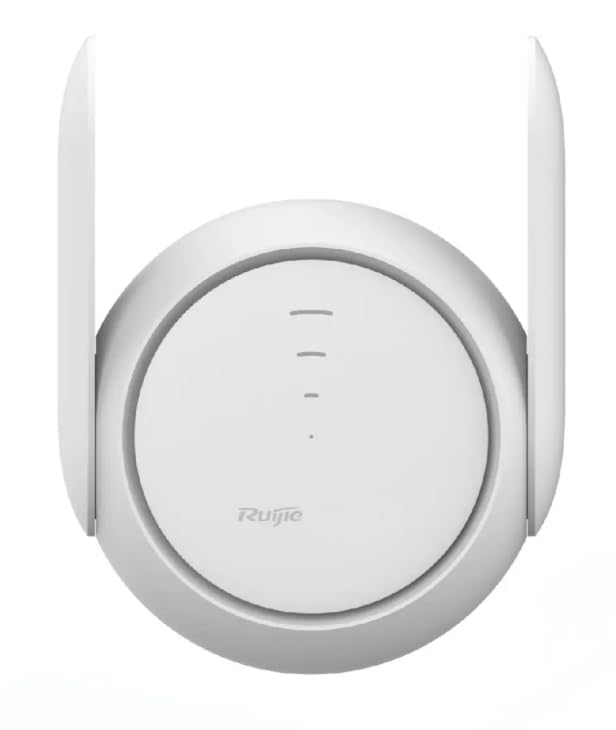
이미지: 앞면 view of the RG-REX12 AC1200 Dual-Band WiFi 5 Mesh Extender, showing its compact design and external antennas.
3. 설정
Follow these steps for initial setup of your RG-REX12 Mesh Extender.
- 전원 켜기: Plug the RG-REX12 extender into a power outlet. Wait for the indicator light to stabilize, typically indicating it is ready for setup.
- 놓기: For optimal performance, place the extender midway between your main router and the area where you need improved Wi-Fi coverage. Avoid obstructions like thick walls or large metal objects.
- 익스텐더에 연결: On your mobile device or computer, connect to the Wi-Fi network broadcast by the extender (e.g., "Reyee_XXXX").
- 구성:
- Using the Reyee App (Recommended): Download the Reyee App from your device's app store. Open the app and follow the on-screen instructions to detect and configure your extender. This method simplifies mesh integration.
- 를 사용하여 Web 브라우저: 열기 web 브라우저를 열고 기본 IP 주소를 입력하세요(일반적으로 192.168.10.1 or reyeewifi.com) into the address bar. Follow the setup wizard to connect the extender to your existing Wi-Fi network.
- 연결 확인: Once configured, the extender's indicator light should show a stable connection status (e.g., solid blue or green). Test the Wi-Fi signal in the extended area.
4. 사용 설명서
The RG-REX12 operates to seamlessly extend your Wi-Fi network. Here are key operational aspects:
4.1 Mesh Network Operation
When integrated with a Reyee Mesh network, the RG-REX12 creates a single, unified Wi-Fi network name (SSID). Your devices will automatically switch between your main router and the extender as you move around, ensuring a continuous and strong signal without manual intervention.
4.2 듀얼 밴드 연결
The extender supports both 2.4GHz and 5GHz Wi-Fi bands. The 2.4GHz band offers wider coverage and better penetration through obstacles, while the 5GHz band provides faster speeds for devices closer to the extender. The extender intelligently manages connections to optimize performance.
4.3 유선 연결
The Fast Ethernet (FE) port on the RG-REX12 allows you to connect a wired device, such as a desktop computer, smart TV, or gaming console, to your network. This provides a stable and high-speed connection for devices that benefit from a direct link.
4.4 관리 및 모니터링
You can manage and monitor your RG-REX12 extender using:
- Reyee App: Provides remote access, network status, connected devices, and advanced settings.
- Web 사용자 인터페이스(Web사용자 인터페이스): 다음을 통해 액세스 web browser for detailed configuration and monitoring.
- 클라우드 관리: For advanced users or small businesses, cloud management offers centralized control.
5. 유지관리
Proper maintenance ensures the longevity and optimal performance of your RG-REX12 extender.
- 펌웨어 업데이트: Regularly check for and install firmware updates through the Reyee App or WebUI. Updates often include performance improvements, security patches, and new features.
- 청소: 기기를 깨끗하게 유지하고 먼지가 쌓이지 않도록 하십시오. 부드럽고 마른 천으로 외부를 닦으십시오. 액체 세척제나 스프레이형 세척제는 사용하지 마십시오.
- 통풍: Ensure the extender is placed in a well-ventilated area. Do not cover ventilation openings.
- 전원 주기: If you experience minor network issues, try power cycling the extender (unplug from power, wait 10 seconds, then plug back in).
6. 문제 해결
If you encounter issues with your RG-REX12 extender, refer to the following common problems and solutions.
- 전원 없음:
- Ensure the power adapter is securely plugged into the extender and a working power outlet.
- 다른 전원 콘센트를 사용해 보세요.
- 확장기의 Wi-Fi에 연결할 수 없습니다:
- Verify the extender is powered on and its indicator light is active.
- Ensure you are selecting the correct Wi-Fi network name (SSID) and entering the correct password.
- 확장기와 기기를 재시작하세요.
- Poor Signal or Slow Speed:
- Relocate the extender closer to your main router, ensuring it's still within a good signal range of the router.
- Avoid placing the extender near large metal objects, microwave ovens, or other sources of interference.
- 펌웨어 업데이트를 확인하십시오.
- Ensure your main router is functioning correctly.
- 확장기가 메인 라우터에 연결되지 않음:
- During setup, ensure you select the correct main Wi-Fi network and enter its password accurately.
- Move the extender closer to the main router during the initial setup phase.
- Reset the extender to factory defaults (refer to the device for a reset button, usually a small pinhole) and attempt setup again.
7. 사양
| 특징 | 설명 |
|---|---|
| 모델 | RG-렉스12 |
| 와이파이 표준 | AC1200, WiFi 5 (802.11ac/a/b/g/n) |
| 주파수 대역 | 2.4GHz & 5GHz Dual-Band |
| 안테나 | 2 x External Omni-directional (2.4GHz: 4dBi, 5GHz: 4dBi) |
| 신호 Amp리퍼 | 2 x FEM Independent |
| 최대 적용 범위 | 7800 평방 피트 |
| 클라이언트 용량 | Up to 64 (24 recommended) |
| 이더넷 포트 | 1 x Fast Ethernet (FE) Port |
| 전력 소비 | 15와트 |
| 관리 | WebUI, Cloud, App |
| 제조업체 | 레이 |
8. 보증 및 지원
For warranty information and technical support, please refer to the documentation provided with your purchase or visit the official Reyee web사이트. 보증 청구를 위해 구매 증빙 자료를 보관하세요.
If you require assistance with setup, troubleshooting, or have questions about your RG-REX12 extender, please contact Reyee customer support through their official channels.


