
Oclean X Lite
Oclean X Lite Electric Toothbrush User Manual
Model: X Lite
소개
The Oclean X Lite Electric Toothbrush is designed to provide a superior oral cleaning experience for adults. Featuring a smart screen display, multiple cleaning modes, and long-lasting battery life, it helps ensure comprehensive plaque removal and promotes overall oral health.

Image: The Oclean X Lite Electric Toothbrush, shown both in its retail packaging and as a standalone unit, highlighting its sleek design and smart display.
패키지 내용
처음 사용하기 전에 패키지에 모든 구성품이 들어 있는지 확인하십시오.
- Oclean X Lite Electric Toothbrush Handle (x1)
- Brush Head (x1)
- USB Type-C 충전 케이블(x1)
- 사용 설명서(x1)

Image: A visual representation of the Oclean X Lite package contents, including the toothbrush handle, brush head, USB-C cable, and user manual.
설정
1. 칫솔 충전하기
The Oclean X Lite features a long-lasting battery, providing up to 30 days of usage on a single charge. For optimal performance, fully charge the toothbrush before first use.
- 칫솔 손잡이 아래쪽에서 USB Type-C 충전 포트를 찾으세요.
- 충전 포트의 보호 커버를 엽니다.
- Insert the provided USB Type-C cable into the port.
- USB 케이블의 다른 쪽 끝을 호환되는 USB 전원 어댑터(포함되지 않음) 또는 컴퓨터 USB 포트에 연결합니다.
- The screen display will indicate the charging status. A full charge typically takes approximately 3 hours.

이미지: 클로즈업 view of the Oclean X Lite's USB-C charging port, illustrating how to connect the charging cable for power.
2. 브러시 헤드 부착
칫솔모를 칫솔 손잡이의 금속 부분에 맞춰 끼우고 딸깍 소리가 나면서 제자리에 고정될 때까지 세게 눌러주세요. 사용하기 전에 칫솔모가 제대로 고정되었는지 확인하십시오.
작동 지침
1. 전원 켜기/끄기 및 모드 선택
Press the power button to turn the toothbrush on or off. While the toothbrush is on, press the power button repeatedly to cycle through the available cleaning modes. The smart screen will display the selected mode.
2. 청소 모드
오클린 X 라이트는 다양한 구강 관리 요구에 맞춰 5가지의 차별화된 세척 모드를 제공합니다.
- 매일 청소: 일상적인 치태 제거를 위한 표준 모드입니다.
- 심층 세척: 더욱 강력한 세정력으로 치태를 철저하게 제거합니다.
- 민감한: 민감한 치아와 잇몸을 위한 부드러운 세정.
- 호분: 치아 표면의 얼룩을 제거하여 더욱 밝은 치아를 만들어주도록 설계되었습니다.
- 마사지: Gently massages gums to improve circulation and health.
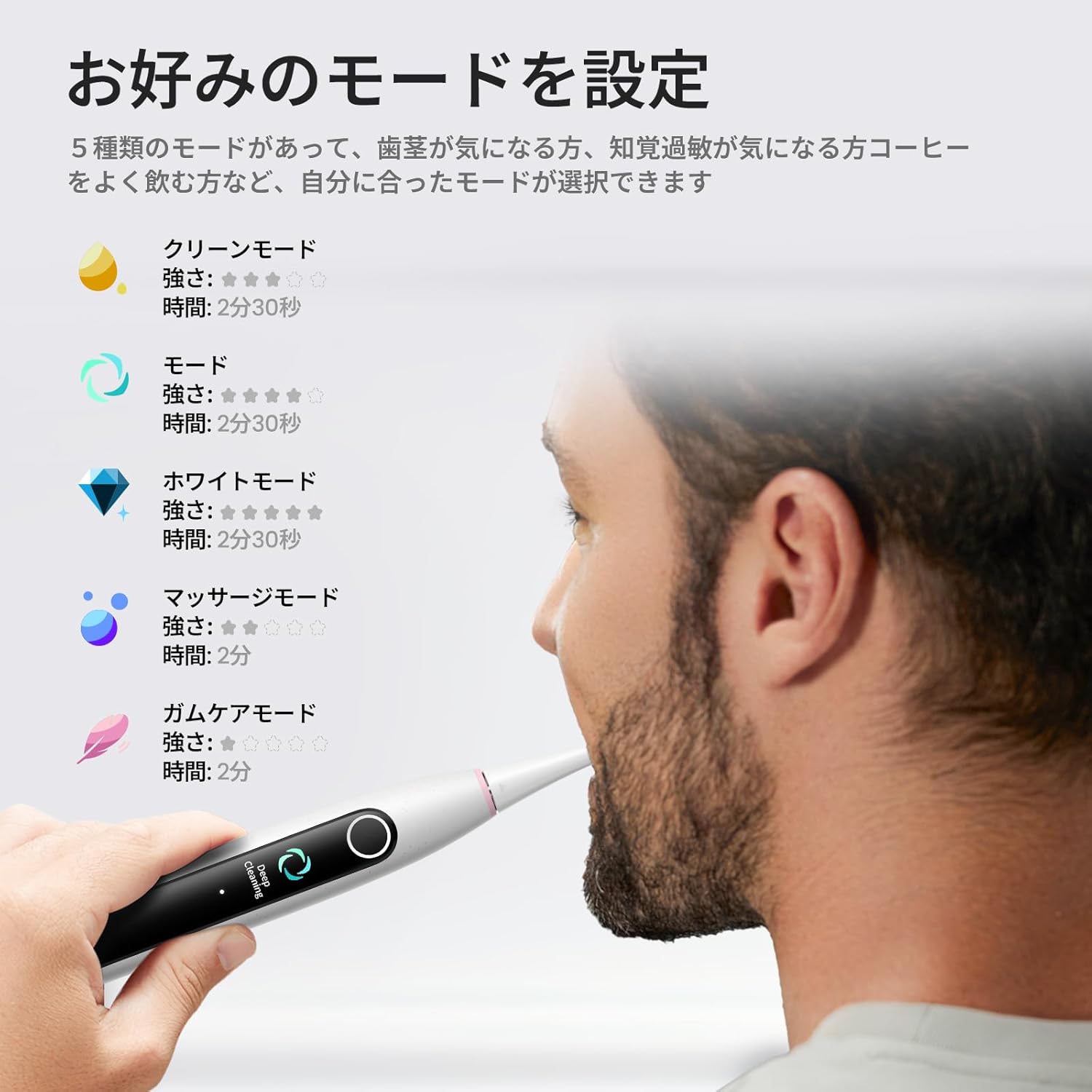
Image: The Oclean X Lite's smart screen displaying the various cleaning modes, illustrating the options available for customized brushing.
3. Brushing Technique and Smart Display
Apply a small amount of toothpaste to the brush head. Place the brush head against your teeth at a slight angle towards the gumline. Move the brush slowly across each tooth, allowing the 40,000 vibrations per minute to clean effectively.
The smart display screen provides real-time feedback on your brushing. It shows brushing zones, helping you ensure no area is missed for a thorough clean. The toothbrush also features a brushing timer and pressure sensor to guide optimal brushing.
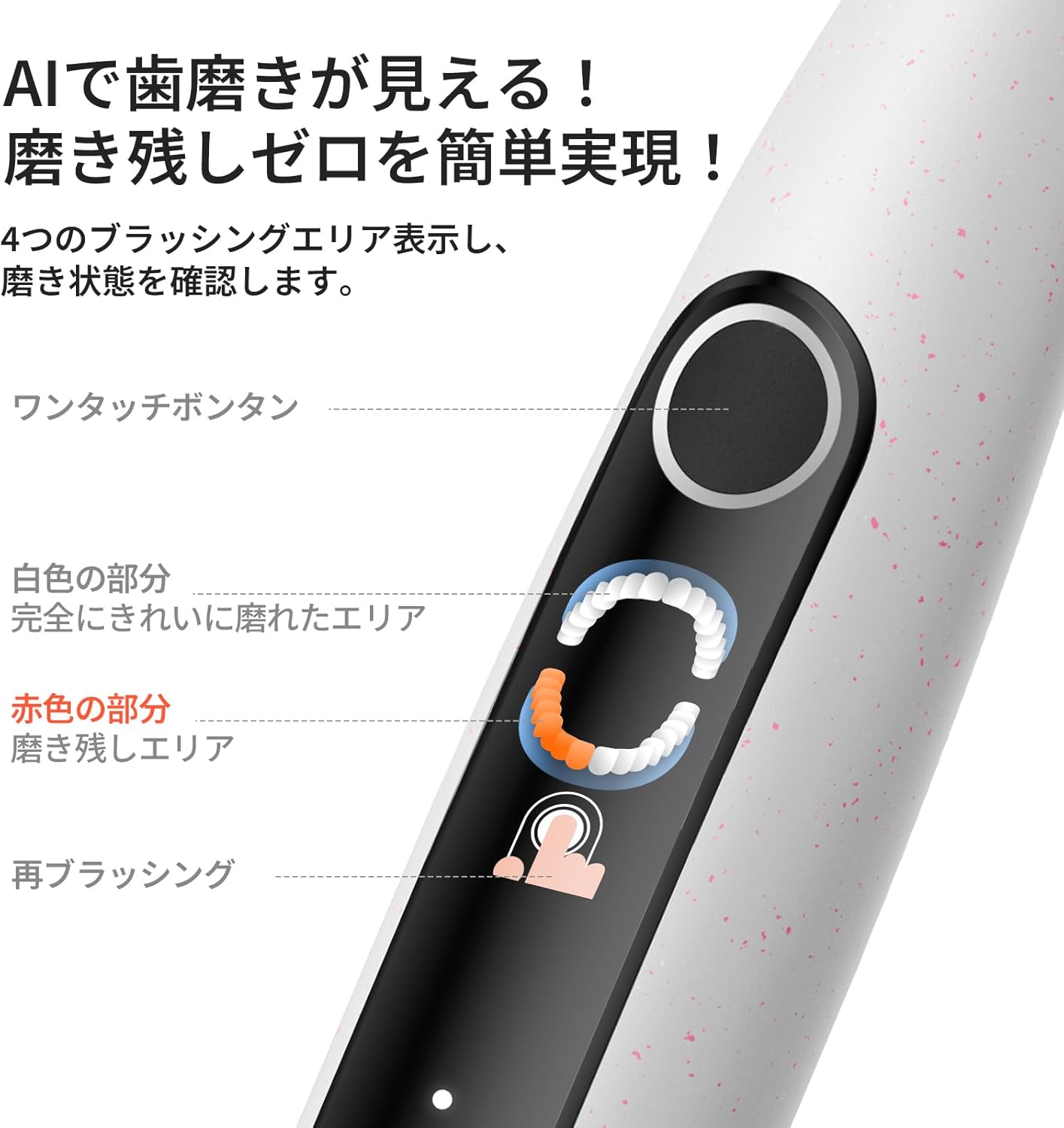
Image: A close-up of the Oclean X Lite's screen showing real-time brushing feedback, indicating areas that have been cleaned and those that require more attention.

Image: An illustration demonstrating the high-frequency sonic vibrations of the Oclean X Lite's bristles, highlighting its powerful cleaning action.
4. Supplementary Brushing Guidance
The Oclean X Lite automatically sets a supplementary brushing guide to target missed areas. After your initial brushing session, the screen may highlight areas that need more attention. With one click, you can activate this guidance to achieve up to 38% more plaque removal for a deeper clean.

Image: A step-by-step visual guide on how the Oclean X Lite provides supplementary brushing guidance to ensure no areas are missed during cleaning.
유지
1. 칫솔 세척
After each use, rinse the brush head thoroughly under running water. You can also detach the brush head and rinse both the head and the handle separately. Wipe the handle with a soft, damp cloth. Do not immerse the entire toothbrush handle in water for extended periods, although it is IPX7 waterproof.
2. 칫솔모 교체
Dentists recommend replacing your toothbrush head every 3 months, or sooner if the bristles become frayed. To replace, simply pull the old brush head off the handle and push a new one into place until it clicks.

이미지: 일러스트레이션 쇼asing different types of Oclean brush heads, including a professional clean brush head, W-shaped brush head, and tongue cleaner, emphasizing their features.
문제 해결
| 문제 | 가능한 원인 | 해결책 |
|---|---|---|
| 칫솔이 켜지지 않습니다. | 배터리가 소진되었습니다. | 제공된 USB-C 케이블을 사용하여 칫솔을 완전히 충전하십시오. |
| 진동이 약하게 느껴집니다. | Low battery or brush head not securely attached. | Recharge the toothbrush. Ensure the brush head is firmly clicked into place. |
| Screen display is not working. | 소프트웨어 오류 또는 배터리 부족. | Try restarting the toothbrush. Ensure it is fully charged. If the issue persists, contact customer support. |
| 칫솔이 사용 중에 멈춥니다. | Battery depleted or automatic timer activated. | Recharge the toothbrush. The toothbrush has a built-in timer; simply restart if you wish to continue brushing. |
명세서
- 모델: X 라이트
- 상표: 오클린
- 진동: 40,000VPM(분당 진동수)
- 청소 모드 : 5 (Daily Clean, Deep Clean, Sensitive, Whitening, Massage)
- 배터리 수명: Up to 30 days (based on typical usage)
- 충전 중: USB Type-C, approx. 3 hours for full charge
- 특별 기능: Smart Screen Display, Brushing Timer, Pressure Sensor, Supplementary Brushing Guidance
- 전원: 배터리 작동식 (12V 배터리 1개 포함)
- 항목 견고성 설명: 중간
- 제조업체: 심천 윈딩 정보기술 유한회사
- ASIN: B0DXZ9PDLC
- 패키지 크기: 8.82 x 3.86 x 1.26인치; 7.05온스
보증 및 지원
For warranty information, product support, or to purchase replacement parts and accessories, please visit the official Oclean website or contact their customer service. Refer to the original product packaging or purchase documentation for specific warranty terms and contact details.
제조업체: 심천 윈딩 정보기술 유한회사
브랜드 스토어: Visit the Oclean Store on Amazon
Ask a question about this manual
Ask about setup, troubleshooting, compatibility, parts, safety, or missing instructions. Manuals+ will review the question and use this page’s manual context to help answer it.