
1. 서론
Welcome to the MCHOSE ACE68 Magnetic Gaming Keyboard user manual. This guide provides detailed instructions for setting up, operating, maintaining, and troubleshooting your new keyboard. The ACE68 is designed for high-performance gaming, featuring magnetic switches, rapid trigger technology, and a compact 65% layout.
2. 제품 오버view
2.1 패키지 내용
- MCHOSE ACE68 Magnetic Gaming Keyboard
- USB-C 케이블
- 사용 설명서(본 문서)
2.2 주요 특징
- 0.01mm 급속 방아쇠 정확도: Adjustable actuation from 0.005mm to 3.4mm for precise and fast key resets.
- 8000Hz 폴링 속도: Ultra-fast 0.1ms report rate for minimal latency.
- Snap Tap & Dynamic Typing: Assign up to four actions to a single key press for complex maneuvers.
- 65% 컴팩트 레이아웃: Space-saving design with 68 keys, ideal for gaming setups.
- PBT 이중사출 키캡: Durable keycaps with an ergonomic Cherry profile.
- StellarVision 2.0 Magnetic Adjustable Switches: Hot-swappable switches with a lifespan of 100 million clicks.
- 엠 허브 Web 운전사: Web-based software for easy configuration and advanced features like RS (Rappy Snappy), DKS (Double KeyStroke), MT (Multi-Tap), TGL (Toggle), and Berserk mode.
- RGB 백라이트: 16 million customizable colors with 22+ preset lighting effects.
2.3 키보드 레이아웃
The MCHOSE ACE68 features a 65% layout with 68 keys. This compact design optimizes desk space while retaining essential keys for gaming and general use.

Image: MCHOSE ACE68 Keyboard Layout and Dimensions. This image illustrates the compact 65% layout of the keyboard, showing its dimensions (32cm length, 11.7cm width, 3.5cm height) and the ergonomic Cherry profile PBT 키캡의 경우.
3. 설정
3.1 키보드 연결
- Locate the USB-C port on the MCHOSE ACE68 keyboard.
- 제공된 USB-C 케이블의 한쪽 끝을 키보드에 연결합니다.
- USB-A 커넥터의 다른 쪽 끝을 컴퓨터의 사용 가능한 USB 포트에 연결하십시오.
- 키보드는 운영체제에서 자동으로 감지됩니다. 기본적인 기능을 사용하기 위해 별도의 드라이버는 일반적으로 필요하지 않습니다.
For advanced customization and features, refer to the "Customization" section for instructions on using the M HUB Web 운전사.
4. 사용 설명서
4.1 기본 사용법
Once connected, the MCHOSE ACE68 functions as a standard QWERTY keyboard. You can begin typing and using it for general computer tasks and gaming.
4.2 기능 키 조합(Fn 레이어)
Due to its compact 65% layout, some functions are accessed via the Fn key in combination with other keys. Specific combinations may vary or be customizable via the M HUB Web 운전사.
- Fn + [키]: Access secondary functions printed on keycaps (e.g., F1-F12, Home, End, Page Up, Page Down, media controls).
- Fn + 화살표 키: Often used for navigation or RGB lighting adjustments.
Refer to the keycap legends for specific Fn combinations.
5. 사용자 정의
The MCHOSE ACE68 offers extensive customization options through its web-based M HUB driver.
5.1 M HUB Web 운전사
The M HUB Web Driver allows you to configure various settings without installing desktop software.
- 키보드가 컴퓨터에 연결되어 있는지 확인하세요.
- 호환되는 파일을 엽니다. web browser (e.g., Opera, Chrome, Firefox) and navigate to the official MCHOSE M HUB web사이트 (특정한 URL not provided, refer to product packaging or official MCHOSE website for the exact link).
- 그만큼 web interface will detect your keyboard, allowing you to adjust settings.
Through the M HUB, you can configure:
- 작동 지점: Adjust the actuation distance for each key from 0.005mm to 3.4mm in 0.005mm increments.
- 빠른 트리거: Enable and fine-tune the rapid trigger function for faster key resets, especially useful in FPS games.
- Snap Tap / Dynamic Typing: Program up to four distinct actions per key press based on pressure or depth.
- 키 리매핑: Reassign key functions, create macros, and set advanced features like RS (Rappy Snappy), DKS (Double KeyStroke), MT (Multi-Tap), and TGL (Toggle).
- RGB 조명: Customize lighting effects, colors, brightness, and speed.
- 찬성files: Create, save, and export multiple configuration profile다양한 게임이나 애플리케이션에 사용 가능.
- 펌웨어 업데이트: Perform firmware updates directly through the web 인터페이스.

Image: Rapid Trigger Accuracy and Low Latency. This graphic illustrates the 0.01mm RT accuracy and ultra-low latency features, showing how key presses are registered and reset almost simultaneously compared to fixed actuation points.

Image: 4-In-1 Action Keys. This image demonstrates the "Snap Tap" or "4-In-1 Action Keys" feature, allowing users to assign up to four distinct actions to a single key press based on the depth of the press.
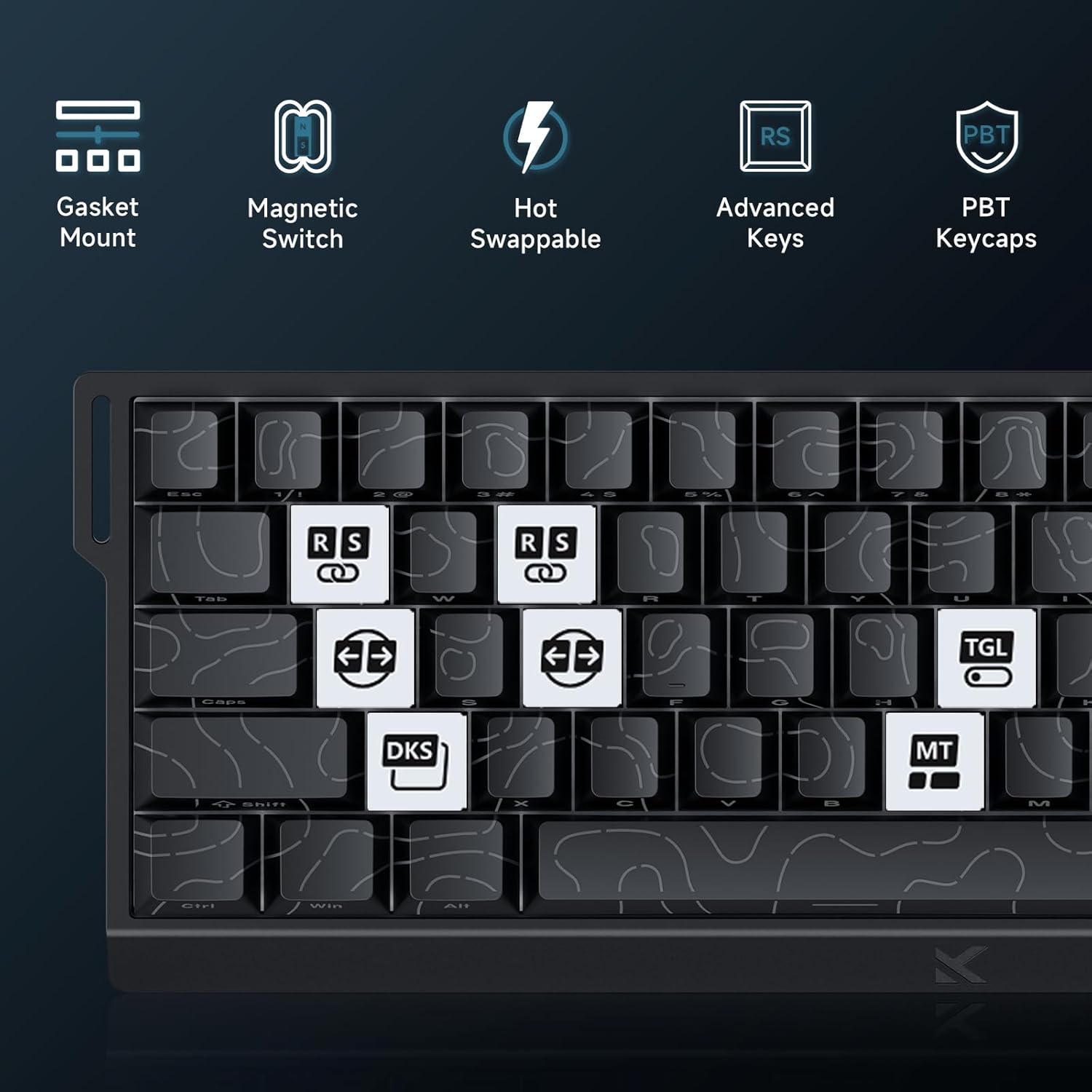
Image: Advanced Key Features. This image highlights various advanced features such as Gasket Mount, Magnetic Switches, Hot-Swappable design, and specific key functions like RS (Rappy Snappy), DKS (Double KeyStroke), MT (Multi-Tap), and TGL (Toggle).
5.2 RGB 조명
The keyboard features per-key RGB backlighting with 16 million colors and over 22 preset lighting effects.
- 온보드 제어: Some basic lighting adjustments (e.g., changing effects, brightness) can be done directly on the keyboard using Fn key combinations. Refer to the keyboard's keycap legends for these shortcuts.
- M HUB Control: For full customization, including per-key lighting, custom effects, and color palettes, use the M HUB Web 운전사.

Image: RGB Lighting Effects. This image showcases the vibrant RGB backlighting of the MCHOSE ACE68 keyboard, highlighting its 22+ preset light effects.
6. 유지관리
6.1 키보드 청소
- 일반 청소: 부드럽고 털이 없는 천을 살짝 사용하세요.amp물이나 순한 세척액을 사용하여 키캡과 케이스를 닦아주세요. 과도한 습기는 피하세요.
- 먼지 제거: 압축 공기를 사용하여 키캡 사이의 먼지와 이물질을 제거합니다.
- 딥 클리닝 : For thorough cleaning, you can remove the keycaps using a keycap puller. Clean the keycaps separately with mild soap and water, ensuring they are completely dry before reattaching.
6.2 키캡 및 스위치 교체
The MCHOSE ACE68 features hot-swappable switches, allowing you to easily replace switches without soldering.
- 키캡 제거: Use a keycap puller to gently pull keycaps straight up.
- 스위치 제거: 스위치 풀러를 사용하여 스위치의 위쪽과 아래쪽 클립을 조심스럽게 잡고 똑바로 당겨 빼냅니다.
- 스위치 설치: Align the pins of the new switch with the holes on the PCB. Gently press the switch down until it clicks into place. Ensure the switch is seated correctly and not bent.
- 키캡 설치: Align the keycap with the switch stem and press down firmly until it is securely attached.

Image: Keyboard Internal Structure and Hot-Swappable Switches. This image provides an exploded view of the keyboard's internal components, including the precision pre-lubricated switches, stability switch plate, and PORON sound dampening, illustrating its hot-swappable design.

Image: Uranus Magnetic eSports Switches. This image details the specifications of the Uranus Magnetic eSports switches, including their actuation range (0.1-3.4mm), total travel (3.4mm), sensitivity (0.005mm), trigger pressure (32 ± 5 gf), and lifespan (100 million clicks).
7. 문제 해결
7.1 일반적인 문제 및 해결 방법
| 문제 | 가능한 원인 | 해결책 |
|---|---|---|
| 키보드가 응답하지 않습니다 | 케이블 연결이 느슨하거나, USB 포트에 결함이 있거나, 드라이버에 문제가 있습니다. |
|
| 키가 등록되지 않거나 두 번 입력됨 | Dust/debris under keycap, switch malfunction, incorrect actuation settings. |
|
| RGB 조명이 작동하지 않거나 올바르지 않습니다. | Software glitch, incorrect settings, power issue. |
|
| 엠 허브 Web Driver not detecting keyboard | Browser incompatibility, connection issue, firewall. |
|
8. 사양
| 특징 | 세부 사항 |
|---|---|
| 상표 | MCHOSE |
| 모델 | 에이스68 |
| 공들여 나열한 것 | 65% (68 keys), QWERTY |
| 스위치 유형 | Uranus Magnetic Standard (StellarVision 2.0 Magnetic Adjustable Switches) |
| 작동 범위 | 0.005 mm to 3.4 mm (adjustable) |
| 폴링 속도 | 8000Hz |
| 보고율 | 0.1밀리초 |
| 키캡 | PBT Double-Shot, Cherry Profile |
| 백라이트 | RGB (16 million colors, 22+ preset effects) |
| 연결성 | 유선(USB-C) |
| 호환 장치 | 컴퓨터 |
| 치수(길이 x 너비 x 높이) | 32cm x 15cm x 3.5cm(12.6인치 x 5.9인치 x 1.4인치) |
| 내부 재료 | 알루미늄, 플라스틱 |
| 특별 기능 | Ergonomic, Backlit, Customizable Keys, Programmable Keys, Hot-Swappable |

Image: 8000 Hz Polling Rate. This image highlights the keyboard's 8000 Hz polling rate, indicating ultra-fast 0.01ms report rate and significantly faster actuation and response times.
9. 보증 및 지원
9.1 제조업체 보증
The MCHOSE ACE68 Magnetic Gaming Keyboard comes with a 2년 제조사 보증. 본 보증은 정상적인 사용 환경에서 발생하는 재료 및 제조상의 결함에 적용됩니다. 보증 청구를 위해 구매 증빙 서류를 보관해 주십시오.
9.2 고객 지원
For technical assistance, troubleshooting, or warranty inquiries, please contact MCHOSE customer support.
- Web대지: 공식 MCHOSE를 방문하세요 website for support resources, FAQs, and contact information. (특정한 URL not provided, refer to product packaging or official MCHOSE web대지)
- 온라인 리소스: Check for updated drivers, firmware, and user guides on the MCHOSE support page.
10. 비디오 자료
No official product videos from the seller were provided in the product data to embed in this manual. Please refer to the manufacturer's official website or YouTube channel for any available video guides or demonstrations.


