
1. 서론
1.1개 제품 이상view
The Rraycom 5MP Wireless Security Camera is a battery-powered, outdoor-ready surveillance device designed for home security. It features 5MP ultra-HD video, a 130° wide field of view, and dual light source night vision for both full-color and infrared options. Equipped with AI motion detection, two-way audio, a siren alarm, and spotlight, it provides comprehensive monitoring and deterrence. The camera supports both cloud and local SD card storage and is compatible with Amazon Alexa.
1.2 주요 특징
- 2.5K (5MP) Ultra-HD Video: Provides clear and detailed surveillance footage.
- 130° 넓은 시야각 View: 사각지대를 최소화하여 더 넓은 범위를 커버합니다.
- Full-Color & Infrared Night Vision: Offers versatile night monitoring options.
- 충전식 배터리: Ensures wire-free operation and flexible placement.
- IP65 방수: 다양한 기상 조건을 견딜 수 있도록 설계되어 야외에서 사용할 수 있습니다.
- PIR Motion Detection with AI Analysis: Accurately detects human movement and sends real-time notifications.
- 양방향 오디오 : Allows for remote communication with visitors or intruders.
- Siren Alarm & Spotlight: Deters unwanted visitors with audible and visual alerts.
- Cloud/SD Card Storage: Offers flexible options for video recording storage.
- 알렉사 통합: Enables voice control for live view 입장.

이미지: 이상view of the Rraycom 5MP Wireless Security Camera and its main features.
1.3 상자 안에는 무엇이 들어있나요?
택배 내용물을 확인해 주세요. 누락된 품목이나 손상된 품목이 있을 경우 고객 지원 센터로 문의해 주세요.
- Rraycom 5MP Wireless Security Camera (x1)
- 마운팅 브래킷(x1)
- Mounting Screws and Wall Anchors (x1 set)
- USB 충전 케이블(x1)
- 사용 설명서(x1)
2. 시작하기: 설정
2.1 카메라 충전하기
Before initial use, fully charge the camera battery. Connect the provided USB charging cable to the camera's charging port and to a standard 5V USB power adapter (not included). The indicator light will show charging status and turn solid when fully charged.
2.2 앱 설치
함께 사용할 앱을 다운로드하세요. VistaFlow, from your mobile device's app store.
- iOS 기기의 경우: 검색 "VistaFlow" in the Apple App Store.
- Android 기기의 경우: 검색 "VistaFlow" in the Google Play Store.
Follow the on-screen instructions to create an account and log in.
2.3 기기 페어링(Wi-Fi 연결)
- 모바일 기기가 인터넷에 연결되어 있는지 확인하십시오. 2.4GHz Wi-Fi 네트워크이 카메라는 5GHz Wi-Fi를 지원하지 않습니다.
- Open the VistaFlow app and tap the "Add Device" or "+" icon.
- 목록에서 카메라 모델을 선택하세요.
- Follow the in-app instructions to power on the camera and put it into pairing mode (usually indicated by a flashing LED).
- Scan the QR code displayed on your phone screen with the camera lens, or follow alternative pairing methods if prompted.
- 연결되면 카메라 이름을 지정하고 설정 과정을 완료하세요.
2.4 카메라 장착
Choose a suitable location for your camera, considering Wi-Fi signal strength, desired viewing angle, and power access for occasional recharging. The camera is IP65 waterproof, making it suitable for outdoor installation.
- 장착 브래킷을 본떠서 드릴 구멍 위치를 표시하십시오.
- 벽돌이나 석고보드에 설치할 경우 구멍을 뚫고 벽 앵커를 삽입하십시오.
- Secure the mounting bracket to the wall or ceiling with screws.
- 카메라를 마운팅 브래킷에 부착하고 최적의 촬영 각도를 위해 각도를 조정하십시오.
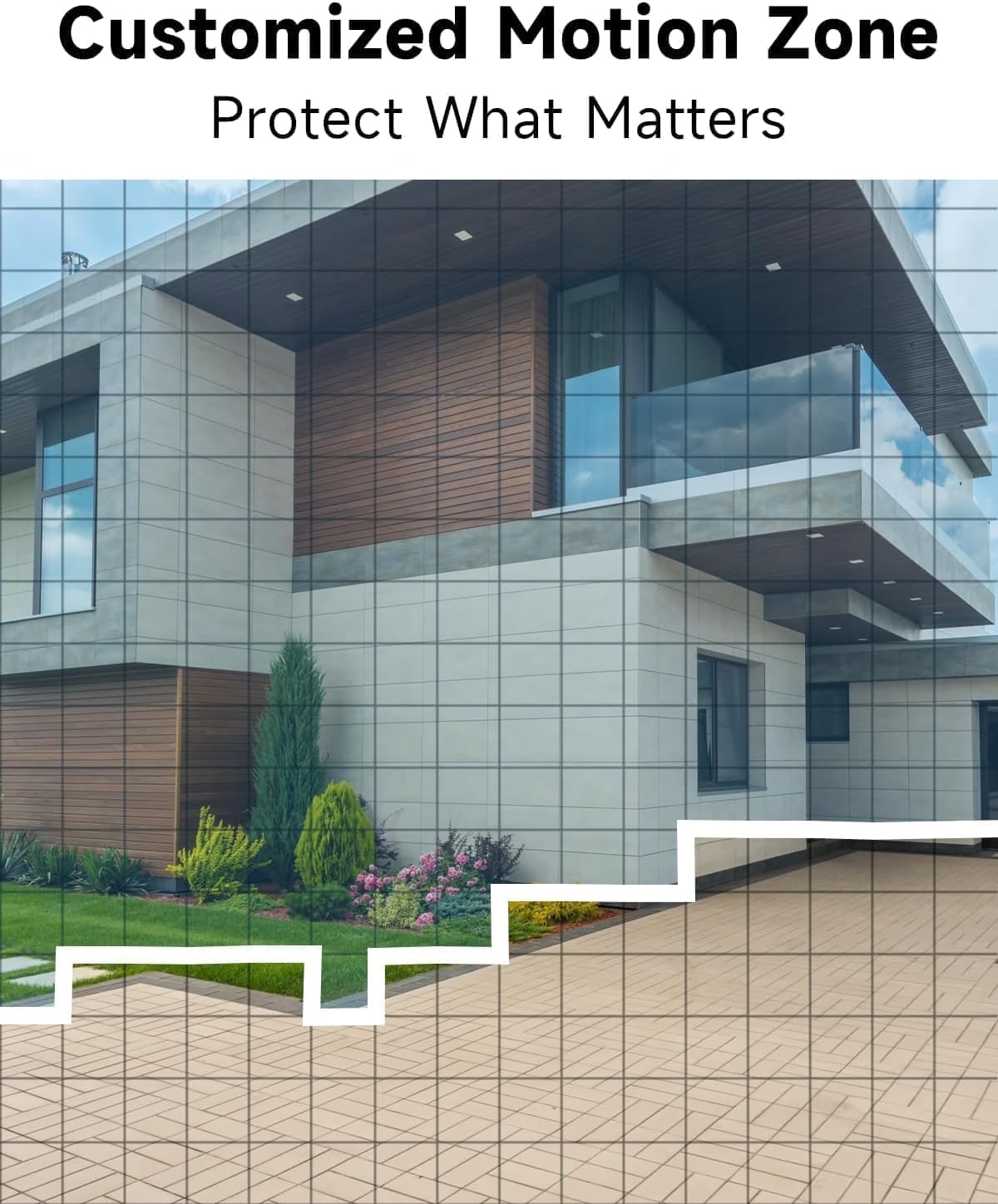
이미지: 전ample of camera placement and customized motion zone setup.
3. 사용 설명서
3.1 라이브 View
Access the VistaFlow app and select your camera to view the live feed. You can pinch to zoom and pan across the 130° wide-angle view. The 5MP resolution provides clear details.

Image: Visual comparison of 5MP versus 1080P video resolution.
3.2 동작 감지 및 AI 분석
The camera uses a PIR sensor and AI analysis to detect motion, specifically identifying persons to reduce false alarms. When motion is detected, you will receive a notification on your phone.
- 맞춤형 활동 구역: In the app settings, you can define specific areas within the camera's view 동작 감지가 활성화되어야 하는 영역을 설정하고, 다른 영역은 무시합니다.
- 감도 조정 : Adjust the motion detection sensitivity to suit your environment and reduce unwanted alerts.

Image: AI Motion Detection in action, highlighting alert options.
3.3 양방향 오디오
The built-in microphone and speaker allow for real-time two-way communication. Tap the microphone icon in the live view 카메라를 통해 말하고, 카메라 위치에서 나오는 소리를 듣는 것입니다.

이미지: 양방향 음성 통신을 시연하는 모습.
3.4 야간 투시경
카메라는 두 가지 야간 시야 모드를 제공합니다.
- 풀컬러 야간 투시경: Utilizes the built-in spotlight to provide color images in low-light conditions.
- 적외선 나이트 비전: 완전한 어둠 속에서 흑백 이미지를 구현하기 위해 적외선 LED를 사용합니다.
앱 설정에서 이러한 모드 간에 전환하거나 자동으로 설정할 수 있습니다.

Image: Comparison of color and infrared night vision modes.
3.5 Siren Alarm & Spotlight
In response to motion detection, or manually activated via the app, the camera can trigger a siren alarm and turn on its spotlight to deter intruders. You can customize the siren sound with pre-recorded messages.
3.6 저장 옵션
카메라는 녹화된 비디오에 대해 두 가지 저장 방법을 지원합니다.
- 클라우드 스토리지: A free rolling 3-day cycled cloud storage service is provided. Optional subscription plans may be available for extended cloud storage.
- 마이크로 SD 카드 : Insert a micro SD card (up to 256GB, not included) into the camera's SD card slot for local storage.
3.7 알렉사 통합
The Rraycom camera is compatible with Amazon Alexa. To enable this feature:
- 모바일 기기에서 Alexa 앱을 여세요.
- Go to "Skills & Games" and search for "VistaFlow".
- Enable the skill and link your VistaFlow account.
- 장치를 검색합니다.
You can then use voice commands such as: "Alexa, show me the [camera name]" to view 호환되는 Alexa 기기(예: Echo Show)에서 실시간 영상을 시청할 수 있습니다.
4. 유지관리
4.1 배터리 관리
The camera is powered by a rechargeable battery. Battery life varies based on usage, motion detection frequency, and environmental factors.
- 충전재: When the battery level is low, you will receive a notification via the app. Disconnect the camera from its mount and charge it using the provided USB cable.
- 배터리 수명 최적화: Reduce motion detection sensitivity, shorten recording duration, and minimize live view access to extend battery life.
4.2 청소
Periodically clean the camera lens and body to ensure optimal performance.
- Use a soft, dry, lint-free cloth to wipe the lens. For stubborn smudges, a slightly damp 천을 사용한 후 마른 천을 사용할 수 있습니다.
- 카메라 바디를 광고로 닦으세요amp 옷감. 가혹한 화학 물질이나 연마성 세제를 사용하지 마십시오.
5. 문제 해결
5.1 일반적인 문제 및 해결 방법
| 문제 | 가능한 해결책 |
|---|---|
| 카메라가 Wi-Fi에 연결되지 않음 | Ensure your Wi-Fi is 2.4GHz. Check Wi-Fi signal strength at the camera's location. Restart your router and the camera. Re-attempt pairing in the app. |
| 동작 감지가 작동하지 않거나 오경보가 너무 많습니다. | Check motion detection settings in the app. Adjust sensitivity. Define activity zones to exclude irrelevant areas. Ensure camera lens is clean. |
| 화질이 나쁘다 | Ensure the camera lens is clean. Check Wi-Fi signal strength. Ensure the camera is set to 5MP resolution in app settings if available. |
| 배터리가 충전되지 않음 | Ensure the USB cable is securely connected. Try a different USB power adapter. Check if the charging port is clean and free of debris. |
| Cannot hear or speak through two-way audio | 휴대폰과 앱의 볼륨 설정을 확인하세요. 앱에 마이크 및 스피커 권한이 부여되었는지 확인하세요. |
6. 기술 사양
| 특징 | 사양 |
|---|---|
| 해결 | 5MP (2.5K QHD) |
| 분야 View | 130° |
| 연결성 | Wi-Fi(2.4GHz만 해당) |
| 전원 | 배터리 구동 |
| 내후성 | IP65 방수 |
| 나이트 비전 | Full-Color, Infrared |
| 오디오 | 2-웨이 오디오 |
| 동작 감지 | PIR with AI Analysis (Person Detection) |
| 저장 옵션 | Cloud (3-day free rolling), Micro SD Card (up to 256GB) |
| 스마트 홈 통합 | 아마존 알렉사 |
| 호환 장치 | iOS, 안드로이드 |
| 실내/실외 사용 | 집 밖의 |
7. 보증 및 고객 지원
7.1 보증 정보
Rraycom products come with a limited warranty. Please refer to the warranty card included in your package or visit the official Rraycom web자세한 보증 약관은 해당 사이트에서 확인하세요.
7.2 고객 지원
If you encounter any issues or have questions regarding your Rraycom 5MP Wireless Security Camera, please contact our customer support team. Contact information can be found on the Rraycom web사이트 또는 제품 포장.