
1. 서론
The DJI Air 3S Drone with RC 2 Fly More Combo is an advanced aerial photography platform designed for capturing high-quality images and videos. It features a dual-camera system, extended flight time, and comprehensive safety mechanisms. This manual provides essential information for the safe and effective setup, operation, and maintenance of your DJI Air 3S drone.
2. 상자 안에 무엇이 들어있나요?
패키지에 모든 구성품이 들어 있는지 확인하세요.
- DJI 에어 3S 드론
- RC 2 조종기
- 3 x Intelligent Flight Battery
- 128GB Extreme microSD Memory Card
- High USB Speed Memory Card Reader
- 숄더백
- Drone Photography Backpack
- 3 x Extra Pair of Low-Noise Propellers
- 짐벌 프로텍터
- USB-C PD 케이블
- ND Filter Set (ND8, ND32 & ND128)
- 배터리 충전 허브
- 드론 착륙장
- Camera Lens Cleaning Kit
- 6-Slot Memory Card Wallet
- CPS 2 Year Warranty
- 번들 잇 베터 렌즈 클로스

Image: Contents of the DJI Air 3S Drone Fly More Combo package, including drone, controller, batteries, and accessories.
영상: 언박싱 및 전체 리뷰view of the DJI Air 3S Fly More Combo components, demonstrating what is included in the package.
Video: A user's experience with the DJI Air 3S, showcasin그 특징과 구성 요소를 살펴보겠습니다.
3. 설정
3.1 드론 펼치기
- 드론을 평평하고 안정적인 표면에 놓으십시오.
- Gently unfold the front arms, then the rear arms, until they lock into position.
- 모든 프로펠러가 단단히 부착되어 있고 손상이 없는지 확인하세요.

Image: The DJI Air 3S Drone fully unfolded, ready for flight, showing its front camera and sensors.
Video: Demonstrates the process of unfolding the DJI Air 3S drone's arms and preparing it for flight.
3.2 Preparing the RC 2 Remote Controller
- Remove the control sticks from their storage slots on the controller.
- Screw the control sticks into the designated ports.
- Ensure the controller is fully charged using the provided USB-C PD cable.
Video: A demonstration of setting up the RC 2 remote controller, including attaching the control sticks.
3.3 배터리 설치 및 충전
- Insert a fully charged Intelligent Flight Battery into the drone's battery compartment until it clicks into place.
- Use the Battery Charging Hub to charge multiple batteries efficiently. Connect the hub to a suitable power adapter (not included) and then to a power source.
3.4 초기 전원 켜기 및 활성화
- Press the power button on the drone once, then press and hold for two seconds to power on. Repeat for the remote controller.
- Follow the on-screen instructions on the RC 2 controller to activate the drone and link it to your DJI account. Ensure a stable internet connection for activation.
4. 드론 작동
4.1 기본 비행 제어
Familiarize yourself with the RC 2 controller's joysticks and buttons. The left stick typically controls altitude and yaw, while the right stick controls forward, backward, and sideways movement. Always perform a pre-flight check before takeoff.
4.2 카메라 작동
The DJI Air 3S features a dual-camera system: a 1" CMOS 24mm 50MP wide-angle camera and a 1/1.3" CMOS 70mm 48MP medium telephoto camera. It supports 4K/60fps HDR video recording and 48MP still images. Use the DJI Fly app on the RC 2 controller to switch between cameras, adjust settings, and initiate recording or photo capture.
- 마스터샷: Automated flight and shooting sequences for cinematic results.
- QuickShot: Pre-programmed flight paths for dynamic video clips.
- 2.7K 세로 촬영: Available on both cameras for social media content.

Image: The DJI Air 3S Drone in mid-flight, showcasing its design and operational capabilities.
4.3 안전 기능
The Air 3S is equipped with advanced safety features:
- Omnidirectional Obstacle Sensing (APAS): Detects obstacles in all directions, providing comprehensive protection.
- Advanced Return-to-Home (RTH): The drone can intelligently return to its takeoff point, utilizing a forward-facing LiDAR sensor for obstacle avoidance during nighttime RTH.
- Non-GPS RTH: If GPS is unavailable, the drone can retrace its flight path to return safely.
4.4 O4 HD Video Transmission
The O4 HD video transmission system, with its six-antenna array, provides a stable 1080p/60fps live feed up to 20 km, ensuring clear and reliable communication between the drone and controller.
비디오: A review of the DJI Air 3S Drone with RC 2 Fly More Combo, highlighting its operational features and performance.
5. 유지관리
5.1 배터리 관리
- Charge batteries fully before each flight.
- 장기간 사용하지 않을 경우 배터리는 약 50~60% 충전 상태로 보관하십시오.
- 충전 및 보관 시 극한의 온도 변화를 피하십시오.
5.2 프로펠러 검사 및 교체
- Before each flight, inspect propellers for cracks, bends, or damage.
- Replace damaged propellers immediately using the extra pairs provided. Follow the drone's manual for correct installation.

이미지: 상단 view of the DJI Air 3S Drone, showing its propellers and overall design.
5.3 Gimbal and Lens Care
- Always attach the gimbal protector when transporting or storing the drone.
- Use the provided lens cleaning kit to keep the camera lenses free from dust and smudges.
5.4 펌웨어 업데이트
Regularly check for and install firmware updates via the DJI Fly app to ensure optimal performance, new features, and enhanced safety.
6. 문제 해결
This section addresses common issues you might encounter. For detailed troubleshooting, refer to the official DJI support resources.
- GPS 신호 없음: 높은 건물이나 강한 자기 간섭이 없는 열린 공간에서 비행하세요.
- Remote Controller Disconnection: Ensure the drone and controller are within range and there is no significant interference. Re-link the controller if necessary.
- 장애물 회피 경고: Pay attention to on-screen warnings and adjust flight path. Ensure sensors are clean and unobstructed.
- 짐벌 오작동: Check for physical obstructions. Restart the drone and controller. If the issue persists, contact support.
- 배터리가 충전되지 않음: Verify the charging cable and adapter are functioning correctly. Ensure batteries are inserted properly into the charging hub.
7. 사양
| 특징 | 사양 |
|---|---|
| 상표 | 디제이(DJI) |
| 모델명 | 에어 3S |
| 특별 기능 | Omnidirectional Obstacle Sensing, Six-Antenna Array |
| 비디오 캡처 해상도 | 4K |
| 효과적인 스틸 해상도 | 50 MP (Wide-angle), 48 MP (Telephoto) |
| 최대 비행 시간 | 최대 45분 |
| 최대 범위 | 20 Kilometers (O4 HD Transmission) |
| 배터리 유형 | 리튬 이온 |
| 품목 무게 | 151 Grams (Drone only, approximate) |
| 품목 치수(L x W x H) | 12.8"L x 10.5"W x 4.2"H (Unfolded, approximate) |
| 연결 기술 | USB, 와이파이 |
| 광센서 기술 | CMOS |
8. 보증
This product includes a CPS 2 Year Warranty, providing coverage for protection, repair, and replacement services. Please refer to the warranty documentation included in your package for full terms and conditions.
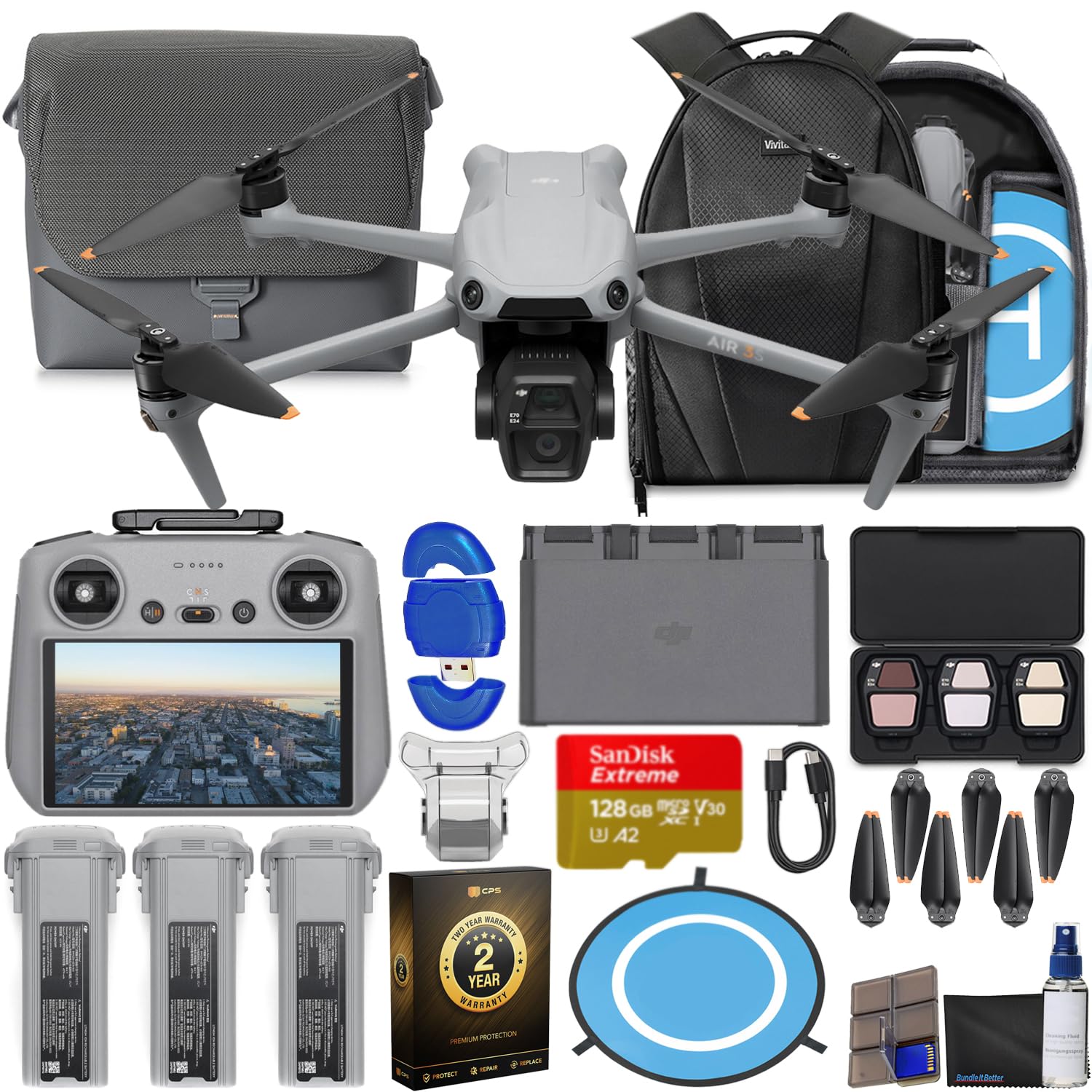
Image: The CPS 2 Year Warranty box, indicating premium protection, repair, and replacement services.
9. 지원
For further assistance, detailed user guides, firmware downloads, and technical support, please visit the official DJI support web이 사이트에서 FAQ와 커뮤니티 포럼을 통해 추가적인 도움을 받으실 수 있습니다.
공식 DJI Web대지: www.dji.com/support