
ITOTIN ITO-LD-C60B
ITOTIN LD-C60B 60W Bi-Color LED Video Light Instruction Manual
Model: ITO-LD-C60B | Brand: ITOTIN
1. 서론
This manual provides detailed instructions for the safe and effective use of your ITOTIN LD-C60B 60W Bi-Color LED Video Light. This compact and powerful COB light is designed for photography and video recording, offering adjustable color temperature, brightness, and various lighting effects. Please read this manual thoroughly before operation and retain it for future reference.
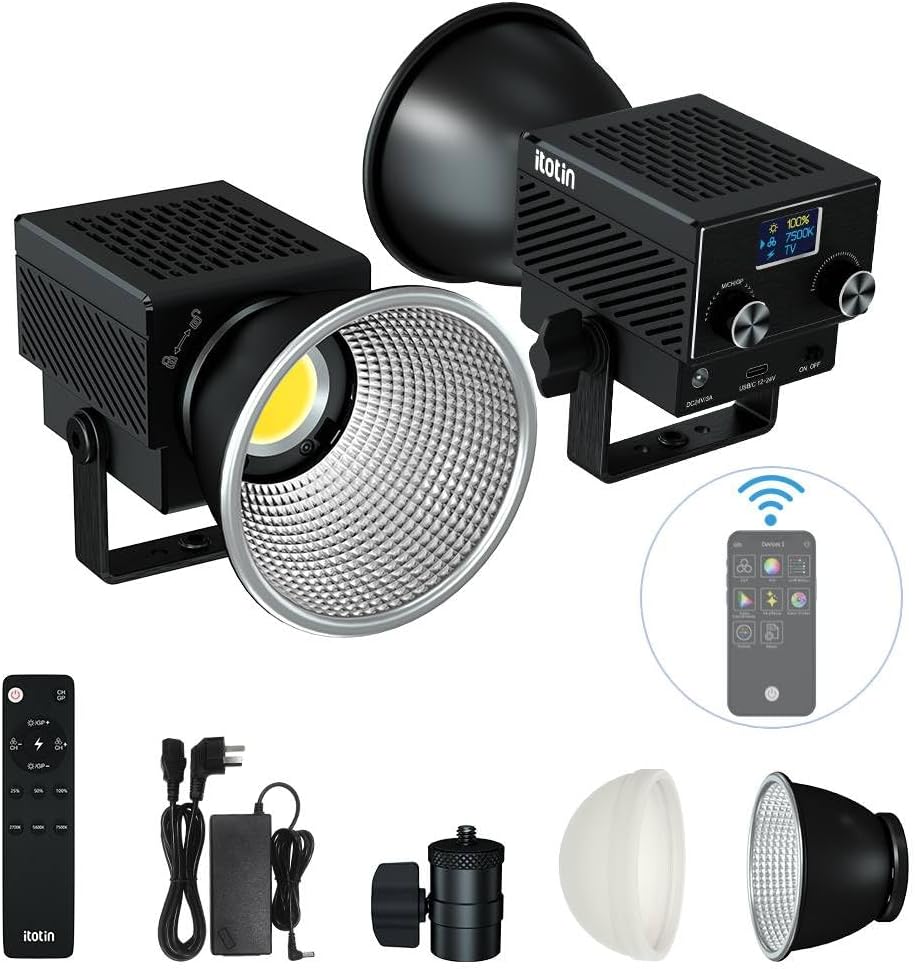
Figure 1.1: The ITOTIN LD-C60B 60W Bi-Color LED Video Light.
2. 패키지 내용
아래 나열된 모든 품목이 패키지에 포함되어 있는지 확인하세요.
- 1 x LED Video Light (Main Body)
- 1 x Silicone Diffuser
- 1 x Spotlight Lamp그늘
- 1 x 전원 공급 어댑터
- 1 x 원격 제어
- 1 x Bayonet Mount Adapter
- 1 x Ball Head (Light Holder)
- 1 x 사용 설명서

그림 2.1: 패키지에 포함된 기본 품목.
3. 제품 오버view
The ITOTIN LD-C60B is a compact and powerful 60W bi-color LED video light. It features a high color rendering index (CRI > 96, TLCI > 97) for accurate color reproduction and a wide color temperature range from 2700K to 7500K.

Figure 3.1: Product diagram showing components and dimensions.
3.1 주요 특징
- 고성능 출력: 60W for bright illumination.
- 이중 색상 온도: Adjustable from 2700K (warm) to 7500K (cool).
- 높은 색상 정확도: CRI > 96, TLCI > 97 for natural light.
- 컴팩트한 디자인: Weighs approximately 0.55 lbs (250 grams) and measures 4 x 2.9 x 2.7 inches (102 x 74 x 68 mm).
- 8가지 조명 효과: Includes Lightning, Thunder, TV, Candlelight, Ambulance, Fire Truck, Explosion, and Fireworks.
- 제어 옵션: Supports 2.4G remote control and mobile APP wireless control.
- 효율적인 냉각: Equipped with an ultra-quiet cooling fan to extend lifespan and prevent noise interference.
- 조정 가능한 각도: The integrated bracket allows for 180° rotation.

Figure 3.2: The light features a strong reflector for concentrated illumination, 60W output, and a high color rendering index (Ra>96+).

Figure 3.3: The light's palm-sized design makes it compact and portable.
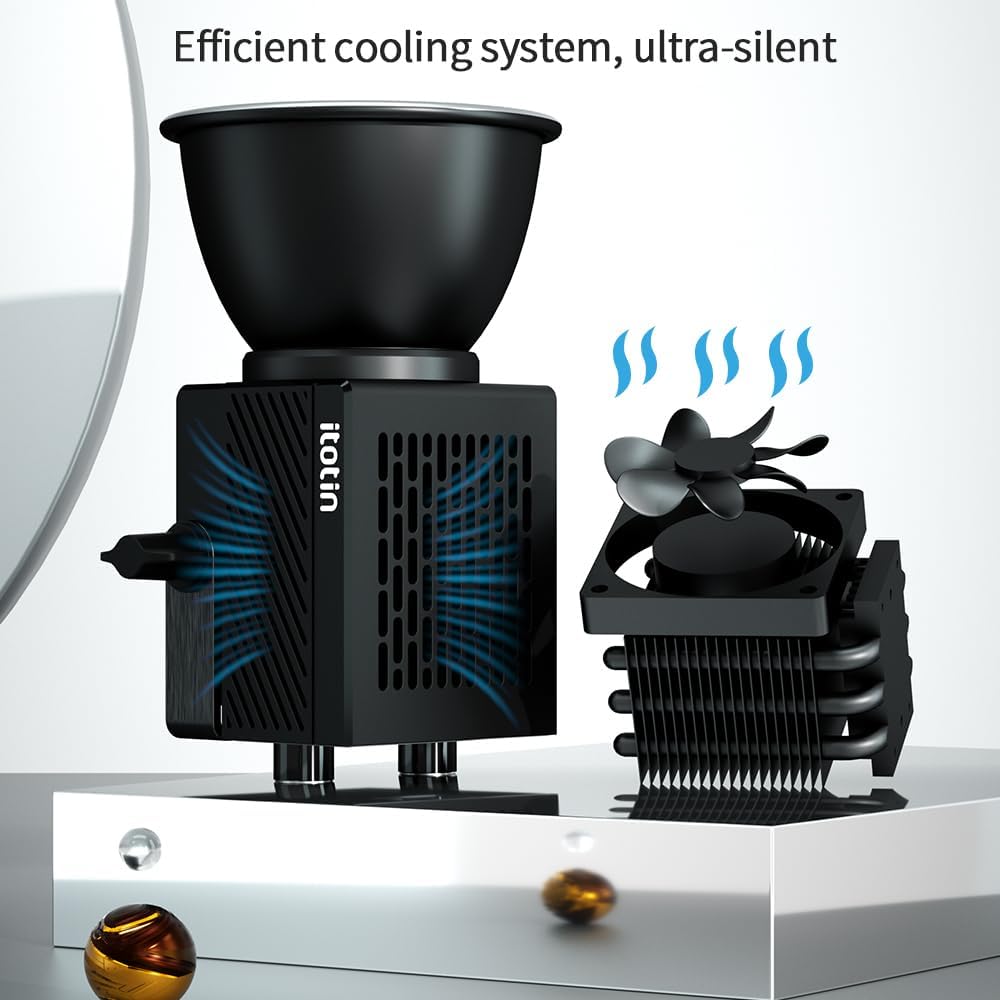
Figure 3.4: The ultra-silent cooling fan ensures efficient heat dissipation.
4. 설정
4.1 액세서리 부착하기
- Mounting the Ball Head: Attach the ball head (light holder) to a compatible light stand or tripod.
- 라이트 장착: Secure the ITOTIN LD-C60B main body onto the ball head. Tighten the bracket fixing twist to secure the light's position.
- L 붙이기amp음영:
- For diffused light, attach the silicone diffuser to the front of the COB LED.
- For concentrated light, attach the spotlight lampshade to the front of the COB LED.
- 전원 연결: Connect the power supply adapter to the DC IN port on the light and plug it into a power outlet.
5. 사용 설명서
5.1 전원 켜기/끄기
Locate the power switch on the side of the light. Flip the switch to the "ON" position to power on the device. Flip to "OFF" to power off.
5.2 밝기 및 색온도 조절
The light can be adjusted using the control knobs on the unit, the 2.4G remote control, or the mobile application.
5.2.1 On-Unit Control
- 밝기 조정: Rotate the "Value knob" to adjust the brightness from 0% to 100%. The current brightness level will be displayed on the screen.
- 색온도 조정: Press the "Function/channel/group knob" to switch to color temperature adjustment mode. Rotate the "Value knob" to select a color temperature between 2700K and 7500K.
5.2.2 원격 제어 작동
Use the provided 2.4G remote control to adjust settings wirelessly. Refer to the remote control's specific instructions for pairing and function details.
5.2.3 모바일 앱 제어
Download the dedicated mobile application (details typically found in the included manual or product packaging). Follow the app's instructions to connect and control the light via Bluetooth or Wi-Fi.
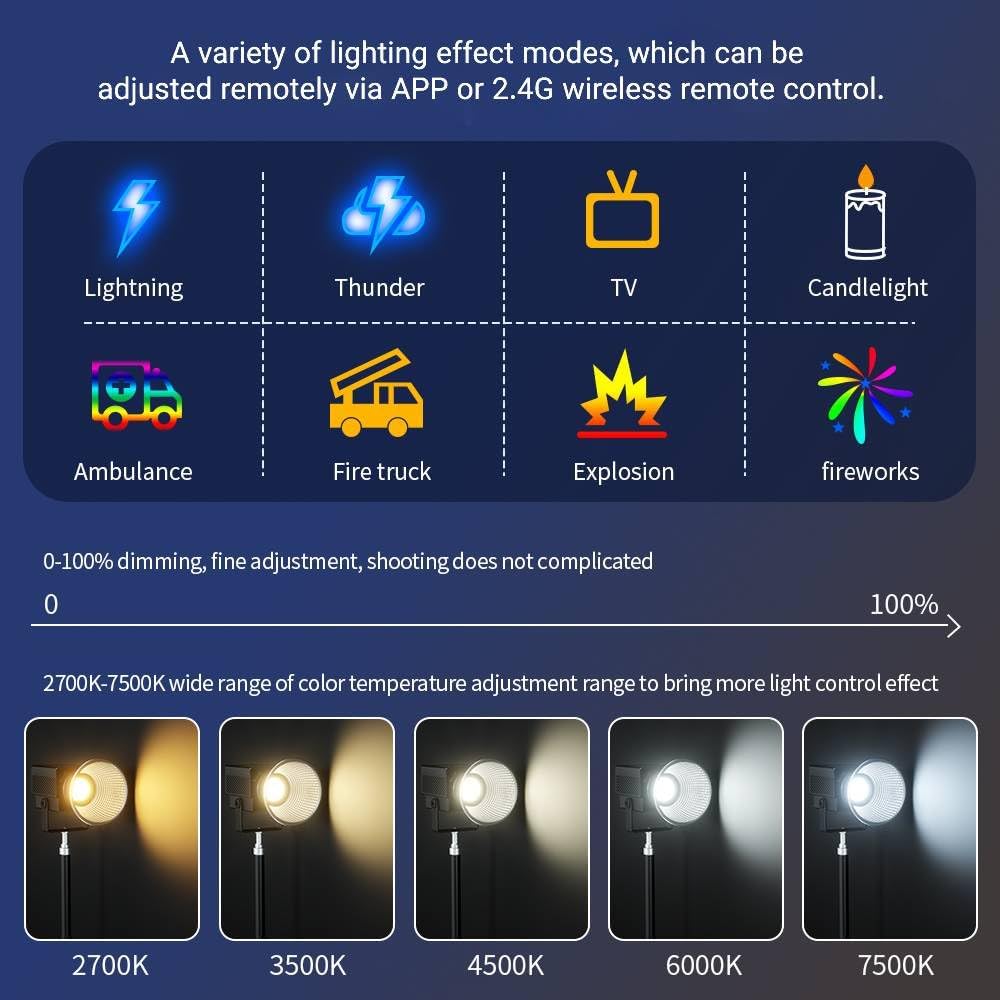
Figure 5.1: The light offers a wide range of color temperatures (2700K-7500K) and 8 special lighting effects, adjustable via APP or 2.4G remote control.
5.3 특수 조명 효과
The light features 8 pre-programmed lighting effects:
- 번개
- 우뢰
- TV
- 촛불
- 구급차
- 소방차
- 폭발
- 불꽃
To activate and cycle through these effects, use the "Function/channel/group knob" on the unit or the corresponding buttons on the remote/app.
6. 유지관리
- 청소: Use a soft, dry cloth to clean the light's surface. Do not use abrasive cleaners or solvents.
- 저장: Store the light in a cool, dry place away from direct sunlight and moisture when not in use.
- 열 발산: Ensure the cooling fan vents are not obstructed during operation to maintain optimal performance and lifespan.
7. 문제 해결
| 문제 | 가능한 원인 | 해결책 |
|---|---|---|
| 조명이 켜지지 않습니다. | 전원이 안 들어옴, 연결 불량, 전원 어댑터 불량. | Check power cable connection. Ensure power outlet is functional. Try a different power adapter if available. |
| 리모컨이 작동하지 않습니다. | Batteries depleted, out of range, not paired. | Replace remote control batteries. Ensure remote is within operating range. Re-pair the remote control with the light according to its instructions. |
| 예상치 못하게 불빛이 깜빡이거나 어두워집니다. | Unstable power supply, overheating, internal fault. | Ensure stable power supply. Check for obstructions around cooling vents. If problem persists, contact customer support. |
| APP control not connecting. | Bluetooth/Wi-Fi off, app not updated, light not in pairing mode. | Ensure Bluetooth/Wi-Fi is enabled on your device. Update the app to the latest version. Follow app instructions to put the light into pairing mode. |
8. 사양
| 특징 | 세부 사항 |
|---|---|
| 모델 번호 | ITO-LD-C60B |
| 전력 출력 | 60와트 |
| 색온도 범위 | 2700K - 7500K |
| 연색지수(CRI) | >96 |
| TLCI(텔레비전 조명 일관성 지수) | >97 |
| 밝기 조정 | 0% - 100% |
| 조명 효과 | 8 (Lightning, Thunder, TV, Candlelight, Ambulance, Fire Truck, Explosion, Fireworks) |
| 제어 방법 | 2.4G 원격 제어, 모바일 앱 |
| 치수(길이 x 너비 x 높이) | 4 x 2.9 x 2.7인치(102 x 74 x 68mm) |
| 무게 | 0.55파운드(250그램) |
| 재료 | 알루미늄 합금 |
9. 보증 및 지원
For warranty information and technical support, please refer to the official ITOTIN web웹사이트를 방문하거나 판매점에 문의하세요. 보증 청구를 위해 구매 증빙 자료로 구매 영수증을 보관하세요.
제조업체: 이토틴
첫 이용 가능 날짜: 10년 2025월 XNUMX일
Ask a question about this manual
Ask about setup, troubleshooting, compatibility, parts, safety, or missing instructions. Manuals+ will review the question and use this page’s manual context to help answer it.