
소개
This manual provides detailed instructions for the setup, operation, and maintenance of your Twisted Minds TM-FUSION-X 4-in-1 Gaming Accessories Kit. This kit includes an 87-key wired mechanical keyboard, a 4-level adjustable DPI gaming mouse, an LED gaming headset, and a large fabric gaming mousepad. Please read this manual carefully before using the product to ensure optimal performance and longevity.

Image: The complete Twisted Minds 4-in-1 Gaming Accessories Kit, including the mechanical keyboard, gaming mouse, LED headset, and large mousepad, set up with a monitor for a full gaming experience.
설치 지침
1. Mechanical Keyboard
Connect the USB cable of the mechanical keyboard to an available USB port on your computer. The keyboard is plug-and-play and should be recognized automatically by most Windows operating systems (XP/Vista/7/8/10).

이미지: 클로즈업 view of the Twisted Minds 87-key wired mechanical keyboard, highlighting its compact design, blue mechanical switches, and dynamic RGB backlighting.
2. Gaming Mouse
Connect the USB cable of the gaming mouse to an available USB port on your computer. The mouse is also plug-and-play. Drivers will install automatically.

Image: The Twisted Minds gaming mouse, showcasing its ergonomic design, 4-level adjustable DPI button, and vibrant 7-color LED lighting effects.
3. LED Gaming Headset
Connect the headset's 3.5mm audio jack(s) and USB cable (for LED lighting) to the corresponding ports on your computer. Ensure the microphone is positioned correctly for clear communication.
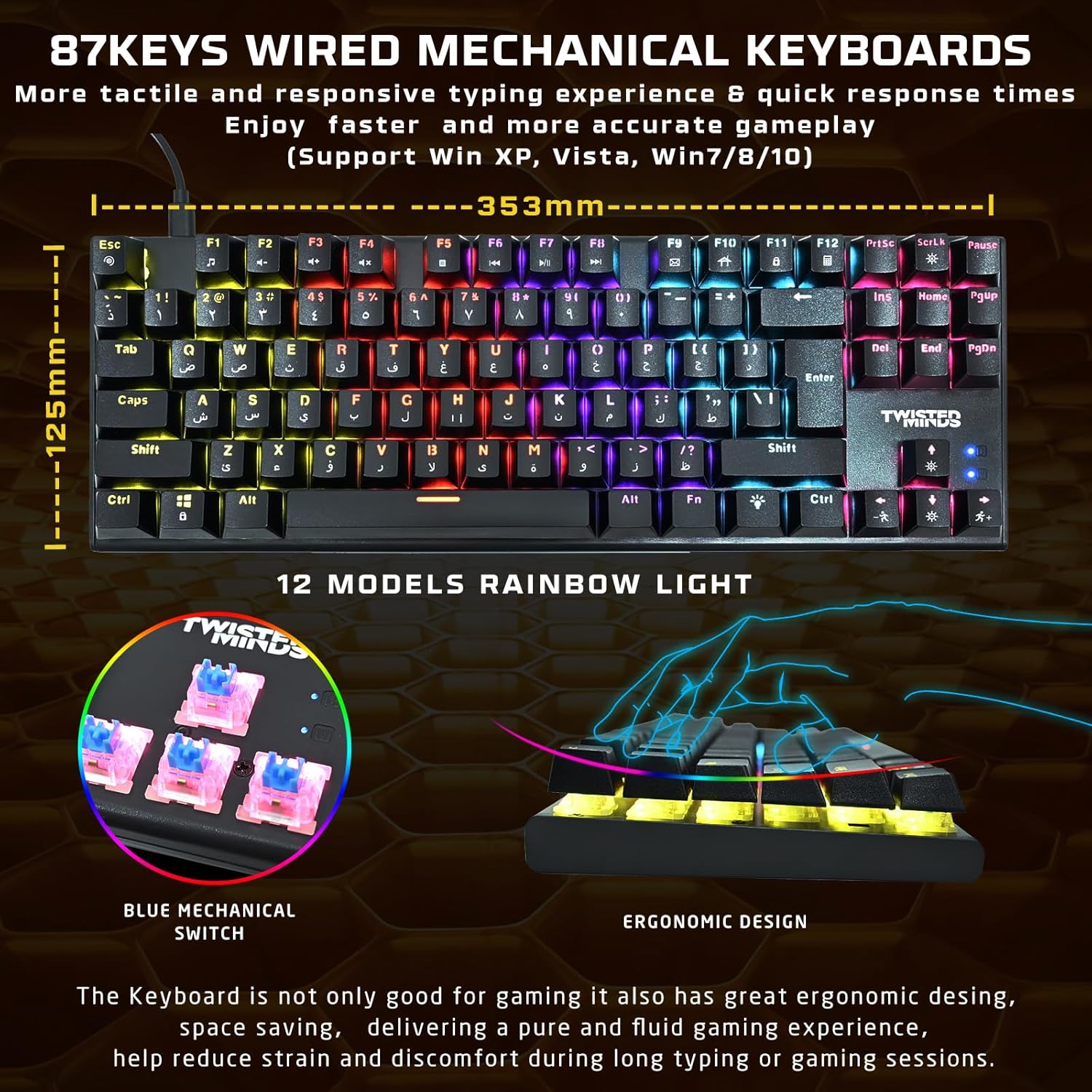
Image: The Twisted Minds LED gaming headset, featuring static rainbow RGB lighting on the earcups, a flexible omnidirectional microphone, and soft PU ear covers for comfort.
4. Gaming Mousepad
Unroll the mousepad and place it on a flat, clean surface. Ensure there are no obstructions for optimal mouse movement.

Image: The Twisted Minds comfy fabric gaming mousepad, illustrating its large dimensions (900mm x 400mm), 3mm extra-thick design, durable edge, RoHS certification, and natural rubber base.
작동 지침
1. Mechanical Keyboard
- 키 스위치: The keyboard features 87 tactile blue mechanical switches for responsive feedback.
- RGB 조명: Cycle through 12 dynamic rainbow lighting modes using the dedicated lighting control keys (refer to keyboard layout for specific keys, often Fn + a specific key).
- 안티 고스팅: The 25-key anti-ghosting feature ensures that multiple simultaneous key presses are registered accurately during intense gaming.
2. Gaming Mouse
- DPI 조정: Use the DPI button (usually located behind the scroll wheel) to switch between 4 sensitivity levels: 1200, 1800, 2400, and 3600 DPI. Adjust according to your preference for different games or tasks.
- LED 조명: The mouse features a 7-color LED backlight that changes automatically.
3. LED Gaming Headset
- 오디오: Enjoy rich stereo sound through the 40mm drivers.
- 마이크로폰: The flexible omnidirectional microphone allows for clear voice communication. Adjust its position for optimal pickup.
- 볼륨 조절: Use the in-line volume control to adjust audio levels.
- LED 조명: The headset features static rainbow RGB LED lights, powered via the USB connection.
유지
- 청소: Use a soft, dry cloth to clean the surfaces of the keyboard, mouse, and headset. For the keyboard, you may use compressed air to remove dust and debris from between the keys.
- 마우스패드: The fabric mousepad can be gently wiped with a damp 필요하면 천과 순한 비누로 닦아주세요. 사용 전 완전히 자연 건조하세요.
- 액체를 피하세요: Do not immerse any electronic components in water or other liquids.
- 저장: 사용하지 않을 때는 액세서리를 직사광선과 극한 온도 변화를 피해 서늘하고 건조한 곳에 보관하십시오.
문제 해결
키보드/마우스가 반응하지 않습니다
- Ensure the USB cables are securely connected to your computer.
- 다른 USB 포트에 연결해 보십시오.
- 컴퓨터를 다시 시작하세요.
헤드셋 오디오 문제
- Check if the 3.5mm audio jack(s) are fully plugged into the correct ports (audio out, mic in).
- Verify that the in-line volume control is not set to minimum or muted.
- Ensure the headset is selected as the default audio device in your computer's sound settings.
LED 조명이 작동하지 않음
- For the keyboard, ensure you have cycled through the lighting modes using the dedicated keys.
- For the headset, ensure the USB cable is connected to provide power for the LEDs.
- Check USB connections for all devices.
명세서
| 요소 | 사양 |
|---|---|
| 건반 | ABS material, 87 keys, 12 RGB modes, 25-key anti-ghosting. Compatible with Win XP/Vista/7/8/10. QWERTY layout. |
| 생쥐 | 1200-3600 DPI (4 levels), 7-color LED, 1.5m braided cable. |
| 헤드폰 | φ40mm drivers, Omnidirectional microphone (φ60 × 50mm), Static RGB light. |
| 마우스패드 | 900 × 400 × 3mm (Length × Width × Height), Rubber base + Fabric surface. |
| 연결성 | USB(유선) |
| 색상 | 검은색 |
| 전원 | 코드식 전기 |
| 필요한 배터리 | 아니요 |
보증 정보
Please refer to the warranty card included with your product or contact your retailer for specific warranty terms and conditions. Keep your proof of purchase for any warranty claims.
지원하다
For technical assistance or further inquiries, please contact the Twisted Minds customer support team or your product retailer. Contact information can typically be found on the product packaging or the official Twisted Minds web대지.
제품 데모
비디오: 제품 시연 영상asing the features and functionality of the Twisted Minds 4-in-1 Gaming Accessories Kit.