
1. 서론
Thank you for choosing the PRUVEEO Waterproof Rear Camera. This manual provides essential information for the proper installation, operation, and maintenance of your new rear camera. Please read this manual thoroughly before use to ensure optimal performance and longevity of the product.
2. 패키지 내용
Verify that all items listed below are present in your package. If any items are missing or damaged, please contact PRUVEEO customer support.
- 1x PRUVEEO Rear Camera (1080P)
- 1x 연장 케이블
- Installation Tools (screws)

그림 2.1: Package contents including the rear camera, extension cable, and installation tools.
3. 호환성
This PRUVEEO Rear Camera is specifically designed for use with the following PRUVEEO Dash Camera models:
- PRUVEEO D90-4CH
- PRUVEEO A6
- PRUVEEO D88
It features a Type-C port for connection to the compatible dash camera. Ensure your dash camera model is listed above for proper functionality.
4. 주요 특징
- 1080P 해상도: Provides clear and detailed video recording.
- 방수 디자인 : Engineered to withstand various weather conditions.
- 광각 렌즈: Offers an expansive field of view for comprehensive rear coverage.
- C 형 포트 : Ensures secure and reliable connection to compatible dash cameras.
- 간편한 설치: Designed for straightforward setup with included tools and extension cable.

그림 4.1: The rear camera demonstrating its waterproof feature.

그림 4.2: Visual representation of the camera's key features: waterproof, high resolution, car rear view, and wide angle.
5. 설정 및 설치
Proper installation is crucial for optimal performance. It is recommended to have this camera installed by a professional if you are unfamiliar with vehicle wiring.
5.1 설치 위치 선택
The rear camera is typically mounted on the rear license plate area or near the rear window. Choose a location that provides a clear, unobstructed view of the road behind your vehicle. Ensure the camera is centered for the best perspective.
5.2 카메라 장착
- Clean the chosen mounting surface thoroughly to ensure proper adhesion or secure screw placement.
- Attach the camera bracket to the vehicle using the provided screws. Ensure it is securely fastened and angled correctly.
- Adjust the camera angle to achieve the desired rear view.
5.3 배선 연결
- Connect the rear camera's cable to the provided extension cable.
- Carefully route the extension cable from the rear of the vehicle to the location of your PRUVEEO dash camera. Ensure the cable is tucked away safely to avoid interference with vehicle operations and to protect it from damage.
- Connect the Type-C end of the extension cable to the designated rear camera input port on your compatible PRUVEEO dash camera (D90-4CH, A6, or D88).
- Once connected, power on your dash camera to verify the rear camera feed is displayed correctly.
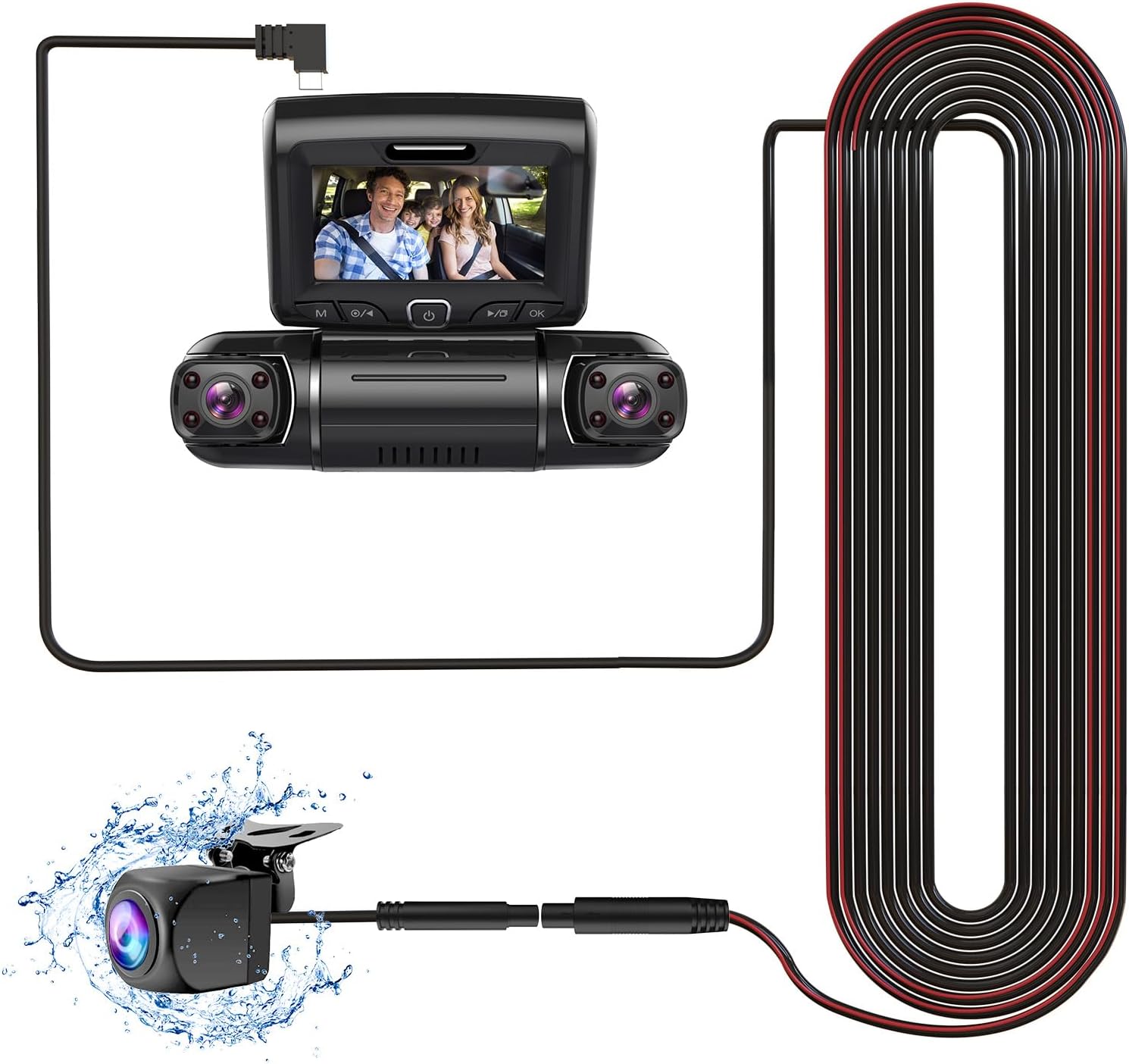
그림 5.1: Connection diagram of the rear camera to a compatible dash camera.

그림 5.2: The PRUVEEO Rear Camera and its extension cable.
6. 운영
Once properly installed and connected to a compatible PRUVEEO dash camera, the rear camera operates in conjunction with the dash camera system.
- 자동 녹음: The rear camera will automatically begin recording when the dash camera is powered on, typically when the vehicle's ignition is turned on.
- 디스플레이 모드 : Refer to your specific PRUVEEO dash camera's manual for instructions on how to switch between front camera view, 후방 카메라 view, or picture-in-picture display modes.
- Parking Monitor (if supported by dash cam): If your dash camera supports a parking monitor feature, the rear camera will also record events when the vehicle is parked, depending on the dash camera's settings.
For detailed operational instructions, please consult the user manual of your PRUVEEO D90-4CH, A6, or D88 dash camera.
7. 유지관리
정기적인 유지 관리는 후방 카메라의 수명과 최적의 성능을 보장합니다.
- 렌즈 세척: 카메라 렌즈는 주기적으로 부드러운 천으로 닦아주세요.amp 먼지, 흙 또는 물 얼룩을 제거하기 위한 천으로 막힘을 방지합니다. view. Avoid abrasive materials or harsh chemicals.
- 케이블 검사: Regularly check the connection cable for any signs of wear, damage, or loose connections. Ensure it remains securely tucked away.
- 장착 확인: Verify that the camera remains securely mounted and its angle has not shifted due to vibrations or impacts.
- 소프트웨어 업데이트: Ensure your main dash camera firmware is up-to-date, as this may affect the performance of connected accessories like the rear camera.
8. 문제 해결
If you encounter issues with your PRUVEEO Rear Camera, refer to the following common problems and solutions.
| 문제 | 가능한 원인 | 해결책 |
|---|---|---|
| 후면 카메라에서 이미지가 촬영되지 않았습니다. |
|
|
| 이미지가 흐릿하거나 불분명합니다 |
|
|
| 간헐적 연결 |
|
|
If the problem persists after attempting these solutions, please contact PRUVEEO customer support for further assistance.
9. 사양
| 특징 | 세부 사항 |
|---|---|
| 모델 호환성 | PRUVEEO D90-4CH, A6, D88 Dash Cameras |
| 해결 | 1080피 |
| 방수 등급 | Yes (Specific IP rating not provided, but described as "Waterproof") |
| 커넥터 유형 | 타입-C(USB) |
| 광센서 기술 | CMOS |
| 렌즈 유형 | 와이드 앵글 |
| 광학 센서 크기 | 1/4 인치 |
| 제품 치수 | 11.02"L x 5.7"W x 1.95"H (Packaging dimensions, actual camera dimensions not specified, using packaging for reference) |
| 품목 무게 | 10.6 ounces (Packaging weight, actual camera weight not specified, using packaging for reference) |
10. 보증 및 지원
For information regarding warranty coverage, technical support, or to purchase replacement parts, please contact PRUVEEO customer service.
Please refer to the official PRUVEEO web최신 연락처 정보와 보증 세부 사항은 해당 사이트나 구매 문서를 참조하세요.