
1. 서론
Thank you for choosing the SANNCE 16-Channel 8MP NVR Wireless Security Camera System. This system is designed to provide comprehensive surveillance for your home, office, or supermarket, offering high-resolution video, advanced detection capabilities, and convenient remote access. This manual provides essential information for the proper installation, operation, and maintenance of your security system.
2. 안전 정보
- 모든 전원 연결이 단단히 고정되어 있고 장치에 적합한 정격 용량인지 확인하십시오.
- Do not expose the NVR or cameras to extreme temperatures, humidity, or corrosive environments beyond their specified operating conditions.
- NVR을 직사광선이 비치는 곳이나 열원 근처에 두지 마십시오.
- Keep the system away from water and other liquids.
- Only use the power adapters provided with the system.
- 기기를 분해하거나 개조하지 마십시오. 모든 서비스는 자격을 갖춘 전문가에게 맡기십시오.
- Install cameras in locations where they are protected from physical damage.
3. 패키지 내용
아래 나열된 모든 품목이 패키지에 포함되어 있는지 확인하세요.
- 1 x NVR (Network Video Recorder)
- 4 x Wireless IP Cameras
- 1 x USB 마우스
- 5 x Power Adapters (1 for NVR, 4 for Cameras)
- 4 x Antennas (for cameras)
- 1 x Cat5e Ethernet Cable (3.3ft/1m)
- 4 x Surveillance Signs
- 1 x 빠른 시작 가이드
- 5 x Mounting Screws Bags

Image: All components included in the SANNCE NVR security camera system package, including the NVR, four cameras, power adapters, mouse, cables, and mounting hardware.
4. 시스템 오버view
4.1 NVR 기능
- 16-Channel support for multiple cameras.
- Supports up to 8MP resolution for recording and playback.
- Advanced H.264+ video encoding for efficient storage.
- Dual-band WiFi (2.4/5.8 GHz) for stable wireless connection.
- Local storage via HDD (up to 8TB, not included) and optional cloud storage.
- Compatible with Alexa for smart voice control.
4.2 카메라 기능
- 8MP high-definition video capture.
- IP66 weatherproof rating for outdoor use (-20℃ to 60℃ operating temperature).
- Infrared (IR) night vision up to 95 feet and full-color night vision up to 33 feet.
- Intelligent human motion detection.
- 양방향 오디오 통신.

Image: An 8MP SANNCE security camera system providing surveillance for a house, highlighting 10 meters of full-color night vision capability.

Image: A SANNCE camera with IP66 weatherproofing, shown operating effectively in rainy conditions and capable of withstanding temperatures from -20°C to 60°C.
5. 설정 가이드
5.1 물리적 설치
- NVR 배치: Place the NVR in a central location, ideally near your internet router, to ensure optimal wireless signal strength for all cameras. Ensure adequate ventilation.
- 카메라 배치 : Mount cameras in desired surveillance areas. Consider the wireless range (up to 1000 feet in open environments) and potential obstructions. Ensure cameras have a clear line of sight to the NVR for best performance. Use the provided mounting screws.
- 안테나 설치: Screw the antennas onto the designated ports on each camera.
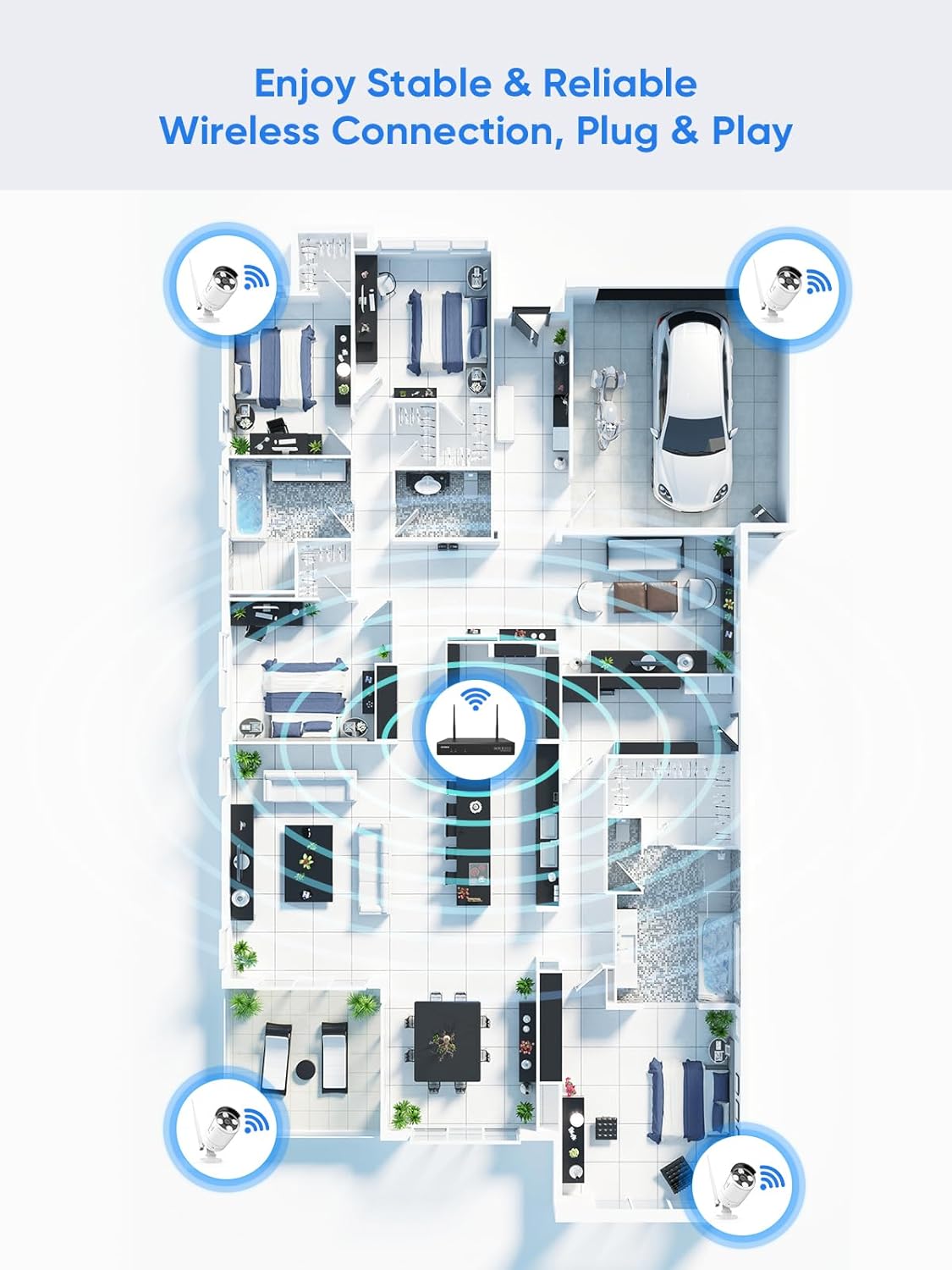
Image: A floor plan illustrating the recommended placement of wireless cameras and the NVR to achieve stable and reliable wireless connectivity throughout a property.
5.2 전원 켜기
- Connect the NVR to a power outlet using its dedicated power adapter.
- Connect each camera to a power outlet using its dedicated power adapter.
- Connect the NVR to a monitor via HDMI or VGA cable (not included) and connect the USB mouse to the NVR.
5.3 초기 구성
- Follow the on-screen prompts to complete the initial setup wizard, including language selection, time zone, and password creation.
- The cameras should automatically pair with the NVR. If not, refer to the Quick Start Guide for manual pairing instructions.
- Connect the NVR to your router using the provided Ethernet cable for internet access, enabling remote view알림 및 알림 기능.
6. 사용 설명서
6.1 시스템 액세스
- 로컬 액세스: Use the connected monitor and USB mouse to navigate the NVR interface directly.
- 원격 접속(앱): Download the SANNCE mobile application from your device's app store. Register an account and add your NVR by scanning the QR code or entering the device ID.
- Remote Access (PC/Web): Install the SANNCE client software on your computer or access the NVR via a web 브라우저가 IP 주소를 사용합니다.

Image: The SANNCE security system interface displayed on a smartphone, tablet, laptop, and desktop monitor, demonstrating remote viewing capabilities and integration with Alexa.
6.2 라이브 View 그리고 녹음
From the NVR interface or mobile app, you can view live feeds from all connected cameras. The system supports various recording modes:
- 연속 녹화 : 24시간 내내 기록합니다.
- 모션 감지 녹화: 움직임이 감지될 때만 녹화합니다.
- Human Detection Recording: Records specifically when human shapes are detected, reducing false alarms.
- 예약 녹화 : Records during specified time intervals.
- Alarm Activated Recording: 알람 이벤트가 발생할 때 기록합니다.

Image: An illustration of SANNCE's intelligent human detection feature, showing how it customizes video recording and enables 24/7 monitoring based on human presence, alongside icons for continuous, human, motion, and timer video recording.
6.3 Playback and Notifications
- 재생: 기록된 foo에 액세스tage through the NVR or app. Use the timeline to select specific dates and times for review.
- 양방향 대화: Utilize the camera's built-in microphone and speaker to communicate with individuals near the camera via the mobile app.
- 알림: Enable app notifications and email alerts to receive instant warnings when motion or human detection events occur.

Image: A delivery person at a door, with a smartphone displaying a SANNCE app notification for human shape detection, indicating a parcel delivery.
7. 유지관리
- 청소: 카메라 렌즈는 부드러운 천으로 정기적으로 닦아주세요.amp 선명한 화질을 위해 천을 사용하십시오. 강한 화학 약품은 사용하지 마십시오.
- 펌웨어 업데이트: Check the SANNCE official website or app periodically for firmware updates to ensure optimal performance and security. Follow the provided instructions carefully for updates.
- 스토리지 관리: Monitor the NVR's hard drive status. The system typically overwrites the oldest footage when the drive is full. Consider backing up important recordings regularly.
8. 문제 해결
- 비디오 출력 없음: Check NVR power, monitor connection, and input source. Ensure cameras are powered on and paired.
- 무선 신호 불량: Relocate NVR or cameras to reduce obstructions. Ensure antennas are securely attached. Consider using a WiFi extender if necessary.
- 원격으로 접속할 수 없습니다: Verify NVR is connected to the internet. Check app settings and ensure port forwarding (if required by your network setup) is correctly configured on your router.
- 허위 모션 경고: Adjust motion detection sensitivity and detection zones in the NVR settings to minimize unwanted triggers from trees, shadows, or small animals.
- 야간 투시경 문제: Ensure the camera lens is clean. Check for obstructions blocking the IR illuminators.
9. 사양
| 특징 | 사양 |
|---|---|
| 모델 번호 | N98WHG0-94FC |
| 상표 | 산 네스 |
| NVR 채널 | 16개 채널 |
| 비디오 해상도 | 최대 8MP(4K) |
| 비디오 인코딩 | H.264 + |
| 연결성 | Wireless (Dual-band 2.4/5.8 GHz WiFi) |
| 무선 범위 | Up to 1000 ft (open environment) |
| 카메라 방수 등급 | IP66 |
| 카메라 작동 온도 | -20℃ ~ 60℃ |
| 나이트 비전 | IR up to 95 ft, Full-color up to 33 ft |
| 스토리지 지원 | Up to 8TB HDD (not included), Cloud Storage |
| 전원 | Electric Cable (via included adapters) |
| NVR 크기 | 30.48 x 30.48 x 20.32cm |
| NVR Weight | 3.22kg |
10. 보증 및 지원
For warranty information, technical support, or service inquiries, please refer to the warranty card included in your product packaging or visit the official SANNCE website. You may also find additional resources, FAQs, and contact information on their support pages.