
1. 중요한 안전 정보
제품을 작동하기 전에 모든 지침을 주의 깊게 읽어 주십시오. 나중에 참조할 수 있도록 이 설명서를 보관하십시오.
- 제빙기가 안정적이고 평평한 표면에 놓여 있는지 확인하세요.
- 환기구를 막지 마십시오.
- Connect to a grounded power outlet only.
- 처음 사용하기 전에 냉매가 안정될 수 있도록 최소 24시간 동안 기기를 똑바로 세워 두십시오.
- 식수만 사용하세요.
2. 제품 오버view
The Coolski Commercial Under Counter Ice Maker Machine (Model IM-55BS) is designed for high-volume ice production, suitable for both commercial and home use. It features a durable stainless steel construction, an intuitive LCD control panel, and an automatic self-cleaning function.

The ice maker produces up to 130 pounds of ice per day with a 30-pound storage capacity.
3. 설정 및 설치
Proper installation is crucial for optimal performance and longevity of your ice maker. This unit can be installed as a built-in, freestanding, or under-counter appliance.
3.1 포장 풀기 및 배치
- 모든 포장재를 조심스럽게 제거하세요.
- 기계를 평평하고 안정적인 표면에 놓으세요.
- Allow at least 1 inch of clearance around the unit for proper ventilation.
- Keep the unit upright for a minimum of 24 hours before plugging it in.

The ice maker supports built-in, freestanding, and under-counter installations.
3.2 물 및 배수 연결
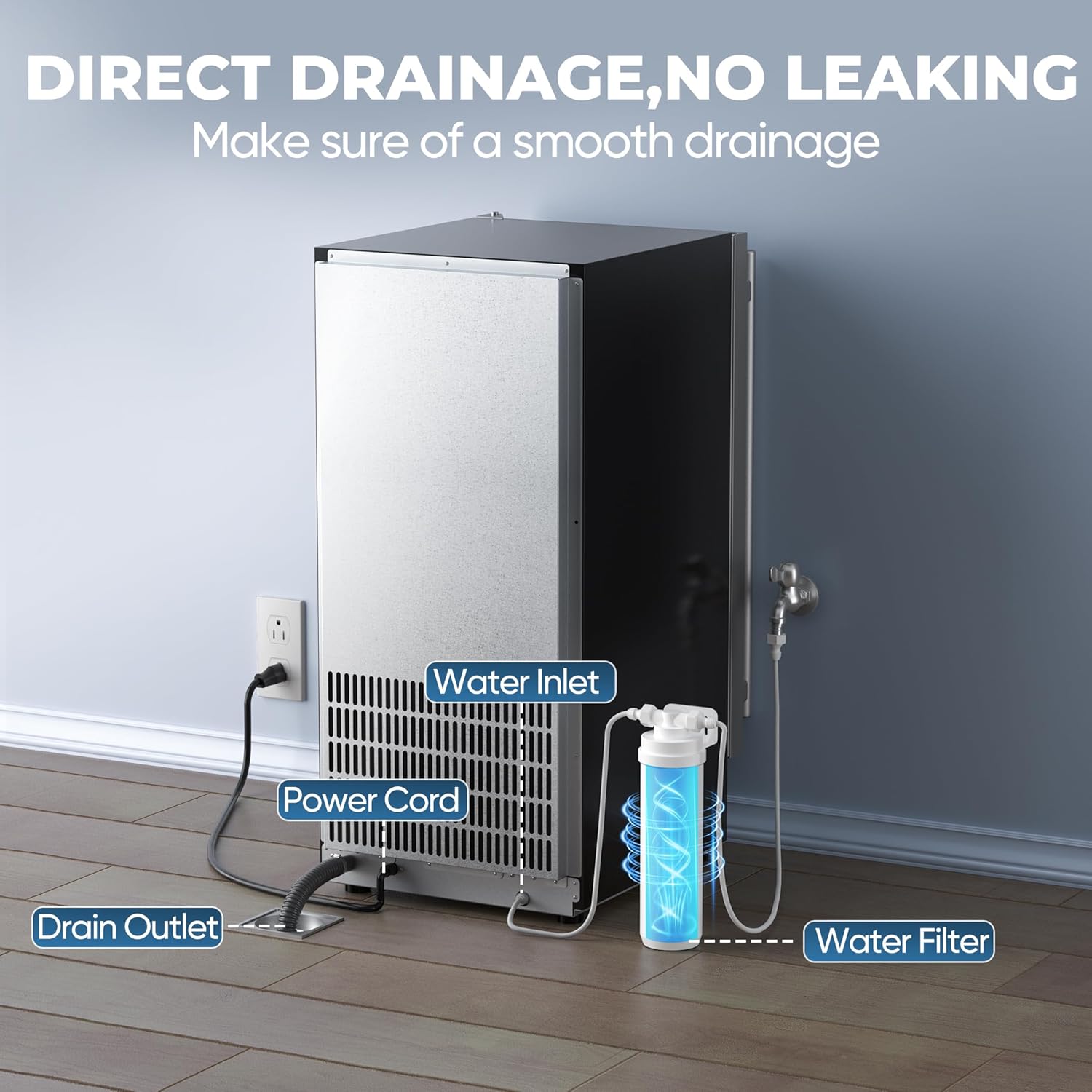
The ice maker requires a continuous water supply and a gravity drain connection.
- Connect the provided water inlet hose to a potable water supply.
- Connect the drain hose to a floor drain or suitable drainage system. Ensure a downward slope for gravity drainage.
- The unit includes an inline water filter to improve water quality.

Illustration of the water inlet, power cord, and drain outlet connections at the rear of the unit.
3.3 전기 연결
Plug the power cord into a grounded electrical outlet. Refer to the specifications for voltag요구사항
4. 사용 설명서
Your Coolski ice maker is designed for user-friendly operation via its LCD digital control panel.
4.1 제어판 기능

The LCD control panel displays status and allows for mode selection and ice thickness adjustment.
- 모드 버튼: 다양한 작동 모드를 순환합니다.
- 클린 버튼: Initiates the self-cleaning cycle (press and hold for 3 seconds).
- 위/아래 버튼: Adjust ice cube thickness.
- 지표: Displays for 'Making Ice', 'Fall Ice', 'Ice Full', 'Temp. Mode', 'Hight Temp.', and 'Water Short'.
4.2 초기 작동
- After connecting water and power, press the 'Mode' button to start ice production.
- The machine will automatically fill with water and begin the ice-making cycle.
- Ice cubes are produced in cycles of 11 to 20 minutes, yielding 32 clear ice cubes per cycle.
4.3 얼음 두께 조정
You can customize the thickness of the ice cubes to suit your needs:

Adjust ice thickness for various uses: Thin (8 mins for smoothies), Medium (12 mins for drinks), Large (16 mins for seafood).
- Use the 'Up' and 'Down' buttons on the control panel to select your desired ice thickness.
- Thinner ice cubes are produced faster (approx. 8 minutes), while thicker cubes take longer (approx. 16 minutes).
5. 유지관리 및 청소
정기적인 유지보수는 제빙기의 수명 연장과 위생적인 작동을 보장합니다.
5.1 자체 세척 기능
The unit features an automatic self-cleaning function:
Activate the Ultra Clean Mode for automatic internal cleaning.
- To activate, press and hold the 'Clean' button for 3 seconds.
- The machine will perform a cleaning cycle, circulating water and draining impurities.
- It is recommended to run the self-cleaning cycle regularly, especially if the machine has been idle for an extended period or if ice quality declines.
5.2 외부 청소
- 부드러운 천과 중성세제로 외관을 닦아주세요.
- 연마성 세척제나 용제를 사용하지 마십시오.
5.3 정수필터 교체
The inline water filter helps remove sediment and improve ice taste. Replace the filter periodically as recommended by the manufacturer or if you notice a decrease in water flow or ice quality.
6. 문제 해결 가이드
제빙기에 문제가 발생하면 다음의 일반적인 문제와 해결 방법을 참조하세요.
| 문제 | 가능한 원인 | 해결책 |
|---|---|---|
| 기계가 켜지지 않음 | No power supply; Power button not pressed (if applicable) | Check power cord connection and outlet. Ensure the unit is plugged in. |
| 얼음 생산 없음 | No water supply; Water filter clogged; Low ambient temperature; Refrigerant issue | Check water connection and supply valve. Replace water filter. Ensure room temperature is within operating range. Contact customer support if issue persists. |
| 얼음이 너무 얇거나 두껍습니다 | Incorrect ice thickness setting | Adjust ice thickness using the 'Up' and 'Down' buttons on the control panel. |
| 얼음 생산이 느립니다 | High ambient temperature; Poor ventilation; Dirty condenser | Ensure adequate ventilation around the unit. Clean the condenser coils regularly. |
| 기계가 시끄럽습니다 | Unit not level; Loose components; Normal operating sounds | Ensure the unit is level. Check for any loose parts. Some operational sounds (e.g., water circulation, compressor) are normal. |
| 표시되는 오류 코드 | 특정 내부 문제 | Refer to the specific error code in a more detailed manual (if available) or contact customer support with the error code. |
If the problem persists after attempting these solutions, please contact Coolski Customer Support.
7. 사양
| 특징 | 세부 사항 |
|---|---|
| 모델 번호 | IM-55BS |
| 제품 크기(D x W x H) | 14.9인치 x 20.7인치 x 33인치 |
| 무게 | 65 파운드 |
| 일일 얼음 생산량 | Up to 130 LBS/24H |
| 얼음 저장 용량 | 30파운드 |
| 제빙 주기 시간 | 11~20분 |
| 에너지 소비 | 280 kWh (per year, estimated) |
| 포함된 액세서리 | Water Filter, Water Hose, Drain Hose, Ice Scoop |

Detailed product dimensions and included hoses.
8. 보증 정보
Coolski stands behind the quality of its products.

Warranty details: 5 Years on Compressor, 3 Years on Parts & Labor.
- 압축기: 5 년 제한 보증
- 부품 및 인력: 3 년 제한 보증
Please retain your proof of purchase for warranty claims. For detailed terms and conditions, refer to the warranty card included with your product or contact Coolski Customer Support.
9. 고객 지원
For any questions, technical assistance, or warranty claims, please contact Coolski Customer Support.
Visit the official Coolski store for more information and contact options: Coolski Store on Amazon