
Aqualin YL21177
Aqualin Water Timer Garden Irrigation Hose Timer User Manual
모델: YL21177
제품 끝view
The Aqualin Water Timer is an advanced irrigation system designed for efficient and automated watering of lawns, gardens, and pools. It features three independent irrigation programs, rain delay functionality, and a manual watering mode, providing flexible control over your watering schedule. Its durable and waterproof design ensures reliable performance in various outdoor conditions.

그림 1: 전면 view of the Aqualin Water Timer, showing the large LCD display, rotary dial, and control buttons.
주요 특징:
- 3 Independent Irrigation Programs: Customize watering schedules with distinct start times, durations (1 to 360 minutes), and frequencies (1 hour to 15 days).
- Waterproof and Durable Design: Constructed with waterproof materials and a sealed battery cover to prevent internal leakage. Features a sturdy metal thread connection.
- 사용하기 쉬운 인터페이스: Large LCD screen for clear display of watering information and intuitive controls for programming.
- 강우 지연 모드: Pause scheduled watering for 6, 12 hours, or 1-7 days to conserve water during rainfall.
- 수동 모드: Allows for on-demand watering without affecting programmed schedules.
- Intelligent Timing System: Built-in solenoid valve for precise and stable program execution.
설정
1. 언박싱 및 구성품
Carefully remove the Aqualin Water Timer from its packaging. Ensure all components are present. The main unit includes the timer body, an integrated metal filter, and a connection nut.

Figure 2: The Aqualin Water Timer highlighting the built-in metal filter for durability and the easy-to-operate rotary dial.
2. 배터리 설치
- 타이머 뒷면에서 배터리 구획을 찾으세요.
- 밀봉된 배터리 덮개를 여세요.
- Insert two (2) AA 1.5V batteries (not included) into the compartment, ensuring correct polarity (+/-).
- Securely close the battery cover to maintain its waterproof seal.
3. Installation to Faucet
- 실외 수도꼭지가 잠겨 있는지 확인하십시오.
- Thread the Aqualin Water Timer onto your standard outdoor faucet. The top connection features a durable metal thread for a secure fit.
- Tighten the connection by hand until snug. Avoid over-tightening.
- Connect your garden hose to the bottom outlet of the water timer.
- Slowly turn on your outdoor faucet. Check for any leaks at the connections.
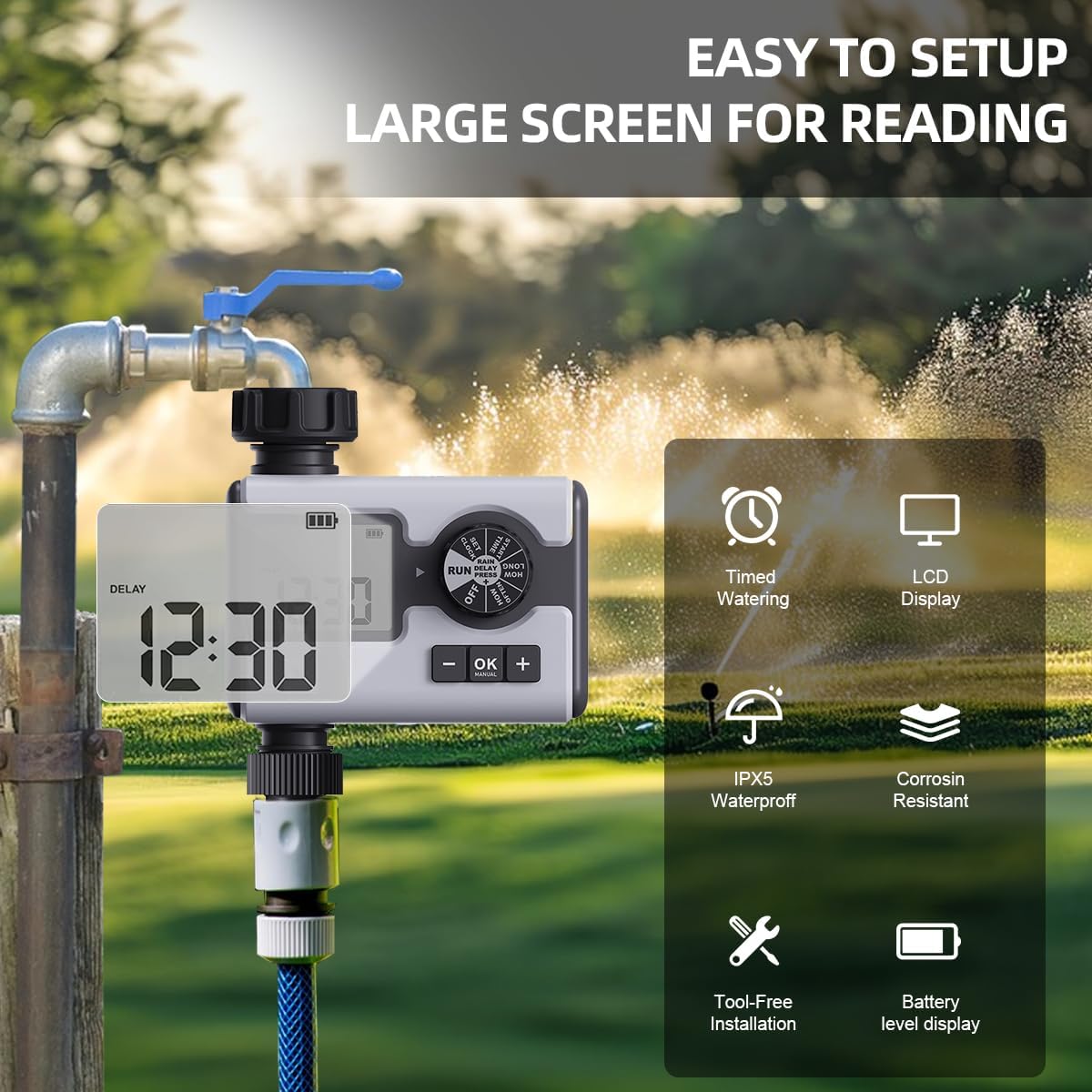
Figure 3: The Aqualin Water Timer connected to a faucet, illustrating its large LCD display for easy reading, IPX5 waterproof rating, corrosion resistance, and tool-free installation.
4. 시계 설정
- Rotate the dial to the "SET CLOCK" position.
- Use the "+" and "-" buttons to adjust the current time.
- Press "OK" to confirm the setting and move to the next digit or exit the setting mode.
작동 지침
1. 컨트롤 다이얼 이해하기
The central rotary dial allows you to navigate through different settings and modes. The available positions are:
- OFF : 모든 급수 프로그램을 끕니다.
- 실행 : Activates the programmed watering schedules.
- 시계 설정: 현재 시간을 설정하는 데 사용됩니다.
- 시작 시간: Sets the beginning time for a watering program.
- 얼마나 오래: Sets the duration of watering.
- 얼마나 자주: Sets the frequency of watering.
- 비 와서 연기 됨: Activates the rain delay function.
2. Programming Irrigation Schedules (P1, P2, P3)
The Aqualin Water Timer supports three independent programs (P1, P2, P3). Each program can be configured with its own start time, duration, and frequency.
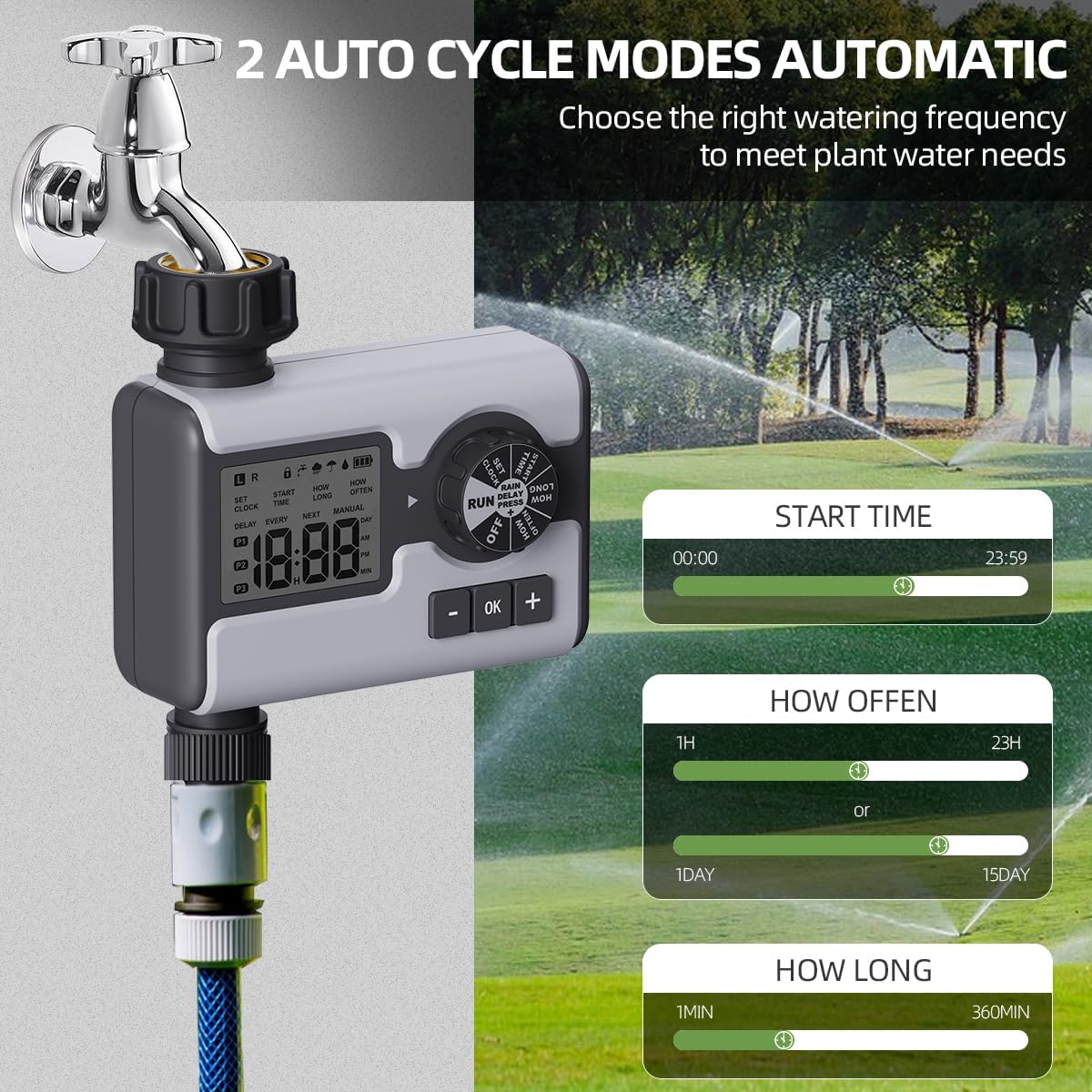
Figure 4: Display illustrating the settings for Start Time (00:00-23:59), How Often (1 hour-23 hours or 1 day-15 days), and How Long (1 minute-360 minutes) for the automatic watering cycles.
- 프로그램 선택: While in "RUN" mode, press the "OK" button repeatedly to cycle through P1, P2, P3. The active program will be displayed on the LCD.
- 시작 시간 설정:
- Rotate the dial to "START TIME".
- Use "+" and "-" buttons to set the desired start time for the selected program.
- 확인하려면 "확인"을 누르세요.
- 물주기 시간 설정("얼마나 오래"):
- Rotate the dial to "HOW LONG".
- Use "+" and "-" buttons to set the watering duration from 1 minute to 360 minutes.
- 확인하려면 "확인"을 누르세요.
- 물주기 빈도("얼마나 자주")를 설정하세요:
- Rotate the dial to "HOW OFTEN".
- Use "+" and "-" buttons to set the frequency: from 1 hour to 23 hours, or from 1 day to 15 days.
- 확인하려면 "확인"을 누르세요.
- After setting all parameters for a program, rotate the dial back to "RUN" to activate the schedule.
3. 강우 지연 모드
The rain delay feature allows you to temporarily pause your watering schedule to avoid overwatering during or after rainfall.

Figure 5: The Aqualin Water Timer displaying the rain delay function, which can be set for 6/12 hours or 1-7 days.
- While the timer is in "RUN" mode, press the "+" button.
- The display will show "DELAY". Use the "+" or "-" buttons to select the desired delay duration: 6 hours, 12 hours, or 1 to 7 days.
- Press "OK" to confirm the rain delay. The timer will resume its schedule automatically after the delay period ends.
4. 수동 급수 모드
The manual mode allows for immediate, on-demand watering without interrupting your pre-programmed schedules.

Figure 6: A person using the manual watering feature with the Aqualin Water Timer, indicating that temporary water use does not alter automatic watering schedules. The watering duration can be set from 1 minute to 360 minutes.
- While the timer is in "RUN" mode, press the "MANUAL" (OK) button.
- The display will show the manual watering duration. Use the "+" and "-" buttons to adjust the desired manual watering time.
- Press "OK" to start manual watering.
- To stop manual watering prematurely, press the "MANUAL" (OK) button again.
유지
- 청소: 타이머 외부를 주기적으로 닦아주세요.amp 먼지와 이물질을 제거하기 위해 천을 사용하십시오. 연마성 세제를 사용하지 마십시오.
- 필터 청소: The timer has a built-in metal filter. If water flow is reduced, unscrew the timer from the faucet, remove and clean the filter screen under running water. Reinstall the filter before reattaching the timer.
- 배터리 교체: Replace batteries when the low battery indicator appears on the LCD screen. Always use fresh AA 1.5V alkaline batteries.
- 겨울 보관: Before freezing temperatures, disconnect the timer from the faucet and hose. Remove the batteries. Store the timer indoors in a dry, frost-free location to prevent damage.
문제 해결
| 문제 | 가능한 원인 | 해결책 |
|---|---|---|
| 타이머가 켜지지 않거나 LCD가 꺼져 있습니다. | 배터리가 방전되었거나 잘못 설치되었습니다. | Replace with new AA 1.5V batteries, ensuring correct polarity. |
| 물이 흐르지 않거나 수압이 약합니다. |
|
|
| Timer not watering at scheduled times. |
|
|
| 연결부에서 물이 새고 있습니다. | Loose connection or missing/damaged washer. | Ensure connections are hand-tight. Check and replace rubber washers if damaged. |
명세서
| 특징 | 세부 사항 |
|---|---|
| 상표 | Aqualin |
| 모델 번호 | YL21177 |
| 재료 | Plastic (with metal thread connection) |
| 색상 | 회색 |
| 제품 크기(D x W x H) | 2.56인치 깊이 x 5.24인치 너비 x 5.91인치 높이 |
| 품목 무게 | 357그램(12.6온스) |
| 수압 범위 | 14.5psi ~ 116psi |
| 전원 | 2 x AA 1.5V 배터리(포함되지 않음) |
| 물주기 시간 | 1 분 ~ 360 분 |
| 급수 빈도 | 1시간에서 15일 |
| 비로 인한 연기 옵션 | 6 hours, 12 hours, 1-7 days |
| 방수 등급 | IPX5 (implied from "IPX5 Waterproff" image) |
보증 및 지원
For warranty information and customer support, please refer to the documentation provided with your purchase or contact the retailer where the product was acquired. You may also visit the official Aqualin web추가 지원은 사이트를 참조하세요.
참고: 제공된 데이터에서 판매자가 제공하는 공식 제품 동영상을 찾을 수 없었습니다.
Ask a question about this manual
Ask about setup, troubleshooting, compatibility, parts, safety, or missing instructions. Manuals+ will review the question and use this page’s manual context to help answer it.