
Edifier es20
Edifier 휴대용 블루투스 스피커 사용 설명서
모델: ES20
Your comprehensive guide to setting up, operating, and maintaining your Edifier ES20 Portable Bluetooth Speaker.
제품 끝view
The Edifier ES20 is a compact and powerful portable Bluetooth speaker designed for both indoor and outdoor use. It features IP67 waterproof and dustproof capabilities, ensuring durability in various environments. With Bluetooth V5.4 connectivity, it offers stable wireless audio and supports stereo pairing for an enhanced sound experience. The speaker also includes a built-in microphone for hands-free calls and customizable ambient lighting.
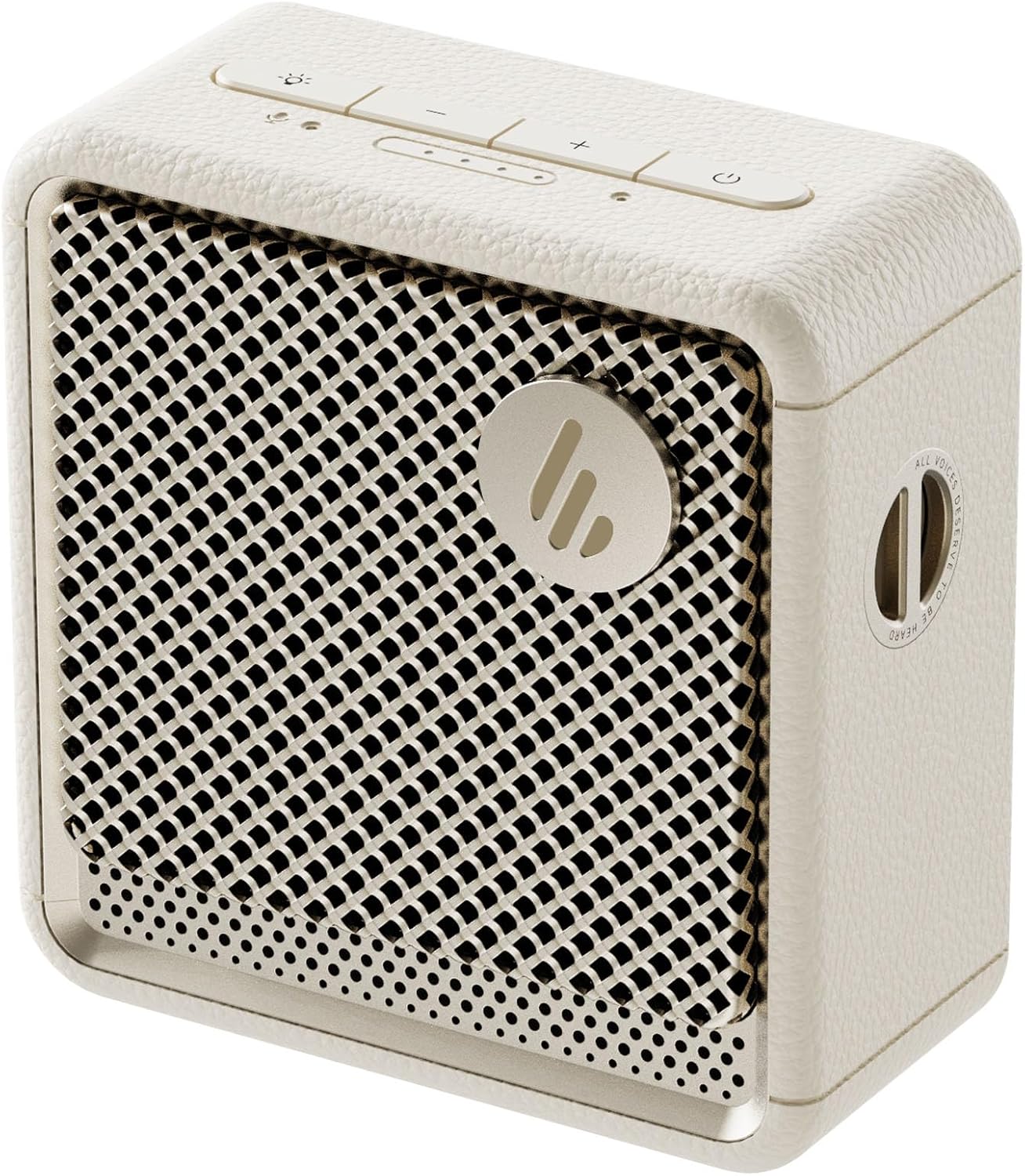
이미지: 앞면 view of the Edifier ES20 Portable Bluetooth Speaker in Ivory, showcasin컴팩트한 디자인과 스피커 그릴이 특징입니다.

Image: The Edifier ES20 speaker placed on a desk, demonstrating its suitability for home or office environments.
주요 특징은 다음과 같습니다.
- 프리미엄 음질: 6W (RMS) output with a 1.7'' full-range driver and 2'' passive bass radiators for rich, punchy sound.
- Bluetooth V5.4 & Stereo Pairing: Seamless wireless connectivity and the ability to pair two speakers for stereo sound.
- IP67 방수 및 방진: Designed to withstand splashes, rain, and dust, making it ideal for outdoor use.
- Long Lasting Playtime: 한 번 충전으로 최대 15시간 동안 재생할 수 있습니다.
- 주변 조명: Features a customizable ambient light system for enhanced atmosphere.
- 내장 마이크: High-sensitivity microphone for clear hands-free communication.
- 제어하기 쉽습니다: Intuitive top-mounted buttons and control via the EDIFIER ConneX app.
설치 가이드
상자 안에 무엇이 들어있나요?
시작하기 전에 모든 구성품이 포장에 들어 있는지 확인하세요.
- Edifier ES20 Portable Bluetooth Speaker
- 견장
- 빠른 시작 가이드
- USB-C to USB-C 케이블
- 중요 안전 지침

Image: A visual representation of the Edifier ES20 speaker and its included accessories, such as the strap, charging cable, and documentation.
스피커 충전하기
The ES20 speaker comes with a built-in rechargeable battery. Before first use, it is recommended to fully charge the speaker.
- Connect the provided USB-C to USB-C cable to the charging port on the speaker.
- 케이블의 다른 쪽 끝을 호환되는 USB 전원 어댑터(포함되지 않음)나 컴퓨터의 USB 포트에 연결합니다.
- The battery indicator lights on the top panel will illuminate to show charging progress. All lights will be solid when fully charged.
초기 블루투스 페어링
Follow these steps to connect your ES20 speaker to a Bluetooth device for the first time:
- 스피커가 충전되어 있고 전원이 켜져 있는지 확인하십시오. 블루투스 표시등이 깜빡이면 페어링 모드에 진입한 것입니다.
- 기기(스마트폰, 태블릿, 노트북)에서 Bluetooth를 활성화하고 사용 가능한 기기를 검색하세요.
- Select "EDIFIER ES20" from the list of found devices.
- Once connected, the Bluetooth indicator light on the speaker will remain solid.
For advanced features and easier control, download the EDIFIER ConneX app from your device's app store.

Image: Screenshots illustrating the EDIFIER ConneX mobile application, which provides additional control and customization options for the speaker.
작동 지침
버튼 기능
The ES20 speaker features intuitive top-mounted buttons for easy control:

Image: A detailed diagram outlining the functions of each button on the top panel of the ES20 speaker, including power, volume, playback, and lighting controls.
| 버튼/표시등 | 기능 |
|---|---|
| 전원 버튼 | Press and hold for 1.5s to power on/off. Short press to play/pause. |
| 볼륨 업(+) | 볼륨을 높이려면 짧게 누릅니다. |
| 볼륨 작게 (-) | 짧게 누르면 볼륨이 감소합니다. |
| 모드/조명 버튼 | Short press to cycle through sound effects. Press and hold for 1.5s to cycle through ambient light modes. |
| 블루투스 버튼 | Short press to disconnect current Bluetooth device. Press and hold for 1.5s to enter Bluetooth pairing mode. Double press to enable/disable stereo pairing. |
| 배터리 전원 표시기 | 현재 배터리 수준을 나타냅니다. |
| 모드 표시기 | Blue for Bluetooth mode, White for Bluetooth stereo pairing mode. |
블루투스 스테레오 페어링
You can pair two ES20 speakers together for a true wireless stereo experience. This requires two ES20 units.
- Ensure both ES20 speakers are powered on and not connected to any other Bluetooth devices.
- On one speaker (this will be the primary speaker), double-press the Bluetooth button. The Bluetooth indicator will flash rapidly.
- The primary speaker will automatically search for and connect to the second ES20 speaker.
- Once connected, the Bluetooth indicator on both speakers will remain solid, and you will hear an audible confirmation.
- Now, connect your device to the primary ES20 speaker via Bluetooth as you normally would.

Image: Two ES20 speakers, one black and one ivory, positioned to illustrate Bluetooth stereo pairing, with a smartphone displaying music playback.
Bluetooth Multi-Point Connectivity
The ES20 supports connecting to two Bluetooth devices simultaneously, allowing for seamless switching between audio sources.
- Connect the first device to the ES20 speaker via Bluetooth.
- Once connected, put the speaker back into pairing mode (press and hold the Bluetooth button for 1.5s).
- Connect the second device to the ES20 speaker.
- The speaker will now be connected to both devices. To switch audio playback, simply pause playback on the active device and start playback on the other.

Image: A visual representation of the ES20 speaker connected to multiple smartphones, highlighting its Bluetooth multi-point connectivity feature.
주변 조명 시스템
The ES20 features an ambient light system with multiple modes to enhance your listening experience or provide utility.
- 호흡: Light gently fades in and out.
- 무지개: 다양한 색상을 순환하며 보여줍니다.
- 공전: A single, constant color.
- Glittering and Colorful: Dynamic, multi-color effects.
- 비상등: Flashing red light for signaling.
To change the ambient light mode, press and hold the Mode/Light button for 1.5 seconds.

Image: The ES20 speaker showcasing its ambient light system, with icons representing different light effects like breathing, rainbow, static, glittering, and emergency light.
다양한 사운드 효과
Optimize your audio experience by selecting from four preset sound modes:
- 음악: 균형 잡힌 사운드 프로file 일반적인 음악 감상용.
- 게임: Enhanced audio cues for gaming.
- 영화: Optimized for dialogue and cinematic soundscapes.
- 야외 : 야외 환경에 맞춰 볼륨과 저음을 강화했습니다.
To cycle through sound effects, short press the Mode/Light button.

Image: The ES20 speaker set in a natural environment, surrounded by icons representing its various sound effect modes: Music, Game, Movie, and Outdoor.
내장형 MEMS 마이크
The ES20 includes a high-sensitivity MEMS microphone with intelligent noise cancellation, allowing for clear hands-free calls when connected to your smartphone.

Image: The ES20 speaker positioned next to a smartphone showing an active call screen, illustrating the use of its built-in MEMS microphone for hands-free communication.
유지
청소
- Use a soft, dry cloth to clean the surface of the speaker.
- 연마성 세척제, 왁스 또는 용제는 마감재를 손상시킬 수 있으므로 사용하지 마십시오.
- For the speaker grille, use a soft brush to gently remove dust or debris.
방수 및 방진 기능 (IP67)
While the ES20 is IP67 rated for water and dust resistance, proper care is essential to maintain its integrity:
- 스피커를 물이나 먼지에 노출시키기 전에 충전 포트 덮개가 단단히 닫혀 있는지 확인하십시오.
- Do not intentionally submerge the speaker beyond 1 meter (3 feet) or for longer than 30 minutes.
- After exposure to water, especially saltwater or chlorinated water, rinse the speaker with fresh water and allow it to air dry completely before charging or using.
- 스피커를 극한의 온도나 직사광선에 장기간 노출시키지 마십시오.

Image: The black version of the ES20 speaker partially submerged in water, illustrating its IP67 waterproof and dustproof protection rating.
배터리 관리
- 배터리 수명을 연장하려면 스피커를 자주 완전히 방전시키지 마십시오.
- 스피커가 완전히 방전되는 것을 방지하기 위해 사용하지 않을 때에도 정기적으로 충전하십시오.
- 장시간 사용하지 않을 때는 스피커를 시원하고 건조한 곳에 보관하세요.

Image: A circular graphic depicting the 15-hour playtime of the ES20 speaker, with the speaker itself at the center.
문제 해결
| 문제 | 가능한 원인 | 해결책 |
|---|---|---|
| 스피커의 전원이 켜지지 않습니다. | 배터리가 부족합니다. 전원 버튼을 제대로 누르지 않았습니다. | Charge the speaker fully. Press and hold the power button for 1.5 seconds. |
| Bluetooth 장치와 페어링할 수 없습니다. | Speaker not in pairing mode; Device Bluetooth off; Speaker too far from device; Interference. | Ensure speaker is in pairing mode (flashing Bluetooth light). Turn device Bluetooth off/on. Move speaker closer to device. Avoid strong Wi-Fi signals or other Bluetooth devices. |
| 소리가 나지 않거나 볼륨이 작습니다. | Volume too low on speaker or device; Paused playback; Incorrect audio output selected on device. | Increase volume on both speaker and device. Ensure music is playing. Check device's audio output settings. |
| 사운드 왜곡. | 볼륨이 너무 높음; 블루투스 신호가 약함. | Lower the volume. Move speaker closer to the Bluetooth device. |
| 스테레오 페어링에 실패했습니다. | Only one speaker in pairing mode; Speakers too far apart. | Ensure both speakers are powered on and not connected to other devices before initiating stereo pairing. Keep speakers within close proximity during pairing. |
If the issue persists, try resetting the speaker by holding the power button for 10 seconds, or consult the EDIFIER ConneX app for further assistance.
명세서
Detailed technical specifications for the Edifier ES20 Portable Bluetooth Speaker:

Image: A comprehensive table listing the technical specifications of the ES20 speaker, including output power, frequency response, dimensions, and weight.
| 특징 | 세부 사항 |
|---|---|
| 모델명 | ES20 |
| 스피커 유형 | 휴대용 스피커 |
| 총 출력 전력 | 6W(실효치) |
| 드라이버 유닛 | Full-range: φ43mm, Passive bass radiator: φ55mm |
| 주파수 응답 | 93Hz – 19kHz |
| 신호 대 잡음 비율 | ≥85dB(A) |
| 블루투스 버전 | V5.4 |
| 코덱 | (주) |
| 연결 프로토콜 | Bluetooth, EDIFIER ConneX App |
| 배터리 수명 | 15시간 |
| IP 등급 | IP67(방수 및 방진) |
| 제품 치수(W × H × D) | 90.4mm × 93.7mm × 49.7mm (깊이 3.55인치 x 너비 3.68인치 x 높이 1.95인치) |
| 순중량 | 326g (1.01 파운드) |
| 제어 방법 | 만지다 |

Image: The ES20 speaker with its dimensions (width, height, depth) clearly marked, providing a visual reference for its compact size.
보증 및 지원
The Edifier ES20 Portable Bluetooth Speaker comes with a limited warranty. Please refer to the "Warranty Card" included in your product packaging for detailed terms and conditions.
For technical support, troubleshooting assistance beyond this manual, or warranty claims, please visit the official Edifier website or contact their customer service. The EDIFIER ConneX app may also provide direct support options or frequently asked questions.
자세한 정보와 지원 리소스는 다음에서 찾을 수 있습니다. Amazon의 Edifier Store.
Ask a question about this manual
Ask about setup, troubleshooting, compatibility, parts, safety, or missing instructions. Manuals+ will review the question and use this page’s manual context to help answer it.