
Solenco 204
Solenco 204 Air Purifier User Manual
모델: 204
소개
Thank you for choosing the Solenco 204 Air Purifier. This device is designed to significantly improve your indoor air quality by removing various airborne pollutants. Featuring an advanced multi-filtration system, UV light sterilization, and smart controls, the Solenco 204 provides clean, fresh air for spaces up to 30m².
기기를 작동하기 전에 이 설명서를 자세히 읽고 나중에 참조할 수 있도록 보관하십시오.
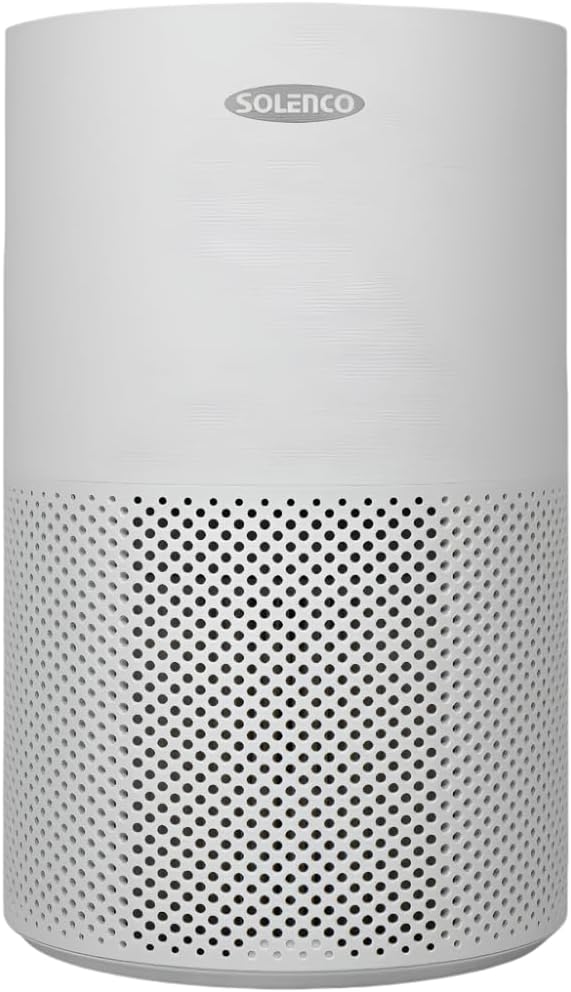
Figure 1: Solenco 204 Air Purifier
제품 구성 요소
The Solenco 204 Air Purifier consists of the following main components:
- 메인 유닛: 팬, 모터, 제어판이 들어 있습니다.
- Multi-Layer Filter: Combines a pre-filter, H13 Medical Grade HEPA filter, antiviral filter, and activated carbon filter.
- UV-CLamp: 내부 lamp for sterilization.
- 전원 코드: 전기 콘센트에 연결합니다.

Figure 2: Advanced Filtration System - Equipped with a pre-filter, H13 Medical Grade HEPA filter, activated carbon filter, and an antiviral filter to capture dust, pollen, smoke, odours, VOC's and airborne viruses.
설치 가이드
- 짐 풀기: 공기청정기를 포장에서 조심스럽게 꺼내세요. 향후 보관이나 운송을 위해 모든 포장재를 보관하세요.
- 필터 설치 : Before first use, ensure the multi-layer filter is correctly installed and any protective plastic wrapping is removed. Refer to the filter compartment instructions for specific steps.
- 놓기: Place the air purifier on a firm, level surface. Ensure there is at least 20 cm of clear space around all sides for optimal airflow. The unit is suitable for rooms up to 30m².
- 전원 연결: 전원 코드를 일반 콘센트에 꽂으십시오. 기기가 대기 모드로 전환됩니다.
운영 가이드
제어판
The Solenco 204 features an intuitive touch panel for easy control:

Figure 3: Smart Control - Features a touch panel with easy-to-use controls, including a timer, speed settings, UV light, and sleep mode. WiFi Enabled: Connect and control the air purifier remotely through the Smart Life app.
- 전원 버튼: 기기를 켜거나 끄려면 누릅니다.
- 팬 속도: Adjust fan speed (Low, Medium, High).
- 자동 모드 : 감지된 공기 질에 따라 자동으로 팬 속도를 조절합니다.
- 자외선: Activate or deactivate the UV-C sterilization lamp.
- 수면 모드 : Reduces fan speed and dims lights for quiet operation (as low as 26dB).
- 시간제 노동자: Set the operating duration (e.g., 2, 4, 8 hours).

Figure 4: Auto Mode - Automatically adjusts the fan speed based on the air quality detected by the built-in sensor.

Figure 5: UV-C Light Technology - Destroys harmful microorganisms such as bacteria, viruses, and mould spores.

Figure 6: Quiet Operation - Operates at a noise level as low as 26dB in sleep mode, ensuring a peaceful environment.
WiFi Connectivity (Smart Life App)
The Solenco 204 can be controlled remotely via the Smart Life app. Download the app from your smartphone's app store and follow the in-app instructions to pair your device. This allows for remote control, scheduling, and monitoring of air quality.
유지 보수 및 관리
필터 교체
The multi-layer filter has a limited lifespan and requires regular replacement to maintain optimal performance. The filter indicator light on the control panel will illuminate when a replacement is needed (typically every 6-12 months, depending on usage and air quality).
- 공기 청정기의 전원을 끄고 플러그를 뽑으세요.
- Locate the filter compartment (usually at the bottom or back of the unit).
- 오래된 필터를 제거하여 올바르게 폐기하세요.
- Unpack the new filter and insert it into the compartment, ensuring correct orientation.
- 필터 칸을 닫습니다.
- Plug in and turn on the unit. Reset the filter indicator by pressing and holding the filter reset button (refer to control panel diagram for exact location) for 3-5 seconds.
장치 청소
- 부드럽고 마른 천으로 장치 외부를 닦으세요.
- 연마성 세척제나 용제를 사용하지 마십시오.
- Periodically vacuum the air intake and outlet vents to remove dust buildup.
문제 해결
| 문제 | 가능한 원인 | 해결책 |
|---|---|---|
| 장치가 켜지지 않습니다 | 전원 공급 없음; 전원 버튼이 눌리지 않음 | Check power cord connection; Ensure outlet is functional; Press power button firmly. |
| 약한 기류 | Filter clogged; Air inlets/outlets blocked | 필터를 교체하고 막힌 부분을 제거하십시오. |
| 비정상적인 소음 | 내부에 이물질이 있습니다. 제품이 수평면에 놓여 있지 않습니다. | Turn off and inspect for objects; Place on a stable, flat surface. |
| 필터 교체 후에도 필터 표시등이 계속 켜져 있습니다. | 필터 재설정이 수행되지 않았습니다. | Press and hold the filter reset button for 3-5 seconds. |
| WiFi에 연결할 수 없음 | Incorrect WiFi password; Router issues; App issues | Verify WiFi password; Restart router; Reinstall Smart Life app. |
기술 사양
| 특징 | 사양 |
|---|---|
| 모델 | Solenco 204 |
| 상표 | Solenco |
| 색상 | 회색 |
| 전력 / 와트tage | 40 와트 |
| 소음 수준 | 26dB(최소) |
| 품목 무게 | 3.53kg |
| 제품 크기(D x W x H) | 22.6D x 22.6W x 36H 센티미터 |
| 제어 방법 | App, Touch Panel |
| 필터 유형 | H13 HEPA, Activated Carbon, Antiviral |
| 바닥 면적 적용 | 최대 30제곱미터 |

Figure 7: Coverage Area - Effectively purifies the air in rooms up to 30m² at 4 air changes per hour.
보증 및 고객 지원
For warranty information and customer support, please refer to the documentation provided at the time of purchase or visit the official Solenco website. You may also contact the seller, Solenco SA, for assistance.
Community Rhino Conservation Initiative: A portion of every Solenco air purifier purchase contributes to the Community Rhino Conservation Initiative (CRCI). Learn more about this initiative and meet the rhinos by scanning the QR code or visiting the link below:

Figure 8: Solenco's contribution to the Community Rhino Conservation Initiative.
Ask a question about this manual
Ask about setup, troubleshooting, compatibility, parts, safety, or missing instructions. Manuals+ will review the question and use this page’s manual context to help answer it.