
VOLTCRAFT PSW 2000-12-G
VOLTCRAFT PSW 2000-12-G 순수 사인파 인버터 사용 설명서
Model: PSW 2000-12-G | Manufacturer Part Number: VC-14490410
1. 서론
The VOLTCRAFT PSW 2000-12-G Pure Sine Wave Inverter is designed to convert 12V DC power from a battery into stable 230V AC pure sine wave power. This type of output is essential for operating sensitive electronic devices that require a clean and consistent power supply, such as televisions, computers, and audio systems, without interference or damage. Its microcontroller-controlled electronics ensure reliable performance and protection under various conditions, including overload and short circuits.
2. 안전 지침
인버터를 작동하기 전에 모든 안전 지침을 읽고 숙지하십시오. 이 지침을 따르지 않을 경우 감전, 화재 또는 심각한 부상을 입을 수 있습니다.
- 통풍: 인버터를 환기가 잘 되는 곳에 설치하세요. 환기구를 막지 마세요.
- 건조한 환경: Operate the inverter only in dry conditions. Avoid exposure to water, rain, or excessive humidity.
- 올바른 볼륨tage: Connect the inverter only to a 12V DC power source. Do not connect to a 24V or higher DC source.
- 인화성 물질: Do not operate the inverter near flammable liquids, gases, or other combustible materials.
- 전문적인 설치: For permanent installations, it is recommended to consult a qualified electrician.
- 접지: 인버터가 현지 전기 규정에 따라 올바르게 접지되었는지 확인하세요.
- 어린이와 애완동물: 인버터를 어린이와 반려동물의 손이 닿지 않는 곳에 보관하십시오.
- 분해 : 인버터를 분해하거나 개조하지 마십시오. 모든 서비스는 자격을 갖춘 전문가에게 맡기십시오.
3. 패키지 내용
포장을 풀 때 모든 품목이 들어 있고 손상되지 않았는지 확인하세요.
- VOLTCRAFT PSW 2000-12-G Pure Sine Wave Inverter
- 사용 설명서
- DC Connection Cables (if included)
4. 제품 오버view
The VOLTCRAFT PSW 2000-12-G inverter features a robust design with multiple output options and cooling mechanisms.

그림 1: 앞면 상단 view of the VOLTCRAFT PSW 2000-12-G inverter, showing the two AC outlets, USB port, and power button on the front panel.

그림 2: 맨 위 view of the inverter, highlighting the VOLTCRAFT branding and model number on its blue casing.
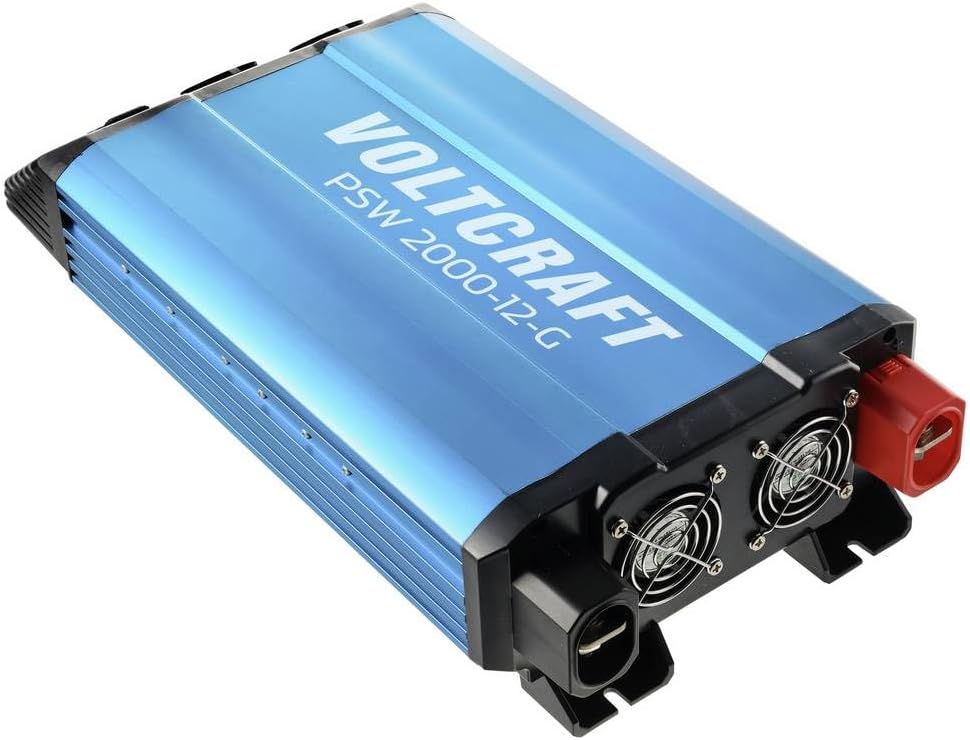
그림 3: Rear-top view of the inverter, displaying the cooling fans and the robust DC input terminals (red for positive, black for negative).

그림 4: 옆 view of the inverter, showing the heat sink fins for efficient thermal management.
5. 설정
Proper setup is crucial for safe and efficient operation of your inverter.
5.1. 위치
- 시원하고 건조하며 통풍이 잘되는 곳을 선택하세요.
- 직사광선, 열원 및 습기를 피하십시오.
- 인버터 주변, 특히 냉각 팬 주변에 충분한 공기 흐름을 위한 공간을 확보하십시오.
- 인버터를 안정적이고 불연성인 표면에 단단히 고정하십시오.
5.2. DC 입력 연결
Connect the inverter to a 12V DC battery or power source.
- 인버터의 전원 스위치가 OFF 위치에 있는지 확인하십시오.
- Use appropriate gauge cables for the power rating (2000W) to minimize voltage drop and prevent overheating.
- 연결하다 빨간색 positive (+) cable to the positive (+) terminal of the inverter and then to the positive (+) terminal of the battery.
- 연결하다 검은색 negative (-) cable to the negative (-) terminal of the inverter and then to the negative (-) terminal of the battery.
- Ensure all connections are tight and secure to prevent loose contacts and sparking.
5.3. 접지
Connect the inverter's chassis ground terminal to a reliable earth ground. This is a critical safety measure.
6. 사용 설명서
6.1. 전원 켜기
- After ensuring all DC connections are secure, switch the inverter's power button to the ON position.
- The indicator light should illuminate, indicating the inverter is operational.
- The cooling fan may activate briefly during startup or when under load.
6.2. Connecting AC Devices
- Plug your 230V AC devices into the AC outlets on the front panel of the inverter.
- 연결된 모든 장치의 총 전력 소비량이 인버터의 연속 정격 전력(2000W)을 초과하지 않도록 하십시오.
- For devices with high inrush current (e.g., motors, refrigerators), connect them one at a time.
6.3. USB 출력
The inverter includes a USB port for charging compatible devices. Simply connect your USB device to the port.
6.4. 전원 끄기
- Disconnect all AC devices from the inverter outlets.
- Switch the inverter's power button to the OFF position.
- For long-term storage or maintenance, disconnect the DC input cables from the battery.
7. 유지관리
정기적인 유지관리를 통해 인버터의 최적의 성능과 수명을 보장할 수 있습니다.
- 청소: 인버터 외부를 부드럽고 마른 천으로 정기적으로 청소하십시오. 통풍구에 먼지나 이물질이 없는지 확인하십시오. 액체 세척제는 사용하지 마십시오.
- 사이: Regularly check all DC input connections for tightness. Loose connections can cause overheating and power loss.
- 배터리 유지 관리: Ensure your 12V DC battery is properly maintained and charged according to its manufacturer's instructions. A healthy battery is crucial for inverter performance.
- 저장: 인버터를 장기간 보관할 경우 배터리에서 분리하여 서늘하고 건조한 곳에 보관하세요.
8. 문제 해결
이 섹션에서는 일반적으로 발생할 수 있는 문제에 대해 설명합니다.
| 문제 | 가능한 원인 | 해결책 |
|---|---|---|
| 인버터가 켜지지 않습니다 | No DC input power; Loose battery connections; Low battery voltage; Blown fuse (internal) | 배터리 연결 및 용량 확인tage; Ensure battery is charged; Consult a technician for internal fuse replacement. |
| AC 출력 없음 | 과부하; 과열; 낮은/높은 입력량tage; Faulty AC device | Reduce connected load; Allow inverter to cool; Check battery voltage; Test AC device on another power source. |
| 인버터가 꺼집니다 | Overload protection activated; Over-temperature protection activated; Low battery voltag전자 종료 | Reduce load; Allow inverter to cool; Recharge or replace battery. |
| Fan runs constantly/loudly | 내부 온도가 높습니다. 부하가 큽니다. | Ensure adequate ventilation; Reduce load if possible. This is normal operation under certain conditions. |
9. 사양
| 특징 | 사양 |
|---|---|
| 상표 | 볼트크래프트 |
| 모델 | PSW 2000-12-G |
| 제조업체 부품 번호 | VC-14490410 |
| 입력 Voltage | 12V 직류 |
| 출력 볼륨tage | 230V 교류 |
| 출력파형 | 순수한 사인 웨이브 |
| 연속 전력 | 2000와트 |
| 무게 | 2.5kg |
| 보호 기능 | Overload, Short Circuit, Over-temperature, Low/High Voltage |
10. 보증 및 지원
The VOLTCRAFT PSW 2000-12-G Pure Sine Wave Inverter comes with a minimum 2-year warranty from the date of purchase, covering manufacturing defects. For technical support, warranty claims, or service inquiries, please contact your retailer or the VOLTCRAFT customer service department. Please have your model number (PSW 2000-12-G) and proof of purchase available when contacting support.
Ask a question about this manual
Ask about setup, troubleshooting, compatibility, parts, safety, or missing instructions. Manuals+ will review the question and use this page’s manual context to help answer it.