
1. 서론
This manual provides detailed instructions for the installation, operation, and maintenance of the TMEZON MZ-VDP-NE160 4-wire doorbell camera. This outdoor station is designed to work seamlessly with compatible TMEZON videophone monitors, such as the MZ-IP-V728TW, to provide secure and convenient visitor management for your property.
2. 안전 정보
본 기기를 설치 또는 작동하기 전에 모든 안전 지침을 읽고 숙지하십시오. 이 지침을 따르지 않을 경우 감전, 화재 또는 제품 손상이 발생할 수 있습니다.
- 전기 안전: Installation should be performed by a qualified electrician or technician. Ensure power is disconnected before any wiring work.
- 물 노출: While designed for outdoor use, avoid direct high-pressure water jets. Ensure all connections are properly sealed.
- 온도: 기기를 작동 범위를 벗어난 극한 온도에 노출시키지 마십시오.
- 청소: 세척에는 부드럽고 마른 천을 사용하십시오. 연마성 세척제나 용매를 사용하지 마십시오.
3. 패키지 내용
패키지에 모든 구성 요소가 들어 있는지 확인하세요.
- 1 x TMEZON MZ-VDP-NE160 Doorbell Camera Unit
- 장착 나사 및 벽면 플러그
- 배선 커넥터
- 사용 설명서 (본 문서)
4. 제품 오버view
The TMEZON MZ-VDP-NE160 is an outdoor doorbell camera unit. It features a camera for video surveillance, a microphone for audio input, a speaker for audio output, and a call button to initiate communication with the indoor monitor.
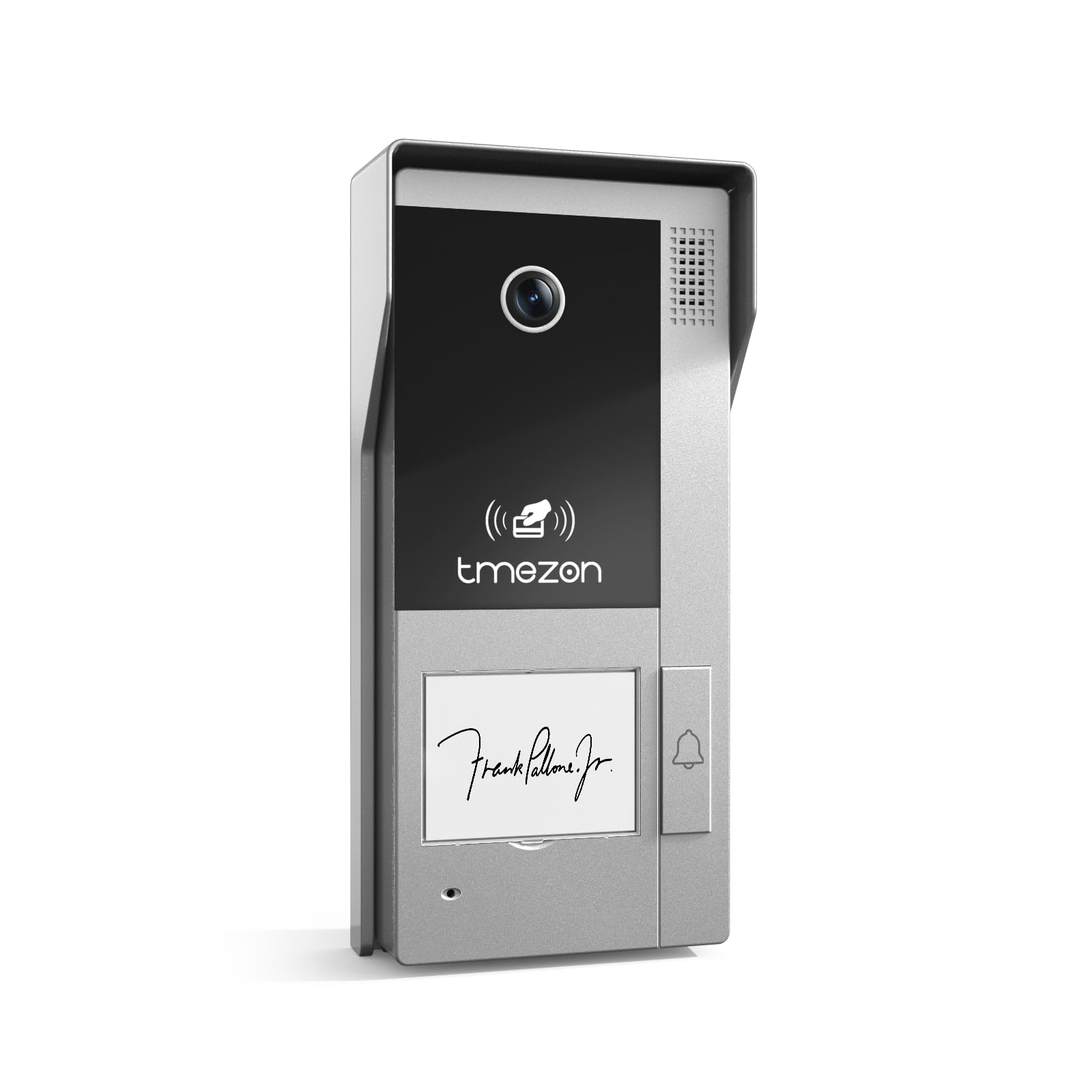
그림 1: 전면 view of the TMEZON MZ-VDP-NE160 doorbell camera, showing the camera lens, call button, microphone, and speaker grille.
주요 구성 요소는 다음과 같습니다.
- 카메라 렌즈: 영상 피드를 캡처합니다.
- 호출 버튼: Activates the indoor monitor and initiates communication.
- 마이크로폰: 방문객의 음성을 캡처합니다.
- 스피커: Allows two-way audio communication.
- Wiring Terminal (Rear): For connecting the 4-wire cable to the indoor monitor and power supply.
5. 설정 및 설치
The MZ-VDP-NE160 is a 4-wire system. Proper wiring is crucial for correct operation. It is recommended to consult a professional for installation if you are unfamiliar with electrical wiring.
5.1 설치 위치
- Choose a location near your entrance, typically at a height of 1.4 to 1.6 meters (4.6 to 5.2 feet) from the ground, ensuring a clear view 방문자의.
- Avoid direct sunlight or strong light sources that could cause glare on the camera.
- 설치 표면이 평평하고 안정적인지 확인하십시오.
5.2 배선도(일반)
The doorbell camera connects to the indoor monitor (e.g., MZ-IP-V728TW) using a 4-wire cable. The typical connections are:
- 와이어 1: 오디오
- 와이어 2: 동영상
- 와이어 3: 접지(GND)
- 와이어 4: 전원(DC 12V)
Note: Refer to the specific wiring diagram provided with your indoor monitor for precise connection details. Ensure polarity is correct for power connections.
5.3 설치 단계
- 전원 분리: Before starting, ensure all power to the existing doorbell system and the indoor monitor is turned off at the circuit breaker.
- 장착 브래킷 : Secure the mounting bracket (if applicable, or the unit directly) to the wall using the provided screws and wall plugs.
- 와이어 연결: Connect the 4-wire cable from the indoor monitor to the corresponding terminals on the rear of the MZ-VDP-NE160 doorbell camera. Ensure connections are secure.
- 보안 장치: Attach the doorbell camera unit to the mounting bracket or directly to the wall, ensuring it is firmly in place.
- 복원력 : Once all connections are made and secured, restore power to the system.
- 테스트 시스템 : Test the doorbell functionality by pressing the call button and verifying communication with the indoor monitor.
6. 사용 설명서
The TMEZON MZ-VDP-NE160 doorbell camera operates in conjunction with your TMEZON indoor monitor.
- 방문객 안내: When a visitor presses the call button on the MZ-VDP-NE160, the indoor monitor will ring and display the video feed from the doorbell camera.
- 양방향 커뮤니케이션: On the indoor monitor, you can answer the call to engage in two-way audio communication with the visitor.
- 도어 해제(연결된 경우): If an electronic door lock is connected to your indoor monitor system, you can typically unlock the door from the indoor monitor during a call.
- 모니터링: Some indoor monitors allow you to manually view the live video feed from the doorbell camera at any time, even without a visitor pressing the button.
7. 유지관리
정기적인 유지 관리는 초인종 카메라의 수명과 최적의 성능을 보장하는 데 도움이 됩니다.
- 청소: Periodically wipe the camera lens and the front panel with a soft, slightly damp 먼지와 오염물을 제거하는 데 천을 사용하십시오. 독한 화학 약품이나 연마제를 사용하지 마십시오.
- 연결 검사: Annually, inspect the wiring connections for any signs of corrosion or loosening. Ensure the unit is securely mounted.
- 소프트웨어 업데이트: While this specific unit does not have user-updatable software, ensure your indoor monitor's firmware is up to date for best compatibility and features.
8. 문제 해결
If you encounter issues with your MZ-VDP-NE160 doorbell camera, refer to the following common problems and solutions:
| 문제 | 가능한 원인 | 해결책 |
|---|---|---|
| No video/audio on indoor monitor |
|
|
| 통화 버튼이 응답하지 않습니다 |
|
|
| 비디오 품질이 좋지 않음 |
|
|
If the problem persists after attempting these solutions, please contact TMEZON customer support.
9. 사양
| 특징 | 세부 사항 |
|---|---|
| 모델 | MZ-VDP-NE160 |
| 상표 | 티메존 |
| 제품 크기(L x W x H) | 1 x 1 x 1cm |
| 배선 유형 | 4선식 시스템 |
| 운영 볼륨tage | 240 Volts (System dependent, typically 12V DC for the unit itself, 240V might refer to power supply input) |
| 전력 소비 | 5 와트 |
| 색상 | 회색 |
| 포함된 구성 요소 | 초인종 장치 |
10. 보증 및 지원
For warranty information and technical support, please refer to the documentation provided with your complete TMEZON videophone system or visit the official TMEZON web사이트. 보증 청구를 위해 구매 증빙 자료로 구매 영수증을 보관하세요.
For direct assistance, you may contact TMEZON customer service through their official channels.