
Micool BT-X easy
Micool BT-X Easy On-Ear Headphones User Manual
Model: BT-X easy
소개
Thank you for choosing the Micool BT-X Easy On-Ear Headphones. These headphones are designed to provide a comfortable listening experience with high-quality audio and extended battery life. Featuring Bluetooth 5.4 technology and a unique open-ear design, they are perfect for various activities, from sports to daily commutes.
상자 안에 무엇이 들어있나요?
- Micool BT-X Easy On-Ear Headphones (Left & Right)
- 무선 충전 케이스
- USB-C 충전 케이블
- 사용자 설명서
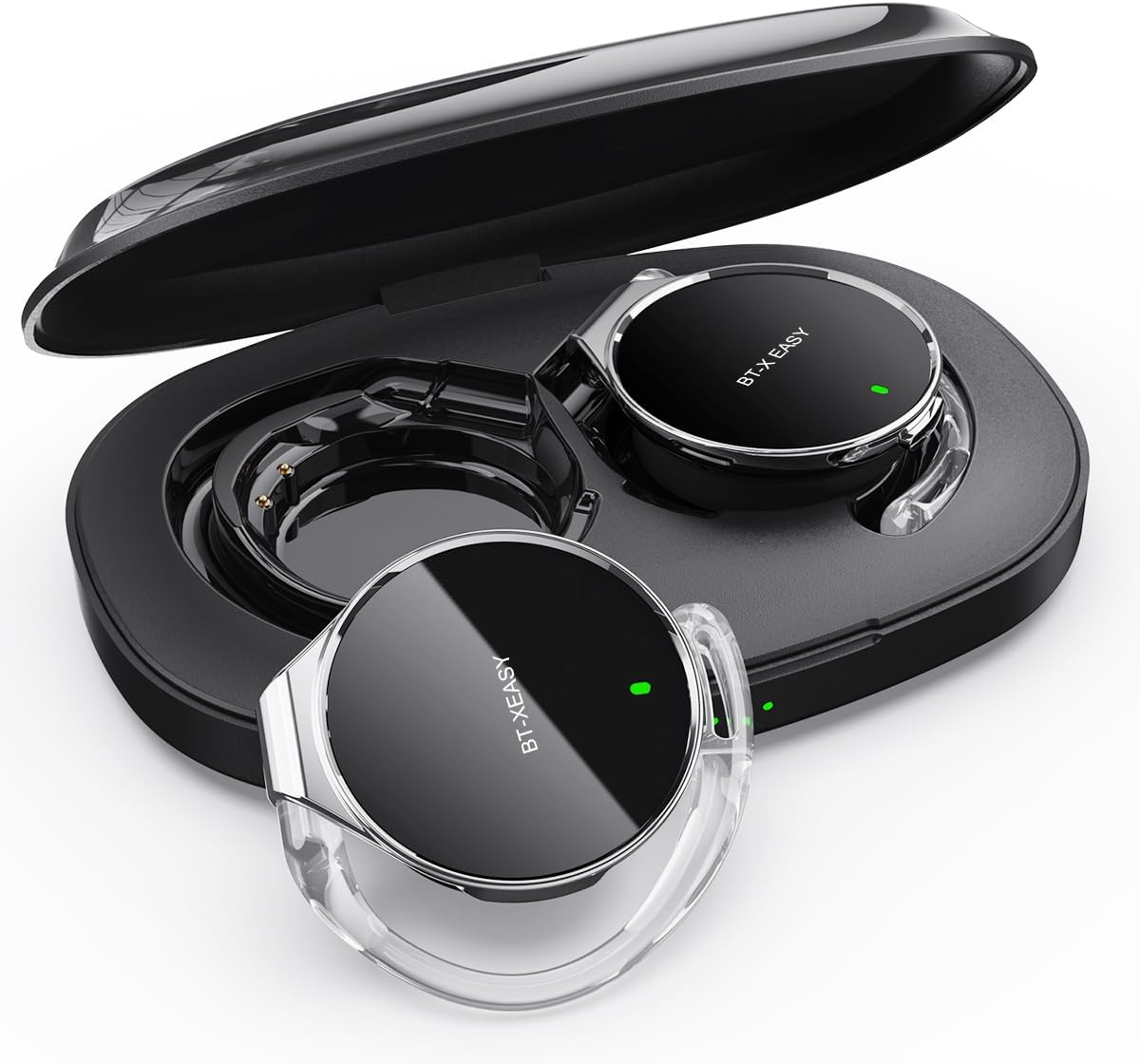
Image: Micool BT-X Easy On-Ear Headphones and their charging case, showing the headphones placed inside the open case.
제품 특징
- HD Stereo Audio: 28mm speakers for rich bass and clear sound.
- 블루투스 5.4 : Fast pairing, stable connection, and reliable use.
- 소음 감소: ANC+ENC adaptive noise reduction for clearer calls with 4 microphones.
- 긴 배터리 수명: 한 번 충전으로 최대 18시간, 충전 케이스를 사용하면 총 52시간까지 음악을 재생할 수 있습니다.
- 편안한 착용감: Small, lightweight 36mm diameter with sponge earcup design for comfortable wear without ear compression.
- 다중 포인트 연결 : Connect to two devices simultaneously (e.g., phone, laptop, tablet).
- 직관적인 컨트롤: Easy control of music and calls via multifunction buttons.
- 방수: 튀는 물과 땀에도 견딜 수 있도록 설계되었습니다.

이미지: 클로즈업 view of the headphone highlighting its compact design and touch control area.
설정
1. 초기 충전
Before first use, fully charge the headphones and the charging case. Connect the provided USB-C cable to the charging case and a power source. The 4-stage power indicator lights on the case will show the charging progress (each light represents 25% battery capacity).

Image: The charging case displaying its 4-stage battery indicator lights.
2. 장치와 페어링
- 충전 케이스를 여세요. 헤드폰이 자동으로 페어링 모드로 진입합니다.
- 기기(스마트폰, 태블릿, 노트북)에서 Bluetooth를 활성화하세요.
- 검색 "BT-XEASY" in the list of available Bluetooth devices and select it to connect.
- 연결되면 음성 안내로 페어링이 성공적으로 완료되었음을 확인할 수 있습니다.
3. Multi-point Connection (Optional)
To connect to a second device, disconnect the headphones from the first device's Bluetooth settings. Then, pair with the second device following the steps above. Reconnect to the first device from its Bluetooth settings. The headphones will now be connected to both devices simultaneously.
작동 지침
헤드폰 착용하기
- 1단계: Open the ear-hook at a 30° angle.
- 2단계: Rotate the headphone around your ear to the bottom of the ear-hook.
- 3단계: 헤드폰을 누르고 clamp them tightly to your ear.
- 4단계: Adjust the angle to make wearing more comfortable.

Image: Step-by-step visual guide on how to properly wear the on-ear headphones.
터치 컨트롤
The BT-X Easy headphones feature intuitive touch controls on each headset for easy management of audio and calls.
| 기능 | 행동 |
|---|---|
| 음악 재생/일시 정지 | 클릭 x1 |
| 전화 받기/종료하기 | 클릭 x1 |
| 전화 거부 | 길게 누르기 |
| Mute (in call) | Click x2 (prompt sound will confirm) |
| 다음 트랙 | Click x2 (Right Headphone) |
| 이전 트랙 | Click x2 (Left Headphone) |
| 볼륨을 높이다 | Hold (Right Headphone) |
| 볼륨 낮추기 | Hold (Left Headphone) |

Image: Diagram illustrating the touch control functions on the headphone.
공식 제품 영상
Video: An official product video from Micool demonstrating the features and usage of the BT-X Easy On-Ear Headphones. This video provides a visual guide to the product's design, comfort, and functionality, including how to wear them and use the touch controls.
유지
- 청소: 부드럽고 마른 천을 사용하여 헤드폰과 충전 케이스를 닦으세요. 연마성 세제나 용제는 사용하지 마세요.
- 저장: When not in use, store the headphones in their charging case to protect them and ensure they are charged for next use.
- 배터리 관리 : 배터리 수명을 연장하려면 헤드폰을 자주 완전히 방전시키지 마세요. 장시간 사용하지 않더라도 정기적으로 충전하세요.
- 방수 기능: The headphones are water-resistant, but not waterproof. Avoid submerging them in water or exposing them to heavy rain. Dry them thoroughly if they get wet.
문제 해결
| 문제 | 가능한 해결책 |
|---|---|
| 헤드폰이 페어링되지 않음 | Ensure headphones are charged. Turn off and on Bluetooth on your device. Forget "BT-XEASY" from your device's Bluetooth list and re-pair. |
| 소리가 나지 않거나 볼륨이 작음 | Check device volume and headphone volume. Ensure headphones are properly connected. Try playing different audio sources. |
| 한쪽 이어버드가 작동하지 않음 | Place both headphones back in the charging case, close the lid, wait a few seconds, then open and try again. Ensure both are charged. |
| 충전 케이스가 충전되지 않음 | Check USB-C cable and power adapter. Ensure proper connection. |
| 연결 불안정 | Move closer to your device. Avoid strong electromagnetic interference. Ensure no other devices are trying to connect simultaneously. |
명세서
| 특징 | 세부 사항 |
|---|---|
| 모델명 | BT-X easy |
| 연결 기술 | 무선(블루투스 5.4) |
| 오디오 드라이버 유형 | 다이내믹 드라이버(28mm 스피커) |
| 배터리 수명(헤드폰) | 최대 18시간 |
| 총 배터리 수명(케이스 포함) | 최대 52시간 |
| 소음 제어 | Active Noise Cancellation (ANC+ENC for calls) |
| 마이크 | 4 마이크 |
| 방수 레벨 | 방수 |
| 재료 | 아크릴로니트릴 부타디엔 스티렌(ABS) |
| 품목 무게 | 5 온스 |
| 한국어: | 775494925862 |
보증 및 지원
Micool provides 24-hour after-sales service for all purchased items. For any issues or inquiries, please contact Micool customer support through the official brand store or the platform where you purchased the product.
For detailed warranty information, please refer to the warranty card included in your product packaging or visit the official Micool web사이트. 보장 범위를 확대하는 보호 플랜도 이용 가능할 수 있습니다.
Micool Brand Store: Visit Micool Store on Amazon
Ask a question about this manual
Ask about setup, troubleshooting, compatibility, parts, safety, or missing instructions. Manuals+ will review the question and use this page’s manual context to help answer it.