
소개
This manual provides detailed instructions for the Micool Bluetooth Headset V5.4 (Model DY20PLUS). Please read this manual carefully before using the product to ensure proper operation and to maximize its features and lifespan. This headset is designed for clear communication and comfortable wear, featuring advanced noise cancellation and long battery life.
안전 정보
To ensure safe and proper use of your headset, please observe the following guidelines:
- Do not expose the headset to extreme temperatures, direct sunlight, or high humidity.
- Avoid dropping or subjecting the headset to strong impacts, which may damage internal components.
- Do not attempt to disassemble, repair, or modify the headset. This will void the warranty and may cause harm.
- 헤드셋과 액세서리는 어린이와 반려동물의 손이 닿지 않는 곳에 보관하십시오.
- Use only the provided USB-C charging cable or a certified equivalent to prevent damage to the battery.
- 청력 손상을 방지하려면 장시간 높은 볼륨으로 청취하지 마십시오.
패키지 내용
패키지에 모든 품목이 들어 있는지 확인하세요.
- Micool Bluetooth Headset (DY20PLUS)
- USB-C 충전 케이블
- 사용자 설명서
- Additional Eartips (Sizes L, M, S)
- 이어후크

Image: Micool Bluetooth Headset and its accessories, including different sized eartips and a charging cable.
제품 끝view
Familiarize yourself with the various components and controls of your Micool Bluetooth Headset:

이미지: 앞면 view of the Micool Bluetooth Headset, highlighting the main call button, volume controls, and the LED battery indicator lights.
- 다기능 버튼: Used for power on/off, answering/ending calls, and playing/pausing music.
- 볼륨 +/- 버튼: Adjust volume, skip tracks, and check battery level.
- LED 전원 표시: Indicates the remaining battery level with four segments.
- 마이크로폰: Equipped with dual-mic noise reduction for clear voice input during calls.
- USB-C 충전 포트: For connecting the charging cable to power the headset.
설정
1. 헤드셋 충전
Before initial use, fully charge your headset to ensure optimal battery performance.
- USB-C 충전 케이블을 헤드셋의 충전 포트에 연결합니다.
- 케이블의 다른 쪽 끝을 USB 전원(예: 컴퓨터, 벽면 어댑터)에 연결합니다.
- The LED power display will illuminate to indicate charging. A full charge typically takes approximately 1.5-2 hours.
2. 장치와 페어링
The headset utilizes Bluetooth 5.4 for a stable and efficient wireless connection up to 50 meters.
- Ensure the headset is powered off and fully charged.
- Press and hold the Multi-function Button for approximately 3-5 seconds until the LED indicator flashes blue and red alternately. This indicates the headset is in pairing mode.
- On your desired device (smartphone, tablet, laptop), enable Bluetooth and search for available devices.
- Select "DY20PLUS" from the list of found devices.
- Once successfully connected, the LED indicator will flash blue slowly.
3. Connecting to Two Devices Simultaneously (Multi-point Connection)
The DY20PLUS supports connecting to two Bluetooth devices concurrently, allowing seamless switching between them.
- 위의 단계를 따라 헤드셋을 첫 번째 장치와 페어링하세요.
- Disable Bluetooth on the first device. The headset will re-enter pairing mode (flashing blue and red).
- 헤드셋을 두 번째 기기와 페어링합니다.
- Re-enable Bluetooth on the first device. The headset should automatically connect to both devices. You can now receive calls or play audio from either device.
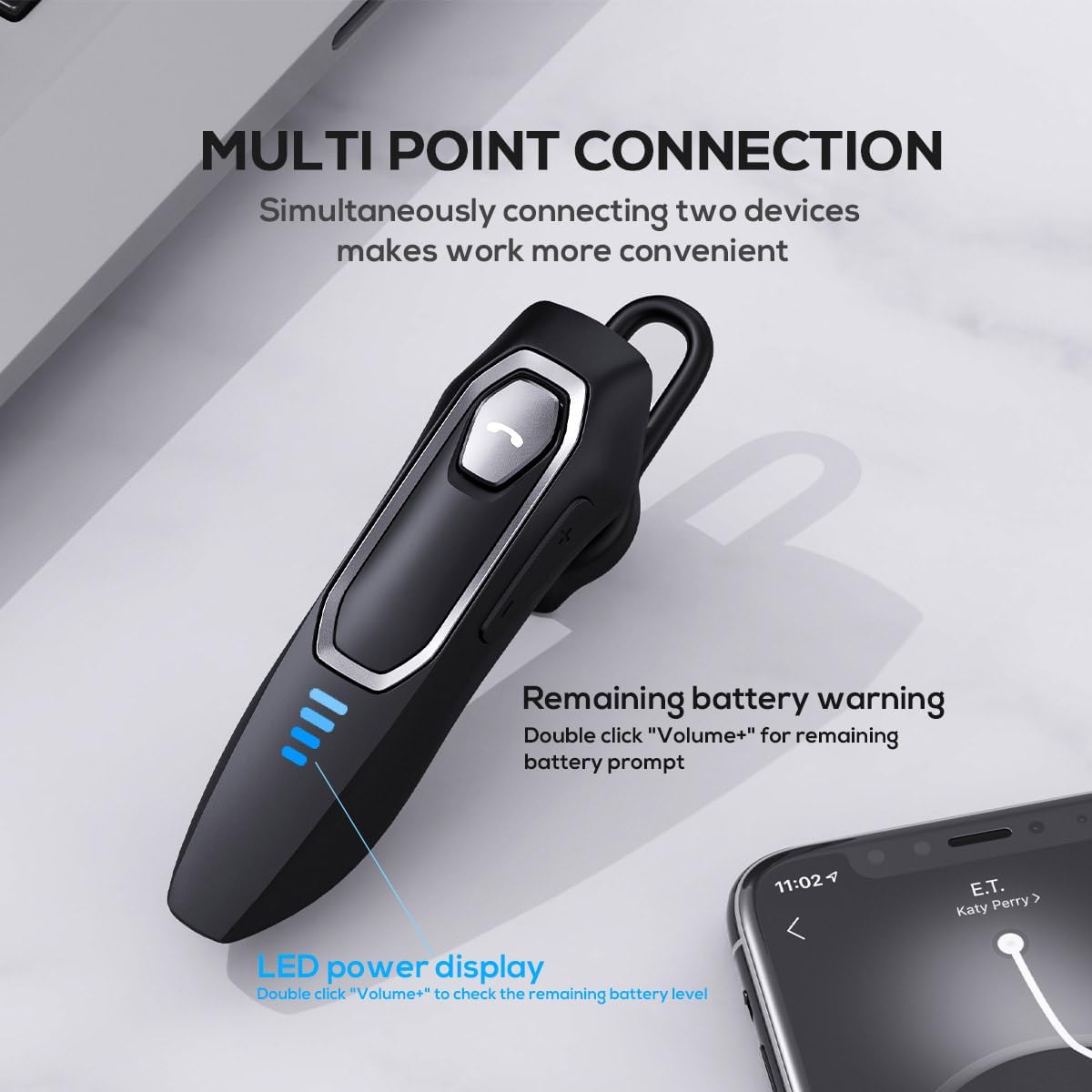
Image: The Micool headset demonstrating its multi-point connection capability, allowing simultaneous connection to two devices.
작동 지침
전원 켜기/끄기
- 전원 켜기: 다기능 버튼을 3초 동안 길게 누릅니다.
- 전원 끄기 : 다기능 버튼을 5초 동안 길게 누릅니다.
통화 관리
- 전화 받기/종료: 다기능 버튼을 짧게 누릅니다.
- 전화 거부: 다기능 버튼을 2초 동안 길게 누릅니다.
- 마이크 음소거/음소거 해제: During a call, press and hold the Volume "-" button for approximately 2 seconds.
- 마지막 발신 통화 재다이얼: Triple-tap the Multi-function Button.

Image: Illustration of the mute function, activated by holding the Volume '-' button.
음악 재생
- 재생/일시 중지: 다기능 버튼을 짧게 누릅니다.
- 다음 트랙: Press and hold the Volume "+" button for 2 seconds.
- 이전 트랙 : Press and hold the Volume "-" button for 2 seconds.
볼륨 조절
- 볼륨 증가: Short press the Volume "+" button.
- 볼륨 감소: Short press the Volume "-" button.
음성 지원
- 음성 지원 기능(Siri, Google Assistant 등)을 활성화합니다. Double-click the Multi-function Button.
LED 전원 표시
- The four LED lights indicate the remaining battery level, with each light representing approximately 25% charge.
- To check the remaining power, double-click the Volume "+" button.
Image: The LED power display on the headset, indicating battery level.
유지
Proper maintenance will help extend the life of your Micool Bluetooth Headset:
- Clean the headset regularly with a soft, dry, lint-free cloth.
- Do not use abrasive cleaners, solvents, or strong chemicals, as these may damage the surface or internal components.
- 헤드셋은 직사광선과 극한의 온도를 피해 서늘하고 건조한 곳에 보관하세요.
- Ensure the USB-C charging port is free of dust and debris to maintain proper charging connection.
- If the headset gets wet, wipe it dry immediately. Do not charge it until it is completely dry.
문제 해결
헤드셋 사용 중 문제가 발생하면 다음의 일반적인 문제 및 해결 방법을 참조하십시오.
| 문제 | 가능한 원인 | 해결책 |
|---|---|---|
| 헤드셋이 켜지지 않습니다. | 배터리가 부족하거나 방전되었습니다. | 제공된 USB-C 케이블을 사용하여 헤드셋을 완전히 충전하십시오. |
| 기기와 페어링할 수 없습니다. | 헤드셋이 페어링 모드가 아닙니다. 기기에서 블루투스가 비활성화되었습니다. 기기가 너무 멀리 떨어져 있습니다. | Ensure headset is in pairing mode (flashing red/blue); enable Bluetooth on your device; move device closer (within 50m). Clear previous Bluetooth connections if necessary. |
| 소리가 나지 않거나 음질이 좋지 않습니다. | Volume too low; headset not connected; audio source issue; interference. | Adjust headset and device volume; re-pair headset; check audio source; move away from other wireless devices. |
| 마이크가 작동하지 않습니다. | Mute function active; microphone blocked; device settings. | Deactivate mute function (hold Volume "-" for 2s); ensure microphone is clear; check microphone settings on your device. |
| 배터리 수명이 짧습니다. | Headset not fully charged; high volume usage; aging battery. | Ensure full charge before use; reduce volume; if issue persists after full charge, contact support. |
명세서
- 모델 이름: DY20PLUS
- 연결 기술 : 무선(블루투스)
- 블루투스 버전: 5.4
- 블루투스 범위 : 최대 50미터
- 배터리 수명(통화 시간): 최대 36시간
- 배터리 수명(음악 재생): 최대 45시간
- 충전 시간: 약 1.5~2시간
- 충전 포트: USB-C
- 소음 제어: 능동형 소음 제거(듀얼 마이크)
- 호환 장치: 스마트폰, 태블릿, 스마트 스피커
- 무게: 2.08 온스(약 59그램)
- 재료: 아크릴로니트릴 부타디엔 스티렌(ABS)
- 방수 수준: 방수
- 주파수 범위: 20Hz - 20,000Hz
보증 및 지원
Micool products are designed for reliability and performance. For detailed warranty information, including coverage and terms, please refer to the warranty card included with your product or visit the official Micool web대지.
For technical support, troubleshooting assistance, or any inquiries regarding your Micool Bluetooth Headset, please contact our customer service team through the contact information provided on your product packaging or via the Micool Amazon Store:
Micool Amazon Store: 매장 방문
Our support team is available to assist you with any questions or concerns you may have.