
1. 서론
The BEBANG PM1000 Handheld Digital Microscope is designed for exploring the microscopic world with ease. Featuring a 200x-1000x magnification range and a 2.0-inch screen, this portable device allows users to observe various specimens, capture images, and record videos. It is equipped with a rechargeable battery for extended use and comes with a set of prepared slides for immediate exploration.
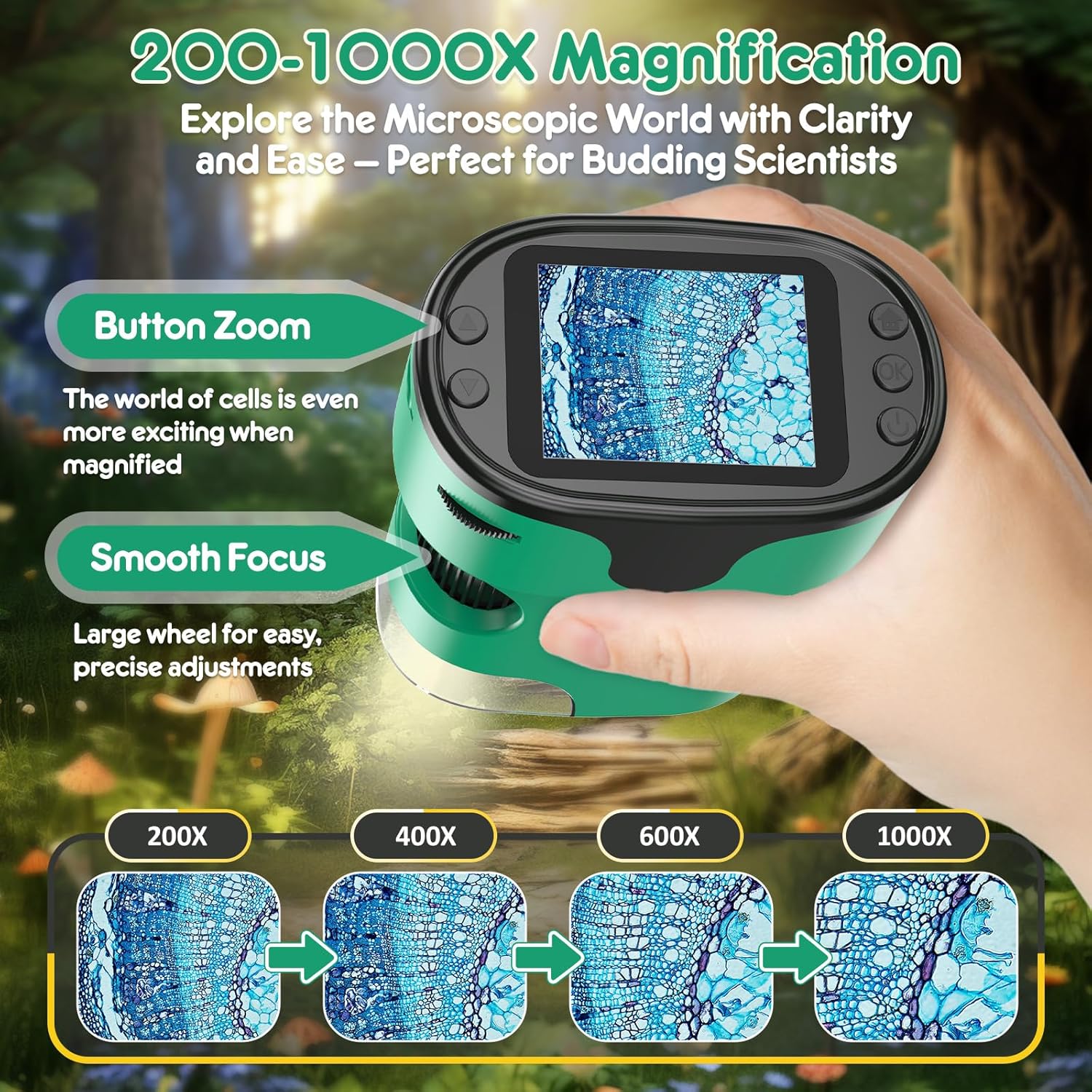
Image: The BEBANG PM1000 Handheld Digital Microscope displaying a magnified view of a specimen.
2. 패키지 내용
아래 나열된 모든 품목이 패키지에 포함되어 있는지 확인하세요.
- BEBANG PM1000 Handheld Digital Microscope
- 32G SD 카드
- 충전 케이블
- 사용자 설명서
- EVA Hard Case
- 색상 상자
- 선물 상자
- 넥스트랩
- Slides Set with Case (5 lab-grade glass slides)

이미지: 이상view of the BEBANG PM1000 microscope and its complete set of accessories.
3. 설정
3.1 장치 충전
Before first use, fully charge the microscope. Connect the provided charging cable to the device's charging port and a compatible USB power source (e.g., USB adapter, power bank, laptop, or car charger). The charging indicator will show the charging status. A full charge provides approximately 2.5 hours of continuous use.

Image: The microscope can be charged via various USB power sources and connected to a PC.
3.2 SD 카드 삽입
Locate the SD card slot on the side of the microscope. Gently insert the provided 32G SD card until it clicks into place. This card is essential for saving photos and videos.
3.3 Attaching the Neckstrap
Attach the neckstrap to the designated loop on the microscope. This allows for convenient and secure carrying, freeing your hands during outdoor exploration.

Image: The microscope with the attached neckstrap for portable use.
4. 사용 설명서
4.1 전원 켜기/끄기
To turn the device on or off, press and hold the Power button for 3 seconds.
4.2 Focusing Guide
The microscope features a smooth focusing wheel for precise adjustments and button zoom for magnification changes.
- Initial Focus Setting: Rotate the focus wheel counter-clockwise to its end to ensure the focus wheel is at its initial position.
- Low Magnification Focusing: Slowly turn the focus wheel clockwise until the image comes into clear view at a lower magnification. Choose the area of the object you wish to observe.
- High Magnification Focusing: Continue turning the focus wheel clockwise until the image enlarges and becomes clearer, achieving the desired high magnification view.

Image: Visual guide to magnification and focusing controls.

Image: Detailed guide on adjusting the focusing wheel for different magnification levels.
4.3 Photography and Video Guide
The microscope allows you to capture high-resolution photos and videos of your observations.
- 사진을 찍는 방법:
- Press the Home button, select "Photo" mode, and press the Confirm button to enter photo mode.
- Press the Confirm button again to capture a photo.
- How to Record Videos:
- Press the Home button, use the Up/Down buttons to switch to "Video" mode, and press the Confirm button to enter video mode.
- Press the Confirm button to start recording, and press it again to stop recording.
- 방법 View 재생:
- Press the Home button, use the Up/Down buttons to switch to "Playback" mode, and press the Confirm button.
- Use the Up/Down buttons to scroll through different photos and videos.

Image: Controls and steps for capturing and review미디어를 빙.
4.4 Using Prepared Slides
The included set of prepared slides allows for immediate scientific observation. Place a slide under the microscope lens and adjust the focus to view 표본.

이미지: 전amples of prepared slides for observation.
4.5 Exploring Other Objects
The microscope is versatile and can be used to examine a wide range of everyday objects. Simply place the microscope over the object you wish to observe and adjust the focus. For larger objects, the bottom cover can be removed to allow direct contact with the specimen.

이미지: 전amples of diverse objects that can be viewed with the microscope.
5. 유지관리
- 청소: Use a soft, dry cloth to clean the microscope's body. For the lens and screen, use a specialized lens cleaning cloth. Avoid using abrasive cleaners or solvents.
- 저장: When not in use, store the microscope and its accessories in the provided EVA hard case to protect them from dust, moisture, and physical damage. Store in a cool, dry place.
- 배터리 관리 : 배터리 수명을 연장하려면 배터리를 자주 완전히 방전하지 마십시오. 장시간 사용하지 않더라도 정기적으로 충전하십시오.
6. 문제 해결
- 기기의 전원이 켜지지 않습니다: 배터리가 충전되었는지 확인하세요. 충전 케이블을 연결하고 다시 시도해 보세요.
- 이미지가 흐릿함: Adjust the focusing wheel slowly until the image becomes clear. Ensure the microscope lens is close enough to the specimen.
- 사진/동영상을 저장할 수 없습니다: Check if the SD card is properly inserted. Ensure the SD card has sufficient free space.
- 화면이 비어 있거나 멈췄습니다. Try restarting the device by holding the Power button for 3 seconds to turn it off, then turn it back on.
7. 사양
| 특징 | 세부 사항 |
|---|---|
| 모델명 | 오후 1000 |
| 상표 | 베방 |
| 확대 범위 | 200배 - 1000배 |
| 화면 크기 | 2.0인치 |
| 광원 유형 | 주도의 |
| 재료 | 플라스틱 |
| 제품 치수 | 3인치 길이 x 1.8인치 너비 x 4인치 높이 |
| 품목 무게 | 0.42 킬로그램 |
| 전원 | 배터리 구동(충전식) |
| 권tage | 3.7 볼트 |
| 호환 장치 | Laptop, Smartphone (for viewing saved media) |
| 대물렌즈 설명 | 무채색 |
8. 보증 및 지원
The BEBANG PM1000 Handheld Digital Microscope comes with a 1년 보증 from the date of purchase. This warranty covers manufacturing defects and malfunctions under normal use. For warranty claims, technical support, or any inquiries, please contact BEBANG customer service through the retailer where the product was purchased or visit the official BEBANG web대지.
보증 확인을 위해 구매 증빙서류를 보관하세요.