
소개
Welcome to your new eSynic Magnifying Glass with Light and Stand. This manual provides detailed instructions for the safe and efficient use of your device. Please read it thoroughly before operation.
제품 끝view
The eSynic Magnifying Glass with Light and Stand is designed to provide enhanced magnification and illumination for various tasks, including reading, hobbies, and detailed work. It features a large optical glass lens, adjustable LED lighting, and versatile mounting options.

This diagram illustrates the key dimensions and flexible metal arm design of the magnifying lamp, highlighting its 360-degree rotation capabilities and USB power input. The lens measures 17.1cm (6.7in) in length and 12.3cm (4.8in) in width, with a smaller auxiliary lens of 8.1cm (3.2in). The flexible arm extends up to 40cm (15.75in), and the power cable is 150cm (59in) long. The base measures 28cm (11in) by 18cm (7in). An interchangeable clamp is also shown, capable of attaching to surfaces up to 2.1 inches thick.
This video demonstrates the eSynic 10X Magnification Desk Magnifier Lamp in use, showcasing its features such as adjustable brightness and color temperature, and its flexible arm. It highlights the clarity of the 10X optical glass lens for detailed tasks like reading and crafting.
설정
짐 풀기
- 포장에서 모든 구성 요소를 조심스럽게 제거합니다.
- Verify all parts are present: Magnifying lamp head with flexible arm, heavy-duty base, and clamp 부착.
장착 옵션
Your eSynic Magnifying Glass offers two primary mounting methods: a stable desktop base and a secure clamp-on style.

This image displays the two versatile mounting options for the eSynic Magnifying Glass. The 'Base Style' shows the lamp securely placed on its heavy-duty metal base, suitable for desktop use. The 'Clamp-On Style' illustrates the lamp attached to a table edge using the included clamp, providing flexibility for various workspaces. The clamp can accommodate surfaces up to 5.5 cm thick.
데스크탑 베이스 설치
Insert the flexible arm's stem into the designated hole on the heavy-duty metal base. Tighten the screw on the side of the base to secure the arm.

This image highlights the stable, large, heavy-duty pure metal base of the magnifying lamp. The base is designed to be anti-slip and flat, providing a secure workstation. It is recommended to use the clamp-on desk type for sideways stretching to ensure greater safety and stability.
Clamp-On Installation
cl을 부착하세요amp to a sturdy surface, such as a desk or workbench, ensuring it is tightened securely. Insert the flexible arm's stem into the clamp's opening and tighten the screw. The clamp can accommodate surfaces up to 6.5 cm (2.5 inches) thick.
전원 연결
Connect the USB-C cable from the magnifying lamp to a compatible USB power source (e.g., computer, wall adapter, power bank). The lamp is USB-C rechargeable and includes a 400mAh battery for portable use.
작동 지침
전원 켜기/끄기
Locate the power button on the top of the magnifying lamp head. Press it once to turn the light on or off.

이 이미지는 클로즈업을 제공합니다 view of the control buttons located on the head of the magnifying lamp. These 'Head Control Buttons' include power on/off, brightness adjustment (+/-), and color temperature switch. This design offers convenient access to controls, unlike some other models with in-line switches.
밝기 조정
난amp features 10 adjustable brightness levels. Use the '+' and '-' buttons on the lamp head to increase or decrease the light intensity.
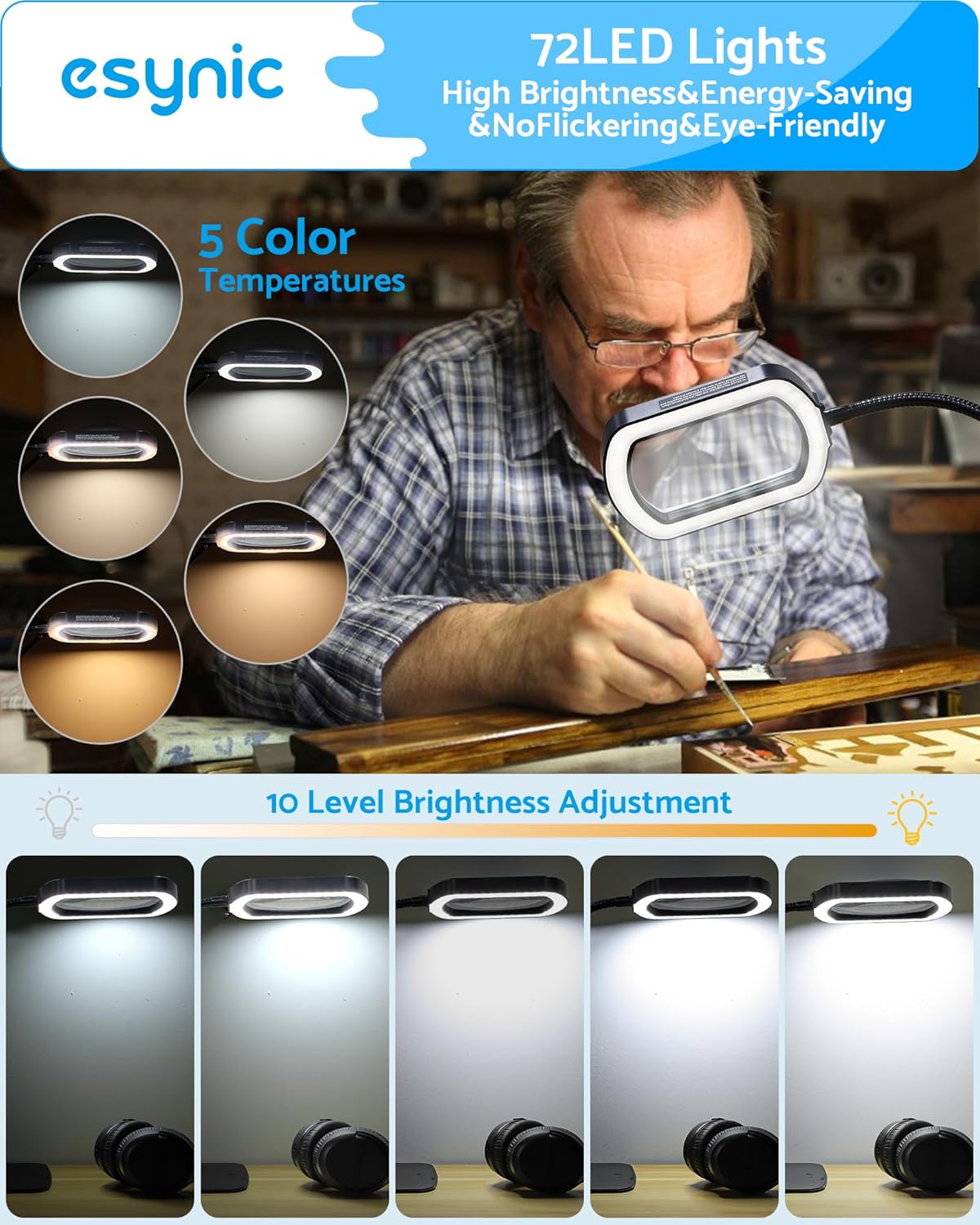
This image demonstrates the 72 energy-efficient LED lights, offering 5 color temperatures and 10 levels of brightness adjustment. The top row shows different color temperatures (e.g., warm to cool white), while the bottom row illustrates the range of brightness from dim to maximum intensity. This allows for optimal lighting conditions for various tasks.
색온도 변경
Select from 5 different color temperatures to suit your preference and task requirements. Press the sun icon button to cycle through the available color modes.
돋보기 사용
난amp features a large 110mm (4.3-inch) optical glass lens with 5X primary magnification and a 10X auxiliary mirror magnification. Position the flexible arm to bring the lens over your work area for clear, distortion-free view주고받음.

This image shows a user engaged in detailed sewing work, utilizing the magnifying lamp to clearly view intricate stitches and fabric patterns. It demonstrates the practical application of the magnification feature for hobbies and crafts.
Flexible Arm Adjustment
The 360° high flexibility gooseneck arm allows you to position the magnifying head precisely where needed. Adjust the arm carefully to avoid damage to the light panel.
유지
렌즈 청소
Gently wipe the optical glass lens with a soft, lint-free cloth (e.g., microfiber cloth) to remove dust or smudges. Avoid using abrasive cleaners or harsh chemicals, as these can scratch the lens or damage coatings.
신체 청소
부드러운 d를 사용하세요amp l을 닦을 천amp's body and base. Ensure the device is unplugged before cleaning. Do not immerse any part of the lamp 물속에서.
저장
When not in use, store the magnifying lamp 직사광선과 극한 온도 변화를 피해 깨끗하고 건조한 곳에 보관하십시오.
문제 해결
불이 켜지지 않음
- 전원 연결을 확인하세요. USB-C 케이블이 양쪽 단자에 제대로 연결되어 있는지 확인하십시오.amp and a functional power source.
- 전원 확인: l을 연결해 보세요amp into a different USB port or wall adapter to rule out a faulty power source.
- 배터리 충전: If using the internal battery, ensure it is charged. Connect the lamp to power and allow it to charge for at least 30 minutes before attempting to turn it on again.
빛이 깜박이거나 흐릿함
- 전원: A weak power source might cause flickering. Try a different USB port or a higher-wattag전자 어댑터.
- 밝기 레벨: Adjust the brightness using the '+' button to ensure it's not set to the lowest level.
Magnification Unclear or Distorted
- 깨끗한 렌즈: Ensure the lens is clean and free of dust, fingerprints, or smudges. Refer to the "Cleaning the Lens" section.
- 최적의 거리: Adjust the distance between the lens and the object being viewed to find the optimal focal point for clear magnification.
Lamp Not Holding Position
- Base/Clamp 보안: Ensure the flexible arm is securely tightened into either the desktop base or the clamp. 클을 위해amp, verify it is firmly attached to the surface.
- 팔 위치: While the arm is flexible, avoid over-extending it in extreme angles, especially when using the desktop base, to maintain stability.
명세서
| 특징 | 세부 사항 |
|---|---|
| 상표 | 이시닉 |
| 모델 번호 | ESYGK234 |
| 색상 | Black-glass Lense |
| 렌즈 소재 | 아크릴 |
| 확대 강도 | 10 개 |
| 렌즈 너비 | 5*3 Inches (110mm) |
| LED 조명 | 72개의 LED |
| 밝기 레벨 | 10 |
| 색온도 | 5 |
| 전원 | USB-C 충전식 |
| 배터리 용량 | 400mAh |
| 품목 무게 | 4.62파운드(2.1킬로그램) |
| 제품 치수 | 5 x 3 x 0.04 인치 |
보증 및 지원
For warranty information or technical support, please contact eSynic customer service through their official website or the retailer where the product was purchased. Please have your model number (ESYGK234) and purchase details ready.