
Warmiehomy PS015
Warmiehomy 24x24x24 Inch Printer Stand with Storage Instruction Manual
모델: PS015
소개
Thank you for choosing the Warmiehomy 24x24x24 Inch Printer Stand. This versatile 2-tier rolling cart is designed to provide efficient storage and mobility for your office or home. Please read this manual carefully before assembly and use to ensure proper setup and longevity of your product.

Image: The Warmiehomy 24x24x24 Inch Printer Stand in Rustic Brown, showcasing its two tiers and overall design.
구성 요소 체크리스트
Before beginning assembly, please ensure all parts are present and undamaged. Refer to the detailed installation instructions paper included in the package for specific part identification.
주요 구성 요소는 다음과 같습니다.
- Top and bottom wooden panels
- 금속 프레임 구성 요소(다리, 가로대)
- Rolling casters (wheels) with locks
- Fixed foot pads
- Assembly hardware (screws, wrench, Allen key)

이미지: 오버헤드 view of all components for the 2-tier printer stand laid out on a wooden floor, including metal frames, wooden panels, wheels, and tools.
설정 및 조립
Assembly of the Warmiehomy printer stand is designed to be straightforward. Follow these general steps, referring to the included paper instructions for detailed diagrams and part numbers.
- 구성 요소 풀기: Carefully remove all parts from the packaging. Check against the components checklist to ensure everything is present.
- 금속 프레임 조립: Connect the metal frame components using the provided screws and tools. Ensure all connections are secure but do not overtighten until the entire frame is assembled. The "X" design crossbars provide structural stability.
- 나무 패널을 부착하세요: Secure the wooden panels to the assembled metal frame. The top panel forms the main countertop, and the lower panel creates the storage shelf.
- 발 또는 캐스터 설치: Decide whether you prefer a stationary stand or a mobile cart.
- 이동성을 위해: Attach the four rolling casters to the bottom of the stand. Two of the four casters are lockable to prevent unwanted movement.
- 안정성을 위해: Attach the four fixed foot pads to the bottom of the stand. These can be adjusted to level the stand on uneven surfaces.
- 최종 조임: Once all components are in place, carefully tighten all screws to ensure the stand is stable and secure.
조립 비디오 가이드
Video: A step-by-step guide demonstrating the assembly process of the Warmiehomy 2-Tier Printer Table.
작동 및 사용
The Warmiehomy printer stand is designed for versatile use in various environments, including home offices, living rooms, and bedrooms.
주요 특징:
- Oversized Countertop: The 23.62''L x 23.62''W top surface is suitable for large printers, scanners, or fax machines.
- 2단 수납공간: The lower shelf provides ample space for office supplies such as paper, folders, books, and documents.
- 이동성과 안정성:
- When using the rolling casters, the stand can be easily moved. Two of the four wheels are lockable to secure the cart in place.
- When using fixed foot pads, the stand offers enhanced stability and can be adjusted to compensate for uneven floors.
- 다기능 디자인: Beyond a printer stand, it can serve as a side table, nightstand, or mini-fridge stand.
사용 시나리오:
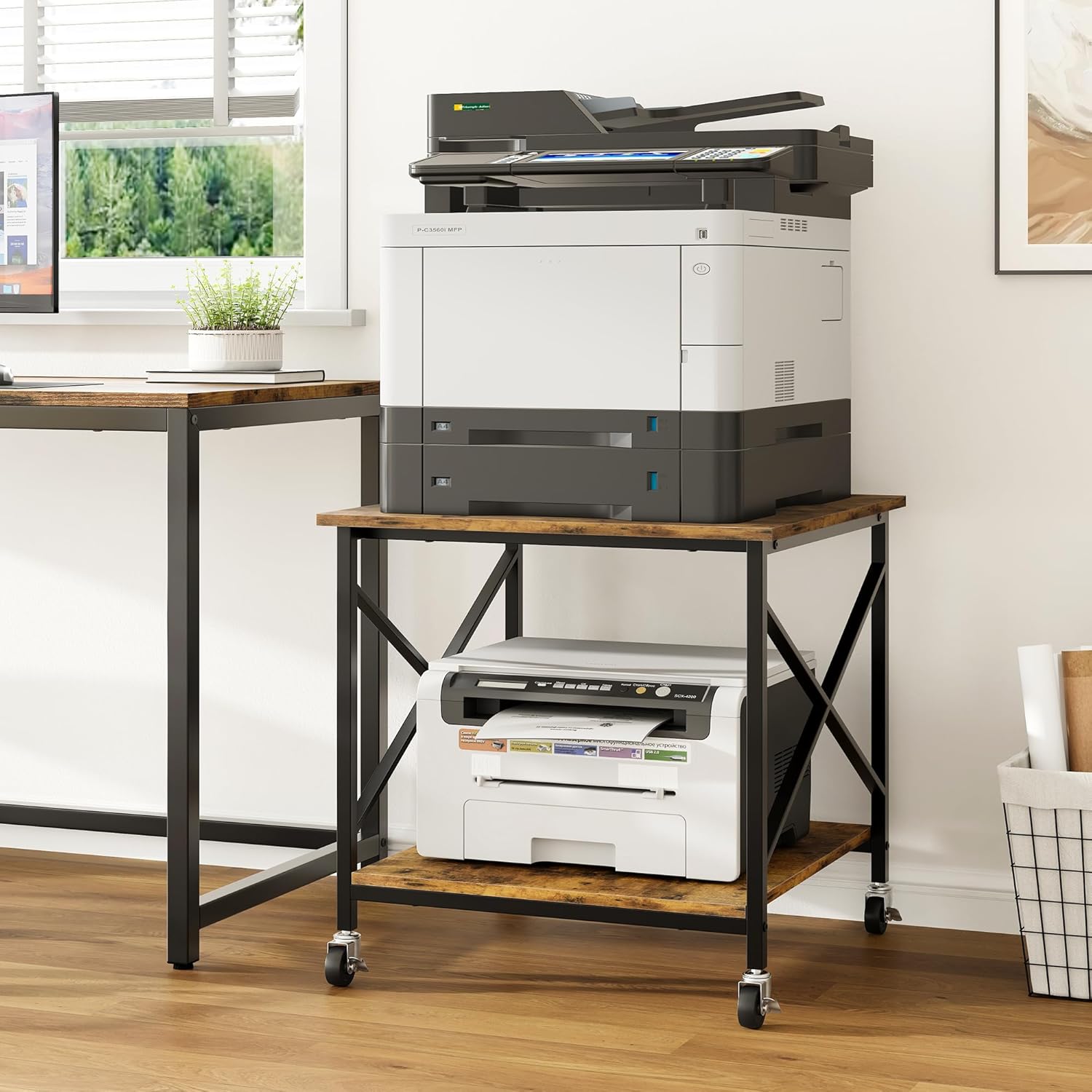
Image: The printer stand in an office, holding a large printer on the top tier and paper on the bottom shelf, demonstrating its primary function.

Image: The stand used as a mini-fridge stand in a kitchen, with snacks stored on the lower shelf, highlighting its versatility.

Image: The stand functioning as a nightstand in a bedroom, holding a lamp, books, and other personal items.

이미지: 클로즈업 view illustrating the option between fixed foot pads for stability and rolling casters for mobility, with lockable wheels shown.
제품 사용 영상
Video: A demonstration of the printer stand's stability and mobility with its wheels, showcasing its use in an office setting.
비디오: 간략하게 살펴보기view highlighting the large storage capacity of the printer stand.
Video: A visual display of the Warmiehomy 2-Tier Printer Table in various settings, demonstrating its functional design.
유지 보수 및 관리
To ensure the longevity and appearance of your Warmiehomy printer stand, follow these simple maintenance guidelines:
- 청소: The wooden panels are waterproof and easy to clean. Use a soft, damp cloth to wipe down surfaces. Avoid harsh chemicals or abrasive cleaners that could damage the finish.
- 유출: 물에 젖거나 얼룩이 생기는 것을 방지하기 위해 흘린 액체는 즉시 닦아내십시오.
- 중량 용량: Do not exceed the maximum weight capacity of 100 pounds per shelf to prevent damage or structural failure.
- 점검: 모든 나사와 연결부가 단단히 조여져 있는지 정기적으로 점검하세요. 필요하면 다시 조이세요.
- 움직임: When moving the stand, especially over uneven surfaces, lift slightly to reduce stress on the casters. Ensure casters are unlocked before moving.

이미지: 자세한 view highlighting the quality features of the stand, including its waterproof and scratch-resistant wooden panels, and the sturdy "X" design metal frame.
문제 해결
If you encounter any issues with your Warmiehomy printer stand, refer to the following common solutions:
- 흔들리는 스탠드:
- 모든 나사가 단단히 조여져 있는지 확인하십시오.
- If using fixed foot pads, adjust them individually to level the stand on uneven floors.
- 롤링 난이도:
- Check that all caster locks are disengaged.
- Ensure the casters are clean and free of debris.
- 잃어버린 부분들: If any parts are missing upon arrival, please contact customer support immediately with your purchase details.
명세서
| 특징 | 세부 사항 |
|---|---|
| 제품 치수 | 23.62 x 23.61 x 23.62 인치 |
| 품목 무게 | 22파운드 |
| 모델 번호 | PS015 |
| 상표 | 워미호미 |
| 색상 | 러스틱 브라운 |
| 폼 팩터 | 구형 |
| 호환 장치 | Printers, Mini Fridge |
| 장착 유형 | 플로어 스탠드 |
| 중량 용량 | 선반당 최대 100파운드 |
| 재료 | CARB P2 class manufactured wood, Steel frames |

Image: A diagram illustrating the dimensions (23.62"L x 23.62"W x 23.62"H) and weight capacity (100 lbs per shelf) of the printer stand.
고객 지원
For any questions regarding assembly, operation, or if you encounter any issues with your Warmiehomy printer stand, please do not hesitate to contact our customer support team. We are committed to resolving your concerns within 24 hours.
Please refer to your purchase documentation or the Warmiehomy official web연락처 정보 사이트.
Ask a question about this manual
Ask about setup, troubleshooting, compatibility, parts, safety, or missing instructions. Manuals+ will review the question and use this page’s manual context to help answer it.