
J-Tech Digital JTECH-MV41AE
J-Tech 디지털 4K HDMI 멀티viewer 스위치(JTECH-MV41AE) 사용 설명서
Model: JTECH-MV41AE
소개
This manual provides detailed instructions for the installation, operation, and troubleshooting of your J-Tech Digital 4K HDMI Multiviewer Switch (JTECH-MV41AE). Please read this manual thoroughly before using the product to ensure proper functionality and to maximize your experience.

Image: J-Tech Digital 4K HDMI Multiviewer Switch (JTECH-MV41AE) with remote and a display showing multiple video inputs.
안전 정보
- 장치 주변의 적절한 환기를 보장하십시오.
- 기기를 물이나 과도한 습기에 노출시키지 마세요.
- 제공된 전원 어댑터만 사용하세요.
- 기기 위에 무거운 물건을 올려놓지 마십시오.
- 장치를 열원에서 멀리 두십시오.
패키지 내용
패키지에 모든 품목이 들어 있는지 확인하세요.
- 1x J-Tech Digital 4K HDMI Multiviewer Switch (JTECH-MV41AE)
- 1x IR 원격 제어
- 1x 5V DC 전원 어댑터
- 1x 사용자 설명서
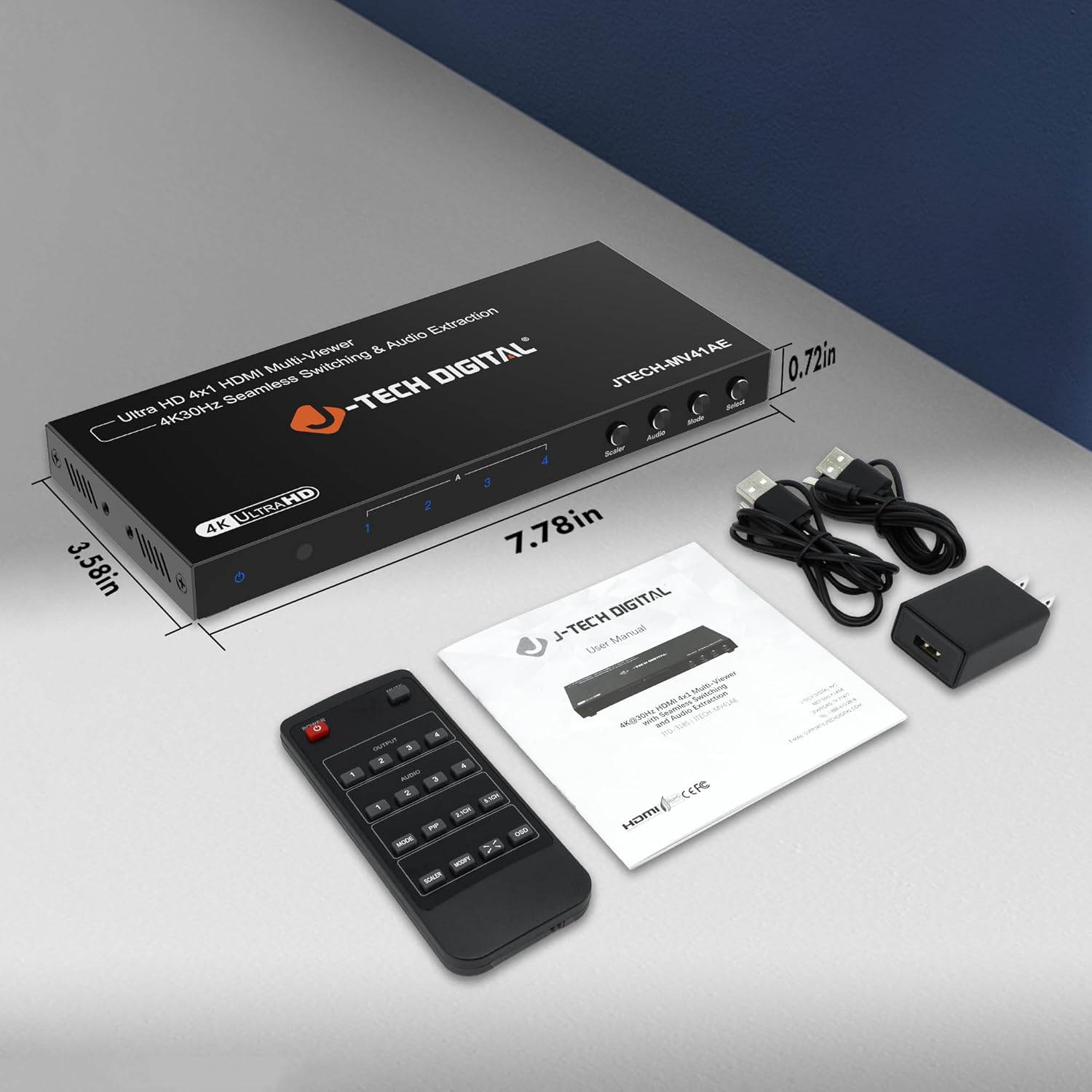
Image: Package contents of the JTECH-MV41AE.
제품 끝view
Front and Rear Panel Interface

Image: Detailed diagram of the multiviewer switch's front and rear panels.
전면 패널:
- 전원 LED: 전원 상태를 나타냅니다.
- IR 수신기 : 원격 제어 신호용입니다.
- HDMI 1-4 Input Indicators: LEDs show active HDMI inputs.
- Input 1-4 Selection Buttons: Select individual HDMI inputs.
- Scaler Button: 출력 해상도를 조정합니다.
- 오디오 버튼: Controls audio output settings.
- 모드 버튼: Cycles through view잉 모드.
- 선택 버튼: Confirms selections or activates PiP.
후면 패널 :
- HDMI 1-4 Input: HDMI 소스 장치를 연결합니다.
- HDMI 출력: 디스플레이 장치(TV, 모니터, 프로젝터)에 연결하세요.
- Audio Output (Stereo): 3.5mm jack for analog audio extraction.
- Audio Output (TOSLINK): Optical port for digital audio extraction.
- Micro USB (RS-232 Control): For advanced control via PC.
- DC 5V : 전원 입력 포트.
- 온 / 오프 스위치: 전원 토글 스위치.
주요 특징
- Supports up to 4 HDMI sources on a single display.
- Seamless switching between source devices without delay or black screen.
- Supports 4K@30Hz resolution.
- Features 6 different viewing modes, including Picture-in-Picture (PiP) with custom location control.
- Audio extraction via Optical (TOSLINK) and 3.5mm stereo outputs.
- Control via remote control, front panel buttons, or RS232.
설정 및 설치
Follow these steps to set up your J-Tech Digital 4K HDMI Multiview어 스위치:
- HDMI 소스 연결: Connect up to four HDMI source devices (e.g., PC, game console, Blu-ray player, STB) to the HDMI Input 1-4 ports on the rear panel of the multiview어 스위치.
- HDMI 디스플레이 연결: Connect an HDMI cable from the HDMI Output port on the multiviewer switch to the HDMI input of your display (TV, monitor, or projector).
- 오디오 출력 연결(선택 사항): If you wish to extract audio to an external sound system, connect an optical cable to the TOSLINK port or a 3.5mm stereo cable to the Stereo port on the rear panel.
- 전원 연결: Plug the provided 5V DC power adapter into the DC 5V port on the rear panel, then plug the adapter into a power outlet.
- 전원 켜기: Flip the ON/OFF switch on the rear panel to the 'ON' position. The Power LED on the front panel should illuminate.

Image: Connection diagram for the JTECH-MV41AE.
작업
전원 켜기/끄기
Use the ON/OFF switch on the rear panel to power the device. The front panel Power LED indicates the power status.
입력 선택
You can select the desired HDMI input using the front panel buttons (Input 1-4) or the corresponding number buttons on the IR remote control.
Viewing 모드
멀티viewer switch offers 6 different viewing modes. Press the 방법 button on the front panel or remote to cycle through these modes:
- Single Display Mode
- Dual Side Mode (Side by Side)
- Dual Side Mode (Up and Down)
- 4 Equal Display Mode
- 1 Big, 3 Small Display Mode
- Picture-in-Picture (PiP) Mode (1 Big, 1 Small)

Image: Six display modes supported by the JTECH-MV41AE.
Picture-in-Picture (PiP) Function
In PiP mode, you can customize the location of the small window. Press the 씨 button on the remote control to adjust its position on the screen.
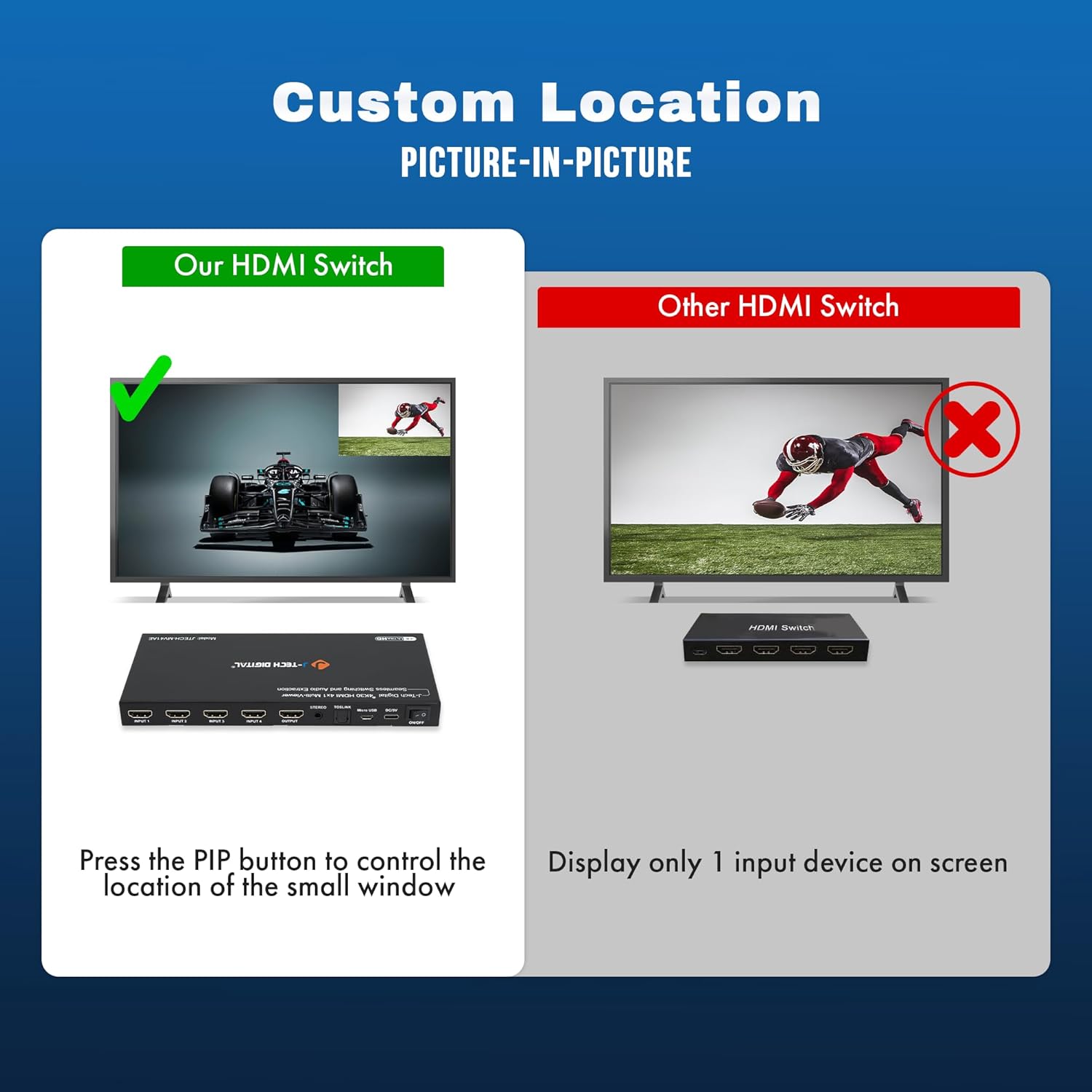
Image: Custom Picture-in-Picture location control feature.
원활한 전환
The device features seamless switching, meaning there is no black screen or delay when transitioning between different source devices. This ensures a smooth view경험.

Image: Seamless switching functionality.
오디오 추출
Audio from any of the incoming HDMI signals can be extracted to an external sound system using the Optical (TOSLINK) or 3.5mm analog audio outputs on the rear panel.
RS232 제어
For advanced control and integration into professional setups, the device can be controlled via RS232 using the Micro USB port and appropriate software.
유지
To ensure the longevity and optimal performance of your J-Tech Digital 4K HDMI Multiviewer Switch, follow these maintenance guidelines:
- 청소: 기기 외부를 닦을 때는 부드럽고 마른 천을 사용하십시오. 독한 화학 약품이나 연마성 세척제 사용은 피하십시오.
- 통풍: 과열을 방지하려면 환기구가 막히지 않았는지 확인하세요.
- 저장: 장시간 사용하지 않을 경우, 직사광선과 극한의 온도를 피해 시원하고 건조한 곳에 보관하세요.
- 케이블 관리 : 케이블을 깔끔하게 정리하고, 손상을 방지하려면 날카로운 굽힘이나 과도한 긴장을 피하세요.
문제 해결
If you encounter issues with your multiviewer switch, refer to the following common problems and solutions:
| 문제 | 가능한 원인 | 해결책 |
|---|---|---|
| No video output or flickering screen. | Loose cable connections, incompatible resolution, power issue. | Check all HDMI and power cable connections. Ensure they are secure. Try a different HDMI cable. Verify that your display supports the output resolution (4K@30Hz). Cycle power to the device and display. |
| 오디오 출력이 없습니다. | Incorrect audio settings, loose audio cable, incompatible audio format. | Check audio cable connections (Optical/3.5mm). Ensure your external sound system is correctly configured. Press the 'Audio' button on the device or remote to adjust audio settings. |
| 리모컨이 작동하지 않습니다. | Dead batteries, obstructed IR path. | Replace batteries in the remote. Ensure there are no obstructions between the remote and the device's IR receiver. |
| Device defaults to 2K resolution on startup. | Default setting behavior. | Press the 'Scaler' button multiple times to cycle to the desired 4K resolution. This setting may need to be reapplied after each power cycle. |
| Cannot switch between inputs. | No signal from source, faulty button/remote. | Ensure all source devices are powered on and sending a signal. Try using both the front panel buttons and the remote control. |
명세서
- 모델: JTECH-MV41AE
- 제품 크기: 3.58 x 7.78 x 0.72 인치
- 품목 무게: 1.4파운드
- 색상: 검은색
- 커넥터 유형: HDMI
- 케이블 유형: HDMI
- 입력 포트 : 4개의 HDMI
- 출력 포트: 1x HDMI, 1x Optical (TOSLINK), 1x 3.5mm Stereo
- 해결 지원: 최대 4K@30Hz
- 제어 방법: IR Remote, Front Panel Buttons, RS232
- 호환 장치: Blu-Ray Player, Gaming Console, Laptop, Projector, Television

Image: Wide compatibility of the JTECH-MV41AE.
보증 및 지원
All J-Tech Digital products include a one-year manufacturer replacement warranty. Additionally, J-Tech Digital provides free lifetime technical support from their customer support team located in Stafford, TX.
기술 지원 시간: 월요일부터 금요일까지, 오전 9시부터 오후 6시 (중부 표준시).
Contact information is available on the J-Tech Digital seller page or official web대지.
Ask a question about this manual
Ask about setup, troubleshooting, compatibility, parts, safety, or missing instructions. Manuals+ will review the question and use this page’s manual context to help answer it.