
칼로비 SK38
Kalobee Watch 4 PRO+ 스마트워치 사용 설명서
모델 : SK38
Brand: Kalobee
소개
Welcome to the user manual for your new Kalobee Watch 4 PRO+ Smart Watch. This guide provides essential information on setting up, operating, maintaining, and troubleshooting your device. Please read this manual thoroughly to ensure optimal performance and longevity of your smartwatch.
The Kalobee Watch 4 PRO+ features a vibrant AMOLED display, versatile interchangeable straps, and convenient wireless charging, designed to seamlessly integrate into your daily life.
패키지 내용
Upon opening your Kalobee Watch 4 PRO+ package, please verify that all the following items are included:
- Kalobee Watch 4 PRO+ Smart Watch (Model SK38)
- Three (3) Interchangeable Straps (e.g., leather, silicone, metal)
- 무선 충전 도크
- 사용 설명서 (본 문서)

Image: The Kalobee Watch 4 PRO+ packaging, displaying the smartwatch alongside its three distinct interchangeable straps, highlighting the complete package contents.
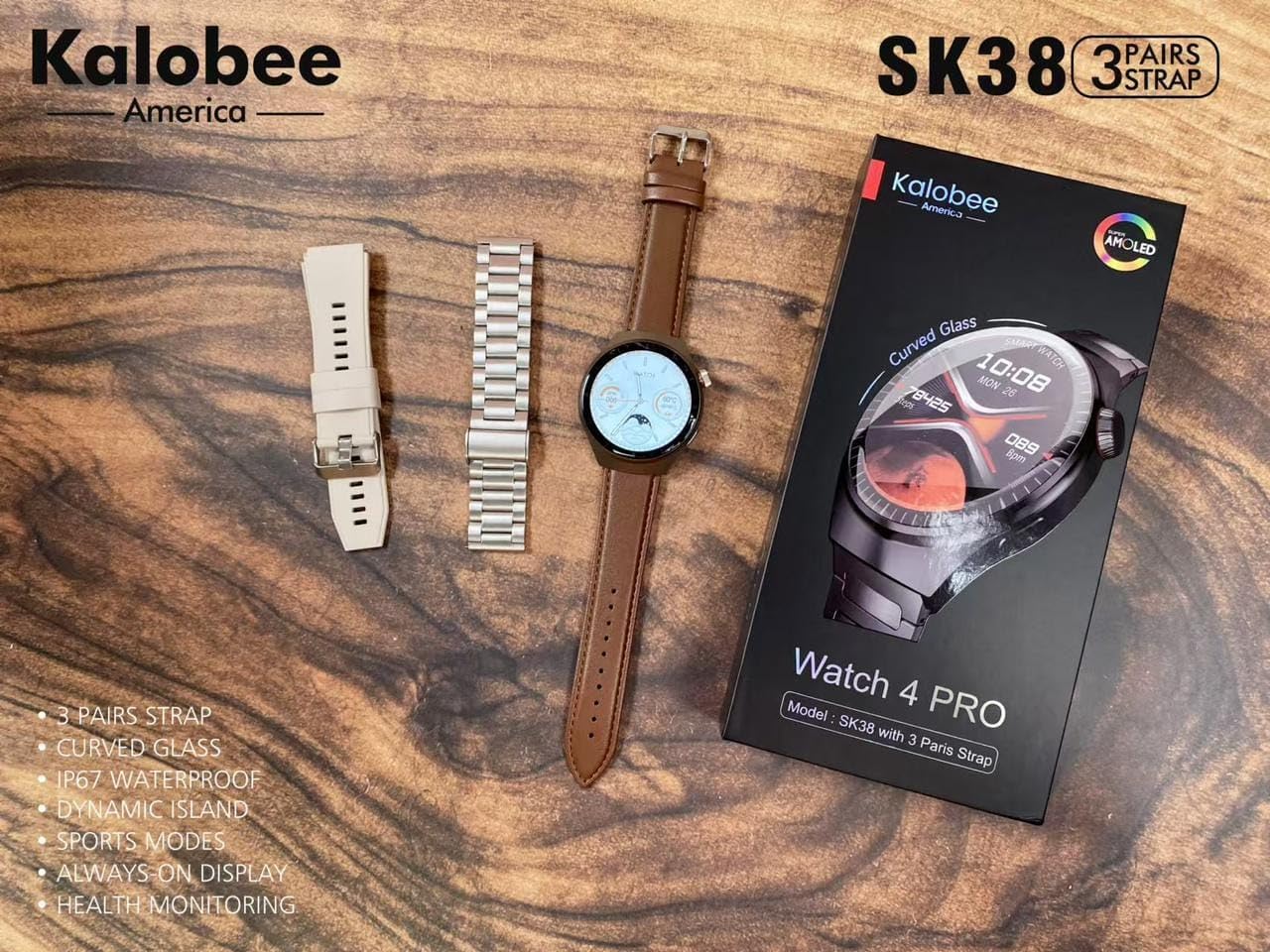
Image: A flat lay of the Kalobee Watch 4 PRO+ components, including the smartwatch, its retail box, and the three different strap options (leather, silicone, and metal), ready for assembly.
설정
1. 초기 충전
Before first use, fully charge your Kalobee Watch 4 PRO+. This ensures optimal battery calibration and performance.
- Connect the wireless charging dock to a USB power adapter (not included) and plug it into a power outlet.
- Place your Kalobee Watch 4 PRO+ onto the charging dock. Ensure the watch is properly aligned for charging to begin.
- 시계 화면에 충전 상태가 표시됩니다. 완전 충전에는 일반적으로 약 2~3시간이 소요됩니다.
2. 스트랩 설치
The Kalobee Watch 4 PRO+ comes with interchangeable straps, allowing you to customize its appearance. To install or change a strap:
- 각 스트랩 뒷면에 있는 퀵 릴리스 핀을 찾으세요.
- Slide the pin inwards to detach or attach the strap to the watch lugs.
- Ensure the pin clicks securely into place, indicating the strap is properly fastened.

이미지: 측면 view of the Kalobee Watch 4 PRO+ featuring a sleek metal strap, demonstrating one of the interchangeable strap options.
3. 기기와 페어링 (블루투스)
To unlock the full smart features of your watch, pair it with your smartphone via Bluetooth.
- Download the official Kalobee companion app from your smartphone's app store (iOS App Store or Google Play Store).
- 스마트폰에서 Bluetooth가 활성화되어 있는지 확인하세요.
- Open the Kalobee app and follow the on-screen instructions to add a new device.
- On your watch, navigate to the Bluetooth settings (refer to "Basic Navigation" section if needed).
- Select your watch from the list of available devices in the app. Confirm the pairing request on both your phone and watch.
- 페어링이 완료되면 시계는 스마트폰과 데이터 및 알림을 동기화합니다.
작동 지침
1. 기본 탐색
The Kalobee Watch 4 PRO+ features an intuitive touch screen and physical buttons for navigation.
- 터치 스크린: 좌우 또는 상하로 스와이프하여 메뉴와 위젯을 탐색하세요. 탭하여 항목을 선택하세요.
- 크라운 버튼: Typically used to return to the home screen, scroll through lists, or zoom in/out. Press and hold for power options.
- 측면 버튼: Often customizable, it can be set to quickly access a specific app or feature.

Image: The Kalobee Watch 4 PRO+ displaying its main watch face, showing time, date, steps, and calories, illustrating the primary user interface.
2. 시계 화면 사용자 정의
Personalize your watch by changing the watch face:
- From the home screen, press and hold the watch face.
- 사용 가능한 워치 페이스를 보려면 왼쪽 또는 오른쪽으로 스와이프하세요.
- Tap on a watch face to select it. Some watch faces may offer further customization options (e.g., complications, colors) which can be adjusted by tapping the "Customize" option.
- Additional watch faces can be downloaded and managed via the Kalobee companion app.
3. 건강 모니터링 기능
Your Kalobee Watch 4 PRO+ is equipped with various health monitoring capabilities:
- 심박수 모니터링 : Access the heart rate app on your watch to measure your current heart rate. Continuous monitoring can be enabled in the app settings.
- 활동 추적: 하루 동안 걸음 수, 이동 거리, 소모 칼로리를 추적합니다. View daily summaries on the watch or in the companion app.
- 수면 추적: Wears the watch to bed to monitor sleep patterns, including deep sleep, light sleep, and awake times. Data is available in the app.
- 스포츠 모드: Select from various sports modes (e.g., running, cycling) to track specific workout data.
4. 알림
Receive notifications from your paired smartphone directly on your watch:
- Ensure notifications are enabled in the Kalobee companion app for desired applications.
- When a notification arrives, the watch will vibrate and display the content.
- 시계 화면 상단에서 아래로 스와이프하세요. view 알림 내역.
유지
1. 시계 청소
정기적으로 세척하면 시계의 외관과 기능을 유지하는 데 도움이 됩니다.
- 시계 본체: Wipe the watch body with a soft, lint-free cloth. If necessary, slightly damp천에 물을 묻혀 닦으세요. 강한 화학 물질이나 연마재는 사용하지 마세요.
- 스트랩: Clean silicone straps with mild soap and water. Leather straps should be wiped with a dry or slightly damp cloth and allowed to air dry. Metal straps can be cleaned with a soft brush and mild soapy water, then rinsed and dried thoroughly.
- 충전하거나 착용하기 전에 시계가 완전히 건조되었는지 확인하세요.
2. 배터리 관리
배터리 수명을 연장하려면:
- 배터리를 자주 완전히 방전시키지 마세요.
- 배터리 잔량이 20% 미만으로 떨어지기 전에 시계를 정기적으로 충전하는 것이 가장 좋습니다.
- Do not expose the watch to extreme temperatures (hot or cold) for extended periods.
3. 보관
When not in use for an extended period, store your watch in a cool, dry place. It is recommended to charge the watch to about 50% before long-term storage.
문제 해결
If you encounter issues with your Kalobee Watch 4 PRO+, refer to the following common solutions:
| 문제 | 가능한 해결책 |
|---|---|
| 시계가 켜지지 않음 | Ensure the watch is fully charged. Connect it to the charging dock for at least 30 minutes. If still unresponsive, perform a forced restart (refer to "Basic Navigation" for button functions). |
| 스마트폰과 페어링이 안되네요 | Ensure Bluetooth is enabled on both devices. Make sure the watch is in pairing mode. Restart both the watch and smartphone. Clear previous Bluetooth connections on your phone if necessary. |
| 부정확한 건강 데이터 | Ensure the watch is worn snugly on your wrist, not too loose or too tight. Clean the sensors on the back of the watch. Update the watch firmware via the companion app. |
| 알림이 나타나지 않습니다 | Check notification settings in the Kalobee companion app and your smartphone's system settings. Ensure the watch is connected via Bluetooth. |
| 배터리 수명이 짧음 | Reduce screen brightness, disable always-on display, limit background app refresh, and turn off unnecessary features like continuous heart rate monitoring if not needed. |
명세서
- 모델: SK38
- 표시하다: AMOLED 화면
- 운영 체제: 아스테로이드OS
- 연결성: 블루투스
- 배터리 용량: 449 Amp 시간
- 충전 중: 무선 충전
- 포함된 구성 요소: Watch Band (3 pairs), Wireless Charging Dock
- 제조업체: HUAYING COMMUNICATION CO.,LTD
- 원산지: 중국
보증 및 지원
Information regarding product warranty and customer support is not available in this manual. Please refer to the product packaging or the official Kalobee web보증 범위 및 서비스 또는 문의 사항에 대한 고객 지원 연락처 정보는 해당 사이트를 참조하십시오.
Ask a question about this manual
Ask about setup, troubleshooting, compatibility, parts, safety, or missing instructions. Manuals+ will review the question and use this page’s manual context to help answer it.