
1. 서론
구매해주셔서 감사합니다asing the Sharp 4T-C65FL6EX 65-inch 4K Frameless Smart TV. This manual provides essential information for the safe and efficient use of your new television. Please read these instructions thoroughly before operating the TV and retain them for future reference.
중요한 안전 정보
Always follow basic safety precautions when using this product to reduce the risk of fire, electric shock, and injury. Do not expose the TV to rain or moisture. Do not open the cabinet; refer all servicing to qualified personnel. Ensure proper ventilation and avoid placing the TV near heat sources.
2. 제품 오버view
The Sharp 4T-C65FL6EX is a 65-inch 4K UHD Smart LED TV designed to deliver an immersive viewing experience. It features a frameless design, Google TV operating system, and a built-in digital receiver.
주요 특징
- 65인치 4K UHD 디스플레이: Enjoy stunning visuals with a resolution of 3840 x 2160 pixels.
- 프레임리스 디자인: Maximizes screen space for an expansive view.
- 구글 TV 운영 체제: Access a wide range of apps, movies, and shows.
- Built-in Digital Receiver: Supports DVB-S/S2/T/T2/C broadcast types.
- Dolby Atmos & DTS Studio Sound: Delivers rich, immersive audio.
- 돌비 비전 및 HDR10: Enhanced contrast and color for compatible content.
- 통합 Chromecast: 모바일 기기에서 콘텐츠를 간편하게 전송하세요.
- Far-field Voice Control & Google Assistant: Control your TV with voice commands.
- 연결성: Wi-Fi, Bluetooth v5.1, 3 HDMI 2.0 ports, 2 USB ports, LAN.
패키지 내용
- Sharp 4T-C65FL6EX 65-inch 4K Smart TV
- 원격 제어
- 전원 케이블
- TV 스탠드(2개)
- 스탠드 설치용 나사
- 사용 설명서 (본 문서)

그림 2.1: 전면 view of the Sharp 4T-C65FL6EX Smart TV.
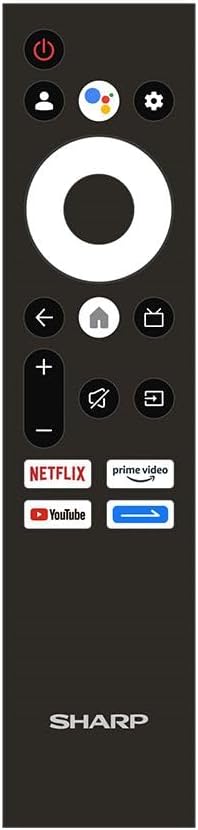
Figure 2.2: The included remote control for the Sharp Smart TV.
3. 설정
3.1 포장 풀기 및 배치
- Carefully remove the TV from its packaging. It is recommended to have two people for this.
- Place the TV on a stable, flat surface or prepare for wall mounting. Ensure adequate space around the TV for ventilation.
3.2 스탠드 설치
TV를 벽에 설치하지 않을 경우, 동봉된 스탠드를 부착하십시오.
- Lay the TV screen-down on a soft, clean cloth to prevent scratches.
- 각 스탠드 조각을 TV 하단의 해당 슬롯에 맞춥니다.
- 제공된 나사를 사용하여 스탠드를 고정하세요. 나사가 단단히 조여졌는지 확인하세요.
3.3 벽면 장착(선택 사항)
This TV is compatible with VESA standard wall mounts. Consult a professional for wall mounting to ensure proper installation and safety. Remove the stand before wall mounting.
3.4 장치 연결
적절한 포트를 사용하여 외부 장치를 TV에 연결하세요.
- HDMI : For Blu-ray players, game consoles, cable/satellite boxes. The TV has 3 HDMI 2.0 ports.
- USB: For USB drives to play media (video, photos, music). The TV has 2 USB ports.
- Antenna/Satellite (RF Input): Connect your antenna or satellite dish cable to the RF input for digital broadcasting.
- LAN : 유선 인터넷 연결의 경우.
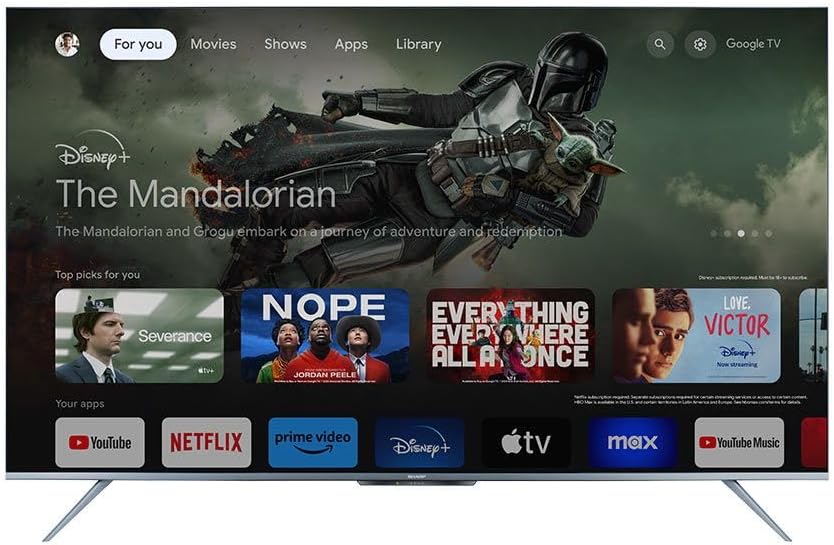
그림 3.1: 후면 view of the TV illustrating various input/output ports.
3.5 전원 켜기 및 최초 설정
- 전원 케이블을 TV에 연결한 다음 전원 콘센트에 연결하세요.
- 리모컨이나 TV의 전원 버튼을 누르세요.
- Follow the on-screen instructions to complete the initial setup, which includes selecting language, connecting to Wi-Fi, and signing in with your Google account.
4. 사용 설명서
4.1 리모콘 기능
리모컨을 사용하여 TV 기능을 조작할 수 있습니다. 주요 버튼은 다음과 같습니다.
- 전원 버튼: TV를 켜거나 끕니다.
- Google 어시스턴트 버튼: 음성 제어를 활성화합니다.
- 내비게이션 패드(원형): 메뉴를 탐색하고 항목을 선택합니다.
- 홈 버튼: Google TV 홈 화면으로 돌아갑니다.
- 뒤로가기 버튼: 이전 화면으로 돌아갑니다.
- 볼륨 높이기/낮추기: 볼륨을 조절합니다.
- 음소거 버튼: 사운드를 음소거하거나 음소거 해제합니다.
- 입력 버튼: 입력 소스(HDMI, AV 등)를 선택합니다.
- 앱 바로가기 버튼: Direct access to Netflix, Prime Video, YouTube.
4.2 구글 TV 인터페이스
The Google TV interface organizes your content from various streaming services and apps into one personalized screen. You can browse recommendations, access your library, and discover new content.
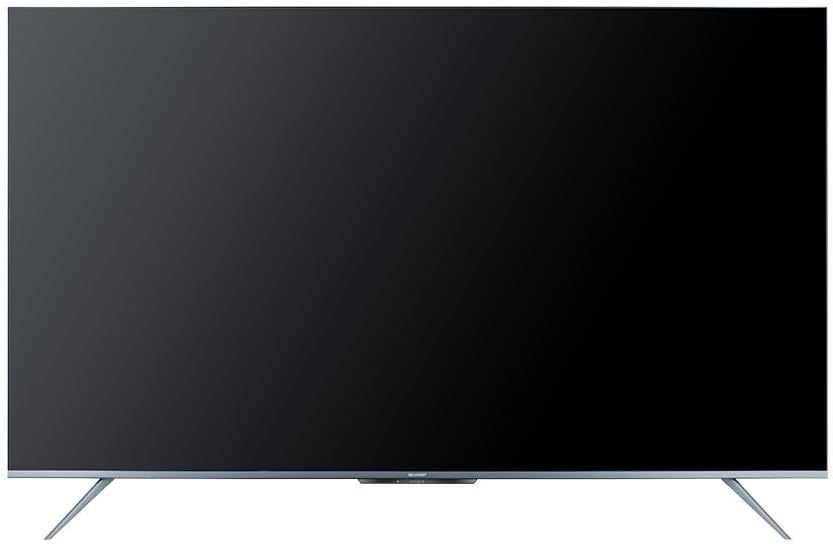
Figure 4.1: The Google TV home screen interface.
4.3 스마트 기능 활용
- 스트리밍 앱: Navigate to the 'Apps' section or use the dedicated remote buttons to launch Netflix, Prime Video, YouTube, and other installed applications.
- 음성 검색: Press the Google Assistant button on your remote and speak into the microphone to search for content, control playback, or ask questions.
- Chromecast 내장: Use the Chromecast feature to cast videos, photos, and music from your compatible smartphone, tablet, or computer directly to the TV.
- Web 브라우저: 내장된 기능을 사용하여 인터넷에 접속하세요 web 브라우저.
- 구글 플레이 스토어: Download and install additional apps and games from the Google Play Store.
4.4 입력 소스 선택
연결된 장치(예: HDMI 1, HDMI 2, TV 튜너) 간에 전환하려면 버튼을 누르십시오. 입력 리모컨의 버튼을 누르고 화면 메뉴에서 원하는 소스를 선택하세요.
5. 유지관리
5.1 TV 청소
- 화면: 부드럽고 보풀 없는 천으로 화면을 살살 닦아주세요. 잘 지워지지 않는 얼룩은 TV 전용 화면 세척액을 천에 묻혀 사용하세요. 화면에 직접 뿌리지 마세요.
- 내각: TV 캐비닛은 부드럽고 마른 천으로 닦으세요. 연마성 세제, 왁스 또는 용제를 사용하지 마세요.
- 청소하기 전에는 항상 TV의 플러그를 전원 콘센트에서 뽑으세요.
5.2 소프트웨어 업데이트
Your Sharp Smart TV may receive software updates periodically to improve performance and add new features. Ensure your TV is connected to the internet to receive these updates. You can usually check for updates in the TV's settings menu.
6. 문제 해결
고객 지원팀에 문의하기 전에 일반적인 문제에 대한 다음 솔루션을 시도해 보세요.
| 문제 | 가능한 해결책 |
|---|---|
| 전원이 없습니다 | Check if the power cable is securely connected to the TV and the power outlet. Ensure the outlet is working. Try pressing the power button on the TV itself. |
| 화면은 나오지 않지만 소리는 나옵니다 | Ensure the correct input source is selected. Check HDMI or other video cables for secure connections. |
| 소리는 나지 않지만 화면은 나옵니다 | 볼륨 레벨을 확인하고 TV가 음소거되어 있지 않은지 확인하십시오. 외부 스피커를 사용하는 경우 오디오 케이블 연결을 확인하십시오. TV 메뉴에서 오디오 출력 설정을 확인하십시오. |
| 리모컨이 작동하지 않습니다 | 리모컨의 배터리를 교체하세요. 리모컨과 TV IR 센서 사이에 장애물이 없는지 확인하세요. |
| Wi-Fi에 연결할 수 없습니다 | 와이파이 공유기가 켜져 있고 제대로 작동하는지 확인하세요. 와이파이 비밀번호를 다시 정확하게 입력하세요. 공유기와 TV를 재시작해 보세요. |
| 스마트 기능이 느리거나 반응이 없습니다. | Restart the TV. Ensure a stable internet connection. Close unused applications running in the background. |
7. 사양
| 특징 | 세부 사항 |
|---|---|
| 모델 번호 | 4T-C65FL6EX |
| 화면 크기 | 65인치 |
| 디스플레이 기술 | 주도의 |
| 해결 | 3840 x 2160(4K UHD) |
| 종횡비 | 16시 9분 |
| View잉 각도 | 178도 |
| 새로 고침 빈도 | 60Hz |
| 운영 체제 | 구글 티비 |
| 내부 메모리 | 32GB (XNUMX기가바이트) |
| 방송 유형 | Digital (DVB-S/S2/T/T2/C) |
| 오디오 기술 | Dolby Atmos, DTS 스튜디오 사운드 |
| 비디오 기술 | HLG, Dolby Vision, HDR10 |
| 연결성 | Wi-Fi, Bluetooth v5.1 |
| HDMI 포트 | 3(HDMI 2.0) |
| USB 포트 | 2 |
| LAN 포트 | 1 |
| 오디오 출력 전력 | 12와트 x 2 |
| 전력 소비(작동) | 200 와트 |
| 전력 소비량(대기) | <0.5 와트 |
| 스탠드 제외 치수(폭 x 높이 x 깊이) | 1447.7 x 837 x 81.3mm |
| 스탠드 포함 치수(폭 x 높이 x 깊이) | 1447.7 x 922.6 x 280.2mm |
| 순중량 | 17.9kg |
| 원산지 | 이집트 |
8. 보증 및 지원
8.1 제품 보증
This Sharp 4T-C65FL6EX Smart TV comes with a 3-year full free warranty. Please retain your proof of purchase for warranty claims. The warranty covers manufacturing defects and malfunctions under normal use conditions. It typically does not cover damage caused by misuse, accidents, unauthorized repairs, or natural disasters.
8.2 고객 지원
For technical assistance, service requests, or further inquiries regarding your Sharp TV, please contact Sharp customer support. Refer to the warranty card or Sharp's official web해당 지역의 연락처 정보는 사이트에서 확인하세요.