
1. 서론
The tenlamp G1 Audio Mixer is a compact and versatile sound card designed for live streaming, podcasting, gaming, and recording. It offers multi-channel mixing capabilities, customizable sound effects, voice changing features, and noise reduction technology. This manual provides detailed instructions for setting up, operating, and maintaining your G1 Audio Mixer to ensure optimal performance.
2. 제품 오버view
The G1 Audio Mixer integrates essential audio controls and effects into a user-friendly interface. Familiarize yourself with the device's layout and key features.
2.1 주요 특징
- 다중 채널 믹싱: Supports 3.5mm microphones and instrument inputs for comprehensive audio control.
- 플러그 앤 플레이 연결: Easy connection to PC, Mac, or mobile devices via USB-C, 3.5mm audio cable, or Bluetooth.
- 맞춤형 음향 효과: Adjust bass, midrange, treble, and reverb settings. Includes 6 customizable ambient sound effects.
- 소음 감소: Equipped with a dedicated noise reduction function for clear audio output.
- 음성 변환기: Offers multiple voice effects (female, deep, baby, magic) with adjustable parameters.
- 리버브 모드: Four preset reverb modes (Sing, Boom, Magic, MC) for various applications.
- 휴대성 있는 디자인: Compact with a built-in 1000mAh battery for up to 6 hours of usage.
2.2 장치 레이아웃
The following image illustrates the main controls and indicators on the G1 Audio Mixer.

그림 1: 전면 view of the tenlamp G1 Audio Mixer, showing sliders for Mic, Music, Charge, B/T, Sing, Boom, Magic, MC, Monitor, Output, Reverb, Ducking, VocalCut, and buttons for Auto tune, Voice changer, Reverb preset, Customize effects, Original sound, Mute, Loopback, Denoise, and Power.
The rear panel features various input and output ports for connecting your devices.
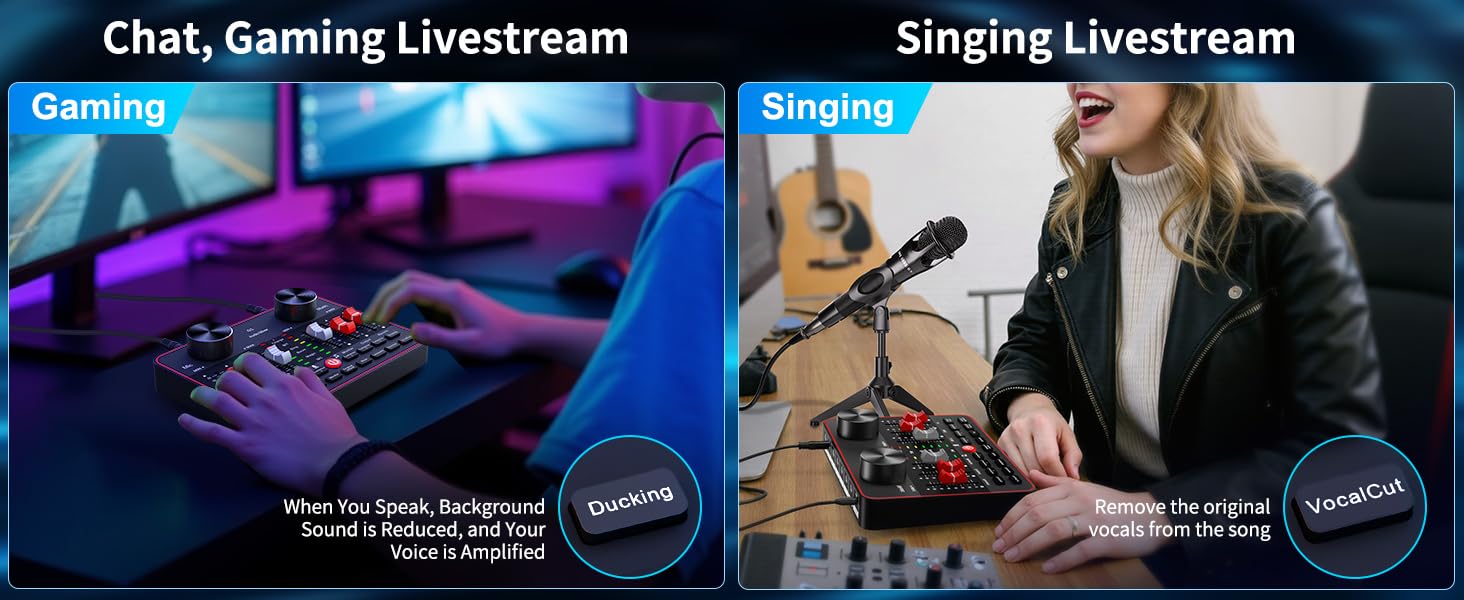
Figure 2: Rear panel of the tenlamp G1 Audio Mixer, indicating USB-C, Output (x2), Music, Monitor, Headset, and Mic (x2) ports.
3. 설정 지침
Follow these steps to set up your G1 Audio Mixer for various applications.
3.1 장치 전원 켜기
- Connect the G1 mixer to a power source (e.g., computer USB port, USB wall adapter) using the provided USB-C cable. The 'Charge' indicator will illuminate.
- 전원 버튼을 길게 누르세요.U) located on the front panel until the indicators light up.
- The built-in 1000mAh battery provides up to 6 hours of usage on a full charge, allowing for portable operation.
3.2 마이크 및 헤드셋 연결
- 마이크: Connect your 3.5mm condenser microphones to the 'Mic' input ports on the rear panel. The G1 supports two microphones simultaneously.
- 헤드셋 : Plug your headset into the 'Headset' port for monitoring your audio.
3.3 Connecting to Devices (PC/Mobile)
- PC/Mac Connection: Use the USB-C cable to connect the G1 mixer to your computer. The device will be recognized as an audio input/output device. Select the G1 as your default audio device in your operating system's sound settings and your streaming/recording software.
- Mobile Device Connection (Analog): Use a 3.5mm TRRS audio cable to connect your mobile device to the 'Output' port for live streaming.
- Mobile Device Connection (Bluetooth): Activate Bluetooth on your mobile device and pair with the G1 mixer. This allows for wireless accompaniment input.
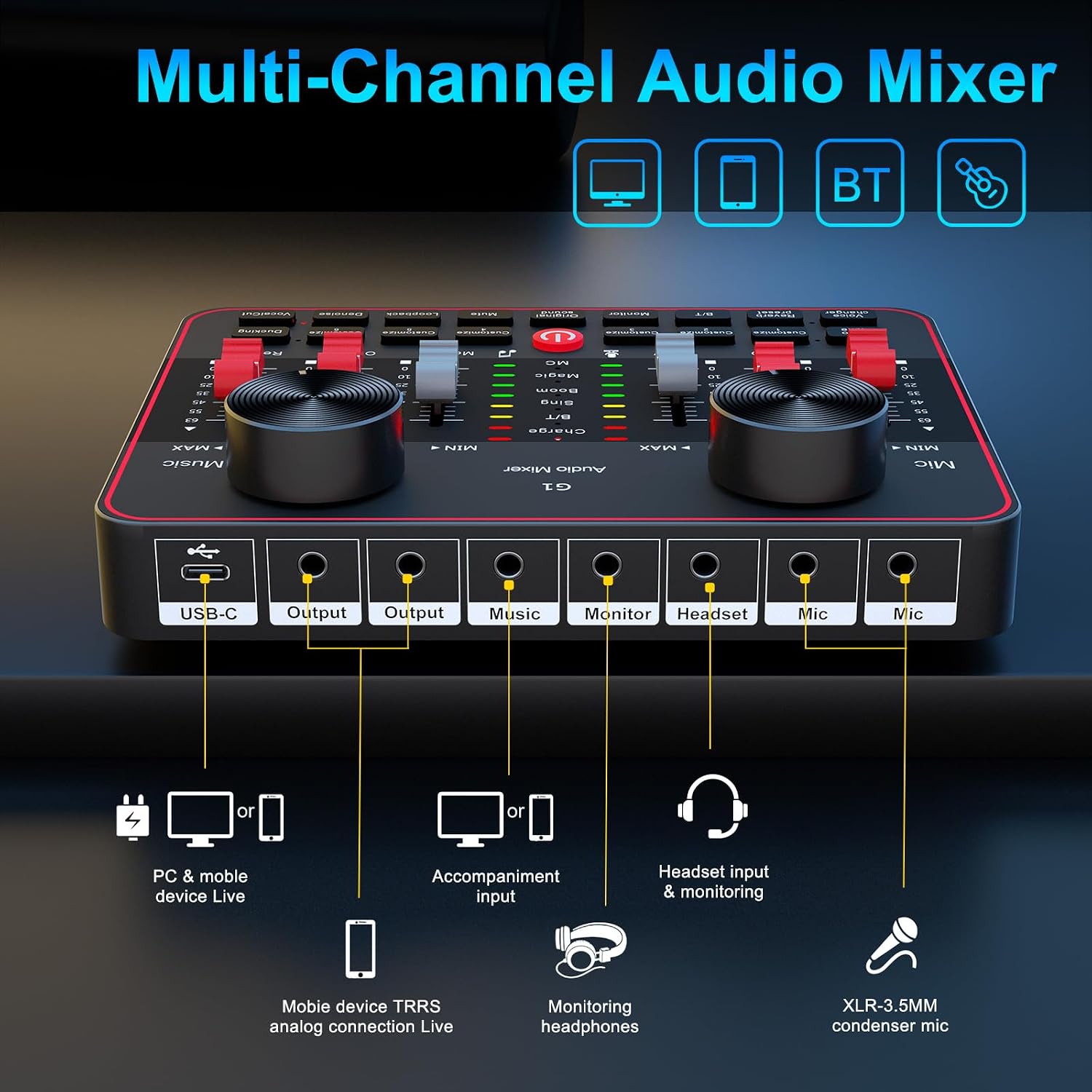
Figure 3: Connection diagram for PC, mobile devices, Bluetooth, headsets, and microphones.
4. 사용 설명서
This section details the functions of the G1 Audio Mixer's controls and features.
4.1 볼륨 및 톤 조절
- 마이크 볼륨: Use the 'Mic' slider to adjust the input volume of your microphone.
- 음악 볼륨: Use the 'Music' slider to control the volume of background music or accompaniment.
- Tone Adjustment (HI, MID, LOW): Use the dedicated sliders to fine-tune the high, mid, and low frequencies of your microphone's audio.
4.2 Reverb Modes and Effects
The G1 offers four preset reverb modes and customizable reverb settings.

Figure 4: Visual representation of the four preset reverb modes: Sing, Boom, Magic, and MC.
- Preset Reverb Modes: Press the 'Reverb preset' button to cycle through 'Sing', 'Boom', 'Magic', and 'MC' modes.
- Reverb Slider: Adjust the intensity of the reverb effect using the 'Reverb' slider.
4.3 Voice Changer and Auto-Tune
Enhance your audio with voice modulation and pitch correction.

Figure 5: Voice changer options and tone controls.
- 음성 변환기: Press the 'Voice changer' button to cycle through different voice effects such as female, deep, baby, or magic voices. Further adjustments to bass, treble, and reverb can personalize these effects.
- 오토튠: The 'Auto tune' button provides 12 steps of pitch correction for singing.
- 보컬 컷: The 'VocalCut' button can remove original vocals from a song, useful for karaoke or instrumental tracks.
4.4 Noise Reduction and Ambient Effects
Improve audio clarity and add interactive elements to your streams.

Figure 6: Smart Noise Reduction and Dodge features.
- 노이즈 제거 : Press the 'Denoise' button to activate intelligent noise filtering, reducing background noise for clearer vocals.
- 물오리 사냥: The 'Ducking' feature automatically lowers background music volume when you speak and restores it when you stop.
- Customizable Interactive Effects: The G1 includes 6 customizable buttons ('Customize 1' through 'Customize 6') for adding ambient sound effects like applause or laughter.
4.5 Monitoring and Loopback
- 감시 장치: Use the 'Monitor' slider to adjust the volume of your headset monitoring.
- 루프백: The 'Loopback' function allows the mixer's output to be routed back as an input, useful for recording computer audio alongside your microphone.
5. 유지관리
Proper maintenance ensures the longevity and optimal performance of your G1 Audio Mixer.
- 청소: 부드럽고 마른 천을 사용하여 기기 외부를 닦으세요. 액체 세척제나 연마재는 사용하지 마세요.
- 배터리 관리 : To prolong battery life, avoid fully discharging the device frequently. Charge the mixer regularly, especially if it will be stored for an extended period.
- 저장: 믹서는 직사광선, 극한 온도 및 과도한 먼지를 피해 서늘하고 건조한 곳에 보관하십시오.
- 케이블 관리 : Ensure all cables are connected securely and are not bent or crimped, which can cause damage or signal loss.
6. 문제 해결
If you encounter issues with your G1 Audio Mixer, refer to the following common problems and solutions.
| 문제 | 가능한 원인 | 해결책 |
|---|---|---|
| 사운드 출력이 없습니다 | Incorrect cable connection; volume levels too low; incorrect audio device selection. | Verify all cables are securely connected. Check 'Mic', 'Music', and 'Output' sliders. Ensure G1 is selected as the default audio device in your computer/software settings. |
| 음질이 좋지 않거나 정전기가 발생합니다. | Faulty cable; microphone issues; high background noise; incorrect gain settings. | Try a different cable. Test the microphone with another device. Activate the 'Denoise' function. Adjust 'Mic' and tone sliders. |
| 블루투스 연결 문제 | 기기가 페어링 모드가 아닙니다. 간섭이 발생하고 있습니다. 기기가 너무 멀리 떨어져 있습니다. | Ensure Bluetooth is enabled on both devices. Move closer to the mixer. Restart both devices and try pairing again. |
| Voice changer effects are not as expected | Misunderstanding of effect type; settings not optimized. | The voice changer provides modulated effects, not perfect impersonations. Experiment with the 'Voice changer' button and adjust bass, treble, and reverb sliders for desired variations. |
| Settings reset after changing modes | Certain modes may have default settings that override previous adjustments. | Re-adjust settings after switching modes if necessary. Understand that some mode changes might prioritize specific audio profiles. |
이러한 해결 방법을 시도한 후에도 문제가 지속되면 고객 지원팀에 문의하세요.
7. 사양
Detailed technical specifications for the tenlamp G1 Audio Mixer.
| 특징 | 사양 |
|---|---|
| 모델 번호 | G1 |
| 상표 | 텐엘amp |
| 품목 무게 | 15.5 온스 |
| 제품 치수 | 6.42 x 1.73 x 4.92인치(6.42인치 깊이 x 1.73인치 너비 x 4.92인치 높이) |
| 채널 수 | 2 |
| 연결 기술 | 3.5mm audio cable, Bluetooth, USB |
| 전원 | 배터리 구동 |
| 배터리 유형 | 1개의 리튬 이온 배터리(포함) |
| 권tage | 5 볼트 |
8. 보증 및 지원
텐엘amp is committed to providing quality products and customer service.
- 365일 교체: The product is eligible for replacement within 365 days of purchase.
- 평생 기술 지원: 텐엘amp offers lifetime technical assistance for the G1 Audio Mixer.
- 고객 서비스: 24/7 customer service support is available for any inquiries or issues.
- 보호 계획: Extended protection plans (2-Year and 3-Year) may be available for purchase separately.
For support, please refer to the contact information provided with your product packaging or visit the official tenlamp web대지.


