
소개
Thank you for choosing the Xega 4G Cellular 2K PTZ Outdoor Security Camera, Model XG-18. This manual provides detailed instructions for the setup, operation, and maintenance of your camera. Please read this manual carefully before use and retain it for future reference.
패키지 내용
아래 나열된 모든 품목이 패키지에 포함되어 있는지 확인하세요.
- Xega 4G Cellular 2K PTZ Outdoor Security Camera
- 전원 어댑터
- 장착 스탠드
- 장착 나사
- 사용 설명서
- SIM Card (with 300MB test data for 30 days)

Figure 1: Contents of the Xega 4G Camera package.
설정
1. SIM Card Insertion and 4G Connectivity
This camera operates on 4G LTE networks, making it suitable for areas without Wi-Fi access. A SIM card is included with 300MB of test data valid for 30 days. For continuous use, an unlimited data plan is recommended (e.g., 12.9€/30 days, or plans from EE, SKY, Vodafone).
- 카메라에서 SIM 카드 슬롯을 찾으세요.
- Insert the provided SIM card or your preferred 4G SIM card into the slot. Ensure it is inserted correctly according to the diagram on the camera or in the quick start guide.
- The camera will automatically attempt to connect to the 4G network upon power-up.
2. 전원 공급
The XG-18 camera is wired and requires continuous power. It does not contain a battery and does not support Wi-Fi connectivity.
- Connect the 3-meter power cable to the camera.
- 전원 어댑터를 표준 전기 콘센트에 연결하십시오.
- Ensure the power connection is secure for uninterrupted operation.
3. 앱 설치 및 초기 설정
The camera is controlled via the Ubox application, available for iOS and Android devices.
- 다운로드 유박스 app from your device's app store (Apple App Store for iOS, Google Play Store for Android).
- 새 계정을 등록하거나 이미 계정이 있는 경우 로그인하세요.
- 앱 내 안내에 따라 새 카메라를 추가하세요. 일반적으로 카메라의 QR 코드를 스캔하거나 카메라 ID를 수동으로 입력하는 과정이 포함됩니다.
- 연결되면 다음을 수행할 수 있습니다. view the live feed and configure camera settings.
4. 물리적 설치
The camera is designed for outdoor use and can be mounted on a wall.
- Choose a suitable location for mounting, ensuring good 4G signal reception and proximity to a power source.
- Use the provided mounting stand and screws to securely attach the camera to a wall or other stable surface.
- Adjust the camera's angle to cover the desired surveillance area.

Figure 2: Xega 4G Camera installed outdoors, highlighting 4G LTE connectivity.
카메라 작동
1. 24시간 연속 녹화
The XG-18 supports continuous 24/7 video recording, ensuring constant surveillance of your property.
- The camera records continuously as long as it is powered.
- 녹화된 푸tage can be accessed and played back remotely via the Ubox app.

Figure 3: Continuous 24/7 recording capability.
2. AI Human Detection and Automatic Tracking
The camera features advanced AI human detection to minimize false alarms and automatic tracking to keep subjects in view.
- When human motion is detected, you will receive an instant alert notification on your iOS/Android device via the Ubox app.
- The camera will automatically track the detected person's movement.
- This feature helps conserve 4G data and storage space by focusing on relevant events.

Figure 4: AI Human Detection and Instant Alert in action.
3. 2K Super HD Resolution and PTZ Functionality
선명하고 자세한 음식 사진을 캡처하세요.tage with 2K HD resolution and monitor a wide area with Pan-Tilt-Zoom (PTZ) capabilities.
- The camera provides 2K (3MP) Super HD video, offering enhanced visual detail.
- It can rotate 350° horizontally (Pan) and 100° vertically (Tilt), providing comprehensive coverage.
- Control the pan, tilt, and 4X digital zoom (no optical zoom) remotely through the Ubox app from anywhere in the world.
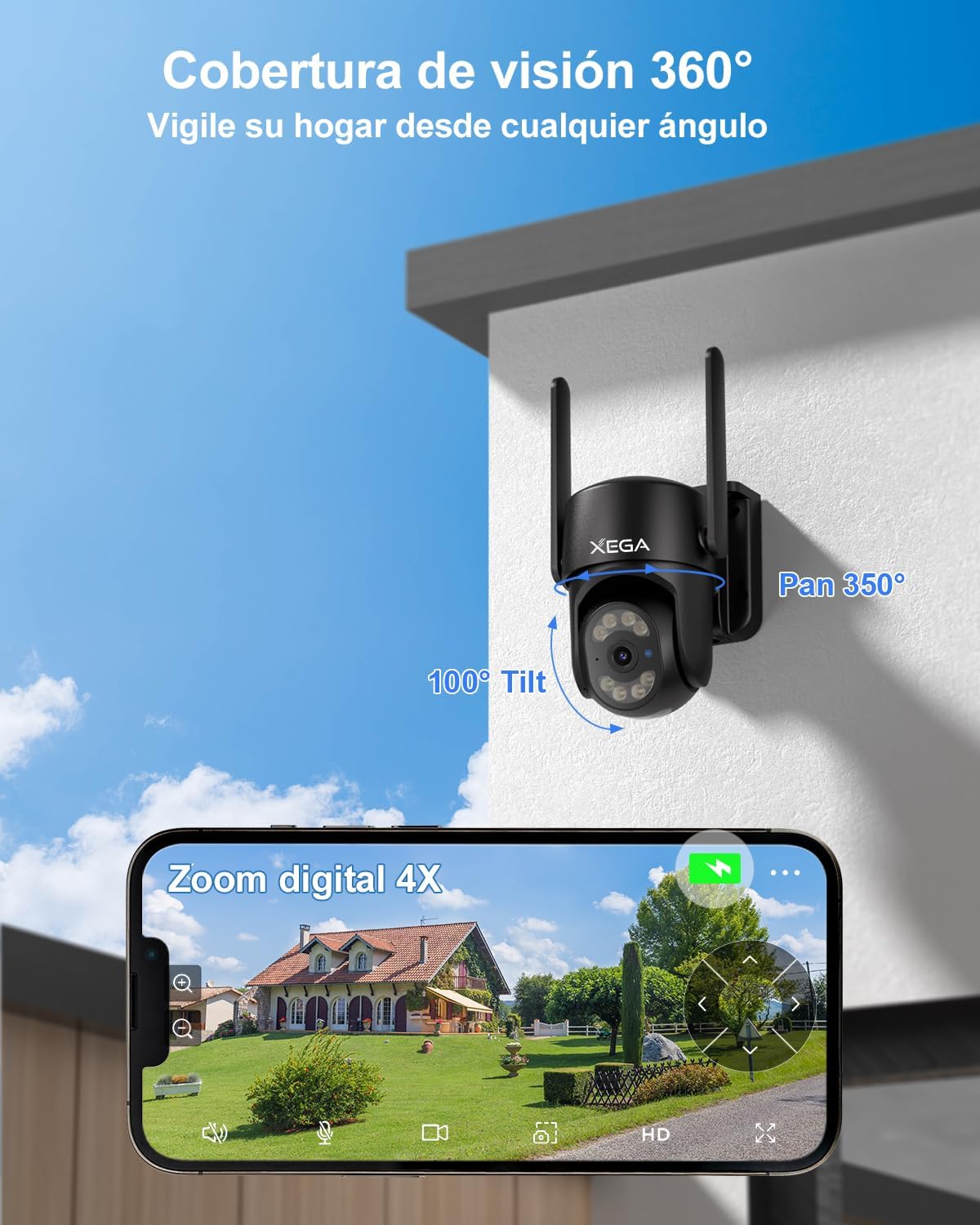
Figure 5: 360° coverage and 4X digital zoom via the Ubox app.
4. 야간 투시 모드
The camera offers versatile night vision options for clear monitoring in low-light conditions.
- 컬러 나이트 비전: With the spotlight on, the camera can capture full-color video at night, providing more detail.
- 적외선 나이트 비전: With the spotlight off, the camera uses infrared LEDs for clear black-and-white footag완전한 어둠 속에서.
- Night vision range extends up to 20 meters (approximately 80 feet).

Figure 6: Comparison of 2K Super HD Color Night Vision and Infrared Night Vision.
5. 양방향 오디오
The integrated microphone and speaker allow for two-way communication.
- Use the Ubox app to listen to audio from the camera's location.
- Speak through the app to communicate with individuals near the camera.
유지
1. 내후성 (IP66)
The XG-18 camera has an IP66 rating, ensuring its durability against various weather conditions.
- The camera is resistant to dust and powerful water jets, making it suitable for use in sunny, rainy, or snowy conditions.
- 작동 온도 범위: -30°C ~ 60°C.

Figure 7: IP66 weather resistance in adverse conditions.
2. 저장 옵션
The camera offers flexible storage solutions for your recordings.
- TF 카드 저장: Supports TF cards up to 128GB (not included). The camera will automatically record and overwrite old videos when the card is full.
- 클라우드 스토리지: Optional military-grade cloud storage is available. A 30-day free trial is offered, with subscription options thereafter (e.g., approximately 1.99€/month). Cloud storage ensures data security even if the camera is stolen or damaged.
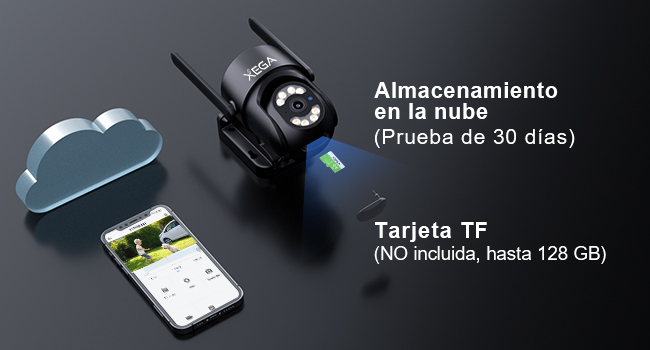
Figure 8: TF card and cloud storage options.
3. 청소
To ensure optimal performance, periodically clean the camera lens and housing.
- 부드러운 d를 사용하세요amp 카메라 외부를 닦을 천.
- 렌즈의 경우, 긁힘을 방지하기 위해 특수 렌즈 세척 천과 세척 용액을 사용하세요.
- 독한 화학 물질이나 연마성 세제를 사용하지 마십시오.
문제 해결
If you encounter issues with your Xega 4G Camera, refer to the following common problems and solutions:
| 문제 | 가능한 원인 | 해결책 |
|---|---|---|
| Camera is disconnected / Offline | No 4G signal, SIM card issue, power loss. | Check 4G signal strength at the camera's location. Verify SIM card is correctly inserted and has an active data plan. Ensure the camera is receiving continuous power. |
| No notifications received on mobile | App notification settings, phone settings, network issues. | Ensure notifications are enabled in the Ubox app settings. Check your phone's system settings to allow notifications from the Ubox app. Verify stable 4G connection for both camera and phone. |
| 화질이 나쁘다 | Dirty lens, low network bandwidth, app settings. | Clean the camera lens. Ensure sufficient 4G bandwidth. In the Ubox app, switch from SD to HD quality if available (note: setting may revert to SD). |
| 동작 감지가 작동하지 않음 | Detection settings, environmental factors. | Check motion detection sensitivity and area settings in the Ubox app. Ensure no obstructions are blocking the camera's view. |
| 카메라가 켜지지 않음 | 전원이 안 들어와요, 어댑터가 고장났어요. | Verify the power adapter is securely connected to both the camera and the power outlet. Test the outlet with another device. |
If these solutions do not resolve the issue, please contact Xega customer support for further assistance.
명세서
| 특징 | 세부 사항 |
|---|---|
| 모델 번호 | XG-18 |
| 치수 | 18 x 16 x 12cm |
| 무게 | 660g |
| 연결 기술 | Wired (Power), Cellular (4G LTE) |
| 비디오 해상도 | 2K(1920p) |
| 팬 각도 | 350도 |
| 기울기 각도 | 100도 |
| 디지털 줌 | 4X |
| 나이트 비전 범위 | 20미터(약 80피트) |
| 야간 투시경 유형 | 컬러 야간 투시경, 적외선 야간 투시경 |
| 특별 기능 | Two-Way Audio, HD Resolution, Motion Sensor, PTZ Technology, Night Vision, AI Human Detection, Auto Tracking |
| 내후성 | IP66 (방수) |
| 저장 옵션 | TF 카드(최대 128GB), 클라우드 저장소 |
| 호환 장치 | 스마트폰(안드로이드, iOS) |
| 전원 | 전기 케이블 |
| 재료 | 아크릴로니트릴 부타디엔 스티렌(ABS) |
보증 및 지원
For any questions, technical assistance, or warranty inquiries, please contact Xega customer support.
- Xega offers 24/7 online customer support.
- Refer to the contact information provided with your product packaging or on the official Xega web지원 채널을 위한 사이트입니다.

Figure 9: Xega 24/7 Online Customer Support.