
1. 서론
Welcome to the user manual for your new XIAOMI Redmi Note 14 Pro+ 5G Smartphone. This guide provides essential information on setting up, operating, and maintaining your device. Please read it carefully to ensure optimal performance and longevity of your smartphone.
2. 패키지 내용
패키지에 다음 품목이 포함되어 있는지 확인하십시오.
- XIAOMI Redmi Note 14 Pro+ 5G Smartphone
- USB 케이블
- 빠른 시작 가이드(지역에 따라 다를 수 있음)
- SIM 카드 추출 도구 (지역에 따라 다를 수 있음)
Note: A charger is not included in the package. Please use a compatible 120W HyperCharge adapter for optimal charging.
3. 디바이스 오버view
Familiarize yourself with the physical components of your Redmi Note 14 Pro+ 5G.
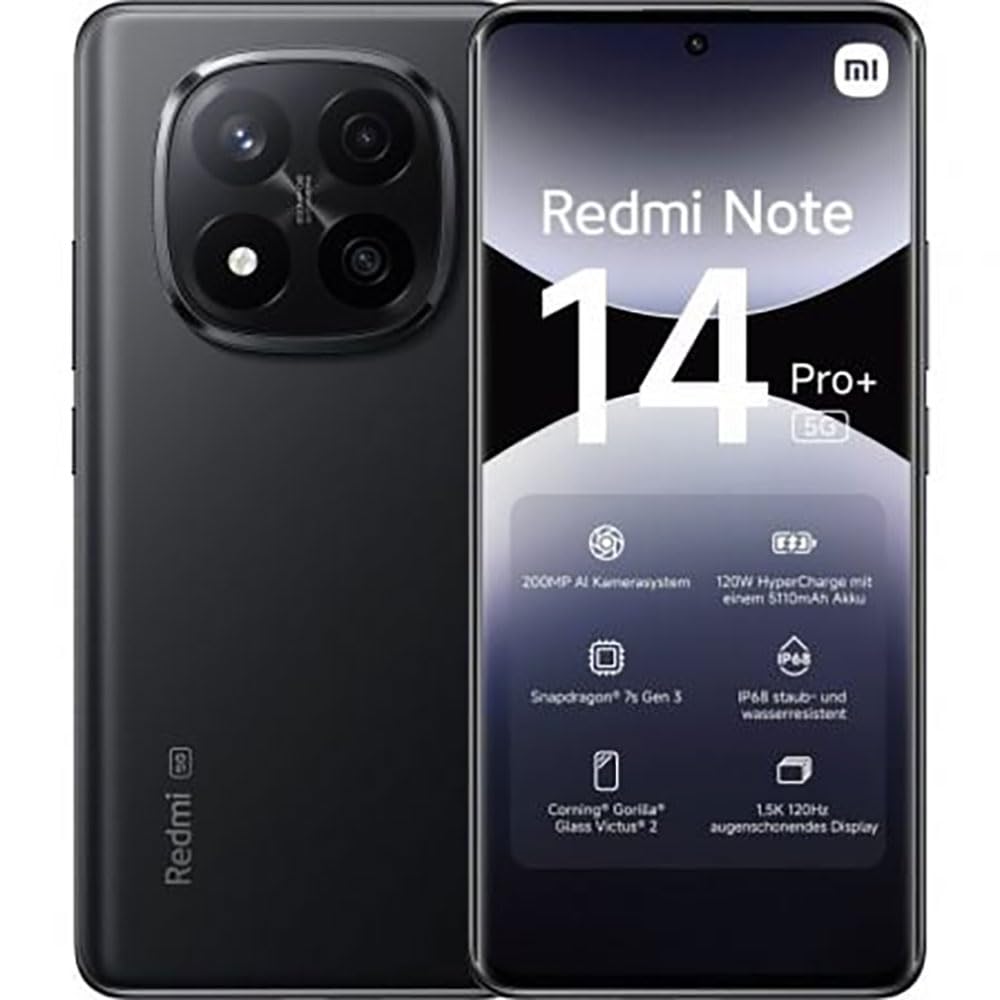
The image displays the front and back of the XIAOMI Redmi Note 14 Pro+ 5G smartphone. The front shows the display with 'Redmi Note 14 Pro+ 5G', '200 Megapixels', and '256 GB' text. The back features a prominent camera module with multiple lenses and the 'Redmi 5G' branding.
주요 구성 요소:
- 전면 디스플레이: 6.67-inch 1.5K 120Hz AMOLED display with Corning Gorilla Glass Victus 2.
- 후면 카메라 모듈: Houses the 200MP Pro-Grade AI Camera system.
- 전원 버튼: 기기 측면에 위치하며, 전원을 켜고 끄거나 기기를 깨우거나 절전 모드로 전환하는 데 사용됩니다.
- 볼륨 버튼: 측면에 위치하며 미디어와 통화 음량을 조절하는 데 사용됩니다.
- USB 타입-C 포트: 충전 및 데이터 전송용입니다.
- SIM 카드 슬롯: Supports Dual SIM Nano SIM cards.
- 스피커: Stereo speakers for audio output.
4. 설정
4.1. SIM 카드 삽입
- 기기 측면에서 SIM 카드 트레이를 찾으세요.
- SIM 꺼내기 도구를 트레이 옆에 있는 작은 구멍에 넣고 트레이가 튀어나올 때까지 단단히 누르세요.
- 나노 SIM 카드의 금색 접촉면이 아래로 향하도록 트레이에 넣으세요. 방향이 올바른지 확인하세요.
- 트레이를 슬롯에 다시 부드럽게 밀어 넣어 딸깍 소리가 나면서 제자리에 고정되도록 합니다.
4.2. 장치 전원 켜기
를 누르고 계세요 전원 버튼 on the side of the phone until the XIAOMI logo appears on the screen. Follow the on-screen instructions to complete the initial setup, including connecting to Wi-Fi, setting up your Google account, and configuring security features like fingerprint recognition.
4.3. 초기 요금
It is recommended to fully charge your device before first use. Connect the USB Type-C cable to the phone and a compatible 120W HyperCharge adapter (not included) to a power outlet.
5. 스마트폰 작동
5.1. 기본 탐색
- 터치 스크린: 탭하여 선택하고, 스와이프하여 스크롤하고, 핀치하여 확대/축소합니다.
- 홈 화면: 앱과 위젯을 위한 중앙 허브입니다.
- 알림 패널: 화면 상단에서 아래로 살짝 밀어 알림과 빠른 설정에 접근하세요.
- 앱 서랍: Swipe up from the bottom of the screen (or tap the app drawer icon) to view 설치된 모든 응용 프로그램.
5.2. 전원 켜기/끄기 및 재시작
- 에게 전원 끄기 : Press and hold the Power Button until the power menu appears, then select "Power off."
- 에게 다시 시작: Press and hold the Power Button until the power menu appears, then select "Restart."
5.3. 보안 기능
Your device supports various security options:
- 지문 인식: 빠르고 안전한 잠금 해제를 위해 지문을 등록하세요.
- 얼굴 인식 잠금 해제: 얼굴 인식을 사용하여 기기의 잠금을 해제하세요.
- PIN/패턴/비밀번호: Standard security methods.
다음 방법을 통해 이러한 설정에 액세스할 수 있습니다. 설정 > 보안 및 개인정보 보호.
6. 카메라 기능
The Redmi Note 14 Pro+ 5G features a powerful 200MP Pro-Grade AI Camera system designed to enhance your photography experience.
- 200MP 메인 카메라: Capture highly detailed images with optical image stabilization (OIS).
- 다양한 카메라 모드: Includes automatic, scene, portrait, and manual modes for versatile shooting.
- Dual LED Flash: Provides enhanced lighting in low-light conditions.
- 전면 카메라: A 20MP front sensor for high-quality selfies and video calls.
- 비디오 녹화: Supports up to 8K video capture at 120 fps.
7. AI 기능
Leverage the integrated AI functionalities for a smarter user experience:
- AI Erase Pro: Intelligently remove unwanted objects or people from your photos.
- AI 이미지 확대: Expand the boundaries of your images using AI.
- AI 노트: Smart note-taking capabilities.
- AI 자막: Generate subtitles for videos or audio in real-time.
- AI 레코더: Enhanced voice recording with AI features.
- AI 통역사: 실시간 언어 번역.
- 쌍둥이자리: Integrated AI assistant.
- Google 검색을 위해 동그라미를 치세요: 화면에서 객체를 동그라미로 표시하여 정보를 빠르게 검색하세요.
8. 충전
Your Redmi Note 14 Pro+ 5G supports 120W HyperCharge technology for rapid charging.
- 배터리 용량: 5110mAh Lithium-polymer battery.
- 충전 중: Use the provided USB Type-C cable with a compatible 120W power adapter (sold separately) for optimal charging speeds.
- 배터리 수명: Expect up to 20 hours of talk time. Actual battery life may vary based on usage.
Always use certified charging accessories to prevent damage to your device.
9. 유지관리
9.1. 방수 및 방진 기능
이 장치의 특징은 다음과 같습니다. IP68 등급 for dust and water resistance. This means it is protected against dust ingress and can withstand immersion in water up to 1.5 meters for 30 minutes. However, this resistance is not permanent and may decrease over time with normal wear. Avoid exposing the device to hot water, saltwater, or other liquids.
9.2. 기기 청소
- 부드럽고 보푸라기가 없는 천을 사용하여 화면과 본체를 닦으세요.
- 연마성 세척제, 용제 또는 에어로졸 스프레이는 사용하지 마십시오.
- If the device gets wet, wipe it thoroughly with a clean, dry cloth before charging or using ports.
9.3. 소프트웨어 업데이트
기기에 최신 기능, 보안 패치, 성능 향상 기능이 적용되어 있는지 확인하려면 소프트웨어 업데이트를 정기적으로 확인하고 설치하세요. 설정 > 휴대전화 정보 > MIUI 버전 업데이트를 확인하세요.
10. 문제 해결
기기에 문제가 발생하면 다음의 일반적인 해결 방법을 시도해 보세요.
- 장치가 켜지지 않음: 배터리가 충전되어 있는지 확인하십시오. 최소 15분 동안 충전기에 연결한 후 전원을 켜보십시오.
- 앱이 충돌하거나 정지됨: 문제가 있는 앱을 닫았다가 다시 열어보세요. 문제가 지속되면 휴대폰을 다시 시작하세요.
- 네트워크 연결 불량: Check your SIM card is correctly inserted. Try toggling Airplane Mode on and off. If the issue persists, contact your network provider.
- 배터리가 빠르게 소모됨: 화면 밝기를 낮추고, 사용하지 않는 앱은 닫고, GPS나 블루투스처럼 불필요한 기능은 사용하지 않을 때 비활성화하세요.
- 화면이 반응하지 않음: Force restart your device by holding the Power Button for approximately 10-15 seconds.
더 복잡한 문제는 공식 XIAOMI 지원을 참조하세요. web사이트를 방문하거나 고객 서비스에 문의하세요.
11. 사양
| 특징 | 사양 |
|---|---|
| 상표 | 샤오미 |
| 모델명 | 레드미노트 14 프로+ 5G |
| 운영 체제 | 안드로이드 14 |
| CPU 모델 | 스냅드래곤 7 3세대 |
| 숫양 | 8GB (XNUMX기가바이트) |
| 저장 용량 | 256GB (XNUMX기가바이트) |
| 화면 크기 | 6.67 인치 |
| 디스플레이 해상도 | 2712 x 1220 픽셀 |
| 새로 고침 빈도 | 120Hz |
| 후면 카메라 해상도 | 200 Megapixels (with OIS) |
| 전면 카메라 해상도 | 20메가픽셀 |
| 배터리 용량 | 5110mAh |
| 충전 기술 | 120W 하이퍼차지 |
| 방수성 | IP68 |
| 셀룰러 기술 | 5G |
| SIM 카드 유형 | 나노 SIM (듀얼 SIM) |
| 연결성 | USB 타입-C |
12. 보증 및 지원
12.1. 제조업체 보증
Your XIAOMI Redmi Note 14 Pro+ 5G Smartphone comes with a 2년 제조사 보증. 본 보증은 정상적인 사용 환경에서 발생하는 재료 및 제조상의 결함에 적용됩니다. 보증 청구를 위해 구매 증빙 서류를 보관해 주십시오.
The warranty does not cover damage caused by accidents, misuse, unauthorized modifications, or normal wear and tear.
12.2. 고객 지원
For technical assistance, warranty claims, or further information, please visit the official XIAOMI support website or contact their customer service department. Contact details can typically be found on the XIAOMI web해당 사이트 또는 제품에 포함된 보증 카드에서 확인하세요.